Pencil: moving more than 35 frames corrupts frames upon save
--Issue Summary--
The issue https://discuss.pencil2d.org/t/frame-is-repositioned-randomly/2604/15
suggests that when moving large amount of frames, the frame content seems to corrupt.
I can confirm that this is the case, although it's quite random what happens, I have experienced that some of the selected frames has been duplicated or removed entirely when saving.
I can't say where the issue stems from but it triggers once you save the project.
I've investigated the save behaviour and there's nothing to suggest in that process that something goes wrong, so my suspicion is that it happens when we offset the frames but somehow first trigger when we save the project (because that's when we save our modified keyframes to disk again)
--Actual Results--
- Selecting 35 frames or more, offset them 30 to 50 frames
- play and make sure that everything seems to be fine
- save project and play again
As soon as you save and play the project again, you should be able to notice that some frames may randomly have been scrambled or has its content removed.
--Expected Results--
The expected behaviour should be that one can offset x frames and always expect the same result once offset.
--System Information--
Pencil2D Version: https://github.com/pencil2d/pencil/commit/336a789166d45ec701566a38bd8f4ec61652f4e1
Operating System:
 CandyFace
All 7 comments
It's a pretty critical bug as it's not possible to undo the process atm, and will corrupt certain parts of your project if experienced, so I say we should prioritize it and maybe add it to 0.6.2 @chchwy what do you think?
CandyFace
on 17 May 2018
Will look into this issue tonight.
 chchwy
on 5 Jun 2018
chchwy
on 5 Jun 2018
@CandyFace Sorry it took me so long to test this. I downloaded the user test file, and I've attempted to move more than 35 frames, but I'm not managing to make it happen. I saved and tried to see if it scrambled, no luck. I closed and reopened the file but the frames were in the correct order.
I'm using the latest nightly from June 13th commit: 999c05af9544706a9df72b39766704f30b378954 but maybe i'm doing something wrong.
How many frames do I have to slide into? Does it work if there's an empty space? I was ramming the selected frames into another chunk of frames and verifying if any of the selected frames or the other ones were getting scrambled before and after saving but things were consistent. Do you have any other kind of procedure or hint so I can reproduce this?
 Jose-Moreno
on 16 Jun 2018
Jose-Moreno
on 16 Jun 2018
@Jose-Moreno it may take more frames for it to happen. I can still reproduce this in latest commit to master.
Download the file from the forum, select from 241 to 358 and drag so the last frame (from left to right) it at 388
save the animation and press play.
result:
At around 272 is where It begins scrambling the content for me.
CandyFace
on 16 Jun 2018
@CandyFace Ok got it. Using those same steps I got the issue. However it seems it's a problem that goes back to the file itself. I'm looking at the temp files after the file becomes loaded.
There are a few drawings that do not appear in the editor but are assigned to the third layer starting from frame 114 to 150.
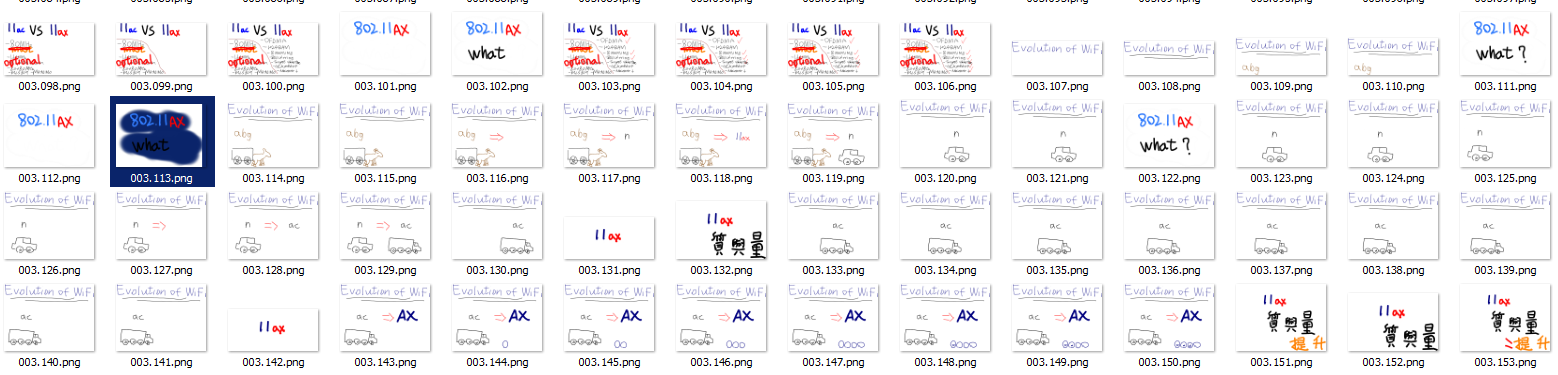
In fact if you notice there's a ton of other drawings that are not matching with what exists in the timeline. (e.g 374 to 438)
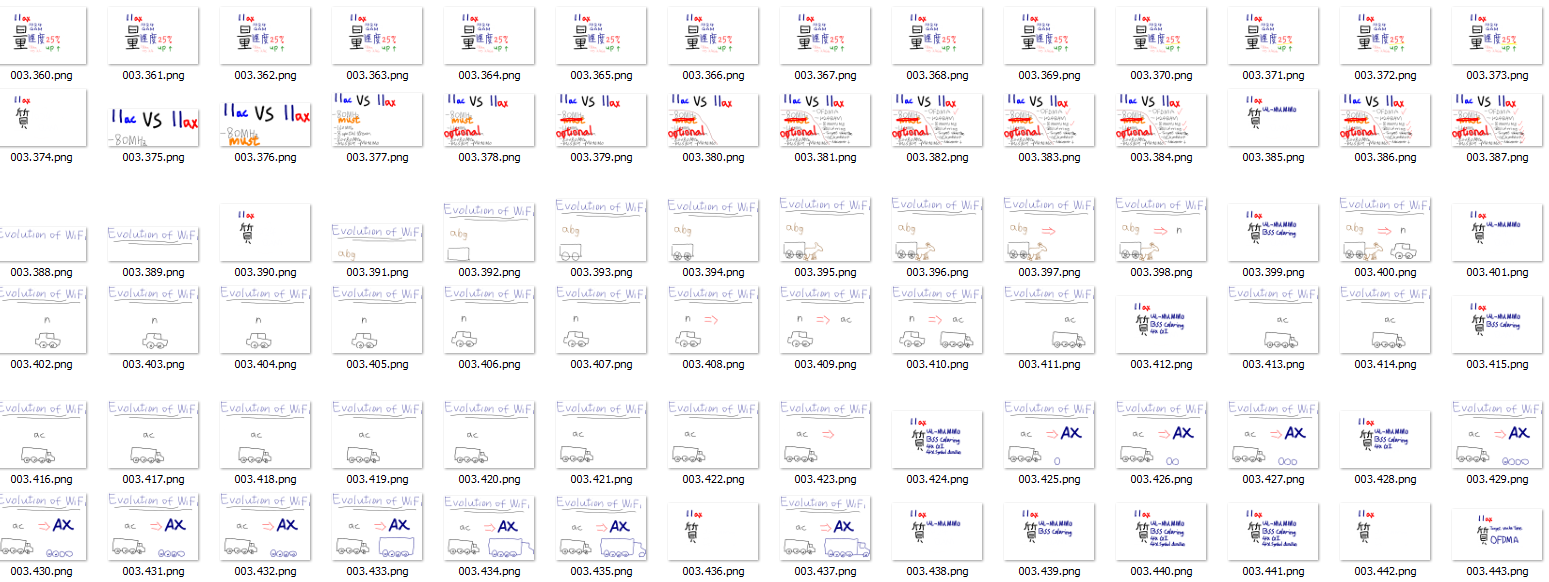
Coincidentially enough these are the exact frames that got scrambled after saving during the working test. (The evolution of wifi and the donkey drawings "in english") so I think the real problem is that after saving, Pencil2D is trying to update those drawings into the timeline but it doesn't know how to bring them since they are not reference themselves as "real" drawings in the editor. so the next best thing is that it tries to "replace" the same drawing containers that were lost by referencing those instead. The act of moving the containers is just enabling the reference to those "un-used" drawings, if that makes sense.
Of course we can't rule out that this was caused by the same bug and it got so bad that Pencil2D ended up not deleting the drawings from the data folder, but I suppose that if we erase those "extra" drawings that do not appear in the editor, then the ghost scrambling will cease and we can test it up again to see how the bug might make Pencil2D lose the reference and not delete the drawings in the first place (maybe its related to how the undo works considering if you want to bring that back the drawings would have to be stored somewhere?).
Jose-Moreno
on 16 Jun 2018
Ah yes you may be onto something there... maybe the step should be to simply remove files in a project that does not have a reference in the xml file when opening a project. I'm baffled though how he even made it happen since, when you move a frame and save the project, then the last key is deleted and only the moved remains.
CandyFace
on 16 Jun 2018
@chchwy I believe I've fixed the problem in an upcoming PR.
Technical comment
As I looked through the way we're saving, I observed several things that seemed to cause this problem and therefore made fixes according to those.
the problem
A part of the issue here seems to be connected to mImage not being loaded properly and therefore appearing as null if a frame has been moved.
the fix:
The fix therefore involves that if a frame has been modified prior to saving, then the image should be cloned via BitmapImage::clone() with the addition of checking if the image is null and try to load from fileName if true.
the problem
Another thing which i'm including in this PR is similar to what I described in my earlier post, that is, cleaning the workspace folder for files that can't be referenced in the xml file anymore... Again it seems that if we've moved frames, we just keep the file reference in the work folder, which could cause problems and in this case did... specifically by scrambling of keyframes, because the keyframe references the old filenames up to a certain point and therefore could end up loading old files.
The fix
The fix here is simply to remove old files as soon as we don't reference them anymore... that mean before saving content (to avoid possible cases of loading files which does not have a reference in xml) and after saving content, because now there are old files lying around after having been moved.
CandyFace
on 7 Jul 2018
Related issues
 Kaikogf
·
3Comments
Kaikogf
·
3Comments
 lewlepton
·
3Comments
Kaikogf
·
3Comments
lewlepton
·
3Comments
Kaikogf
·
3Comments
 scribblemaniac
·
3Comments
scribblemaniac
·
4Comments
scribblemaniac
·
3Comments
scribblemaniac
·
4Comments
Most helpful comment
It's a pretty critical bug as it's not possible to undo the process atm, and will corrupt certain parts of your project if experienced, so I say we should prioritize it and maybe add it to 0.6.2 @chchwy what do you think?