Pencil: [ISSUE] When Importing PNG ImageSequence the last frames are not imported
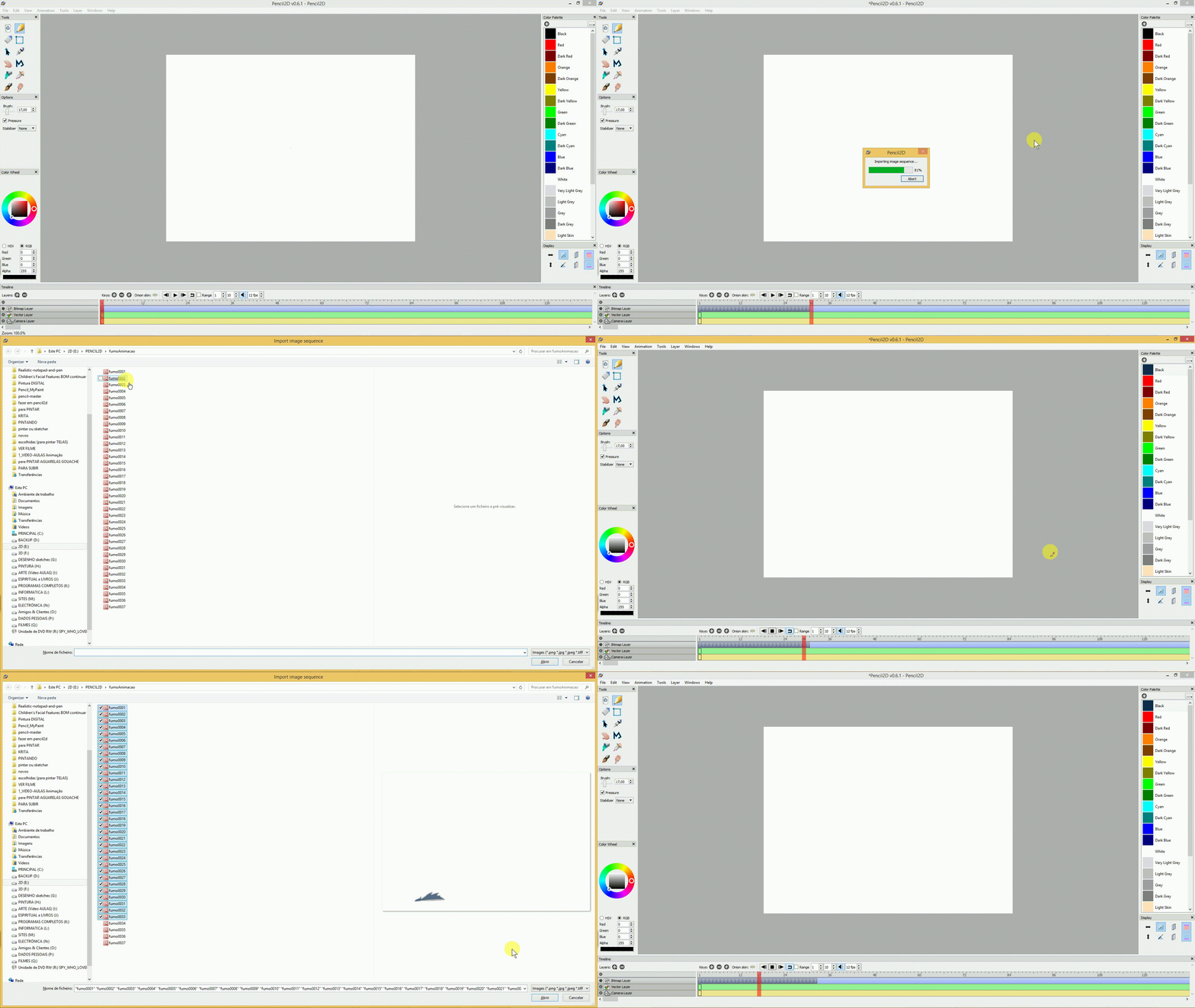
When Importing a specific number of PNG images (37 to be precised), the last three images are not imported into the timeline. This is a consistence issue
If the number of images is bellow 30 (more or less) all images are imported correctly. When the total is above 32 (more or less) all images are imported empty (blank frames)
(haven't tested with other format files)
Pencil2D version 28Marc2018
Win8.1x64bits
 Kaikogf
All 9 comments
@Kaikogf I just tested this. I'm using April 11th version and I have Windows 7, but i'm not having this problem. I tried importing 37 images on a new file in a single layer. In my test I also used PNG files. Their size is 1280 x 720px.
Can you see if there is any other kind of behavior or hint that can let developers know how to find this problem? For example
- Can you check if the PNG files have proper transparency channels?
- Can you check how much RAM do you have and how much Pencil2D is using when you import the sequence? Mine goes from 44 mbs to 280mbs just during import.
- Does this problem occurs with previous versions too? how about newer ones?
 Jose-Moreno
on 14 Apr 2018
Jose-Moreno
on 14 Apr 2018
Kaikogf
on 14 Apr 2018
@Jose-Moreno
The issue is from last build 11Apr2018
The version from 15MAr2018 is working fine
The PNG files has no transparency and are 3000x2000 size
Kaikogf
on 14 Apr 2018
@Kaikogf Thank you for showing the process. Can you try to select the frames from the last one to the first? Like literally clicking on the laste frame then shift clicking on the first one.
I'm asking this because I have my suspicions on how the frames are actually being imported since usually the names are reversed in the import dialog box when I attempt to import normally, and I do the process of selecting in reverse to the names are aligned.
Also, the image files seem to be a bit big. So I'll try on my end with files that have that size to see If I can get the same result as you.
If I can't it might be a specific issue with Windows 8.1, in such case try to use Pencil2D with Windows 7 compatibility and let us know if it works or not as well.
Jose-Moreno
on 15 Apr 2018
Hmm I can't replicate this behaviour.. although it's likely that some of your last files have different extension or something. I looked at the code and we check for extensions when importing but don't fire an error if it doesn't exist, we just continue. Looking at your gif the bar stops before it completes, making me suspicious that some files are simply being ignored.
@Kaikogf could you please try to compile this branch and see if it fixes the problem?
https://github.com/pencil2d/pencil/pull/948
 CandyFace
on 15 Apr 2018
CandyFace
on 15 Apr 2018
@Jose-Moreno
The issue remains doing what you suggested. I even selected the same images but randomly to check the result and it showed that Pencil behaves the same when doing so. What is of importance here is the total number of images selected.
@CandyFace
Since you are not able to replicate this issue (nor @Jose-Moreno) I am starting to think that the real problem might be the build I got from Qt Creator ?, if that could be possible ...
Anyway, I compiled the new code (15Apr2018) but the same issue remains. It is consistence though in the way that the import ImageSequence is limited to around 30 images...
EDITED: Haven't tried the new version 0.6.1....
Kaikogf
on 16 Apr 2018
A note:
I played a lot with this thing of importing 37 sequence images...
Sometimes Pencil would import 34 images and the animation was playing OK. Sometimes it would import only 32 images with no animation (blank frames). At the end Pencil2D will consistently allow to import correctly around 30 images as a total.
Kaikogf
on 16 Apr 2018
@Kaikogf I can't replicate this issue either with images the same size and type as you describe. Can you please try this again with the latest nightly build? If the issue persists, would it be possible for you to upload a zip of the image sequence you are using to reproduce this to mega.nz, dropbox, google drive or any other service you consider and post the direct link in a reply? If you want you can send it privately to pencil2danimation (at) gmail.com. This might help us replicate your issue and eventually fix it.
 scribblemaniac
on 21 May 2018
scribblemaniac
on 21 May 2018
@scribblemaniac
I tested the same animation with the last version (20Jun2018) and everything is working fine. All frames are imported to the timeline and the animation is playing OK.
Sorry for the late reply.
I am closing this. Thank you
Kaikogf
on 2 Jul 2018
Related issues
 puetsua
·
3Comments
puetsua
·
3Comments
 petr-akhlamov
·
4Comments
scribblemaniac
·
4Comments
Kaikogf
·
3Comments
petr-akhlamov
·
4Comments
scribblemaniac
·
4Comments
Kaikogf
·
3Comments
 prokoudine
·
4Comments
prokoudine
·
4Comments