Pencil: [UX] Increase Selection Tool corner drag threshold
--Issue Summary--
This is something really painful I've had to deal with ever since last year nightlies. It seems trying to resize any drawing via selection tool really takes time because the threshold is only taken into account from the inside of the selection, and not the outside, but this is not apparent to the user. Also if you click on top of the corners the selection will disappear, it requires ridiculous precision to resize something if you don't know the trick (clicking inside).
If possible could we increase the threshold or improve it so clicking & dragging the selection corner dots also allow us to resize the selection, and not only clicking the area inside the dotted line?
From what I've experimented the threshold is made of roughly an 8 pixel square area towards the inside of the selection radiating form the corner dot. We should increase this at least to 20px
--Expected Results--
An Improved selection resize experience.
--Steps to reproduce--
1) draw something
2) press CTRL + A or create a selection over it
3) Try to click and drag from the selection corners. Evaluate experience.
4) Try to click an drag next to the corner dot but inside the dotted line on it's proximity. Evaluate experience
--System Information--
Pencil2D Version:
Version: 0.6.0 Development buildOperating System:
Windows 7
 Jose-Moreno
All 9 comments
How about this - I've extended the corner margins for clicking and dragging to about 20px, covering inside and outside the rectangle. See below (the green circles are just to show the margins; I'll remove them in the final PR.)
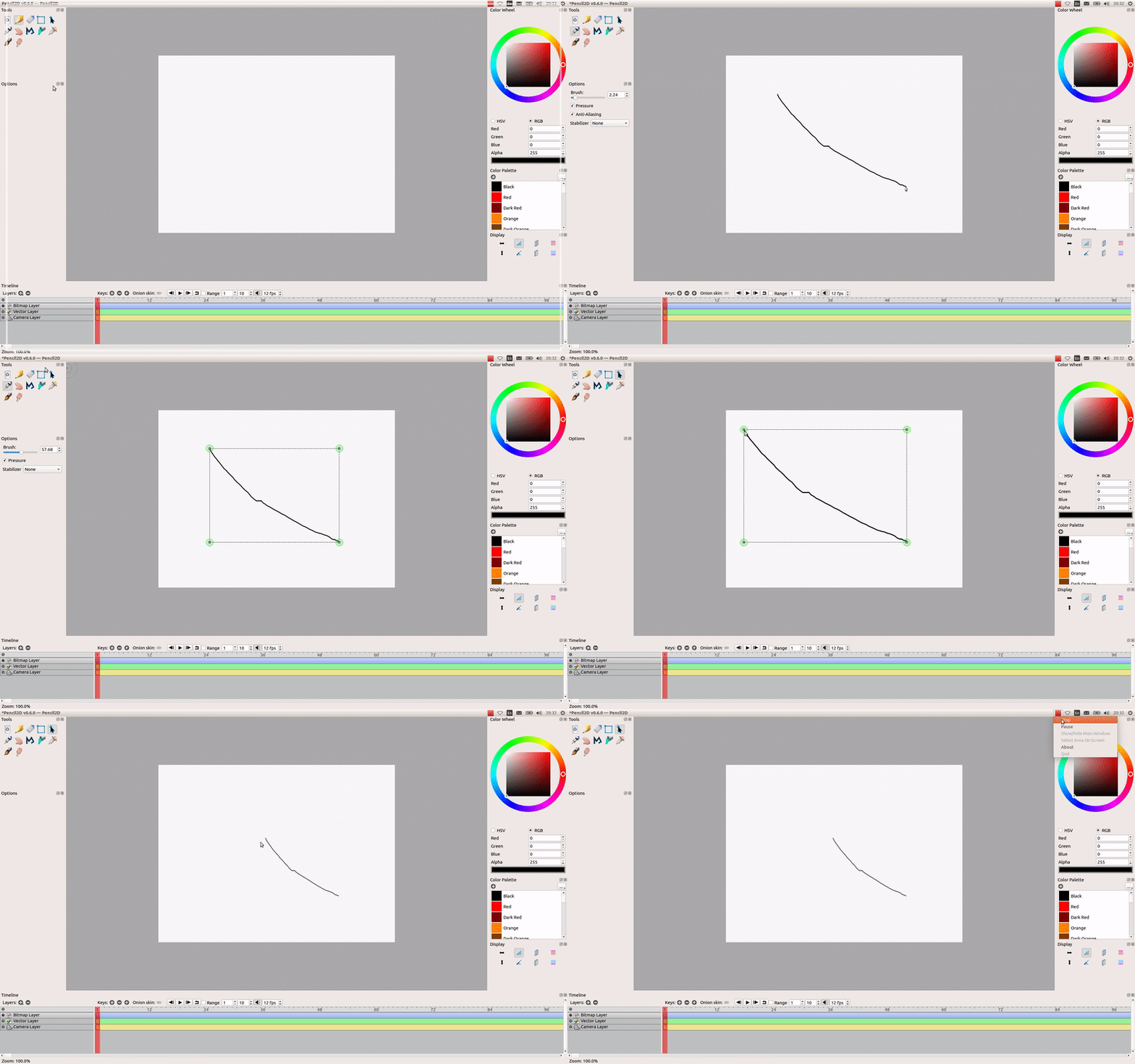
How does that look?
 martinvanzijl
on 14 Mar 2018
martinvanzijl
on 14 Mar 2018
@martinvanzijl I really like that! and actually I think the circles work better than the little dots as a complement since the user immediately can tell where they are supposed to click to drag the marquee box. Thank you for all of your invaluable submissions!
Jose-Moreno
on 14 Mar 2018
Looks good @martinvanzijl
I also agree with @Jose-Moreno that we could switch to ellipses instead of rectangles.
Taking it a bit further though, I've been meaning to change its style for some time, using the blue outline like we have on some of the icons to make the UI feel lighter.
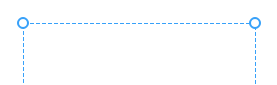
The ellipse is filled with white color and the outline Rgb(56,161,249)
I've also increased the thickness of the outline and changed the dashed line color.
I think a feature complete and bug free selection tool would be a good milestone for 0.6.2
Currently I'm thinking that means having realtime updated visual of the selection (not just the selected image) and a better way to get into transformation mode.
~Edit: I should mention: I think that 20px may be too much, especially if we change style. The ellipses in my image are 10px.~
 CandyFace
on 14 Mar 2018
CandyFace
on 14 Mar 2018
@martinvanzijl I like the ellipses as well. I think this change might even be worth trying to add to 0.6.1 depending on how big of a change was necessary to do that.
As for a feature complete selection tool, that would require quite a bit of work depending on just how feature complete you want it. I imagine it's going to take quite a bit of working to get irregular selections working and displaying properly (for ellipse and lasso selection modes/tools). We also need to consider how these transformation tools will be displayed on irregular selections (if at all). A second minimum bounding box would be the simple solution, but then the two selection boundaries could be confusing to the user. Maybe it would be best to make the selection paths more like a temporary vector layer. Then the vector tools could be used for all transformations, manipulations and rendering of selection boundaries. Implementing addition, subtraction, and intersection selection modes is also super easy with native vector operations (union, difference, etc.). Of course this ignores the fact that our vector tools suck, but we plan on fixing those eventually so why not fix the vector tools, use them for selections, and save ourselves the work of improving and maintaining selections separately? (Obligatory "everything should be vector" reference: #578)
 scribblemaniac
on 14 Mar 2018
scribblemaniac
on 14 Mar 2018
@scribblemaniac
Well I did say
Currently I'm thinking that means having realtime updated visual of the selection (not just the selected image) and a better way to get into transformation mode.
I didn't think it through though and I also forgot about addition, subtraction and Intersection selection modes and maybe also stuff like expand and shrink.
Depending on the software you come from though, lasso, ellipse, polygon etc.. selection tools could be subsets of selection tool but I didn't consider them that in my earlier post. The use of "feature complete" was purely based on current selection tool and not what it could be.
If we're talking about the everything you mentioned then I agree that would be too much.
My only problem with waiting for a vector solution is that we have no ETA for fixing the vector tools which therefore leaves us with a bit of both but nothing complete. This may be okay for us developers but i'd certainly feel saddened as a user, especially when we've stated numerous times around the forums, discord and irc that we're focusing on the raster part of the software.
While I don't like writing code that I know will be removed later, I think that in this case it makes sense because it'll make the software feel more complete, even if temporary.
edit:
I do think the idea to use vector for selections and such is neat and would be great for a long term solution.
CandyFace
on 15 Mar 2018
OK guys, I've uploaded the branch here: https://github.com/martinvanzijl/pencil/tree/increase-corner-drag-threshold. Note: this has the green circles still intact.
Would you like me to create the PR?
And if so would you like me to remove the green circles or keep them? (I could also make a preference to show/hide them).
martinvanzijl
on 15 Mar 2018
@CandyFace We can close this issue now, right?
scribblemaniac
on 4 Aug 2018
Yes, I'll close it :)
CandyFace
on 4 Aug 2018
@martinvanzijl Thank you very much for helping to solve this issue!
scribblemaniac
on 4 Aug 2018
Related issues
 Kaikogf
·
3Comments
scribblemaniac
·
3Comments
Kaikogf
·
3Comments
scribblemaniac
·
3Comments
 prokoudine
·
4Comments
prokoudine
·
4Comments
 puetsua
·
3Comments
Jose-Moreno
·
3Comments
puetsua
·
3Comments
Jose-Moreno
·
3Comments
Most helpful comment
How about this - I've extended the corner margins for clicking and dragging to about 20px, covering inside and outside the rectangle. See below (the green circles are just to show the margins; I'll remove them in the final PR.)
How does that look?