Peertube: Lower resolutions take more space than higher resolutions
What happened?
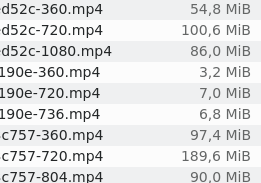
When I check the file size of some videos of my instance, I see that it is usual to see videos at 1080p having a smaller file size than 720p. It happens too sometimes between 720 and lower resolutions.
Basically it seems that sometimes, the native resolutions take less disk space than the downsized files. I would expect that behavior if the native resolution files were the one uploaded by the user, but since they are "optimized" I don't understand why this happens.
What do you expect to happen instead?
The native resolution video should take always the higher disk space.
Steps to reproduce:
Upload a video with not that great quality or with not that much action in it.
Check the size of the files in .../storage/videos
Additional information
- PeerTube version or URL: 2.0.0
- NodeJS version: v12.14.1
- ffmpeg version: 3.2.14
Thanks
An example of three videos where this happens:
 alejandrocobo
All 8 comments
Could you paste a link to one of these videos?
 Chocobozzz
on 12 Jun 2020
Chocobozzz
on 12 Jun 2020
Here you have: https://video.hardlimit.com/videos/watch/f812612a-c625-4f74-ac25-09af192c0971
I have a bunch of 1080p videos where you can see this behavior but since the user(s) decided not to list them, I prefer give you this one that has a native resolution of 1040.
alejandrocobo
on 12 Jun 2020
Maybe it's because the source video is not processed/reencoded by Peertube/ffmpeg ?
 aerogus
on 16 Jun 2020
aerogus
on 16 Jun 2020
Maybe it's because the source video is not processed/reencoded by Peertube/ffmpeg ?
Sadly, I don't have the logs of the day that video was uploaded but I do have the logs of one uploaded today where this happens (the author set it up as not listed so I won't post the link unless it is necessary for debugging purposes). There are three jobs completed for that video:
"type": "optimize",
"videoUUID": "...1f907",
"isNewVideo": true
"type": "new-resolution",
"videoUUID": "...1f907",
"resolution": 360
"type": "new-resolution",
"videoUUID": "...1f907",
"resolution": 720
The sizes of each file are these:

alejandrocobo
on 16 Jun 2020
I would need the original files to be sure, but here's my theory:
- The original file can be quick transcoded (we just copy the video/audio codecs) because it is below the max peertube bitrate and has the appropriate codecs. So the max resolution file has ~ the same size than the original file
- We create other resolutions, with a custom bitrate (because we don't just copy codecs), that is a higher value than the original file
Ping @rigelk
Chocobozzz
on 17 Jun 2020
I would like to chime in with a related issue. We share lots of (open content) educational talks where a video is a recording of talking over a BBB slideshow or a screen recording about handling software. Sometimes the speaker was also shown in the corner in the past. Hence these are recorded/published with a very low bitrate and/or FPS and/or having increased keyframe distance.
I've noticed that the various transcoding target bitrates are hardcoded like so:
- https://github.com/Chocobozzz/PeerTube/blob/875f0610e42fad6046cc731fed1953cb0a451f38/server/initializers/constants.ts#L330
- https://github.com/Chocobozzz/PeerTube/blob/a02b93ce756d646a59cef57b5e4ff53c2bb30bec/shared/models/videos/video-resolution.enum.ts#L38
Could this perhaps be adapted based on the properties of the original upload (original bitrate, resolution, FPS) or even set manually by the uploader?
A cheap workaround would be simply basing the new bitrate on scaling the original bitrate. Ie., get a quality (entropy) factor by dividing the original bitrate by what bitrate the original should have had at the original resolution (invoking getTargetBitrate()). Multiply by this factor at every resolution target.
I couldn't find any settings for audio bitrate in ffmpeg-utils.ts, so I guess ffmpeg defaults to 128kb/s. Fortunately in this case, the encoder is smart enough to preserve our lower bitrate encountering insufficient entropy. In general, YouTube also reduces audio quality at the lowest resolutions - 32 or 48kb/s AAC-LC can be adequate for speech and may be worthwhile to consider for 240p compared to 128kb/s when the audio track could take a significant proportion of the total bitrate.
Here's an example showing the current situation:
- https://tube.grin.hu/videos/watch/cf614250-7738-4d68-af2b-81b0c913b13e _ottwiz: OSM használata ottwizzel avagy miért is jó OSMerkedni szabadidőben #MagyarOSM_
- 720p: 91.45 MB
- 480p: 138.04 MB
- 360p: 105.17 MB
- 240p: 77.29 MB
- 0p: 22.43 MB
Original file before upload:
- 2-pass encoded
- 95896485 bytes (91.45 MiB)
- Video: h264 (High) (avc1 / 0x31637661), yuv420p, 1280x720 [SAR 1:1 DAR 16:9], 199 kb/s, 24 fps, 24 tbr, 12288 tbn, 48 tbc (default)
- Audio: aac (LC) (mp4a / 0x6134706D), 48000 Hz, stereo, fltp, 64 kb/s (default)
This use case of sharing talks and tutorials also begs for the question of whether it would make sense to just reduce bitrate below a certain point without also reducing resolution. 240p makes lots of things unreadable (especially unzoomed software interfaces) or too blurry to be bearable for an hour, while 480p with half the bitrate could result in more transition artifacts and worse colors, but might provide better readability overall for the same bandwidth.
 bkil
on 18 Nov 2020
bkil
on 18 Nov 2020
- 720p: 91.45 MB
- 480p: 138.04 MB
- 360p: 105.17 MB
- 240p: 77.29 MB
- 0p: 22.43 MB
FYI this specific example uses 882.3 MB (431 MB for HLS and 440 MB for whole files).
 grinapo
on 19 Nov 2020
grinapo
on 19 Nov 2020
Thanks for the issue, and thanks @bkil for the email.
Should be fixed by https://github.com/Chocobozzz/PeerTube/commit/d218e7de9400938ae6ac593d9ae5842e23abd4f0
Chocobozzz
on 20 Nov 2020
Related issues
 kabo
·
3Comments
kabo
·
3Comments
 ufm
·
3Comments
ufm
·
3Comments
 filmaidykai
·
3Comments
filmaidykai
·
3Comments
 JohnXLivingston
·
3Comments
JohnXLivingston
·
3Comments
 milleniumbug
·
3Comments
milleniumbug
·
3Comments