Peertube: Easy way to load balance disk
Currently i am facing huge io on disk like 225 Mega Bytes Per Second (And yes SSD is not solution as its very expensive and HDD are very cheap). And Nginx frequently shows 50x error.
What is the possible suggestion to scale in case of high io?
- Can we shard the disk? Like half file in one disk other half in other disk? (Upload issue how to determine where to place file ? Round robin)
- Can we use other server (same as above but how would we handle like upload issue where should it go? Round robin)?
Is there any suggestion please do let me know I cannot think what is the best way to handle such situation.
 shirshak55
All 19 comments
Check what process does these IOs (using iotop or another tool): is it nginx? peertube? postgresql?
Please also fill the template: what is your peertube version?
 Chocobozzz
on 20 May 2020
Chocobozzz
on 20 May 2020
@Chocobozzz its mostly nginx.
30771 be/4 www-data   22.78 M/s    0.00 B/s  0.00 % 99.99 % nginx: worker process
30770 be/4 www-data   21.05 M/s    0.00 B/s  0.00 % 99.99 % nginx: worker process
 1064 be/4 root      147.37 K/s    0.00 B/s  0.00 % 99.99 % python /usr/bin/yunohost-api
30769 be/4 www-data    4.29 M/s    0.00 B/s  0.00 % 99.99 % nginx: worker process
30774 be/4 www-data   38.91 M/s    0.00 B/s  0.00 % 86.34 % nginx: worker process
30768 be/4 www-data    6.94 M/s    0.00 B/s  0.00 % 85.76 % nginx: worker process
30775 be/4 www-data   37.53 M/s    0.00 B/s  0.00 % 85.26 % nginx: worker process
30772 be/4 www-data    6.90 M/s    0.00 B/s  0.00 % 82.69 % nginx: worker process
30773 be/4 www-data   41.06 M/s    0.00 B/s  0.00 % 69.01 % nginx: worker process
27477 be/4 postgres    7.76 K/s   93.08 K/s  0.00 % 57.02 % postgres: 9.6/main: peertube~ertube 127.0.0.1(58330) idle
27027 be/4 peertube    3.88 K/s    0.00 B/s  0.00 % 38.51 % peertube [node]
30573 be/4 postgres    0.00 B/s    7.76 K/s  0.00 % 27.97 % postgres: 9.6/main: wal writer process
27029 be/4 peertube  213.31 K/s    0.00 B/s  0.00 % 27.28 % peertube [node]
 2288 be/4 root      108.59 K/s    0.00 B/s  0.00 % 24.30 % cloudstats-agent [jobs.rb:289]
27479 be/4 postgres    0.00 B/s    0.00 B/s  0.00 % 23.16 % postgres: 9.6/main: peertube~ertube 127.0.0.1(58332) idle
27026 be/4 peertube   65.93 K/s    0.00 B/s  0.00 % 17.24 % peertube [node]
27028 be/4 peertube  465.39 K/s    0.00 B/s  0.00 %  8.29 % peertube [node]
30568 be/4 postgres    0.00 B/s   85.32 K/s  0.00 %  0.00 % postgres: 9.6/main: logger process
30571 be/4 postgres    0.00 B/s   77.57 K/s  0.00 %  0.00 % postgres: 9.6/main: checkpointer process
    1 be/4 root        0.00 B/s    0.00 B/s  0.00 %  0.00 % init
    2 be/4 root        0.00 B/s    0.00 B/s  0.00 %  0.00 % [kthreadd]
Do you have an heavy traffic on your peertube instance? What routes are served by nginx?
Chocobozzz
on 20 May 2020
@Chocobozzz Yes.
"What routes are served by nginx?"
Routes that are related to peertube only? I only host videos. Sometime there are like 500 users so i really don't know how should i scale it up.
shirshak55
on 20 May 2020
Routes that are related to peertube only
Knowing the type of the route and user agent would help. It could be a peertube bug (loop or something like that), or a client bug.
Also, did you enable HLS?
Chocobozzz
on 20 May 2020
"Knowing the type of the route and user agent would help. It could be a peertube bug (loop or something like that), or a client bug."
Sorry can u let me know how to do it?
"Also, did you enable HLS?"
HLS is enabled.
shirshak55
on 20 May 2020
Send me by email (in my profile) your nginx peertube logs (access log and error log) and instance URL please
Chocobozzz
on 20 May 2020
@Chocobozzz alright will do in 2min.
shirshak55
on 20 May 2020
Have you enough RAM on your server to cache files? As your iotop output shows, it is mainly read access.
 JohnXLivingston
on 20 May 2020
JohnXLivingston
on 20 May 2020
@JohnXLivingston well caching ram is not a solution right as there are like 17 TB of data and yes its mainly read io.
shirshak55
on 20 May 2020
Your 17TB aren't fully read each day. The purpose of the cache is to cache files that are often accessed. So cache is often a good solution. How many RAM have you on your server? Can you show us the amount of RAM used for caching?
Have you checked your nginx config? Is rate limiting active even for HLS? (there was a change in the peertube config, hls wasn't rate limited in old versions). I see nginx instances that read at 22M/s. It seems a lot compared to the rating limit.
JohnXLivingston
on 20 May 2020
@JohnXLivingston
Usage of ram is given below:
              total        used        free      shared  buff/cache   available
Mem:          31910        4818        1611        1239       25480       25396
Swap:          4091         804        3287
I do see this config in nginx
# Bypass PeerTube for performance reasons. Could be removed
location ~ ^/static/(webseed|redundancy|streaming-playlists)/ {
    # Clients usually have 4 simultaneous webseed connections, so the real limit is 3MB/s per client
    #set $peertube_limit_rate 800k;

    # Increase rate limit in HLS mode, because we don't have multiple simultaneous connections
    #if ($request_uri ~ -fragmented.mp4$) {
    #  set $peertube_limit_rate 5000k;
    #}

    # Use this with nginx >= 1.17.0
    # limit_rate $peertube_limit_rate;
    # Or this if your nginx < 1.17.0
    set $limit_rate 1m;
    limit_rate_after 0;

    if ($request_method = 'OPTIONS') {
      add_header 'Access-Control-Allow-Origin' '*';
      add_header 'Access-Control-Allow-Methods' 'GET, OPTIONS';
      add_header 'Access-Control-Allow-Headers' 'Range,DNT,X-CustomHeader,Keep-Alive,User-Agent,X-Requested-With,If-Modified-Since,Cache-Control,Content-Type';
      add_header 'Access-Control-Max-Age' 1728000;
      add_header 'Content-Type' 'text/plain charset=UTF-8';
      add_header 'Content-Length' 0;
      return 204;
    }

 if ($request_method = 'GET') {
      add_header 'Access-Control-Allow-Origin' '*';
      add_header 'Access-Control-Allow-Methods' 'GET, OPTIONS';
      add_header 'Access-Control-Allow-Headers' 'Range,DNT,X-CustomHeader,Keep-Alive,User-Agent,X-Requested-With,If-Modified-Since,Cache-Control,Content-Type';

      # Don't spam access log file with byte range requests
      access_log off;
    }

    root /home/yunohost.app/peertube/storage;

    # Use this in tandem with fuse-mounting i.e. https://docs.joinpeertube.org/#/admin-remote-storage
    # to serve files directly from a public bucket without proxying.
    # Assumes you have buckets named after the storage subdirectories, i.e. 'videos', 'redundancy', etc.
    #set $cdn <your S3-compatiable bucket public url mounted via fuse>;
    #rewrite ^/static/webseed/(.*)$ $cdn/videos/$1 redirect;
    #rewrite ^/static/redundancy/(.*)$ $cdn/redundancy/$1 redirect;
    #rewrite ^/static/streaming-playlists/(.*)$ $cdn/streaming-playlists/$1 redirect;

    rewrite ^/static/webseed/(.*)$ /videos/$1 break;
    rewrite ^/static/redundancy/(.*)$ /redundancy/$1 break;
    rewrite ^/static/streaming-playlists/(.*)$ /streaming-playlists/$1 break;

    try_files $uri /;
}
regarding nginx caching can u please let me know how to check ram used for caching?
shirshak55
on 20 May 2020
regarding nginx caching can u please let me know how to check ram used for caching?
Nginx can’t cache in RAM, only on disk, but you can mount a ramfs space on a directory and use it for nginx caching.
 ldidry
on 20 May 2020
ldidry
on 20 May 2020
Usage of ram is given below:
              total        used        free      shared  buff/cache   available
Mem:          31910        4818        1611        1239       25480       25396
Swap:          4091         804        3287
Ok, no problem here.
# Bypass PeerTube for performance reasons. Could be removed
location ~ ^/static/(webseed|redundancy|streaming-playlists)/ {
    # Clients usually have 4 simultaneous webseed connections, so the real limit is 3MB/s per client
    #set $peertube_limit_rate 800k;

    # Increase rate limit in HLS mode, because we don't have multiple simultaneous connections
    #if ($request_uri ~ -fragmented.mp4$) {
    #  set $peertube_limit_rate 5000k;
    #}

    # Use this with nginx >= 1.17.0
    # limit_rate $peertube_limit_rate;
    # Or this if your nginx < 1.17.0
    set $limit_rate 1m;
    limit_rate_after 0;
Some of these lines should not be commented. And there is a limite_rate_after 0 that is not normal. Please check the official template to fix: https://github.com/Chocobozzz/PeerTube/blob/develop/support/nginx/peertube
JohnXLivingston
on 20 May 2020
I updated the nginx but still same issue.
Whenever error popups up it is related to hls i see lot of error on nginx like this
2020/05/20 10:31:26 [error] 30774#30774: *8787086 open() "/home/yunohost.app/peertube/storage/streaming-playlists/hls/f59608a3-3b7f-4783-9281-5a1d01b5cfb7/segments-sha256.json" failed (2: No such file or directory), client: 62.210.137.118, server: snipped.tv, request: "GET /static/streaming-playlists/hls/f59608a3-3b7f-4783-9281-5a1d01b5cfb7/segments-sha256.json HTTP/1.0", host: "snipped.tv", referrer: "https://snipped.tv/videos/embed/f59608a3-3b7f-4783-9281-5a1d01b5cfb7"
2020/05/20 11:18:43 [error] 30771#30771: *9321066 open() "/home/yunohost.app/peertube/storage/streaming-playlists/hls/5f2b21db-a110-45e8-aed4-d804d4aaf81e/segments-sha256.json" failed (2: No such file or directory), client: 62.210.137.118, server: snipped.tv, request: "GET /static/streaming-playlists/hls/5f2b21db-a110-45e8-aed4-d804d4aaf81e/segments-sha256.json HTTP/1.0", host: "snipped.tv", referrer: "https://snipped.tv/videos/embed/5f2b21db-a110-45e8-aed4-d804d4aaf81e"
2020/05/20 12:03:54 [error] 4553#4553: *19560 open() "/home/yunohost.app/peertube/storage/streaming-playlists/hls/5f2b21db-a110-45e8-aed4-d804d4aaf81e/segments-sha256.json" failed (2: No such file or directory), client: 62.210.137.118, server: snipped.tv, request: "GET /static/streaming-playlists/hls/5f2b21db-a110-45e8-aed4-d804d4aaf81e/segments-sha256.json HTTP/1.0", host: "snipped.tv", referrer: "https://snipped.tv/videos/embed/5f2b21db-a110-45e8-aed4-d804d4aaf81e"
IO seems low at the moment anyway
Total DISK READ :      60.75 M/s | Total DISK WRITE :     227.47 K/s
Actual DISK READ:      60.75 M/s | Actual DISK WRITE:     141.19 K/s
  TID  PRIO  USER     DISK READ  DISK WRITE  SWAPIN     IO>    COMMAND
 4553 be/4 www-data   25.16 M/s    0.00 B/s  0.00 %  3.39 % nginx: worker process
  308 be/3 root        0.00 B/s   39.22 K/s  0.00 %  1.50 % [jbd2/md3-8]
 4558 be/4 www-data    6.14 M/s    0.00 B/s  0.00 %  1.23 % nginx: worker process
10051 be/4 postfix     0.00 B/s    3.92 K/s  0.00 %  0.04 % bounce -z -n defer -t unix -u -c
  344 be/4 root        0.00 B/s  105.89 K/s  0.00 %  0.00 % systemd-journald
30571 be/4 postgres    0.00 B/s   78.44 K/s  0.00 %  0.00 % postgres: 9.6/main: checkpointer process
 4552 be/4 www-data   15.69 M/s    0.00 B/s  0.00 %  0.00 % nginx: worker process
 4554 be/4 www-data   13.76 M/s    0.00 B/s  0.00 %  0.00 % nginx: worker process
Can someone let me know docs regarding hls?
shirshak55
on 20 May 2020
Thanks for your email. What you can do:
- Use a RAID system to increase read perf' (but you'll be limited by bandwidth)
- Add a proxy server in front of your instance that caches some static files
- Create another peertube instance and enable redundancy: https://docs.joinpeertube.org/#/admin-following-instances?id=instances-redundancy
- Enable access logs in https://github.com/Chocobozzz/PeerTube/blob/develop/support/nginx/peertube#L150 and check nginx logs to understand where the traffic comes from (is it on a specific video? etc)
Chocobozzz
on 20 May 2020
@Chocobozzz
I don't think scaling vertically will offer scalability?
Use a RAID system to increase read perf (but you'll be limited by bandwidth)
Yep this is good idea but network problem will come up sooner or later
Is there easy way to architect properly for scalability.
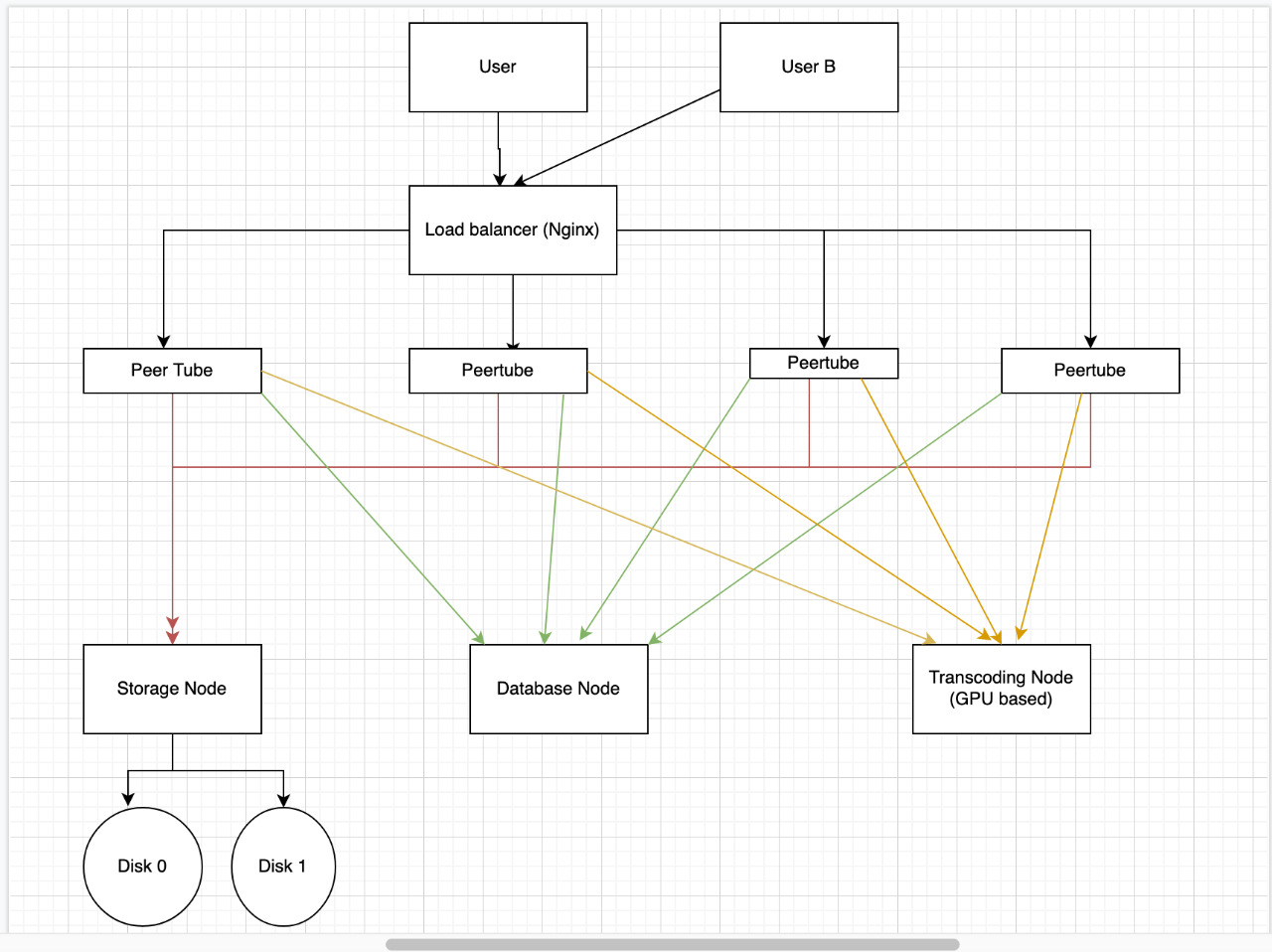
I would like to separate stuff?
- Database layer(which can be easily done just by using ip:port of new server),
- Transcoding Server (no idea how to separate it so it works properly when we upload video)
- Multiple Storage So we can create multiple storage server so we can distribute traffic. (In figure there is only one but we should be able to add more)
Is there any guide / docs for such setup?
Thanks
shirshak55
on 20 May 2020
2020/05/20 10:31:26 [error] 30774#30774: *8787086 open() "/home/yunohost.app/peertube/storage/streaming-playlists/hls/f59608a3-3b7f-4783-9281-5a1d01b5cfb7/segments-sha256.json" failed (2: No such file or directory), client: 62.210.137.118, server: snipped.tv, request: "GET /static/streaming-playlists/hls/f59608a3-3b7f-4783-9281-5a1d01b5cfb7/segments-sha256.json HTTP/1.0", host: "snipped.tv", referrer: "https://snipped.tv/videos/embed/f59608a3-3b7f-4783-9281-5a1d01b5cfb7"
2020/05/20 11:18:43 [error] 30771#30771: *9321066 open() "/home/yunohost.app/peertube/storage/streaming-playlists/hls/5f2b21db-a110-45e8-aed4-d804d4aaf81e/segments-sha256.json" failed (2: No such file or directory), client: 62.210.137.118, server: snipped.tv, request: "GET /static/streaming-playlists/hls/5f2b21db-a110-45e8-aed4-d804d4aaf81e/segments-sha256.json HTTP/1.0", host: "snipped.tv", referrer: "https://snipped.tv/videos/embed/5f2b21db-a110-45e8-aed4-d804d4aaf81e"
2020/05/20 12:03:54 [error] 4553#4553: *19560 open() "/home/yunohost.app/peertube/storage/streaming-playlists/hls/5f2b21db-a110-45e8-aed4-d804d4aaf81e/segments-sha256.json" failed (2: No such file or directory), client: 62.210.137.118, server: snipped.tv, request: "GET /static/streaming-playlists/hls/5f2b21db-a110-45e8-aed4-d804d4aaf81e/segments-sha256.json HTTP/1.0", host: "snipped.tv", referrer: "https://snipped.tv/videos/embed/5f2b21db-a110-45e8-aed4-d804d4aaf81e"
I don't understand... These logs mentions https://snipped.tv. But I can't reach this website. And the whois command has no match.
JohnXLivingston
on 21 May 2020
@JohnXLivingston i changed domain to sniped. Should have done xyz to remove confusion.
shirshak55
on 23 May 2020
Related issues
 kabo
·
3Comments
kabo
·
3Comments
 XenonFiber
·
3Comments
XenonFiber
·
3Comments
XenonFiber
·
3Comments
XenonFiber
·
3Comments
 ChameleonScales
·
3Comments
JohnXLivingston
·
3Comments
ChameleonScales
·
3Comments
JohnXLivingston
·
3Comments
Most helpful comment
@Chocobozzz
I don't think scaling vertically will offer scalability?
Use a RAID system to increase read perf (but you'll be limited by bandwidth)
Yep this is good idea but network problem will come up sooner or later
Is there easy way to architect properly for scalability.
I would like to separate stuff?
Is there any guide / docs for such setup?
Thanks