Peertube: Allow user to disable video in the player
Enhancement
Add an option in the player to allow user to disable video (play and download only soundtrack).
Why?
When playing music videos, I don't care about the image. Disable video would reduce used bandwidth and CPU.
Next step?
Allow to upload sound files? Allow to disable video by default when editing video settings.
 ZettaScript
All 12 comments
Hi,
I guess that if you're on another tab, your web browser optimize video playing so the CPU overhead is insignificant. Regarding bandwidth, h264 is very good at optimizing static images so again, the overhead is insignificant. We don't want to add this complexity in PeerTube for so little gain.
Allow to upload sound files
People can already upload audio files if their admin allows it.
 Chocobozzz
on 12 Aug 2019
Chocobozzz
on 12 Aug 2019
@Chocobozzz the CPU overhead might be insignificant but what about data transfer? Is h264 that efficient?
 Silmathoron
on 13 Sep 2019
Silmathoron
on 13 Sep 2019
Also, music videos might not necessarily have a static image. There could be animation, or an actual music video playing, which would take a lot of bandwidth and cpu for transmission and decoding.
 Nutomic
on 13 Sep 2019
Nutomic
on 13 Sep 2019
I see a few possibilities here which could help to improve the utility of PT in these situations:
- have the transcoder optionally create an audio-only version of imported material using either a new parameter (--extract-audio or something along those lines) or by a channel default setting (i.e. the _lectures_ channel always generates these while the _experiments_ channel does not) which is added to the resolution chooser in the player as _audio-only_. This audio-only version can be generated using the video thumbnail for a static image.
- The same as above without the static image, i.e. an audio-only mp4 container. I have not tried yet whether the web player supports these but I know that regular players (vlc, mplayer, mpv et al) have not problems with such files or streams. Maybe m4a works as well, it has the advantage of being supported on a wider variety of audio players but I suspect it would take more work to adapt the web player to this format for relatively little benefit.
While h264 is an effective codec it still adds overhead for any static image added to the stream. Testing with Firefox (nightly, 72.0a1) on my lowly Thinkpad T42p makes the thing jump to 100% CPU when playing audio tracks with static imagery (~50% _Web Content_, ~13% _GPU Process_, ~10% _firefox-72.0a1_ and some other related stuff). Playing a true audio-only stream in a browser takes no more than 10% so there is a marked difference.While PeerTube is a video streaming platform and as such does not focus on audio-only content it probably does not take that much work to add true audio-only content (possibly with a static image (as in _jpeg_ instead of _h264_) where the video would be).
I'll do some experiments around this theme as such a facility would be a marked improvement for one of my use cases: video lectures. Listening to such while on the road gobbles up ~400MB/hour for a low-res video version while audio-only versions don't take much more than ⅒ of that.
 Yetangitu
on 27 Oct 2019
Yetangitu
on 27 Oct 2019
I made a proof of concept of how this could work by adding a 0p transcoding step to the list of available resolutions which runs a new presetAudioSplit() preset in _ffmpeg-utils_ which runs _ffmpeg_ with -vn -acodec copy, producing mp4 files without video streams.
Here are the resulting files after uploading a 5 minute music video with a still image:
-rw-r--r-- 1 frank src  4876271 Oct 30 15:43 06a7f0f4-3b09-4d73-b674-6989a2cfe029-0.mp4
-rw-r--r-- 1 frank src  7526283 Oct 30 15:45 06a7f0f4-3b09-4d73-b674-6989a2cfe029-360.mp4
-rw-r--r-- 1 frank src 10540647 Oct 30 15:43 06a7f0f4-3b09-4d73-b674-6989a2cfe029-720.mp4
...and here's how the player presents these 'resolutions':

Playing the 0p resolution works fine and produces (in the current hackish version) a black background with music playing. The seek function works as normal, sharing works as normal. The conclusion is that both server as well as client (player) can handle audio-only mp4 content just fine.
Further enhancements would include:
- a true static image in the player instead of the current black background
test with_tested, PeerTube does not likem4acontainers instead of the currentmp4. Add video thumbnail as 'cover art' to them4aif this works.m4a_- add a pure audio download option - download works but of course it produces
mp4files. See the previous point for a possible solution. - present that
0p'resolution' as something more descriptive. This is partly done in the preferences section (where it is called _Resolution Audio-only (0p)_ ) but the player presents it as0p.
As to whether something like this should become part of _PeerTube_ remains to be seen. While this implementation works it is far from ideal. A better solution would be to serve audio and video as separate streams which get combined in the player as this makes it possible to offer multiple audio streams for a given video. This might wreak havoc with the _p2p_ streaming functionality as it doubles the number of streams which need to arrive in a timely fashion. Combining the streams on the server comes with its own issues related to server load and less efficient use of the torrent swarm.
Yetangitu
on 30 Oct 2019
The player now:
- shows audio-only content as (localised) _Audio-only_ in the resolution selector:
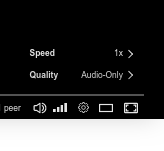
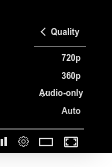
- shows the _poster_ image as background when playing audio-only content
- does not auto-hide the controls when playing audio-only content
These changes can be found in the audio-only branch of my PeerTube fork:
https://github.com/Yetangitu/PeerTube/tree/audio-only
I won't do a pull request yet as I don't think this is the best way to achieve audio-only playback, it just happens to be the easiest way and as such the one I chose for this proof-of-concept.
Yetangitu
on 1 Nov 2019
@Yetangitu honestly that looks great to me, maybe there could be other (better?) ways to do it, but as a first test to see how people feel about it, this seems pretty nice to me!
Silmathoron
on 1 Nov 2019
Wouldn't a PR actually be a great way to discuss this and see what the response is?
Silmathoron
on 1 Nov 2019
I think this is too much of a hack to add it permanently to PeerTube, hence my reticence to submit a PR. I made it to test the feasibility of using the standard player and P2P distribution methods to play audio-only files, this turns out to work just fine so now it is time to think about a more versatile way of handling audio and video streams. If the idea of having separate audio and video streams does not pan out this method could be revisited.
@Chocobozzz, @Nutomic, any ideas on this subject?
Yetangitu
on 1 Nov 2019
BTW, I looked a bit into the differences between mp4 and m4a container files to find out how to convert between the two. From what I gather the only difference is the extension, the actual container is identical. This means that the _Download_ option in the player can be made to produce m4a files without problems.
Yetangitu
on 1 Nov 2019
@Yetangitu I think you should make a PR, even if it is hacky. Discussing your changes across different issues and without seeing the code sucks.
Nutomic
on 1 Nov 2019
OK, I'll submit it and see where the discussion goes.
Edit: done, see #2213
Yetangitu
on 1 Nov 2019
Related issues
Nutomic
·
35Comments
 ballsystemlord
·
29Comments
Nutomic
·
22Comments
ballsystemlord
·
29Comments
Nutomic
·
22Comments
 conferences-gesticulees
·
26Comments
Chocobozzz
·
47Comments
conferences-gesticulees
·
26Comments
Chocobozzz
·
47Comments
Most helpful comment
I see a few possibilities here which could help to improve the utility of PT in these situations:
While h264 is an effective codec it still adds overhead for any static image added to the stream. Testing with Firefox (nightly, 72.0a1) on my lowly Thinkpad T42p makes the thing jump to 100% CPU when playing audio tracks with static imagery (~50% _Web Content_, ~13% _GPU Process_, ~10% _firefox-72.0a1_ and some other related stuff). Playing a true audio-only stream in a browser takes no more than 10% so there is a marked difference.While PeerTube is a video streaming platform and as such does not focus on audio-only content it probably does not take that much work to add true audio-only content (possibly with a static image (as in _jpeg_ instead of _h264_) where the video would be).
I'll do some experiments around this theme as such a facility would be a marked improvement for one of my use cases: video lectures. Listening to such while on the road gobbles up ~400MB/hour for a low-res video version while audio-only versions don't take much more than ⅒ of that.