I'm seeing significant differences in encoded video quality from the same file sent to PeerTube (left) and YouTube (right):

And the formats involved:
$ for i in *.mp4; do du -h $i; ffprobe $i 2>&1 | grep -A1 bitr; done
614M    scanlime041_original.mp4
  Duration: 00:02:30.04, start: 0.000000, bitrate: 34306 kb/s
    Stream #0:0(eng): Video: hevc (Main) (hvc1 / 0x31637668), yuvj420p(pc, bt709), 3840x2160 [SAR 1:1 DAR 16:9], 33989 kb/s, 60 fps, 60 tbr, 60k tbn, 60 tbc (default)
 96M    scanlime041_peertube_1080p.mp4
  Duration: 00:02:30.06, start: 0.000000, bitrate: 4777 kb/s
    Stream #0:0(und): Video: h264 (High) (avc1 / 0x31637661), yuvj420p(pc), 1920x1080 [SAR 1:1 DAR 16:9], 4632 kb/s, 60 fps, 60 tbr, 15360 tbn, 120 tbc (default)
 96M    scanlime041_peertube_2160p.mp4
  Duration: 00:02:30.06, start: 0.000000, bitrate: 4779 kb/s
    Stream #0:0(und): Video: h264 (High) (avc1 / 0x31637661), yuvj420p(pc), 3840x2160 [SAR 1:1 DAR 16:9], 4633 kb/s, 60 fps, 60 tbr, 15360 tbn, 120 tbc (default)
 47M    scanlime041_peertube_720p.mp4
  Duration: 00:02:30.06, start: 0.000000, bitrate: 2600 kb/s
    Stream #0:0(und): Video: h264 (High) (avc1 / 0x31637661), yuvj420px720 [SAR 1:1 DAR 16:9], 2455 kb/s, 60 fps, 60 tbr, 15360 tbn, 120 tbc (default)
The original was a 33 megabit 4K file, the highest PeerTube will give me is 4.8 megabits. YouTube on the other hand will give me nearly the source bitrate thanks to the 4K upload resolution, but even the 1080p is allocated a hefty 6.7 megabits! This is responsible for the smoother looking image on the right above.
format code  extension  resolution note
140          m4a        audio only DASH audio  132k , m4a_dash container, mp4a.40.2@128k, 2.32MiB
278          webm       256x144    144p  119k , webm container, vp9, 30fps, video only, 1.88MiB
160          mp4        256x144    144p  131k , avc1.4d400c, 30fps, video only, 2.19MiB
242          webm       426x240    240p  260k , vp9, 30fps, video only, 4.15MiB
133          mp4        426x240    240p  285k , avc1.4d4015, 30fps, video only, 4.83MiB
243          webm       640x360    360p  466k , vp9, 30fps, video only, 7.47MiB
134          mp4        640x360    360p  690k , avc1.4d401e, 30fps, video only, 11.63MiB
244          webm       854x480    480p  933k , vp9, 30fps, video only, 14.12MiB
135          mp4        854x480    480p 1304k , avc1.4d401f, 30fps, video only, 21.82MiB
247          webm       1280x720   720p 1983k , vp9, 30fps, video only, 28.29MiB
136          mp4        1280x720   720p 2680k , avc1.4d401f, 30fps, video only, 43.98MiB
248          webm       1920x1080  1080p 2907k , vp9, 30fps, video only, 44.46MiB
302          webm       1280x720   720p60 3061k , vp9, 60fps, video only, 47.08MiB
298          mp4        1280x720   720p60 4005k , avc1.4d4020, 60fps, video only, 62.95MiB
303          webm       1920x1080  1080p60 4351k , vp9, 60fps, video only, 72.80MiB
137          mp4        1920x1080  1080p 5081k , avc1.640028, 30fps, video only, 82.01MiB
299          mp4        1920x1080  1080p60 6715k , avc1.64002a, 60fps, video only, 106.49MiB
271          webm       2560x1440  1440p 8100k , vp9, 30fps, video only, 134.32MiB
308          webm       2560x1440  1440p60 12214k , vp9, 60fps, video only, 202.72MiB
313          webm       3840x2160  2160p 17041k , vp9, 30fps, video only, 257.61MiB
315          webm       3840x2160  2160p60 25554k , vp9, 60fps, video only, 383.74MiB
17           3gp        176x144    small , mp4v.20.3, mp4a.40.2@ 24k, 1.40MiB
36           3gp        320x180    small , mp4v.20.3, mp4a.40.2, 3.93MiB
18           mp4        640x360    medium , avc1.42001E, mp4a.40.2@ 96k, 13.21MiB
43           webm       640x360    medium , vp8.0, vorbis@128k, 16.02MiB
22           mp4        1280x720   hd720 , avc1.64001F, mp4a.40.2@192k (best)
This is actually even worse than my first try, where I was uploading a 1080p source instead of 4K. There, YouTube still offers a decent set of encodes topping out at 6.5 megabits:
format code  extension  resolution note
139          m4a        audio only DASH audio   50k , m4a_dash container, mp4a.40.5@ 48k (22050Hz), 894.85KiB
140          m4a        audio only DASH audio  132k , m4a_dash container, mp4a.40.2@128k (44100Hz), 2.32MiB
160          mp4        256x144    DASH video  108k , mp4_dash container, avc1.4d400b, 30fps, video only
133          mp4        426x240    DASH video  242k , mp4_dash container, avc1.4d400c, 30fps, video only
134          mp4        640x360    DASH video  698k , mp4_dash container, avc1.4d401e, 30fps, video only, 11.77MiB
135          mp4        854x480    DASH video 1155k , mp4_dash container, avc1.4d4014, 30fps, video only
136          mp4        1280x720   DASH video 2310k , mp4_dash container, avc1.4d4016, 30fps, video only
298          mp4        1280x720   DASH video 3465k , mp4_dash container, avc1.4d4016, 60fps, video only
137          mp4        1920x1080  DASH video 4331k , mp4_dash container, avc1.64001e, 30fps, video only
299          mp4        1920x1080  DASH video 6557k , mp4_dash container, avc1.64002a, 60fps, video only, 108.53MiB
17           3gp        176x144    small , mp4v.20.3, mp4a.40.2@ 24k, 1.40MiB
36           3gp        320x180    small , mp4v.20.3, mp4a.40.2, 3.95MiB
18           mp4        640x360    medium , avc1.42001E, mp4a.40.2@ 96k, 13.21MiB
43           webm       640x360    medium , vp8.0, vorbis@128k, 16.17MiB
22           mp4        1280x720   hd720 , avc1.64001F, mp4a.40.2@192k (best)
And the screenshot of YouTube at 1080p:

There may be differences in encoding details, but it seems like at the very least we might want to increase our bandwidth budget for streams that need the bits- or to make this configurable. To my eye at least, these limits are too low to give good video quality for video with high complexity.
(For the current implementation see https://github.com/Chocobozzz/PeerTube/blob/develop/shared/models/videos/video-resolution.enum.ts)
 scanlime
All 11 comments
I've been testing this change on my instance, to just bump the limits a bit:
https://github.com/scanlime/PeerTube/commit/557b70b99c73b42a762a87d4ab43e37cdf19832a
this is intended to be very temporary though, I'd really like to have a more reliable way to set video bitrates.
scanlime
on 22 Nov 2018
We need to limit bitrate somehow, otherwise FFmpeg will happily transcode with the input bitrate, and waste a lot of bandwidth. But maybe there are better ways to set the bitrate limit. Maybe FFmpeg has some option to use a higher bitrate only if the video actually needs it?
 Nutomic
on 22 Nov 2018
Nutomic
on 22 Nov 2018
I was not suggesting we remove the maxrate entirely, just that we come up with a better way to calculate it. And this is already a maximum rate, ffmpeg won't just burn extra bandwidth on a video that doesn't need it because we chose a higher limit.
scanlime
on 22 Nov 2018
@Nutomic In https://github.com/Chocobozzz/PeerTube/blob/develop/server/helpers/ffmpeg-utils.ts#L341, shouldn't it be
const maxBitrate = getMaxBitrate(resolution, fps, VIDEO_TRANSCODING_FPS)
localCommand = localCommand.outputOptions([`-maxrate ${ maxBitrate }`, `-bufsize ${ targetBitrate * 2 }`])
(defined here: https://github.com/Chocobozzz/PeerTube/blob/develop/shared/models/videos/video-resolution.enum.ts#L73)?
 Chocobozzz
on 23 Nov 2018
Chocobozzz
on 23 Nov 2018
No, target bitrate is the bitrate we want to achieve (so it's the parameter for transcoding). But sometimes, ffmpeg produces a video with a bitrate higher than target bitrate. Max bitrate is only used to check if a video was properly transcoded, both for tests and for the optimize-videos script.
Nutomic
on 23 Nov 2018
@Nutomic okay thanks, so what do you think regarding the @scanlime fix? https://github.com/scanlime/PeerTube/commit/557b70b99c73b42a762a87d4ab43e37cdf19832a
Chocobozzz
on 11 Dec 2018
That looks fine to me, like I said in the original PR, I wasn't sure at all what the actual bitrate values should be.
Nutomic
on 11 Dec 2018
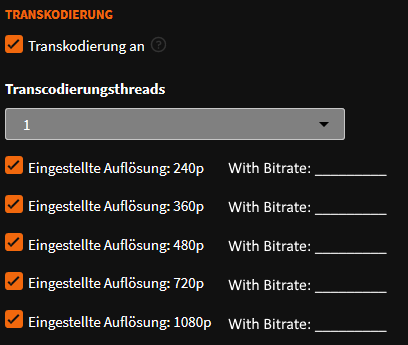
The most elegant option would be to allow the admin to specify the bitrate for each quality level in the web interface. It's best to do it right next to the transcoding activation.
 Hoerli1337
on 19 Dec 2018
Hoerli1337
on 19 Dec 2018
I applied the patch of @scanlime. I hope it will be better with theses values: https://github.com/Chocobozzz/PeerTube/blob/develop/shared/models/videos/video-resolution.enum.ts#L49
Chocobozzz
on 5 Dec 2019
I also think it is an excellent option to add the possibility of Kbits or even CRF and to close add precision as normal, low, very low etc ...
 IvanlokoBR
on 19 Jan 2020
IvanlokoBR
on 19 Jan 2020
@IvanlokoBR please open a new issue to decribe your suggestion in more detail.
 rigelk
on 19 Jan 2020
rigelk
on 19 Jan 2020
Related issues
 conferences-gesticulees
·
3Comments
conferences-gesticulees
·
3Comments
 ufm
·
3Comments
ufm
·
3Comments
 sschueller
·
3Comments
sschueller
·
3Comments
 NoraCodes
·
3Comments
Nutomic
·
3Comments
NoraCodes
·
3Comments
Nutomic
·
3Comments
Most helpful comment
The most elegant option would be to allow the admin to specify the bitrate for each quality level in the web interface. It's best to do it right next to the transcoding activation.