Peek: 1.2.2
GTK: 3.18.9
GLib: 2.48.2
Details:
Error opening file '/home/abcd/snap/peek/619/Peek 2018-01-29 05-28.gif': Permission denied
GLib-GIO-WARNING **: Error creating IO channel for /proc/mounts: Permission denied (g-file-error-quark, 2)
operating system ubuntu 14.04
 Xavi007
All 17 comments
Same here for Ubuntu 16.10. Started to appear recently, no permission errors before.
 evenfrost
on 29 Jan 2018
evenfrost
on 29 Jan 2018
Please check your file permissions on /home/abcd/snap/peek/619/ or /home/abcd/snap/peek/. Did you maybe run Peek with sudo at some point in the past?
 phw
on 29 Jan 2018
phw
on 29 Jan 2018
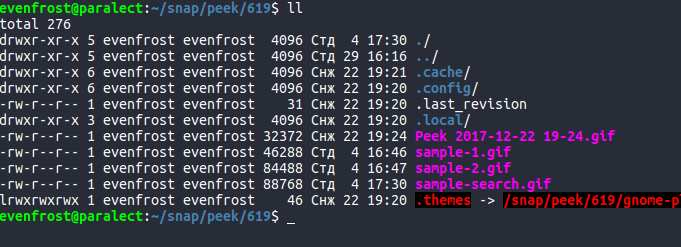
Permissions are the same as for other local files, owned by me ($USER). Ran peek via the desktop icon, not from Terminal.
evenfrost
on 29 Jan 2018
evenfrost
on 29 Jan 2018
on archlinux i can't render to any format anymore. maybe due to ffmpeg update?
 faridosc
on 5 Feb 2018
faridosc
on 5 Feb 2018
@faridosc Unless you are using the Snap version your's is a different issue. Please run Peek from command line and see if there is any error output. And open a new issue.
phw
on 5 Feb 2018
@evenfrost Does it save the file for you? Works for me, I also get the GLib-GIO-WARNING **: Error creating IO channel for /proc/mounts: Permission denied (g-file-error-quark, 2) error, but saving works.
@Xavi007 Can you save to any other file location? Saving to the snap folder is probably not the best idea anyway :)
phw
on 5 Feb 2018
@phw Nope, saving not working, I get the very Error opening file '/home/evenfrost/snap/peek/619/Peek 2018-02-07 15-02.gif': Permission denied error as OP. And saving in home folder shouldn't have permission issues, why is it a bad idea? Also, the folder is owned by me as seen on screenshot.
evenfrost
on 7 Feb 2018
@evenfrost Do I get this right: So even if you save to somewhere entirely different, let's say directly to /home/evenfrost/ you get the error for the path '/home/evenfrost/snap/peek/619/Peek 2018-02-07 15-02.gif' ?
phw
on 7 Feb 2018
I can absolutely not reproduce this. I would suggest you install Peek by other means, e.g. from PPA, as Flatpak or AppImage.
As it stands currently I will likely discontinue the Snap packages in the near future anyway.
phw
on 15 Feb 2018
My bad, didn't follow this up, but I tried it today, so here is more info from command line
(peek:26597): Gtk-WARNING **: Locale not supported by C library.
    Using the fallback 'C' locale.
Gtk-Message: Failed to load module "overlay-scrollbar"
Using screen recorder backend ffmpeg

(peek:26597): GLib-GIO-WARNING **: Error creating IO channel for /proc/mounts: Permission denied (g-file-error-quark, 2)
File save error: Error opening file '/home/abcd/snap/peek/619/Peek 2018-02-17 17-39.gif': Permission denied
method return time=1518869378.851552 sender=:1.928 -> destination=:1.927 serial=3 reply_serial=2
This is weird, I can save the file in other home directory (e.g. ~/downloads) but not in~/snap` one though they have same permisssions:

Output when saving to ~/snap (couldn't save):
(peek:19022): GLib-GIO-WARNING **: Error creating IO channel for /proc/mounts: Permission denied (g-file-error-quark, 2)
File save error: Error opening file '/home/evenfrost/snap/Peek 2018-02-26 17-40.gif': Permission denied
Output when saving to ~/downloads (saved):
(peek:19022): GLib-GIO-WARNING **: Error creating IO channel for /proc/mounts: Permission denied (g-file-error-quark, 2)
Can reproduce:
Kernel: 4.15.7-1-MANJARO x86_64 bits: 64 gcc: 7.3.0
Desktop: Xfce 4.12.4 (Gtk 2.24.31) Distro: Manjaro Linux 17.1.6
Peek 1.2.2-7-g0cbdd30
When I try to stop a screencast recording, the button stays depressed and the taskbar counter keeps on rolling. This doesn't only happen with gif though.
 luzpaz
on 13 Mar 2018
luzpaz
on 13 Mar 2018
Snap packages are no longer supported, see https://www.reddit.com/r/Ubuntu/comments/870bcn/snap_support_for_peek_screen_recorder_discontinued/
phw
on 25 Mar 2018
Thanks for the fix, can't reproduce in the latest 1.3.0
Sweet!
luzpaz
on 25 Mar 2018
Having this issue on my install. When I go to save as gif and the file manager opens, both windows are closed and I get this error:
free(): double free detected in tcache 2.
Any ideas what would cause this?
The gif and webm formatted files can be found at the location it logs. But I would love to be able to actually save the file and have it be a better name.
Logs from terminal:
joe@pop-os:~$ flatpak run com.uploadedlobster.peek
Using screen recorder backend gnome-shell
Recording to file /home/joe/.var/app/com.uploadedlobster.peek/cache/peek/peekJ9H57Z.webm
free(): double free detected in tcache 2
joe@pop-os:~$ flatpak run com.uploadedlobster.peek --version
Peek 1.3.1
 JoePotentier
on 13 Sep 2019
JoePotentier
on 13 Sep 2019
Had same issue as @JoePotentier (peek 1.3.1 on Ubuntu 19.04) but it was resolved by upgrading from 1.3.1 to 1.4.0.
 frederic-klein
on 16 Dec 2019
frederic-klein
on 16 Dec 2019
Related issues
 leoherzog
·
7Comments
leoherzog
·
7Comments
 msongz
·
7Comments
msongz
·
7Comments
 chteuchteu
·
6Comments
chteuchteu
·
6Comments
 fbruetting
·
3Comments
fbruetting
·
3Comments
 StephenFluin
·
4Comments
StephenFluin
·
4Comments
Most helpful comment
Having this issue on my install. When I go to save as gif and the file manager opens, both windows are closed and I get this error:
free(): double free detected in tcache 2.Any ideas what would cause this?
The gif and webm formatted files can be found at the location it logs. But I would love to be able to actually save the file and have it be a better name.
Logs from terminal:
joe@pop-os:~$ flatpak run com.uploadedlobster.peekUsing screen recorder backend gnome-shellRecording to file /home/joe/.var/app/com.uploadedlobster.peek/cache/peek/peekJ9H57Z.webmfree(): double free detected in tcache 2joe@pop-os:~$ flatpak run com.uploadedlobster.peek --versionPeek 1.3.1