When I click save and a few kB are saved, I don't need a notification, that these 10 kB have been successfully saved. Instead it just clutters the notification overview – therefore this should be deactivated.
 fbruetting
All 17 comments
I don't think I will remove this, it is one of the features I use a lot myself to access the just recorded files :)
It is a big redundant if you also have the open file manager option enabled, so maybe it could be disabled in this case. Or just make it a (probably hidden) option.
 phw
on 7 Sep 2016
phw
on 7 Sep 2016
Ok, I see… an option at least would be great!
fbruetting
on 7 Sep 2016
The issue I try to solve here is that most simple screenshot/screen cast utilities, such as the Gnome screenshot tool or similar, just stop after saving the file. But actually creating that screencast is just part of a larger workflow and I usually want to do something with the recorded file afterwards (edit it, share it, upload or copy it somewhere etc.)
With the notification that works pretty well for me, but I'm open for suggestions here as long as they don't involve blowing up Peek into something like Shutter :)
phw
on 7 Sep 2016
Ok, I understand your workflow. But some people like me, who just make one Gif and upload it to a Github bug report, trash the notification center. ;P But I have an idea, since Gnome loves popups (and me too, and maybe even you ;P):
You could integrate a button or symbol in the header bar, which when clicked, opens a popup. This popup lists all screencasts done in this session as file names or some other describing text (Shutter-like behaviour, but with the style of the open button in Gedit). Below the list, but still inside the popup (or alternatively in the main view) you could draw the first or middle frame (or play the screencast) of the currently mouse-overed screencast as preview. And when you click on a screencast item in the list, the entry could expand on the bottom and show icons for "open in file manager", "edit", "copy", "share" and "trash" for example (like the notifications in Android behave when dragged down). Being able to drag and drop an item of the list would also be beneficial, if you already got some other video editing program open, or want to save a screencast in a specific folder. This method has the advantage of easily accessing all screencasts done in a session and starting various actions on them. What do you think?
fbruetting
on 7 Sep 2016
Huh, I really like that idea @fb87!
However, I think the notifications works really well the way they are.
 fosspill
on 8 Sep 2016
fosspill
on 8 Sep 2016
It is a big redundant if you also have the open file manager option enabled, so maybe it could be disabled in this case.
Just as a note: Showing the file manager and showing the notification is already mutual exclusive, so no confusing double notification here at least :)
phw
on 13 Oct 2016
I'd much rather have it in the interface or something, maybe "Open last" next to "Record" when a last is existing, could also show progress there.
But either way, maybe the icon could not be an angry red error one, I was certain something had gone horribly wrong. :) Blue "i" for information maybe or a thumbs up?
 kribblo
on 5 Jan 2017
kribblo
on 5 Jan 2017
My current idea is to have a status area inside the peek window as a semi transparent bar at the bottom of the window. This could be used to show the rendering progress as suggested in #58, but the actual notification would stay around after recording, showing the file name and allowing one to open the file manager or open the file directly in the preferred application or even more.
My proposed solution is something like this:
After recording the whole recording area stays dark during post processing to indicate it is not yet ready for recording again. The notification bar area at the bottom shows the processed file name together with a progress indicator.

After post processing the window is ready for recording again, but the semi transparent notification area at the bottom still shows the saved file name and an icon to open the file in the file manager. This could be expanded to open the file in the preferred application or share it (see e.g. #60). Once the next recording starts the notification bar is hidden again. You can also explicitly close the notification bar with the X on the right in case you want to get a better look at what is behind it (e.g. to exactly position the recording area again).

Thoughts?
phw
on 27 Feb 2017
Why shouldn't the frame be ready for another recording while the former recording is processed in the background? Can't processing be done in a separate thread?
As described above, I'd suggest a button like the "open" button in Gedit. Could be named "Saved (2)" or "2 (saved) Recordings" or whatever… And if you click on it, a popup gets opened below (like in Gedit) and shows a list of all previous recordings of that session. Clicking it could open the recording itself or (maybe through a separate icon) the containing folder. Advantages are (a) no sight-blocking bar which has to be clicked away most times, (b) access to all instead of just one previous recording, (c) no popup appearing for those people who don't need it, and (d) a preview image could be shown. What's your opinion of my suggestion? :)
fbruetting
on 2 Mar 2017
The main issue I have with this is that it adds another button to the header bar, effectively increasing the minimum size the window can have. I want to avoid this if possible.
Points (b) and (d) can also be implemented with the proposed notification bar. Point (c) I don't quite understand, there is now no pop-up other than the file chooser and the proposed UI above also does not involve a pop-up.
phw
on 2 Mar 2017
Okay, then maybe a small square button with just a number inside? If there are no previous (or cleared) recordings, the button can disappear, which gives you minimal frame size. With (c) I meant the notification, sorry.
fbruetting
on 3 Mar 2017
I have committed a change that hides the button labels on small window sizes. This allows a smaller recording area, but probably also allows another small button without causing much issues.
Your suggestion is probably the easier one to get all wanted functionality in, so I will probably just give it a try.
phw
on 6 Mar 2017
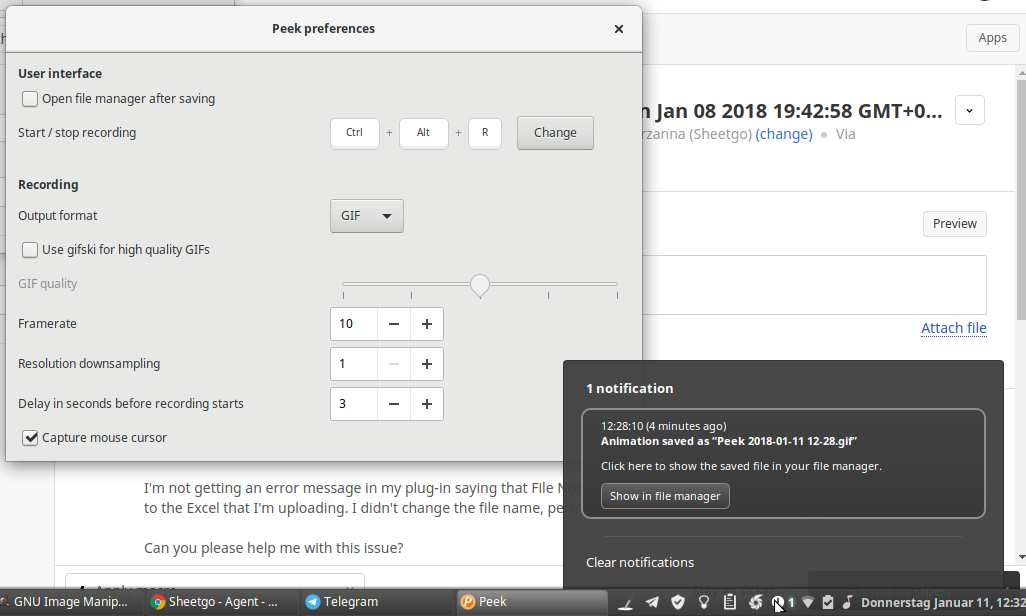
I also vote for an option in the preferences to disable notifications and prevent them from cluttering the notification tray – in my case Cinnamon.
 orschiro
on 11 Jan 2018
orschiro
on 11 Jan 2018
Ok, I've added the option to not show the notifications. The default is notifications enabled. Also enabling the "Open file manager" option will never show notifications, just as before.
The only case where notifications will be used no matter what is when you close Peek while it is still rendering. In this case it will use desktop notifications to inform the user that it continues rendering, and when it is finished.
phw
on 23 Jan 2018
@phw great addition! Is the 1.2.2 version already available via Flatpak?
Cannot install using flatpak install --user https://flathub.org/repo/appstream/com.uploadedlobster.peek.flatpakref

orschiro
on 24 Jan 2018
No, there is no 1.2.2 release yet. You will have to use the unstable version from http://flatpak.uploadedlobster.com/peek-master.flatpakref
I will do a release soon, maybe this weekend.
phw
on 24 Jan 2018
That worked excellently. Thanks!
The new feature works perfectly. Finally no notifications. :-)
orschiro
on 24 Jan 2018
Related issues
 ArsenArsen
·
3Comments
ArsenArsen
·
3Comments
 CasperHK
·
5Comments
CasperHK
·
5Comments
 msongz
·
7Comments
msongz
·
7Comments
 Art-2
·
6Comments
Art-2
·
6Comments
 StephenFluin
·
4Comments
StephenFluin
·
4Comments
Most helpful comment
Ok, I've added the option to not show the notifications. The default is notifications enabled. Also enabling the "Open file manager" option will never show notifications, just as before.
The only case where notifications will be used no matter what is when you close Peek while it is still rendering. In this case it will use desktop notifications to inform the user that it continues rendering, and when it is finished.