Pdfmake: No support for multi-page unbreakableBlocks
I saw the comment in pageElementWriter.js line 95:
// no support for multi-page unbreakableBlocks
Is there a reason why this is not supported? Any hints how we could fix this?
When I have a table with a lot of content in one or more rows and the dontBreakRows attribute is set to true; the rows will not get rendered at all.
Example:
var dd = {
    content: [
        { text: 'Table with a row that is higher than a single page' },
        { table: {
            widths: ['*'],
            dontBreakRows: true,
            body: [
                [{ stack:
                    [
                     { text: 'Text'},
                     { text: 'Text'},
                     { text: 'Text'},
                     { text: 'Text'},
                     { text: 'Text'},
                     { text: 'Text'},
                     { text: 'Text'},
                     { text: 'Text'},
                     { text: 'Text'},
                     { text: 'Text'},
                     { text: 'Text'},
                     { text: 'Text'},
                     { text: 'Text'},
                     { text: 'Text'},
                     { text: 'Text'},
                     { text: 'Text'},
                     { text: 'Text'},
                     { text: 'Text'},
                     { text: 'Text'},
                     { text: 'Text'},
                     { text: 'Text'},
                     { text: 'Text'},
                     { text: 'Text'},
                     { text: 'Text'},
                     { text: 'Text'},
                     { text: 'Text'},
                     { text: 'Text'},
                     { text: 'Text'},
                     { text: 'Text'},
                     { text: 'Text'},
                     { text: 'Text'},
                     { text: 'Text'},
                     { text: 'Text'},
                     { text: 'Text'},
                     { text: 'Text'},
                     { text: 'Text'},
                     { text: 'Text'},
                     { text: 'Text'},
                     { text: 'Text'},
                     { text: 'Text'},
                     { text: 'Text'},
                     { text: 'Text'},
                     { text: 'Text'},
                     { text: 'Text'},
                     { text: 'Text'},
                     { text: 'Text'},
                     { text: 'Text'},
                     { text: 'Text'},
                     { text: 'Text'},
                     { text: 'Text'},
                     { text: 'Text'},
                     { text: 'Text'},
                     { text: 'Text'},
                     { text: 'Text'},
                     { text: 'Text'},
                     { text: 'Text'},
                     { text: 'Text'},
                     { text: 'Text'},
                     { text: 'Text'},
                     { text: 'Text'},
                     { text: 'Text'},
                     { text: 'Text'},
                     { text: 'Text'},
                     { text: 'Text'},
                     { text: 'Text'},
                     { text: 'Text'},
                    ]
                }]
            ]
        }
    }]

}
 SteffiPeTaffy
All 43 comments
Is this is planned to be fixed ?
 Elyahou
on 21 Jun 2015
Elyahou
on 21 Jun 2015
There are no immediate plans to fix it.
Also: It's hard to know when to break a block when the user of the API
specified the block as "unbreakable".
On Sun, Jun 21, 2015 at 1:05 PM, Elyahou [email protected] wrote:
Is this is planned to be fixed ?
—
Reply to this email directly or view it on GitHub
https://github.com/bpampuch/pdfmake/issues/207#issuecomment-113885321.
 jthoenes
on 21 Jun 2015
jthoenes
on 21 Jun 2015
I have a large table that doesn't fit on one page and as a whole but has reasonable sections where it could be broken. I'd like to set the whole table so it doesn't break, but then set a 'breakHint' or something so the system knows where it is allowed to break.
 s7726
on 31 May 2016
s7726
on 31 May 2016
Same here for dynamic stack content. I need a way to keep small dynamic stack content together but also render content that does not fit to one page.
// playground requires you to assign document definition to a variable called dd

var dd = {
    content: [{
        unbreakable: true,
        stack: [
            {text: 'test'},
            {text: 'test'},
            {text: 'test'},
            {text: 'test'},
            {text: 'test'},
            {text: 'test'},
            {text: 'test'},
            {text: 'test'},
            {text: 'test'},
            {text: 'test'},
            {text: 'test'},
            {text: 'test'},
            {text: 'test'},
            {text: 'test'},
            {text: 'test'},
            {text: 'test'},
            {text: 'test'},
            {text: 'test'},
            {text: 'test'},
            {text: 'test'},
            {text: 'test'},
            {text: 'test'},
            {text: 'test'},
            {text: 'test'},
            {text: 'test'},
            {text: 'test'},
            {text: 'test'},
            {text: 'test'},
            {text: 'test'},
            {text: 'test'},
            {text: 'test'},
            {text: 'test'},
            {text: 'test'},
            {text: 'test'},
            {text: 'test'},
            {text: 'test'},
            {text: 'test'},
            {text: 'test'},
            {text: 'test'},
            {text: 'test'},
            {text: 'test'},
            {text: 'test'},
            {text: 'test'},
            {text: 'test'},
            {text: 'test'},
            {text: 'test'},
            {text: 'test'},
            {text: 'test'},
            {text: 'test'},
            {text: 'test'},
            {text: 'test'},
            {text: 'test'},
            {text: 'test'},
            {text: 'test'},
            {text: 'test'},
            {text: 'test'},
            {text: 'test'},
            {text: 'test'},
            {text: 'test'},
            {text: 'test'},
            {text: 'test'},
            {text: 'test'},
            {text: 'test'},
            {text: 'test'},
            {text: 'test'},
            {text: 'test'},
            {text: 'test'},
            {text: 'test'},
            {text: 'test'},
            {text: 'test'},
            {text: 'test'},
            {text: 'test'}
        ]
    }]
}
 kaedwen
on 2 Sep 2018
kaedwen
on 2 Sep 2018
Would an acceptable solution for this be to ignore unbreakable if the content is larger than one page?
 jwerre
on 8 Mar 2019
jwerre
on 8 Mar 2019
I would still prefer a way to hint where the break should end up, but a solution that at the least spent drop the content, would be minimally acceptable.
s7726
on 8 Mar 2019
I'm going to take a stab at fixing this. @jthoenes why do you say this:
Also: It's hard to know when to break a block when the user of the API
specified the block as "unbreakable".
It looks like the hight of the block is set in PageElementWriter::commitUnbreakableBlock on line 104
Could we not just add something like this:
if (fragment.height > this.context().getCurrentPage().pageSize) {
    // Content is too big, make content unbreakable then render as normal
    return super.addFragment(fragment);
}
Is the issue that the block height is available only because it's is already rendered at this point? I'd love to get a conversation going about this issue. Any possible solutions or suggestion much appreciated (particularly from @liborm85 ).
jwerre
on 16 Mar 2019
Any preliminary solution like the one you just suggested would be very much appreciated. I would consider it a bug fix while working on more advanced features for page-break corner cases like the hinting suggested further up.
Things not ending up on the pdf at all because they couldn't be placed in the requested pretty way is a bug equivalent to the printer "out of magenta" way of dealing with printouts.
 LukasGlader
on 16 Apr 2019
LukasGlader
on 16 Apr 2019
I suggest that an unbreakable that has multiple pages, simply start the unbreakable in a new page and then break where it should break, like not being an unbreakable.
Something like "break before if don't fits in the remaining space".
 Llorx
on 6 May 2019
Llorx
on 6 May 2019
@jwerre Did you get around to trying this workaround? I just came across the issue and was planning to fork and patch with something similar but would be great if you could share some code / elaborate on any difficulty you ran into.
 ramijarrar
on 26 Jun 2019
ramijarrar
on 26 Jun 2019
@ramijarrar I didn't get around to fixing this. It's been a while but I believe the issue is that you can't get the height of the block until it has been rendered on the page. I'm still interested in a fix for this so I'd be eager to know what you come up with.
jwerre
on 26 Jun 2019
I have also come across this issue - it's quite a big blocker for my project.
Is there a way of 'catching' the issue (i.e. identifying when an unbreakable block is more than a page long) and then re-rendering without unbreakable:true and just with a pagebreak:before?
 paprikati
on 5 Aug 2019
paprikati
on 5 Aug 2019
I posted a $500 bounty at BountySource if anyone wants to take a stab at this.
jwerre
on 6 Sep 2019
Hi @jwerre i want to take a look at this, but could be the aproach mentioned by @paprikati and @Llorx an accepted solution ??
I mean if the unbreakable block is larger than page size, then start it in a new page and break it where needs ?
 willy2dg
on 10 Sep 2019
willy2dg
on 10 Sep 2019
For me the desired behaviour would be - if it hits a block that is too big:
- add page break before
- respect any unbreakable:true flags on child components while continuing to render
paprikati
on 10 Sep 2019
As it stands now if a block is marked as unbreakable and the block is longer than a page then the entire block is not rendered.
I think the best solution would be to simply ignore the unbreakable flag if the block is longer than the page.
I get why you would add a before break to try and fit it on the next page, but if it doesn't fit on the next page then you end up with unnecessary white space. If the block doesn't fit on the next page either then it should go back to the position before the page break and render from there.
jwerre
on 10 Sep 2019
As it stands now if a block is marked as
unbreakableand the block is longer than a page then the entire block is not rendered.I think the best solution would be to simply ignore the
unbreakableflag if the block is longer than the page.I get why you would add a before break to try and fit it on the next page, but if it doesn't fit on the next page then you end up with unnecessary white space. If the block doesn't fit on the next page either then it should go back to the position before the page break and render from there.
Maybe that can be an option. "Render on next page or ignore unbreakable".
I guess the easy way is to ignore it. We could start with that.
Llorx
on 10 Sep 2019
I would expect that it would incrementally push the unbreakable property to the next largest block until the blocks can fit on a page.
block1 unbreakable
  block1.2
  block1.3
    block1.3.1
  block1.4
if block1 won't fit, becomes
  block1.2 unbreakable
  block1.3 unbreakable
    block1.3.1
  block1.4 unbreakable
if block 1.3 won't fit, becomes
  block1.2 unbreakable
  block1.3
    block1.3.1 unbreakable
  block1.4 unbreakable
I would also expect that pagebefore type behavior would be triggered by some percentage of the page available... If 50% (configurable) of the page already has content then do a pagebefore if not then don't.
s7726
on 10 Sep 2019
I guess the easy way is to ignore it. We could start with that.
@willy2dg, I agree, let's start with a simple and see where we end up. But I do agree, it would be nice to add a pagebreak before a block _if_ the block can fit on the next page else ignore.
jwerre
on 10 Sep 2019
@s7726 I think you're overcomplicating it a bit. I also think an arbitrary 50% (or any percent for that matter) doesn't make much sense when the following block could be any length.
jwerre
on 10 Sep 2019
@jwerre might be overcomplicating it for the initial cut, but it's always nice to have an idea where the end goal might be.
I agree percentage might not make the most sense, maybe a measurement of some kind (in, cm, etc.). It would be nice to have some control over the allowed amount of blank page at the bottom, if the block is going to be forced to break. i.e. I might not want to start on a fresh page with the whole big block if there is only one line of text on the page it's breaking from.
s7726
on 10 Sep 2019
@jwerre - for me the priority is preserving unbreakable blocks within the larger block - where something like a table row should by 'default' be considered unbreakable.
That gives the user the option to sub-divide their larger blocks into smaller ones if they need the kind of control that @s7726 would describe.
paprikati
on 10 Sep 2019
@paprikati That would be better for sure. Sound doable @willy2dg?
jwerre
on 11 Sep 2019
@jwerre I will look into the code more in deep and give you some feedback as soon as possible.
willy2dg
on 11 Sep 2019
I made a quick fix; still working on it
 denim2x
on 12 Sep 2019
denim2x
on 12 Sep 2019
@denim2x, for the sake of time, can you explain how you fixed it and what you've done?
jwerre
on 12 Sep 2019
the fix is at an early stage - the table gets rendered all right, but only on the page where it starts
denim2x
on 12 Sep 2019
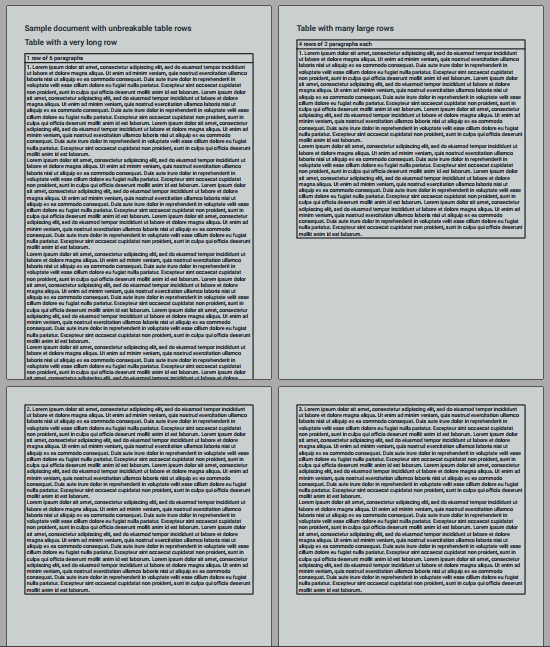
I've made some progess
denim2x
on 12 Sep 2019
Next I'll ensure that paragraphs exceeding page height shall be divided into smaller fragments
denim2x
on 15 Sep 2019
For this to work it'd be better if pdfmake was based on coroutines/message queues, at least the modules TableProcessor and PageElementWriter (which contains beginUnbreakableBlock()); that means a lot more working going into it, so it'd be much appreciated if the funding for this issue was increased
denim2x
on 23 Sep 2019
hey @denim2x - was wondering if you were still looking at this?
paprikati
on 31 Oct 2019
Taking the direct approach seems unwieldy in this case, leading towards having a proper, more sustainable implementation in place.
The API will remain the same, however the layout processor will be completely redesigned.
denim2x
on 1 Nov 2019
Has the progress you've made good enough? That is, will unbreakable content at least flow to the next page instead of disappear? If so maybe that's a decent enough patch for now.
jwerre
on 1 Nov 2019
I was looking on this too, and found a way to fix it like @s7726 mentions, is almost implemented, but hasn't the time to finish it yet.
willy2dg
on 1 Nov 2019
The fix here doesnt seem to have fixed my issue, no.
I am still seeing a blank page rather than content flowing across two pages
let me try to create a simple test case to build against
paprikati
on 6 Nov 2019
I've attached a gist here.
The fix means that rather than rendering a blank page, it renders as much of the text as it can before stopping. However, it does not wrap onto the next page.
The gist has 10 pgraphs, when I render it I only get 7
https://gist.github.com/paprikati/7d7cc98c3a2c1fada02098007920dd1f
paprikati
on 6 Nov 2019
@willy2dg Looking forward to seeing what you've come up with.
jwerre
on 6 Nov 2019
Just dropping these options/examples of ways to break the rows across pages
while maintaining unbreakable parts/chunks of data...
1. Placing specific breaks
var singleRow = [
{ text: 'This is text from row 1' },
{ text: 'This is text from row 1' },
{ break: true },
{ text: 'this is still text from row 1' },
{ text: 'this is still text from row 1' },
{ text: 'this is still text from row 1' },
{ text: 'this is still text from row 1' },
{ break: true },
{ text: 'Yet more text from row 1' },
{ text: 'Yet more text from row 1' },
{ text: 'Yet more text from row 1' }
];
var currentParent = [];
var rowParents = [];
for (var i = 0; i < singleRow.length; i++) {
if (singleRow[i].break || i === singleRow.length - 1){
rowParents.push(
[
{
stack: [...currentParent],
pageBreak: rowParents.length === 0 ? null : 'before',
unbreakable: true
}
]
);
currentParent = [];
} else {
currentParent.push(singleRow[i]);
}
}
var docDefinition = {
content: [
{
table: {
body: rowParents
}
}
]
}
2. Breaking based on amount of content in row
var singleRow = [
{ text: 'This is text from row 1..' },
{ text: 'This is text from row 1..' },
{ text: 'This is text from row 1..' },
{ text: 'This is text from row 1..' },
{ text: 'this is still text from row 1' },
{ text: 'this is still text from row 1' },
{ text: 'this is still text from row 1' },
{ text: 'this is still text from row 1' },
{ text: 'Yet more text from row 1' },
{ text: 'Yet more text from row 1' },
{ text: 'Yet more text from row 1' }
];
var maxCharactersPerPage = 100;
var currentParentLength = 0;
var currentParent = [];
var rowParents = [];
for (var i = 0; i < singleRow.length; i++) {
if (currentParentLength + singleRow[i].text.length > maxCharactersPerPage || i === singleRow.length - 1){
rowParents.push(
[
{
stack: [...currentParent],
pageBreak: rowParents.length === 0 ? null : 'before',
unbreakable: true
}
]
);
currentParent = [];
currentParentLength = 0;
} else {
currentParent.push(singleRow[i]);
currentParentLength += singleRow[i].text.length;
}
}
var docDefinition = {
content: [
{
table: {
body: rowParents
}
}
]
}
maxCharactersPerPage is up to you.
 ShadrackZysk
on 27 Apr 2020
ShadrackZysk
on 27 Apr 2020
I too struck with this, any plan to fixing this issue, or any one have solution in case of table with multiple column
 snrkannan
on 19 Oct 2020
snrkannan
on 19 Oct 2020
Just dropping these options/examples of ways to break the rows across pages
while maintaining unbreakable parts/chunks of data...1. Placing specific breaks
var singleRow = [
{ text: 'This is text from row 1' },
{ text: 'This is text from row 1' },
{ break: true },
{ text: 'this is still text from row 1' },
{ text: 'this is still text from row 1' },
{ text: 'this is still text from row 1' },
{ text: 'this is still text from row 1' },
{ break: true },
{ text: 'Yet more text from row 1' },
{ text: 'Yet more text from row 1' },
{ text: 'Yet more text from row 1' }
];
var currentParent = [];
var rowParents = [];
for (var i = 0; i < singleRow.length; i++) {
if (singleRow[i].break || i === singleRow.length - 1){
rowParents.push(
[
{
stack: [...currentParent],
pageBreak: rowParents.length === 0 ? null : 'before',
unbreakable: true
}
]
);
currentParent = [];
} else {
currentParent.push(singleRow[i]);
}
}
var docDefinition = {
content: [
{
table: {
body: rowParents
}
}
]
}2. Breaking based on amount of content in row
var singleRow = [
{ text: 'This is text from row 1..' },
{ text: 'This is text from row 1..' },
{ text: 'This is text from row 1..' },
{ text: 'This is text from row 1..' },
{ text: 'this is still text from row 1' },
{ text: 'this is still text from row 1' },
{ text: 'this is still text from row 1' },
{ text: 'this is still text from row 1' },
{ text: 'Yet more text from row 1' },
{ text: 'Yet more text from row 1' },
{ text: 'Yet more text from row 1' }
];
var maxCharactersPerPage = 100;
var currentParentLength = 0;
var currentParent = [];
var rowParents = [];
for (var i = 0; i < singleRow.length; i++) {
if (currentParentLength + singleRow[i].text.length > maxCharactersPerPage || i === singleRow.length - 1){
rowParents.push(
[
{
stack: [...currentParent],
pageBreak: rowParents.length === 0 ? null : 'before',
unbreakable: true
}
]
);
currentParent = [];
currentParentLength = 0;
} else {
currentParent.push(singleRow[i]);
currentParentLength += singleRow[i].text.length;
}
}
var docDefinition = {
content: [
{
table: {
body: rowParents
}
}
]
}maxCharactersPerPage is up to you.
i have tried this worked well in case of single column, please provide solution for multiple columns
snrkannan
on 19 Oct 2020
I was looking on this too, and found a way to fix it like @s7726 mentions, is almost implemented, but hasn't the time to finish it yet.
Any update on this, please share if have
snrkannan
on 21 Oct 2020
solution for multiple columns
Perhaps something to the effect of wrapping each row in a column and setting maxCharactersPerColumn ...
Then breaking all next columns to the next page if any of those rows length > maxCharactersPerColumn
Sorry, I don't have time to write it out right now.
ShadrackZysk
on 21 Oct 2020
I would love to use a conditional unbreakable if I had a method to check if a content like a stack fits in a page
 Crsk
on 17 Jan 2021
Crsk
on 17 Jan 2021
Related issues
 sayjeyhi
·
3Comments
sayjeyhi
·
3Comments
 dgrice
·
3Comments
dgrice
·
3Comments
 Masber
·
3Comments
Masber
·
3Comments
 imoum007
·
3Comments
imoum007
·
3Comments
 MathLavallee
·
3Comments
MathLavallee
·
3Comments
Most helpful comment
I suggest that an unbreakable that has multiple pages, simply start the unbreakable in a new page and then break where it should break, like not being an unbreakable.
Something like "
break beforeif don't fits in the remaining space".