Pdfmake: Align text in a table column vertically
Is it possible to center some text vertically such that the text is the same distance apart from the top and bottom borders?
I'm aware of alignment : 'center' but this only works horizontally.
 jimmyting44
All 89 comments
not at the moment, this would be a little bit problematic to support all boundary cases
 bpampuch
on 20 Oct 2014
bpampuch
on 20 Oct 2014
Yes. to be able to align text to the bottom border of a table cell would be useful.
 sierrakilo
on 6 Jan 2015
sierrakilo
on 6 Jan 2015
+1
 silveur
on 31 Oct 2015
silveur
on 31 Oct 2015
+1
 tihomirsmudj
on 7 Nov 2015
tihomirsmudj
on 7 Nov 2015
I've managed to do this by using html canvas to create vertical text and then importing it in as an image
// define your function for generating rotated text
writeRotatedText = function(text) {
  var ctx, canvas = document.createElement('canvas');
  // I am using predefined dimensions so either make this part of the arguments or change at will
  canvas.width = 36;
  canvas.height = 270;
  ctx = canvas.getContext('2d');
  ctx.font = '36pt Arial';
  ctx.save();
  ctx.translate(36,270);
  ctx.rotate(-0.5*Math.PI);
  ctx.fillStyle = '#000';
  ctx.fillText(text , 0, 0);
  ctx.restore();
  return canvas.toDataURL();
};

// set the fitted width/height to a fraction for mitigating pixelation on print/zoom
var tableBody = [
 [{image: writeRotatedText('I am rotated'), fit:[7,53], alignment: 'center'}]
];

// use this body in a table definition
EDIT: Sorry guys, I thought this was about "vertically rotated text" since I was looking for that when I saw this issue. I'm leaving this reply here in case anyone still finds this useful.
 serkandurusoy
on 20 Jan 2016
serkandurusoy
on 20 Jan 2016
+1
 jorgebo10
on 30 Jan 2016
jorgebo10
on 30 Jan 2016
The only way I could do it was by setting margin-top. i.e.: margin: [0, 20, 0, 0]
 MangaRed
on 15 Feb 2016
MangaRed
on 15 Feb 2016
+1
 sirhcybe
on 22 Apr 2016
sirhcybe
on 22 Apr 2016
+1
 fguillen
on 28 Jun 2016
fguillen
on 28 Jun 2016
+1
 csvan
on 13 Sep 2016
csvan
on 13 Sep 2016
+1
 Dejab666
on 22 Sep 2016
Dejab666
on 22 Sep 2016
+1
 mehmetalidumlu
on 22 Dec 2016
mehmetalidumlu
on 22 Dec 2016
I think this feature is really an important one. As we really need to tweak vertical alignment in the table cell most often. Is there any recent update on this issue?
 kabirbaidhya
on 28 Feb 2017
kabirbaidhya
on 28 Feb 2017
+1
 sheikirfanbasha
on 14 Mar 2017
sheikirfanbasha
on 14 Mar 2017
+1
 lerit
on 6 Apr 2017
lerit
on 6 Apr 2017
+1
 filipejoe
on 10 Apr 2017
filipejoe
on 10 Apr 2017
+1
 olgaivanysko
on 21 Apr 2017
olgaivanysko
on 21 Apr 2017
+1
 beebha
on 27 Jun 2017
beebha
on 27 Jun 2017
+1
 rdkleine
on 29 Jun 2017
rdkleine
on 29 Jun 2017
👍
 d3mi3n
on 30 Jun 2017
d3mi3n
on 30 Jun 2017
+1
 helloworld1987
on 9 Jul 2017
helloworld1987
on 9 Jul 2017
Im new on github, sorry for the dumb question, but the commit by sherpya fixed this issue? I tried putting verticalAlign: "center" in my code and it didnt work! :(
 Daniel147
on 21 Jul 2017
Daniel147
on 21 Jul 2017
@Daniel147 it might but he pushed it to his own fork. When he makes a Pull Request to add it to this repro and when it gets accepted then it will.
rdkleine
on 24 Jul 2017
+1
 elliskot
on 7 Aug 2017
elliskot
on 7 Aug 2017
+1
 Julian-Sam
on 8 Aug 2017
Julian-Sam
on 8 Aug 2017
+1
 Tonio31
on 9 Aug 2017
Tonio31
on 9 Aug 2017
+1
 mitchdennett
on 10 Aug 2017
mitchdennett
on 10 Aug 2017
+1
 ooKriangsaKoo
on 22 Aug 2017
ooKriangsaKoo
on 22 Aug 2017
+1
 factor4
on 29 Aug 2017
factor4
on 29 Aug 2017
+1
 leontalbot
on 30 Aug 2017
leontalbot
on 30 Aug 2017
+1
 RicardoBorgesGO
on 31 Aug 2017
RicardoBorgesGO
on 31 Aug 2017
+1
 rogelio2k
on 13 Sep 2017
rogelio2k
on 13 Sep 2017
+1
 flroux
on 14 Sep 2017
flroux
on 14 Sep 2017
+1
 imprss
on 4 Oct 2017
imprss
on 4 Oct 2017
+1
 emanueleliardo
on 9 Oct 2017
emanueleliardo
on 9 Oct 2017
+1
 enniosousa
on 9 Oct 2017
enniosousa
on 9 Oct 2017
+1
 niightly
on 21 Oct 2017
niightly
on 21 Oct 2017
Hi Guys,
We can use Margin to align the Columns. We need to give top margin if we want to align at bottom.
E.g
{ text: 'Destination', style: 'tableHeader',margin:[0,70,0,0] }
 faizalshap
on 22 Oct 2017
faizalshap
on 22 Oct 2017
Any news about this feature? I'm really in the need of it in one of my projects...
Thank you!
 FelipeMicali
on 19 Nov 2017
FelipeMicali
on 19 Nov 2017
Hi @liborm85,
Thank you for the library. Is there any improvement in this feature ?
 YamanSehzade
on 23 Nov 2017
YamanSehzade
on 23 Nov 2017
+1
 sayjeyhi
on 25 Dec 2017
sayjeyhi
on 25 Dec 2017
+1
 Yongling225
on 4 Jan 2018
Yongling225
on 4 Jan 2018
+1
 wyteco
on 13 Jan 2018
wyteco
on 13 Jan 2018
+1
 lxlplnl
on 28 Jan 2018
lxlplnl
on 28 Jan 2018
+1, would be great.
using margins is fine for static content. When the text is not known in advance, we can not anticipate the correct value for the margin... But I understand this is an effort.
Cheers anyway, great tool !
 Benibur
on 30 Jan 2018
Benibur
on 30 Jan 2018
+1
 vipex
on 9 Mar 2018
vipex
on 9 Mar 2018
+1
 RRiggs13
on 14 Mar 2018
RRiggs13
on 14 Mar 2018
+1
 fredriklundgren
on 16 Mar 2018
fredriklundgren
on 16 Mar 2018
+1 this is very important
 maa105
on 24 Mar 2018
maa105
on 24 Mar 2018
+1
 hrbu
on 26 Mar 2018
hrbu
on 26 Mar 2018
+1
 mmichaelk
on 4 Apr 2018
mmichaelk
on 4 Apr 2018
+1
 AlSaeed
on 19 Apr 2018
AlSaeed
on 19 Apr 2018
+1
 hansfelix
on 11 May 2018
hansfelix
on 11 May 2018
Can any future +1ers please use the Github +1 thumbs up system on the OP instead of adding a +1 comment that spams everyone else on the list? This allows people to show their support for an issue without all the emails in other people's inboxes.
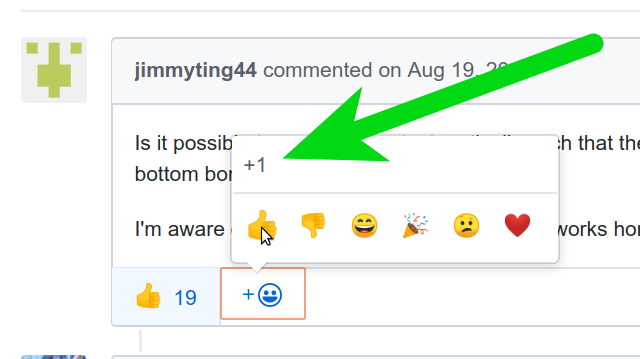
If you do have something meaningful to contribute, please do comment.
 frederickjh
on 11 May 2018
frederickjh
on 11 May 2018
+1
 saltedsword
on 12 Jun 2018
saltedsword
on 12 Jun 2018
@saltedsword Please read https://github.com/bpampuch/pdfmake/issues/74#issuecomment-388274590, thanks.
 liborm85
on 12 Jun 2018
liborm85
on 12 Jun 2018
+1
 oceangravity
on 16 Aug 2018
oceangravity
on 16 Aug 2018
So strokovnjaka made a commit where he added the feature (if I understand correctly). Can't you implement that. Pdfmake is freaking cool, these tables give me a serious pain, though :/
 Ramboush
on 1 Oct 2018
Ramboush
on 1 Oct 2018
any update for rotate text?
 jakupi1
on 13 Dec 2018
jakupi1
on 13 Dec 2018
+1
 luchusnet
on 13 Dec 2018
luchusnet
on 13 Dec 2018
+1 @bpampuch
 KarovInal
on 9 Jan 2019
KarovInal
on 9 Jan 2019
any update for vertical alignment??
 nayrban
on 19 Feb 2019
nayrban
on 19 Feb 2019
Is this feature merged ?
@nayrban were you able to use this feature ?
 nabilnalakath
on 28 Feb 2019
nabilnalakath
on 28 Feb 2019
TLDR:
Give up hope or get busy coding.
Back at the beginning of this issue, the first comment to the OP in fact, the owner of this project, bpampuch stated:
not at the moment, this would be a little bit problematic to support all boundary cases
This is in response to the question in the OP:
Is it possible to center some text vertically such that the text is the same distance apart from the top and bottom borders?
No one has been assign this issue. No commits have been made. No pull request have been submitted.
In short I believe that currently no one is interested in fixing this. The owner says that this would be a difficult thing to code. So, if you would like to see this I would suggest that you roll up your sleeves and submit a pull request.
Please no more +1ing or asking for updates. If a commit or pull request is submitted on this issue then you can ask or better yet download it and test the new version and submit a review.
frederickjh
on 28 Feb 2019
I've managed to do this by using html canvas to create vertical text and then importing it in as an image
// define your function for generating rotated text
writeRotatedText = function(text) {
  var ctx, canvas = document.createElement('canvas');
  // I am using predefined dimensions so either make this part of the arguments or change at will
  canvas.width = 36;
  canvas.height = 270;
  ctx = canvas.getContext('2d');
  ctx.font = '36pt Arial';
  ctx.save();
  ctx.translate(36,270);
  ctx.rotate(-0.5*Math.PI);
  ctx.fillStyle = '#000';
  ctx.fillText(text , 0, 0);
  ctx.restore();
  return canvas.toDataURL();
};

// set the fitted width/height to a fraction for mitigating pixelation on print/zoom
var tableBody = [
 [{image: writeRotatedText('I am rotated'), fit:[7,53], alignment: 'center'}]
];

// use this body in a table definition
EDIT: Sorry guys, I thought this was about "vertically rotated text" since I was looking for that when I saw this issue. I'm leaving this reply here in case anyone still finds this useful.
its working thank you..
its possible in text , instead of image?
 prabhugodchild
on 17 Sep 2019
prabhugodchild
on 17 Sep 2019
For your information, I created a trashy function. It's can't use for all case, but it's useful for some situation.
Code for playground page:
const setTopMarginOfCellForVerticalCentering = (ri, node) => {
  const cellHeights = node.table.body[ri].map(cell => {
    if(cell._inlines && cell._inlines.length) {
      return cell._inlines[0].height
    } else if(cell.stack) {
      return cell.stack[0]._inlines[0].height * cell.stack.length
    }
    return null
  })

  const maxRowHeight = Math.max(...cellHeights)
  node.table.body[ri].forEach((cell, ci) => {
    if(cellHeights[ci] && maxRowHeight > cellHeights[ci]) {
      let topMargin = (maxRowHeight - cellHeights[ci]) / 2
      if(cell._margin) {
        cell._margin[1] = topMargin
      } else {
        cell._margin = [0, topMargin, 0, 0]
      }
    }
  })

  return 2
}

var dd = {
    content: [
        {
            table: {
                body: [
                    [{text: 'AAA', style: {fontSize: 30}}, {text: 'BBB', style: {fontSize: 20}}, {text: 'CCC', style: {fontSize: 10}}],
                    [['AAA', 'AAA', 'AAA'], ['BBB', 'BBB'], 'CCC']
                ]
            },
            layout: { paddingTop: setTopMarginOfCellForVerticalCentering }
        }
    ]
}
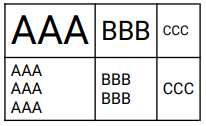
Result image:
 snowsunny
on 8 Nov 2019
snowsunny
on 8 Nov 2019
Looks awesome @snowsunny :+1:
It might need some coverage of some corner cases:
const setTopMarginOfCellForVerticalCentering = (ri, node) => {
  const cellHeights = node.table.body[ri].map(cell => {
    if(cell._inlines && cell._inlines.length) {
      return cell._inlines[0].height
    } else if(cell.stack) {
      return cell.stack[0]._inlines[0].height * cell.stack.length
    }
    return null
  })

  const maxRowHeight = Math.max(...cellHeights)
  node.table.body[ri].forEach((cell, ci) => {
    if(cellHeights[ci] && maxRowHeight > cellHeights[ci]) {
      let topMargin = (maxRowHeight - cellHeights[ci]) / 2
      if(cell._margin) {
        cell._margin[1] = topMargin
      } else {
        cell._margin = [0, topMargin, 0, 0]
      }
    }
  })

  return 2
}

var dd = {
    content: [
        {
            table: {
                body: [
                    [{text: 'AAA', style: {fontSize: 30}}, {text: 'BBB', style: {fontSize: 20}}, {text: 'CCC', style: {fontSize: 10}}],
                    [['AAA', 'AAA', 'AAA'], ['BBB', 'BBB'], 'CCC'],
                    [
                        {
                            image: 'sampleImage.jpg',
                            width: 150,
                            opacity: 0.5
                        },
                        ['BBB', 'BBB'],
                        'CCC'
                    ],
                ]
            },
            layout: { paddingTop: setTopMarginOfCellForVerticalCentering }
        }
    ]
}
 IvanDimanov
on 8 Nov 2019
IvanDimanov
on 8 Nov 2019
@IvanDimanov
Looks awesome
Thanks. d(`・ω・´)b
It might need some coverage of some corner cases
Yeah... now, the function is work with simple case only. If you want image in cell case support, you need fix the code of create cellHeights. Maybe, necessary data is already into the node.
Let's try. :wink: :+1:
snowsunny
on 9 Nov 2019
Anybody got a solution for cells with rowSpan set? The provided solution is good but sadly does not work for cells that have rowSpan :(
 bernhardwaidacher
on 12 Feb 2020
bernhardwaidacher
on 12 Feb 2020
Was trying to use it but it didn't seem to make a difference, how is this suppose to be used?
For your information, I created a trashy function. It's can't use for all case, but it's useful for some situation.
Code for playground page:
const setTopMarginOfCellForVerticalCentering = (ri, node) => {
  const cellHeights = node.table.body[ri].map(cell => {
    if(cell._inlines && cell._inlines.length) {
      return cell._inlines[0].height
    } else if(cell.stack) {
      return cell.stack[0]._inlines[0].height * cell.stack.length
    }
    return null
  })

  const maxRowHeight = Math.max(...cellHeights)
  node.table.body[ri].forEach((cell, ci) => {
    if(cellHeights[ci] && maxRowHeight > cellHeights[ci]) {
      let topMargin = (maxRowHeight - cellHeights[ci]) / 2
      if(cell._margin) {
        cell._margin[1] = topMargin
      } else {
        cell._margin = [0, topMargin, 0, 0]
      }
    }
  })

  return 2
}

var dd = {
  content: [
      {
          table: {
              body: [
                  [{text: 'AAA', style: {fontSize: 30}}, {text: 'BBB', style: {fontSize: 20}}, {text: 'CCC', style: {fontSize: 10}}],
                  [['AAA', 'AAA', 'AAA'], ['BBB', 'BBB'], 'CCC']
              ]
          },
          layout: { paddingTop: setTopMarginOfCellForVerticalCentering }
      }
  ]
}
Result image:
 scottyh527
on 21 Feb 2020
scottyh527
on 21 Feb 2020
For your information, I created a trashy function. It's can't use for all case, but it's useful for some situation.
Code for playground page:
const setTopMarginOfCellForVerticalCentering = (ri, node) => {
  const cellHeights = node.table.body[ri].map(cell => {
    if(cell._inlines && cell._inlines.length) {
      return cell._inlines[0].height
    } else if(cell.stack) {
      return cell.stack[0]._inlines[0].height * cell.stack.length
    }
    return null
  })

  const maxRowHeight = Math.max(...cellHeights)
  node.table.body[ri].forEach((cell, ci) => {
    if(cellHeights[ci] && maxRowHeight > cellHeights[ci]) {
      let topMargin = (maxRowHeight - cellHeights[ci]) / 2
      if(cell._margin) {
        cell._margin[1] = topMargin
      } else {
        cell._margin = [0, topMargin, 0, 0]
      }
    }
  })

  return 2
}

var dd = {
  content: [
      {
          table: {
              body: [
                  [{text: 'AAA', style: {fontSize: 30}}, {text: 'BBB', style: {fontSize: 20}}, {text: 'CCC', style: {fontSize: 10}}],
                  [['AAA', 'AAA', 'AAA'], ['BBB', 'BBB'], 'CCC']
              ]
          },
          layout: { paddingTop: setTopMarginOfCellForVerticalCentering }
      }
  ]
}
Result image:
So for this to work the words have to be in those arrays within the array. Does anyone know if there is a way to detect if a single line will start wrapping so that we can split it into arrays?
scottyh527
on 24 Feb 2020
I've tried to improve the code a little bit.
It works best with {stack:'...'} instead of {text:'...'}.
Feel free to optimize/ extend.
But the bug which adds some space in rows with wrapped cells and dontBreakRows = true still exists...
const setTopMarginOfCellForVerticalCentering = (ri, node) => {
    const calcCellHeight = (cell, ci) => {
        if (cell._height !== undefined) {
            return cell._height;
        }
        let width = 0;
        for (let i = ci; i < ci + (cell.colSpan || 1); i++) {
            width += node.table.widths[i]._calcWidth;
        }
        let calcLines = (inlines) => {
            let tmpWidth = width;
            let lines = 1;
            inlines.forEach(inline => {
                tmpWidth = tmpWidth - inline.width;
                if (tmpWidth < 0) {
                    lines++;
                    tmpWidth = width - inline.width;
                }
            });
            return lines;
        };

        cell._height = 0;
        if (cell._inlines && cell._inlines.length) {
            let lines = calcLines(cell._inlines);
            cell._height = cell._inlines[0].height * lines;
        } else if (cell.stack && cell.stack[0] && cell.stack[0]._inlines[0]) {
            cell._height = cell.stack.map(item => {
                let lines = calcLines(item._inlines);
                return item._inlines[0].height * lines;
            }).reduce((prev, next) => prev + next);
        } else if (cell.table) {
            // TODO...
            console.log(cell);
        }

        cell._space = cell._height;
        if (cell.rowSpan) {
            for (let i = ri + 1; i < ri + (cell.rowSpan || 1); i++) {
                cell._space += Math.max(...calcAllCellHeights(i)) + padding * (i - ri) * 2;
            }
            return 0;
        }

        ci++;
        return cell._height;
    };
    const calcAllCellHeights = (rIndex) => {
        return node.table.body[rIndex].map((cell, ci) => {
            return calcCellHeight(cell, ci);
        });
    };

    calcAllCellHeights(ri);
    const maxRowHeights = {};
    node.table.body[ri].forEach(cell => {
        if (!maxRowHeights[cell.rowSpan] || maxRowHeights[cell.rowSpan] < cell._space) {
            maxRowHeights[cell.rowSpan] = cell._space;
        }
    });

    node.table.body[ri].forEach(cell => {
        if (cell.ignored) return;

        if (cell._rowSpanCurrentOffset) {
            cell._margin = [0, 0, 0, 0];
        } else {
            let topMargin = (maxRowHeights[cell.rowSpan] - cell._height) / 2;
            if (cell._margin) {
                cell._margin[1] += topMargin;
            } else {
                cell._margin = [0, topMargin, 0, 0];
            }
        }
    });

    return  2
}

var dd = {
    content: [
        {
            table: {
                body: [
                    [{text: 'AAA', style: {fontSize: 30}}, {text: 'BBB', style: {fontSize: 20}}, {text: 'CCC', style: {fontSize: 10}}],
                    [['AAA', 'AAA', 'AAA'], ['BBB', 'BBB'], 'CCC']
                ]
            },
            layout: { paddingTop: setTopMarginOfCellForVerticalCentering }
        }
    ]
}
 jhasenfuss
on 28 Feb 2020
jhasenfuss
on 28 Feb 2020
Still no solution? I can't believe, this issue was created at 2014, 6 year need for resolve vertical-align text in table? wtf
 dlishtvan
on 5 Mar 2020
dlishtvan
on 5 Mar 2020
Has anyone come up with a function to bottom align text in a cell?
scottyh527
on 13 Mar 2020
more advanced version:
- handles center & bottom alignment
- supports nested tables
install via:
table def:

{
   table: ...,
   layout: {
      paddingTop: (index: number, node: any) => {
         this.applyVerticalAlignment(node, index, 'bottom');
         return 0
      }
   }
}


    private applyVerticalAlignment(node, index, align: 'center' | 'bottom') {
        const allCellHeights = node.table.body[index].map((innerNode) => {
            const findInlineHeight = this.findInlineHeight(innerNode, node.table.widths[index]._calcWidth);
            const lines = Math.ceil(findInlineHeight.width / node.table.widths[index]._calcWidth);
            return findInlineHeight.height * lines;
        });
        const maxRowHeight = Math.max(...allCellHeights)
        node.table.body[index].forEach((cell, ci) => {
            if (allCellHeights[ci] && maxRowHeight > allCellHeights[ci]) {
                let topMargin;
                if (align ==='bottom') {
                    topMargin = (maxRowHeight - allCellHeights[ci]);
                } else if (align === 'center') {
                    topMargin = (maxRowHeight - allCellHeights[ci]) / 2;
                }
                if (cell._margin) {
                    cell._margin[1] += topMargin
                } else {
                    cell._margin = [0, topMargin, 0, 0]
                }
            }
        })
    }

    private findInlineHeight(cell, maxWidth: number, usedWidth: number = 0) {
        if (cell._offsets) {
            usedWidth += cell._offsets.total;
        }

        if (cell._inlines && cell._inlines.length) {
            let currentMaxHeight = 0;
            for (const currentNode of cell._inlines) {
                usedWidth += currentNode.width;
                if (usedWidth > maxWidth) {
                    currentMaxHeight += currentNode.height;
                } else {
                    currentMaxHeight = Math.max(currentNode.height, currentMaxHeight);
                }
            }
            return {
                height: currentMaxHeight,
                width: usedWidth
            }
        } else if (cell.table) {
            let currentMaxHeight = 0;
            for (const currentTableBodies of cell.table.body) {
                const innerTableHeights = currentTableBodies.map((innerTableCell) => {
                    const findInlineHeight = this.findInlineHeight(innerTableCell, maxWidth, usedWidth);

                    usedWidth = findInlineHeight.width;
                    return findInlineHeight.height
                });
                currentMaxHeight = Math.max(...innerTableHeights, currentMaxHeight);
            }
            return {
                height: currentMaxHeight,
                width: usedWidth
            }
        } else if (cell._height) {
            usedWidth += cell._width;
            return {
                height: cell._height,
                width: usedWidth
            };
        }

        return {
            height: null,
            width: usedWidth
        };
    }
 domschmidt
on 28 Apr 2020
domschmidt
on 28 Apr 2020
wtf
 erald14
on 1 May 2020
erald14
on 1 May 2020
Any updates yet for this feature?
 sohaib3335
on 24 Jun 2020
sohaib3335
on 24 Jun 2020
any updates, since this feature is very important ?
 Anand-Paul
on 12 Aug 2020
Anand-Paul
on 12 Aug 2020
I gues they won't implement this feature. In almost all usecases we require this feature.
 mohankoppuravuri
on 3 Nov 2020
mohankoppuravuri
on 3 Nov 2020
Mixing the solutions of @domschmidt and @jhasenfuss I build this workaround that works well for:
- Text
- Stack
- Nested Table
WIth an align option that can align in:
'center''bottom'
The snippet that works in the playground:
function findInlineHeight(cell, maxWidth, usedWidth = 0) {
    let calcLines = (inlines) => {
        if (inlines == undefined)
            return {
                height: 0,
                width: 0,
            };
        let currentMaxHeight = 0;
        for (const currentNode of inlines) {
            usedWidth += currentNode.width;
            if (usedWidth > maxWidth) {
              currentMaxHeight += currentNode.height;
              usedWidth = currentNode.width;
            } else {
              currentMaxHeight = Math.max(currentNode.height, currentMaxHeight);
            }
        }
        return {
            height: currentMaxHeight,
            width: usedWidth,
        };
    }
    if (cell._offsets) {
      usedWidth += cell._offsets.total;
    }
    if (cell._inlines && cell._inlines.length) {
        return calcLines(cell._inlines);
    }  else if (cell.stack && cell.stack[0]) {
        return cell.stack.map(item => {
            return calcLines(item._inlines);
        }).reduce((prev, next) => {
            return {
            height: prev.height + next.height,
            width: Math.max(prev.width + next.width)
            };
        });
    } else if (cell.table) {
      let currentMaxHeight = 0;
      for (const currentTableBodies of cell.table.body) {
        const innerTableHeights = currentTableBodies.map((innerTableCell) => {
          const findInlineHeight = this.findInlineHeight(
            innerTableCell,
            maxWidth,
            usedWidth
          );

          usedWidth = findInlineHeight.width;
          return findInlineHeight.height;
        });
        currentMaxHeight = Math.max(...innerTableHeights, currentMaxHeight);
      }
      return {
        height: currentMaxHeight,
        width: usedWidth,
      };
    } else if (cell._height) {
      usedWidth += cell._width;
      return {
        height: cell._height,
        width: usedWidth,
      };
    }

    return {
      height: null,
      width: usedWidth,
    };
}

function applyVerticalAlignment(node, rowIndex, align) {
    const allCellHeights = node.table.body[rowIndex].map(
      (innerNode, columnIndex) => {
        const mFindInlineHeight = findInlineHeight(
          innerNode,
          node.table.widths[columnIndex]._calcWidth
        );
        return mFindInlineHeight.height;
      }
    );
    const maxRowHeight = Math.max(...allCellHeights);
    node.table.body[rowIndex].forEach((cell, ci) => {
      console.log(cell, maxRowHeight, allCellHeights[ci])
      if (allCellHeights[ci] && maxRowHeight > allCellHeights[ci]) {
        let topMargin;
        if (align === 'bottom') {
          topMargin = maxRowHeight - allCellHeights[ci];
        } else if (align === 'center') {
          topMargin = (maxRowHeight - allCellHeights[ci]) / 2;
        }
        if (cell._margin) {
          cell._margin[1] = topMargin;
        } else {
          cell._margin = [0, topMargin, 0, 0];
        }
      }
    });
}

var dd = {
    content: [
        {
            table: {
                body: [
                    [{text: 'AAA', style: {fontSize: 30}}, {text: 'BBB', style: {fontSize: 20}}, {text: 'CCC', style: {fontSize: 10}}],
                    [['AAA', 'AAA', 'AAA'], ['BBB', 'BBB'], 'CCC']
                ]
            },
            layout: { paddingTop: function (index, node) {
                applyVerticalAlignment(node, index, 'center');
                return 0;
            }, }
        }
    ]
}
 augustoicaro
on 12 Nov 2020
augustoicaro
on 12 Nov 2020
@augustoicaro thank you for a nice solution. However, if the text breaks more than once in not the highest column (use widths: [70, 70, 70], in table and add row [['AAA', 'AAA', 'AAA', 'AAA', 'AAA', 'AAA'], ['BBB BBB BBB BBB BBB BBB'], 'CCC'] in your example) then usedWidth needs to be reset, to continue adding line heights correctly, i.e. after if (usedWidth > maxWidth) { currentMaxHeight += currentNode.height; I inserted the line usedWidth = currentNode.width; and the bottom center BBB-cell is centered nicely, also.
TL;DR: https://github.com/bpampuch/pdfmake/issues/74#issuecomment-726181063 works even more nicely with usedWidth = currentNode.width; added after currentMaxHeight += currentNode.height;
 PaulRotter
on 20 Nov 2020
PaulRotter
on 20 Nov 2020
I got a production error today and updated the https://github.com/bpampuch/pdfmake/issues/74#issuecomment-726181063 with the error fix and @PaulRotter improvement. Thanks @PaulRotter 👍
The error fix was change:
} else if (cell.stack && cell.stack[0] && cell.stack[0]._inlines[0]) {
To:
} else if (cell.stack && cell.stack[0]) {
Because calcLines() handles the case that _inlines is undefined.
augustoicaro
on 7 Dec 2020
patiently waiting for this...
 rickyzhangca
on 3 Mar 2021
rickyzhangca
on 3 Mar 2021
@rickyzhangca you can hack this by yourself using https://github.com/bpampuch/pdfmake/issues/74#issuecomment-726181063
You can try the snippet in the playground and move the essential code for your application. If you use typescript and want grab the typescript version, they are in the first functions of this code: https://github.com/nortan-projetos/plataforma/blob/main/src/app/pages/invoices/pdf.service.ts
Happy hacking!
augustoicaro
on 3 Mar 2021
I needed a different align for each column, so I modified the applyVerticalAlignment() function from https://github.com/bpampuch/pdfmake/issues/74#issuecomment-726181063:
function applyVerticalAlignment(node, rowIndex, align) {
    const allCellHeights = node.table.body[rowIndex].map(
      (innerNode, columnIndex) => {
        const mFindInlineHeight = findInlineHeight(
          innerNode,
          node.table.widths[columnIndex]._calcWidth
        );
        return mFindInlineHeight.height;
      }
    );
    const maxRowHeight = Math.max(...allCellHeights);
    node.table.body[rowIndex].forEach((cell, ci) => {
      if (allCellHeights[ci] && maxRowHeight > allCellHeights[ci]) {
        let topMargin;

        let cellAlign = align;
        if (Array.isArray(align)) {
            cellAlign = align[ci];
        }

        if (cellAlign === 'bottom') {
          topMargin = maxRowHeight - allCellHeights[ci];
        } else if (cellAlign === 'center') {
          topMargin = (maxRowHeight - allCellHeights[ci]) / 2;
        }

        if (topMargin) {
            if (cell._margin) {
              cell._margin[1] = topMargin;
            } else {
              cell._margin = [0, topMargin, 0, 0];
            }
        }
      }
    });
}
This allows the align argument to be an array, so I can pass
layout: { paddingTop: function (index, node) {
    applyVerticalAlignment(node, index, ['center','top','center','bottom']);
    return 0;
}, }
I'll leave this here in case it comes in handy for someone else...
 Connum
on 31 Mar 2021
Connum
on 31 Mar 2021
I still had some problems with linebreaks in cells resulting in incorrectly calculated padding. I made another modification to take the lineEnd property into account for inline elements, which fixed the issues I had. I also made the table bodies map callback function a function of its own, so it isn't created as an anonymous function inside the loop on every iteration, which could have an impact performance-wise.
function mapTableBodies(innerTableCell) {
  const findInlineHeight = this.findInlineHeight(
    innerTableCell,
    maxWidth,
    usedWidth
  );

  usedWidth = findInlineHeight.width;
  return findInlineHeight.height;
}

function findInlineHeight(cell, maxWidth, usedWidth = 0) {
    let calcLines = (inlines) => {
        if (!inlines)
            return {
                height: 0,
                width: 0,
            };
        let currentMaxHeight = 0;
        let lastHadLineEnd = false;
        for (const currentNode of inlines) {
            usedWidth += currentNode.width;
            if (usedWidth > maxWidth || lastHadLineEnd) {
              currentMaxHeight += currentNode.height;
              usedWidth = currentNode.width;
            } else {
              currentMaxHeight = Math.max(currentNode.height, currentMaxHeight);
            }
            lastHadLineEnd = !!currentNode.lineEnd;
        }
        return {
            height: currentMaxHeight,
            width: usedWidth,
        };
    }
    if (cell._offsets) {
      usedWidth += cell._offsets.total;
    }
    if (cell._inlines && cell._inlines.length) {
        return calcLines(cell._inlines);
    }  else if (cell.stack && cell.stack[0]) {
        return cell.stack.map(item => {
            return findInlineHeight(item, maxWidth);
        }).reduce((prev, next) => {
            return {
            height: prev.height + next.height,
            width: Math.max(prev.width + next.width)
            };
        });
    } else if (cell.table) {
      let currentMaxHeight = 0;
      for (const currentTableBodies of cell.table.body) {
        const innerTableHeights = currentTableBodies.map(mapTableBodies);
        currentMaxHeight = Math.max(...innerTableHeights, currentMaxHeight);
      }
      return {
        height: currentMaxHeight,
        width: usedWidth,
      };
    } else if (cell._height) {
      usedWidth += cell._width;
      return {
        height: cell._height,
        width: usedWidth,
      };
    }

    return {
      height: null,
      width: usedWidth,
    };
}

function applyVerticalAlignment(node, rowIndex, align) {
    const allCellHeights = node.table.body[rowIndex].map(
      (innerNode, columnIndex) => {
        const mFindInlineHeight = findInlineHeight(
          innerNode,
          node.table.widths[columnIndex]._calcWidth
        );
        return mFindInlineHeight.height;
      }
    );
    const maxRowHeight = Math.max(...allCellHeights);
    node.table.body[rowIndex].forEach((cell, ci) => {
      if (allCellHeights[ci] && maxRowHeight > allCellHeights[ci]) {
        let topMargin;

        let cellAlign = align;
        if (Array.isArray(align)) {
            cellAlign = align[ci];
        }

        if (cellAlign === 'bottom') {
          topMargin = maxRowHeight - allCellHeights[ci];
        } else if (cellAlign === 'center') {
          topMargin = (maxRowHeight - allCellHeights[ci]) / 2;
        }

        if (topMargin) {
            if (cell._margin) {
              cell._margin[1] = topMargin;
            } else {
              cell._margin = [0, topMargin, 0, 0];
            }
        }
      }
    });
}
Update: unified the line break condition for automatic and manual line breaks, so usedWidth gets reset as well
Update 2: On stacks, we also have to call return findInlineHeight(item); instead of return calcLines(cell._inlines) to make it work
Update 3 (8 Apr 2021): Forgot to pass maxWidth to findInlineHeight() when iterating cell stacks
Connum
on 1 Apr 2021
Has a simple "alignVertical: " rule been added for PDFmake yet??? Or do I need a massive function to manually align vertically?
 cfoxy17
on 28 Apr 2021
cfoxy17
on 28 Apr 2021
Has a simple "alignVertical: " rule been added for PDFmake yet??? Or do I need a massive function to manually align vertically?
Unfortunately, the latter. But my solution (https://github.com/bpampuch/pdfmake/issues/74#issuecomment-811820282) seems to be working quite stable, I'm using it in production for some weeks now.
Connum
on 28 Apr 2021
Has a simple "alignVertical: " rule been added for PDFmake yet??? Or do I need a massive function to manually align vertically?
I agree with @Connum. I'm also using the final solution in production and it is working quite stable for a few months in our scenario.
augustoicaro
on 28 Apr 2021
Related issues
 dmatesic
·
3Comments
dmatesic
·
3Comments
 imoum007
·
3Comments
imoum007
·
3Comments
 qgliu
·
3Comments
qgliu
·
3Comments
 jkd003
·
3Comments
jkd003
·
3Comments
 davidyeiser
·
3Comments
davidyeiser
·
3Comments
Most helpful comment
Can any future +1ers please use the Github +1 thumbs up system on the OP instead of adding a +1 comment that spams everyone else on the list? This allows people to show their support for an issue without all the emails in other people's inboxes.

If you do have something meaningful to contribute, please do comment.