Is it possible somehow to get header and subheaders on different levels in the table of contents?
Something like:
Table of contents:
Introduction
- Background
- About the project
- About the authors
Abstract
...
Been looking around and trying with the code but can't get it to work.
 karatekaneen
All 6 comments
i hope i understand you...
if your headers make use of a specific style you can iterate over the contents and just grep them together to create a ToC
 naxmefy
on 25 Jul 2018
naxmefy
on 25 Jul 2018
Sorry but I now see I wasn't very clear.
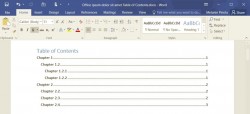
I'm generating reports and I've got some major headers things like introduction and summary and so on. And within these major headers i've got subheaders so I want that the subheaders get indented one level. Attaching pic from word to show how I mean.
karatekaneen
on 27 Jul 2018
So your problem is the indention? Why you don't manage that by margin?
naxmefy
on 27 Jul 2018
You can use tocMargin for indentation. Is also possible to use tocStyle.
Example:
var dd = {
    content: [
        {
            toc: {
                title: {text: 'INDEX'},
            }
        },
        {
            text: 'Introduction',
            tocItem: true,
            tocStyle: {bold: true},
            pageBreak: 'before'
        },
        'Lorem ipsum dolor sit amet...',

        {
            text: 'Background',
            tocItem: true,
            tocMargin: [20, 0, 0, 0],
            pageBreak: 'before'
        },
        'Lorem ipsum dolor sit amet...',

        {
            text: 'About the project',
            tocItem: true,
            tocMargin: [20, 0, 0, 0],
            pageBreak: 'before'
        },
        'Lorem ipsum dolor sit amet...',

        {
            text: 'About the authors',
            tocItem: true,
            tocMargin: [20, 0, 0, 0],
            pageBreak: 'before'
        },
        'Lorem ipsum dolor sit amet...',

        {
            text: 'Abstract',
            tocItem: true,
            tocStyle: {bold: true},
            pageBreak: 'before'
        },
    ]
}
And see /examples/toc.js
 liborm85
on 25 Aug 2018
liborm85
on 25 Aug 2018
I want to add the dot in TOC. How can I do that? @karatekaneen
 xuananpham93
on 22 Jan 2019
xuananpham93
on 22 Jan 2019
i also want to add the dot in TOC. anyone can help me ?
 cesc1802
on 18 Jun 2020
cesc1802
on 18 Jun 2020
Related issues
 SummerSonnet
·
3Comments
SummerSonnet
·
3Comments
 dgrice
·
3Comments
dgrice
·
3Comments
 jkd003
·
3Comments
jkd003
·
3Comments
 davidyeiser
·
3Comments
davidyeiser
·
3Comments
 svenyonson
·
3Comments
svenyonson
·
3Comments
Most helpful comment
I want to add the dot in TOC. How can I do that? @karatekaneen