Pdfmake: How does pdfmake work with dynamic data?
All of the examples provided for pdfmake use inline text; in other words, static data.
But I cannot imagine too many people working with documents in such a manner.
When working with tables, for instance, someone is likely to be working with JSON data obtained from the server.
Is pdfmake supposed to handle such scenarios, and if so, can a generic example be provided?
I am running into unexpected oddities as I try this out. In some attempts, I get a
TypeError: Cannot read property '_calcWidth' of undefined. You can generate the problem as well by trying to use variables for multiple table rows in the playground.
Unless there is a way to have dynamic row data for tables, this is a showstopper for me.
 mg1075
All 22 comments
I wouldn't mix responsibilities here. PdfMake should be treated as a low-level component providing layout-engine + pdf creation logic.
You can build doc-definition-object in code - it doesn't have to be static. Your code can retrieve data from external sources.
There's also another option - unless you send doc-definitions as JSON, you can use plain JavaScript objects here with custom method calls.
var externalDataRetrievedFromServer = [
    { name: 'Bartek', age: 34 },
    { name: 'John', age: 27 },
    { name: 'Elizabeth', age: 30 },
];

function buildTableBody(data, columns) {
    var body = [];

    body.push(columns);

    data.forEach(function(row) {
        var dataRow = [];

        columns.forEach(function(column) {
            dataRow.push(row[column].toString());
        })

        body.push(dataRow);
    });

    return body;
}

function table(data, columns) {
    return {
        table: {
            headerRows: 1,
            body: buildTableBody(data, columns)
        }
    };
}

var dd = {
    content: [
        { text: 'Dynamic parts', style: 'header' },
        table(externalDataRetrievedFromServer, ['name', 'age'])
    ]
}
 bpampuch
on 9 May 2014
bpampuch
on 9 May 2014
is there any example for generate the column dynamically
 infacq
on 25 Jun 2014
infacq
on 25 Jun 2014
no, it's up to the calling code to build table part of doc-definition, as I wrote above - pdfmake should be the low-level library
bpampuch
on 26 Jun 2014
What I could add however (while still keeping the above statement valid) is support for promises in the doc-defintion-object. I'll have to think about it
bpampuch
on 26 Jun 2014
Dynamic data is working pretty damn good, but how about different style for different parts of the data?
I.E. can I make it so that if it is under specific value it displays italics?
 Tanshaydar
on 18 Aug 2014
Tanshaydar
on 18 Aug 2014
you can set style property from your code, just like the content for dynamic styling
bpampuch
on 14 Sep 2014
A note in the Docs about where anonymous functions are allowed, and where they are not would be nice. I spent entirely too much time trying to get this to work:
var docDefinition = {
    content: [
        'This is an sample PDF printed with pdfMake',
        {text: function(){return 'Doesnt work'}},
        {text: function(){return (new Date()).toString();}}
    ]
};
Based on the Background-layer example, I thought it should work
Everything else is great so far - thanks!
 velcrospud
on 19 Mar 2015
velcrospud
on 19 Mar 2015
How to add dynamic picture of PDFMaker
 mackadir
on 2 Mar 2016
mackadir
on 2 Mar 2016
@bpampuch how can we hide few columns based on conditions like:
columns: [
{
// auto-sized columns have their widths based on their content
width: 'auto',
text: 'Trasaction Number :',
margin: [0, 15, 0, 5],
hide:isVisible //I want to be able to hide this column base on bool value isVisible
}
]
is there any property in pdfmake, I am unable to hide the columns :(
 vijender1256
on 22 Apr 2016
vijender1256
on 22 Apr 2016
Hi @bpampuch
Thanks for above code for dynamically populating table.
But how to set Column Headers (Labels)?
Thanks.
 umaganesan
on 30 Jun 2016
umaganesan
on 30 Jun 2016
Hi
Its a good solution for populating table with dynamic data. But need a solution to write custom column headers (labels).
 naqib83
on 14 Jul 2016
naqib83
on 14 Jul 2016
@bpampuch Your solution on May 19 2014 is awesome! Would have thought this is a common enough use-case to be in the docs? Also worth mentioning that @NilsDannemann did a lovely job of packaging up pdfmake for Meteor https://atmospherejs.com/nilsdannemann/pdfmake (not supported anymore because of Meteor 1.3 using npm directly) but it makes using it a piece of cake. Thank you.
 BrianJLennon
on 17 Aug 2016
BrianJLennon
on 17 Aug 2016
HI FRIENDS, I HAVE A PROBLEM WHIT DINAMIC DATA.
THE FIRST TIME IT CREATE THE PDF WITHOUT PROBLEMS WHEN CLICK AGAIN SHOW THIS PROBLEM
angular.js:11699 Malformed table row, a cell is undefined. undefined
(anonymous) @ angular.js:11699
(anonymous) @ angular.js:8628
(anonymous) @ angular-block-ui.js:22
processQueue @ angular.js:13300
(anonymous) @ angular.js:13308
$eval @ angular.js:14547
$digest @ angular.js:14363
$apply @ angular.js:14652
done @ angular.js:9734
completeRequest @ angular.js:9924
requestLoaded @ angular.js:9865
MY CTRL CODE IS
function buildTableBody() {
    var datalist=JSON.stringify($scope.listaGeneral);
    var valores = JSON.parse(datalist);
    var body = [];

    body.length=0;

     if( valores.length > 0 ) {
          for( var aux in valores[0] )
              $scope.colDefs.push({
                    text: aux,
                    style: "tableHeader",
                    alignment: "center"
                  });

        }
      body.push($scope.colDefs);

      for (var key in $scope.listaGeneral)
    {
        if ($scope.listaGeneral.hasOwnProperty(key))
        {
            var data = $scope.listaGeneral[key];
            var row = new Array();

            row.push( data.CIP );
            row.push( data.DNI  );
            row.push( data.GRADO );
            row.push( data.ARMA  );
            row.push( data.NOMBRES );


            angular.forEach($scope.colDefs, function(value, key) {
                    console.log("valorrrrrrrrrrrrrrrrrrrcolumnas"+value.text);
                    if(value.text=="UNIDAD"){
                        row.push( data.UNIDAD );
                    }
                    else if(value.text=="GRAN_UNIDAD"){
                        row.push( data.GRAN_UNIDAD );
                    }else if(value.text=="NUCLEO"){
                        row.push( data.NUCLEO );
                    }else if(value.text=="GUARNICION"){
                        row.push( data.GUARNICION );
                    }else if(value.text=="EMPLEO"){
                        row.push( data.EMPLEO );
                    }else if(value.text=="EDAD"){
                        row.push( data.EDAD );
                    }else if(value.text=="SITUACION_ADTMVA"){
                        row.push( data.SITUACION_ADTMVA );
                    }else if(value.text=="ANTIGUEDAD"){
                        row.push( data.ANTIGUEDAD );
                    }


                });


            body.push(row);
        }
    }

    return body;
}

function table() {
    return {
        table: {
            headerRows: 1,
            body: buildTableBody()
        }
    };
}
content: [
{ text: 'Dynamic parts', style: 'header' },
table()
]
};
pdfMake.createPdf(docDefinition).download("Reporte.pdf");
 ochafloquet
on 20 Apr 2017
ochafloquet
on 20 Apr 2017
example createPdf.vue
<template>
  <div class="create-pdf">
    <a class="button" @click="create">create pdf</a>
  </div>
</template>

<script>
import pdfMake from 'pdfmake/build/pdfmake.min.js'
import pdfFonts from 'pdfmake/build/vfs_fonts.js'

export default {
  name: 'CreatePdf',
  data () {
    return {
      pdfMake,
      pdfFonts,
      pdfContent: {
        content: [
          {
            text: 'example row 0'
          },
          {
            text: 'example row 1'
          },
          {
            text: 'example row 2'
          }
        ]
      },
      exampleDinamicRow: {
        text: 'date now: ' + (new Date()).toString()
      }
    }
  },

  methods: {
    create () {
      //first add dinamic rows, by positions
      this.pdfContent.content.splice(1, 0, this.exampleDinamicRow)

      this.pdfMake.vfs = this.pdfFonts.pdfMake.vfs
      this.pdfMake.createPdf(this.pdfContent).download('optionalName.pdf')
    }
  }
}
</script>
 zinge
on 24 Oct 2017
zinge
on 24 Oct 2017
my code is working here
i took code from bpampuch, and made what i wanted,
table created by this code in content: [ table(tempArr, ['№', 'Наименование работ', 'Ед.', 'Кол.', 'Цена', 'Сумма']),] and others text's.
but
how set width of 2nd column = '*' ?
i'm trying to set width like this: table(tempArr, ['№', { text:'Наименование работ', width: '*' }, 'Ед.', 'Кол.', 'Цена', 'Сумма']),
upd:
i understand where need to add styles for width:
function table(data, columns) {
        return {
            table: {
                headerRows: 1,
                widths: [ 'auto', '*', 'auto', 'auto','auto', 'auto'],
                body: buildTableBody(data, columns)
            }
        };
    }
 oscarhandsome
on 28 Oct 2017
oscarhandsome
on 28 Oct 2017
How To Grouping In pdfmake???????????????????????????
I can not understand your problem ((
I create rows with functions, and generate end content object with splice
maybe my code can help you?
https://github.com/zinge/akt-to-pdf/blob/master/src/components/CreatePdf.vue
zinge
on 8 Nov 2017
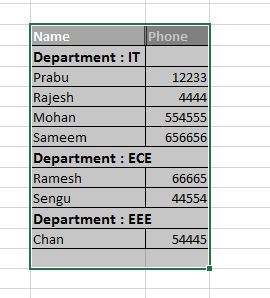
I want to look like this, any sample code there?
 PrabuGovindan
on 9 Nov 2017
PrabuGovindan
on 9 Nov 2017
@PrabuGovindan Have you solved that?
 donvie
on 16 Apr 2018
donvie
on 16 Apr 2018
TypeError: Cannot read property 'toString' of undefined
Code :
function buildTableBody(data, columns) {
var body = [];
  body.push(columns);

  data.forEach(function(row) {
    var dataRow = [];

    columns.forEach(function(column) {
      dataRow.push(row[column].toString());
    });

    body.push(dataRow);
  });

  return body;
}

function table(data, columns) {
  return {
    table: {


      headerRows: 1,
      body: buildTableBody(data, columns)
    }
  };
}
 vinayakvijay02
on 16 Nov 2018
vinayakvijay02
on 16 Nov 2018
printMonthly () { this.docDefinition = { pageOrientation: 'landscape', content: [ { style: 'tableExample', color: '#444', table: { widths: [240, 240, 80, 80, 80], headerRows: 1, body: [ [{style: 'header', border: [false, false, false, false], text: 'QUARTERLY/SEMI-ANNUAL PROGRESS REPORT', colSpan: 5, alignment: 'center'}, {border: [false, false, false, false], text: ''}, {border: [false, false, false, false], text: ''}, {border: [false, false, false, false], text: ''}, {border: [false, false, false, false], text: ''}], [{style: 'header1', border: [false, false, false, false], text: 'for the Period of ' + this.labelYear.month, colSpan: 5, alignment: 'center'}, {border: [false, false, false, false], text: ''}, {border: [false, false, false, false], text: ''}, {border: [false, false, false, false], text: ''}, {border: [false, false, false, false], text: ''}], [{style: 'header1', border: [false, false, false, false], text: '(To be submitted by the researcher quarterly for project with 1 year duration while semi-annually for multi-year project)\n\n\n', colSpan: 5, alignment: 'center'}, {border: [false, false, false, false], text: ''}, {border: [false, false, false, false], text: ''}, {border: [false, false, false, false], text: ''}, {border: [false, false, false, false], text: ''}], [{text: 'Project Title: ' + this.projectTitle, colSpan: 5, style: 'header1', border: [false, false, false, false]}, {text: '', border: [false, false, false, false]}, {text: '', border: [false, false, false, false]}, {text: '', border: [false, false, false, false]}, {text: '', border: [false, false, false, false]}], [{text: 'Program Title: ' + this.programTitle, style: 'header1', border: [false, false, false, false]}, {text: '', border: [false, false, false, false]}, {text: '', border: [false, false, false, false]}, {text: '', border: [false, false, false, false]}, {text: '', border: [false, false, false, false]}], [{text: 'Project Leader: ' + this.projectLeader, style: 'header1', border: [false, false, false, false]}, {text: '', border: [false, false, false, false]}, {text: '', border: [false, false, false, false]}, {text: '', border: [false, false, false, false]}, {text: '', border: [false, false, false, false]}], [{text: 'Monitoring Agency: ' + this.monitoringAgency, style: 'header1', border: [false, false, false, false]}, {text: '', border: [false, false, false, false]}, {text: '', border: [false, false, false, false]}, {text: '', border: [false, false, false, false]}, {text: '', border: [false, false, false, false]}], [{colSpan: 3, text: 'Project Expenditures for the period : ' + this.fundingDurations[this.select].Year[this.select1].AccomplishmentReportMonthly[this.select3].expforperiod, style: 'header1', border: [false, false, false, false]}, {text: '', border: [false, false, false, false]}, {text: '', border: [false, false, false, false]}, {text: '', border: [false, false, false, false]}, {text: '\n\n', border: [false, false, false, false]}], [{}, {}, {text: 'PERCENTAGE ACCOMPLISHMENT', style: 'tableHeader', colSpan: 2, alignment: 'center'}, {}, {text: '', style: 'tableHeader', alignment: 'center'}], [{text: 'TARGET ACTIVITIES FOR THE PERIOD', style: 'tableHeader', alignment: 'center'}, {text: 'ACTUAL ACCOMPLISHMENT', style: 'tableHeader', alignment: 'center'}, {text: 'FOR THE PERIOD', style: 'tableHeader', alignment: 'center'}, {text: 'CUMMULATIVE', style: 'tableHeader', alignment: 'center'}, {text: 'REMARKS', style: 'tableHeader', alignment: 'center'}], [{style: 'header', border: [true, true, false, true], text: ''}, {border: [false, false, false, true], fontSize: 10, alignment: 'left', text: 'Project Over-all Physical Accomplishment'}, {alignment: 'center', colSpan: 2, border: [false, false, false, true], fontSize: 10, text: this.fundingDurations[this.select].Year[this.select].physicalaccomplishment}, {border: [false, false, false, false], text: ''}, {border: [false, true, true, true], text: ''}]
] } } ], styles: { header: { fontSize: 10, bold: true }, header1: { fontSize: 10 }, subheader: { fontSize: 10, bold: true }, tableExample: { margin: [0, 5, 0, 15] }, tableHeader: { bold: true, fontSize: 10, color: 'black' } }, defaultStyle: { } } this.fundingDurations[this.select].Year[this.select].AccomplishmentReportMonthly[this.select3].Activities.reverse().forEach(element => { var wew = [{style: 'subheader', text: element.Activity}, {style: 'subheader', text: element.ActualAccomplishment}, {style: 'subheader', text: element.PercentageAccomplishment.ForThePeriod}, {style: 'subheader', text: element.PercentageAccomplishment.ForThePeriod}, {style: 'subheader', text: element.Remarks}] this.docDefinition.content[0].table.body.splice(10, 0, wew) }) pdfMake.createPdf(this.docDefinition).open() this.fundingDurations[this.select].Year[this.select].AccomplishmentReportMonthly[this.select3].Activities.reverse() },
On Friday, November 16, 2018, 12:22:17 PM GMT+8, Vinayak nadar <[email protected]> wrote:
TypeError: Cannot read property 'toString' of undefined
Code :
handleDownloadToPdf() {
console.log("inside pdf");
const data2 = this.reactTable.getResolvedState().sortedData;
const columns2 = this.state.columns.map(i => i.Header);
// var valueArray=this.reactTable.getResolvedState().sortedData.filter(i=>i.lastservice);
// for (var i = 0; i < valueArray.length; i++) {
// if (valueArray[i] === null || valueArray[i] === ' ' || valueArray[i] === '') {
// valueArray[i] = 'n/a';
// }
// console.log(valueArray[i]);
// }
data2.forEach(function(o) {
Object.keys(o).forEach(function(k) {
if (o[k] === null) {
o[k] = "";
}
});
});
console.log(data2);
console.log(columns2);
function buildTableBody(data, columns) {
var body = [];
body.push(columns);
data.forEach(function(row) {
var dataRow = [];
columns.forEach(function(column) {
  dataRow.push(row[column].toString());
});

body.push(dataRow);
});
return body;
}
function table(data, columns) {
return {
table: {
  headerRows: 1,
  body: buildTableBody(data, columns)
}
};
}
var dd = {
pageSize: "A3",
pageOrientation: "landscape",
pageMargins: [25, 25, 25, 50],
header: function() {
return { text: 'aas',
alignment: 'right',
italics: true,
fontSize:8,
margin: 10};
},
      {
          alignment: 'center',
          text: [
              { text: page.toString(), italics: true },
              ' of ',
              { text: pages.toString(), italics: true }
          ]
      },
      {
        alignment: 'right',
        text: [
            { text: moment().format("MM ddd, YYYY hh:mm:ss a")},

        ]
    }
  ],
  margin: [15,5]
};
},
content: [
{ text: this.props.pdftitle, style: "subheader" },
{
style: "tableExample",
table: {
body: [[table(data2, columns2)]]
}
},
],
styles: {
header: {
fontSize: 18,
bold: true,
margin: [0, 0, 0, 10]
},
subheader: {
fontSize: 16,
bold: true,
margin: [0, 10, 0, 5]
},
tableExample: {
margin: [0, 5, 0, 15]
},
tableHeader: {
bold: true,
fontSize: 13,
color: "black"
},
sectionStyling: {
fontSize: 18,
color: "blue",
bold: true,
alignment: "right",
margin: [0, 190, 0, 80]
}
},
defaultStyle: {
alignment: "justify"
}
};
pdfMake.createPdf(dd).download();
}
—
You are receiving this because you commented.
Reply to this email directly, view it on GitHub, or mute the thread.
donvie
on 16 Nov 2018
@bpampuch Thanks a bunch for the snippet, it was super useful, I've made few changes to it. I've added it more options to make it more customizable. Pdfmake has been really useful for my work.
I'll leave my snippet here. _Version 2 added_
var externalDataRetrievedFromServer = [
    {
        'name': 'Martin',
        'points': '20',
        'hobbies': {
            'hobby1': 'Drawing',
            'hobby2': 'Code'
        }
    },
    {
        'name': 'Diego',
        'points': '30',
        'hobbies': {
            'hobby1': 'Music',
            'hobby2': 'Video Games'
        }
    }
];

// Get property value by key/nested key path
// Source: https://stackoverflow.com/questions/6491463/
Object.byString = function(o, s) {
    s = s.replace(/\[(\w+)\]/g, '.$1'); // convert indexes to properties
    s = s.replace(/^\./, '');           // strip a leading dot
    var a = s.split('.');
    for (var i = 0, n = a.length; i < n; ++i) {
        var k = a[i];
        if (k in o) {
            o = o[k];
        } else {
            return;
        }
    }
    return o;
}

// Table body builder
function buildTableBody(data, columns, showHeaders, headers) {
    var body = [];
    // Inserting headers
    if(showHeaders) {
    body.push(headers);
    }

    // Inserting items from external data array
    data.forEach(function(row) {
        var dataRow = [];
        var i = 0;

        columns.forEach(function(column) {
            dataRow.push({text: Object.byString(row, column), alignment: headers[i].alignmentChild });
            i++;
        })
        body.push(dataRow);

    });

    return body;
}

// Func to return generated table
function table(data, columns, witdhsDef, showHeaders, headers, layoutDef) {
    return {
        table: {
            headerRows: 1,
            widths: witdhsDef,
            body: buildTableBody(data, columns, showHeaders, headers)
        },
        layout: layoutDef
    };
}

var dd = {
    content: [
        { text: 'Dynamic parts v2', fontSize: 14, bold:true, margin: [0, 0 ,0, 10]},
        table(
            // External data
            externalDataRetrievedFromServer,
            // Columns display order
            ['name', 'points', 'hobbies.hobby2'],
            // Custom columns widths
            ['*', '*', '50%'],
            // Show headers?
            true,
            // Custom headers
            [{text:'Col 1', fillColor: 'red', color:'white', alignment: 'center', alignmentChild: 'right'},
            'Col 2',
            {text:'Col 3', fillColor: 'blue', color:'white', alignment: 'right', alignmentChild: 'center'}],
            // Custom layout, use '' for no layout
            '')
    ]
}

Edited* Version 2. Added more customization options to play with and support for nested arrays.
 cmfc31
on 17 Jan 2019
cmfc31
on 17 Jan 2019
how to push base64 image to table column display
{ text: 'Dynamic parts v2', fontSize: 14, bold:true, margin: [0, 0 ,0, 10]},
table(
// External data
externalDataRetrievedFromServer,
// Columns display order
*['name', 'points', 'hobbies.hobby2'],*
 sbalabtech
on 21 Jan 2019
sbalabtech
on 21 Jan 2019
Related issues
 Christian24
·
3Comments
Christian24
·
3Comments
 jokris1
·
3Comments
jokris1
·
3Comments
 imoum007
·
3Comments
imoum007
·
3Comments
 kumarandena
·
3Comments
kumarandena
·
3Comments
 dgrice
·
3Comments
dgrice
·
3Comments
Most helpful comment
I wouldn't mix responsibilities here. PdfMake should be treated as a low-level component providing layout-engine + pdf creation logic.
You can build doc-definition-object in code - it doesn't have to be static. Your code can retrieve data from external sources.
There's also another option - unless you send doc-definitions as JSON, you can use plain JavaScript objects here with custom method calls.