Pdfkit: not able to write text at bottom of file
Hi,
I am using pdfkit successfully and able to write text to multiple coordinates as shown in attached pdf.
I am having issues writing to the bottom/right side/edges of the pdf.
when writing to the right side of the page - it has a tendency to wrap and go to next line even if I see plenty of space in right side.
Similarly, when writing to the bottom, it goes to next page even if sufficient space is available at the bottom.
As you see in the pdf attached, the image has plenty of space at the bottom where I want to write. But after certain coordinates (712 on Y-axis) text moves to next page.
`var doc = new pdf({
size: 'letter',
layout : 'portrait',
    margin : {
        top : 0.095 * 72,
        left: 0.2 * 72,
        right: 0.2 * 72,
        bottom: 0
    }
});


doc.pipe(fs.createWriteStream(__dirname + "/pdf/" + name));
// doc.pipe (fs.createWriteStream('foo.pdf'));
// doc.pipe(fs.createWriteStream(__dirname + "/pdf/" + name));

//add background image
doc.image(__dirname + "/cms1500.png", {
    x: 0.2 * 72,
    y: 0.095 * 72,
    width: (612 - 2 *0.2 * 72),
    height: (792 - 2  *0.095 * 72)
});

doc.font('Times-Roman');
doc.fontSize(8);
for (var i=0; i< 713; i++){
doc.text (i + " => do you see me ", 380, i);
}
//-
doc.on('end', function() {
    console.log("pdf created");
    return cb(true);
});
//--

doc.end();
 quicksoftpro
All 7 comments
I am seeing the same exact thing, and it is not at all expected behavior.
 prescottprue
on 14 Apr 2017
prescottprue
on 14 Apr 2017
Hi @prescottprue , I was able to fix this problem by removing margin properties.
please reset your marging property.
main issues :
margin : {
top : 0.095 * 72,
left: 0.2 * 72,
right: 0.2 * 72,
bottom: 0
}
quicksoftpro
on 14 Apr 2017
@quicksoftpro Thanks! That got me on the right track, but I had to pass the settings to the constructor when creating the doc like so:
const pdfDoc = new PDFDocument({
  margins: {
    bottom: 0,
  }
});
Sweet. Thank you
 SoTxJay
on 5 Nov 2017
SoTxJay
on 5 Nov 2017
EDIT:
Commenting out this section of line_wrapper.js (lines 127-129) seems to have resolved the issue. It's a bit of a band-aid, but it works:
      // if (this.document.y > this.maxY || nextY > this.maxY) {
      //   this.nextSection();
      // }
EDIT 2:
I'm pretty sure doing this means the text will not wrap to the next page if you have a large block that overflows. I have no need for this feature, so commenting out this portion is okay for me.
ORIGINAL COMMENT:
I am having the same issue. When i try to write text to the bottom of the page, a new page is created with the text in the wrong position.
var doc = new PDFDocument({
    size: [5 * 72, 3 * 72],
    margin: {
        top: 0,
        left: 0,
        right: 0,
        bottom: 0
    }
});

var stream = doc.pipe(blobStream());


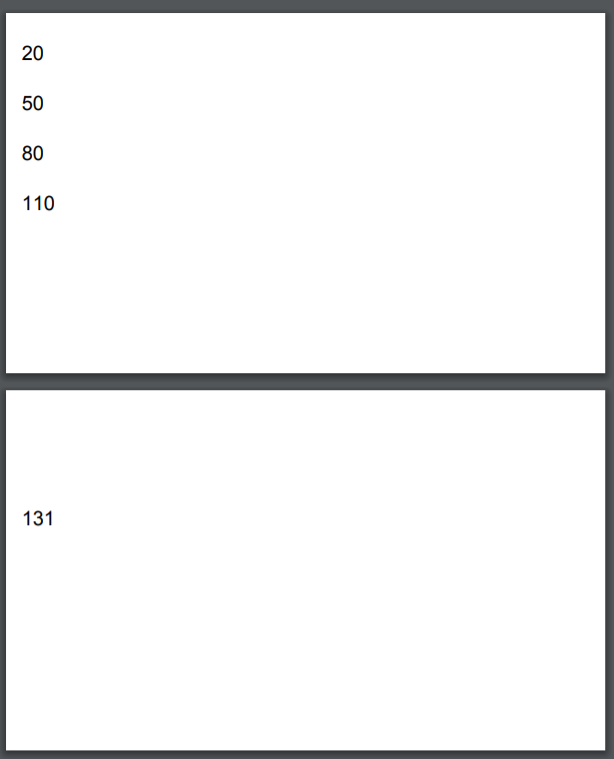
doc.text('20', 10, 20);
doc.text('50', 10, 50);
doc.text('80', 10, 80);
doc.text('110', 10, 110);
doc.text('131', 10, 131);
As soon as i try to add text beyond 130 pt, a new page is added. As you can see I am working with an index size sheet.
Here is the result:
 kbrock84
on 21 Mar 2018
kbrock84
on 21 Mar 2018
@kbrock84 thank you for your EDIT section. commenting out this stuff does the trick for me (rendering large text at the bottom of the document without adding a new page).
@devongovett i think it would be nice if there would be an option for that instead of hacking :-).
output.pdf it seems, this wouldn't be possible
EDIT: i just found a better solution for my problem: calculating the rest available height and setting this new height value to my text will fix the issue too.
 inselmensch
on 28 Apr 2018
inselmensch
on 28 Apr 2018
doc.text(text, x, y, {height: doc.page.height}) works for me. However I cannot change the color of the font
 quick-sort
on 4 Sep 2018
quick-sort
on 4 Sep 2018
Related issues
 GuiRitter
·
3Comments
GuiRitter
·
3Comments
 michapixel
·
4Comments
michapixel
·
4Comments
 Valen558
·
5Comments
Valen558
·
5Comments
 oknoorap
·
4Comments
oknoorap
·
4Comments
 balsamiqMichele
·
4Comments
balsamiqMichele
·
4Comments
Most helpful comment
@quicksoftpro Thanks! That got me on the right track, but I had to pass the settings to the constructor when creating the doc like so: