Enhancement request:
It would be great if pdfkit could support an arc function like HTML5 Canvas.
From the canvas spec:
void arc(double x, double y, double radius, double startAngle, double endAngle, optional boolean anticlockwise);
Currently it doesn't appear possible to draw arcs using pdfkit....
Thanks!
 cam-intel
All 6 comments
You can currently draw arcs with the path command:
eg:
doc.path("M {startX},{startY} A{radiusX},{radiusY} {xAxisRotation} {largeArc},{antiClockwise} {endX},{endY} z").stroke();
Or create your own arc command such as this:
var PDF = require('pdfkit');
PDF.prototype.arc = function(x, y, radius, startAngle, endAngle, anticlockwise) {
var startX = x + radius * Math.cos(startAngle);
var startY = y + radius * Math.sin(startAngle);
var endX = x + radius * Math.cos(endAngle);
var endY = y + radius * Math.sin(endAngle);
var arcAngle = endAngle-startAngle;
while(arcAngle > 2*Math.PI) { arcAngle -= Math.PI; }
while(arcAngle < 0) { arcAngle += Math.PI; }
largeArc = anticlockwise ? (arcAngle < Math.PI) : (arcAngle > Math.PI);
var path = "M "+startX+","+startY+" A "+radius+","+radius+" 0 "+(largeArc?"1":"0")+","+(anticlockwise?"0":"1")+" "+endX+","+endY;
return this.path(path);
};
doc
.lineWidth(2)
.arc(200, 200, 100, 0*Math.PI/180, 360*Math.PI/180, false)
.stroke('red')
.arc(200, 200, 100, 0*Math.PI/180, 45*Math.PI/180, false)
.stroke('black');
 HughePaul
on 15 Aug 2012
HughePaul
on 15 Aug 2012
didn't deal with negative angles; here's an improved arc function:
var PDF = require('pdfkit');

PDF.prototype.arc = function(x, y, radius, startAngle, endAngle, anticlockwise) {
    var startX = x + radius * Math.cos(startAngle);
    var startY = y + radius * Math.sin(startAngle);
    var endX = x + radius * Math.cos(endAngle);
    var endY = y + radius * Math.sin(endAngle);
    var arcAngle = endAngle-startAngle;
    var largeArc = (arcAngle > Math.PI) ^ (startAngle > endAngle) ^ anticlockwise;
    var path =
        "M "+startX+","+startY+
        " A "+radius+","+radius+
        " 0 "+(largeArc?"1":"0")+","+(anticlockwise?"0":"1")+
        " "+endX+","+endY;
    return this.path(path);
};
@cam-intel did that work for you and can this issue be closed now?
 optikfluffel
on 25 Oct 2013
optikfluffel
on 25 Oct 2013
@optikfluffel haven't tested it but looks feasible - happy for it to be closed, thanks!
cam-intel
on 27 Oct 2013
didn't deal with negative angles; here's an improved arc function:
var PDF = require('pdfkit');

PDF.prototype.arc = function(x, y, radius, startAngle, endAngle, anticlockwise) {
    var startX = x + radius * Math.cos(startAngle);
    var startY = y + radius * Math.sin(startAngle);
    var endX = x + radius * Math.cos(endAngle);
    var endY = y + radius * Math.sin(endAngle);
    var arcAngle = endAngle-startAngle;
    var largeArc = (arcAngle > Math.PI) ^ (startAngle > endAngle) ^ anticlockwise;
    var path =
        "M "+startX+","+startY+
        " A "+radius+","+radius+
        " 0 "+(largeArc?"1":"0")+","+(anticlockwise?"0":"1")+
        " "+endX+","+endY;
    return this.path(path);
};
This works!
 Ovsdrak
on 3 Sep 2020
Ovsdrak
on 3 Sep 2020
Update!
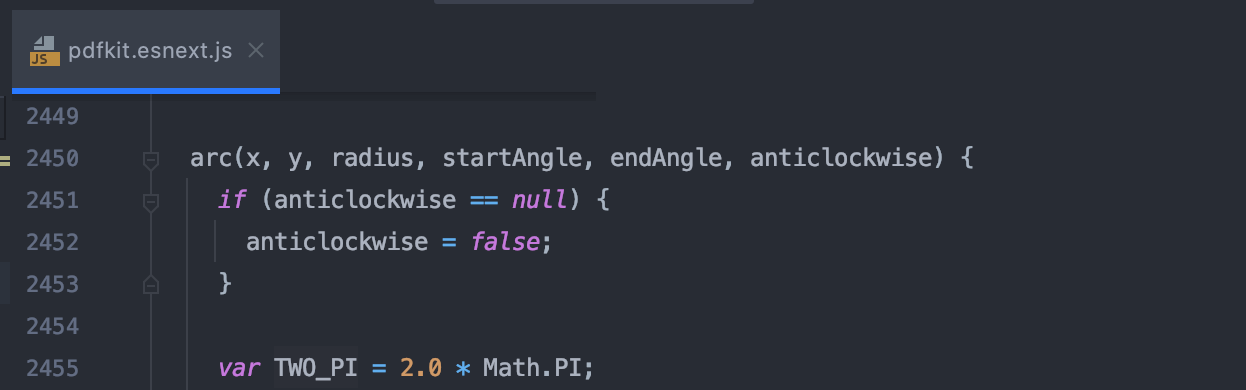
The arc function always has been in the source code, I found it, test it and works exactly like canvas API. Since the above solution still doesn't work for specific use cases, I suggest to add this method to the documentation.
Ovsdrak
on 16 Dec 2020
Related issues
 michapixel
·
4Comments
michapixel
·
4Comments
 durango
·
4Comments
durango
·
4Comments
 tadarao
·
5Comments
tadarao
·
5Comments
 liubin
·
4Comments
liubin
·
4Comments
 nqgajanan
·
4Comments
nqgajanan
·
4Comments
Most helpful comment
didn't deal with negative angles; here's an improved arc function: