Pcsx2: Jak 3 [PAL] really slow during catacomb levels.
PCSX2 version:
1.5.0.r4127.30a5922
PCSX2 options:
Clamping, gamefixes, etc are all default, all the safe speedhacks are enabled, and the GsDX CRC hacks are at the recommended OpenGL level.
Plugins used:
Using GsDX with 4x native, with partial CRC hacks and high blending unit accuracy.
Mipmapping is also on full at the trilinear filtering level; changing these options don't speed it up noticeably.
Description of the issue:
The game appears to trigger a bottleneck in GsDX, the software renderer can barely push 8 FPS, and the hardware renderer struggles even more.
It seems to make very heavy use of mipmapping during these levels, so that might be related.
How to reproduce the issue:
Reach one of the levels where you race through the catacombs in Jak3, the first one is at approximately 33% completion.
GS dump here: https://my.mixtape.moe/vuxwpr.tar.xz (md5: 584afb598e46b2b91b91ad7745f03bbf)
The dump was taken with 1.5.0.r3869.fc32b74, but is still an issue in 1.5.0.r4127.30a5922
Last known version to work:
It works, it's just really slow.
PC specifications:
OS: x64 Arch Linux (last update Nov 2nd)
CPU: AMD FX8320
GPU: NVIDIA 770GTX (driver: 370.28)
 Hirato
All 25 comments
What are EE% and GS% during slowdowns?
Why do you think that mipmapping is the issue if changing the mipmapping level barely changes the output speed?
 willkuer
on 20 Nov 2016
willkuer
on 20 Nov 2016
@willkuer
EE is about 18% or so, the GS is at 99% in HW mode.
I suspect mipmapping is related more due to intense data transfer to the GPU than anything to do with PCSX2's mipmapping implementation itself.
I'm not sure how much that GS dump covers I uploaded cover, I think it's only a few frames and its size is well over 50 MB.
Hirato
on 20 Nov 2016
Could be the shadow. Did you test the speed on 1.4 ?
 gregory38
on 20 Nov 2016
gregory38
on 20 Nov 2016
I didn't test on 1.4.
I just rolled back to an earlier build I had that identifies itself as 1.3.1.r2407.60426a5 and it's just as slow there.
On a side note, it does render about 3x as fast at the 'None' blending unit accuracy level (I tend to use High as that's the OpenGL recommendation)
Hirato
on 20 Nov 2016
Can you share a save file(memory card file) from near or at the catacombs?
 FlatOutPS2
on 20 Nov 2016
FlatOutPS2
on 20 Nov 2016
@FlatOutPS2 here you go https://my.mixtape.moe/ceszbb.tar.xz
Hirato
on 20 Nov 2016
@Hirato Thanks 👍
I can confirm the issue. I managed to make it playable on Software mode with the EE an VU sliders on the speedhacks tab, but Hardware mode takes extreme measure(very high skipdraw and max EE & VU sliders) to get decent framerates, but the speedhacks also cause false FPS so it doesn't ever feel smooth.
Skipdraw managed to remove the shadows, but that doesn't seem like the core issue here. Might be lighting related judging by the looks of the level(or like From Russia With Love it loads too much resources from further away in the level that cause the slowdown with all renderers).
FlatOutPS2
on 20 Nov 2016
I can confirm that OpenGL has a faster framerate but still laggy. (D3D11- 35FPS avg) (OpenGL- 50FPS avg)
 FerrazaDazzle
on 7 Dec 2016
FerrazaDazzle
on 7 Dec 2016
@FlatOutPS2 check the number of draw call in a gpu debugger. I already saw a rendering that miss vsync. So rendering is done serveral times for the same frames.
@FerrazaDazzle config ?
gregory38
on 7 Dec 2016
@FlatOutPS2 check the number of draw call in a gpu debugger. I already saw a rendering that miss vsync. So rendering is done serveral times for the same frames.
Number of draw calls is often 20000-50000, a significant increase over the aprox. 2000-10000 during the cutscene intro and 2000-7000 during the beginning of the game.
FlatOutPS2
on 7 Dec 2016
@gregory38


Those are the Speedhacks and GS configs, everything else is default (note, shader boost is on) i would also like to note that all the Jak games are strangely demanding even for very high end hardware.
FerrazaDazzle
on 7 Dec 2016
EE and VU literally make it full speed but way too un-smooth. I usually test builds, compared to the ones from January (2015) to now December (2016), the catacombs have had a SIGNIFICANT speedup, however still not running at full speed. mipmapping is definitely one cause here.
PC Specs:
i7-5960X
GTX 980Ti
16 GB DDR4
Windows 10 Enterprise
FerrazaDazzle
on 11 Dec 2016
Our setups here aren't a fair comparison at all
In particular, you have the Blending Unit Accuracy option set to Basic, whereas I'm using High.
As I mentioned earlier in this bug, this option has a pretty significant effect on framerate, it increases it anywhere from 3-5 FPS to 15 - while not great it does make the level playable
And we really shouldn't be using the cyclerate speedhacks, they cause too many issues with games.
In this level, it seems to make it skip rendering a bunch of things properly., which in my case nets me a very janky but noticeably faster 40 FPS.
And that aside, neither EE nor VU are the bottleneck here.
Hirato
on 11 Dec 2016
If vu sends less data to the gs the rendering in the gs might be easier. Vu cycle stealing thus can help although the vu is not bottlenecked.
willkuer
on 11 Dec 2016
@Hirato i tried high and agree with your comparison. at the opening scene when starting game, there are MORE corrupted textures on High than basic... And I do not use cycle rate speed hacks. any insight on the root of these issues?
FerrazaDazzle
on 11 Dec 2016
Is there any point keeping this open? The issue seems to be more related to the user's system and their GSdx configuration rather than being an actual issue.
 MrCK1
on 26 Mar 2018
MrCK1
on 26 Mar 2018
Can this be retested? Recent opengl changes may give an improvement.
 lightningterror
on 16 Jul 2019
lightningterror
on 16 Jul 2019
I tried it again around the time Allesandro's palette management changes
were merged, but they didn't really have much of an effect during this
level.
Would love to give it another try with
f4090798644c1d21238e2c6603789b3176ad6a39 present, but at the moment I can't
build due to GCC 9.1 being broken.
Hirato
on 16 Jul 2019
New palette management gives the real boost with 8-bit texture enabled, did you try setting the plugin that way?
The new SW render will give a consistent boost, in any case.
 iMineLink
on 16 Jul 2019
iMineLink
on 16 Jul 2019
The last one I've built identifies itself as 1.5.0-dev-3121-g079baaed9, which should correspond to this commit 079baaed9913d4c993500c43b323107b1de7438c
I can't build a new one because of the GCC ICE issue, that will have to get fixed first.
HW mode (about 5 FPS)

SW Mode (13-14 FPS) - this result may be as well be due to the fact that I have a beasty threadripper 1950x now though...

Options
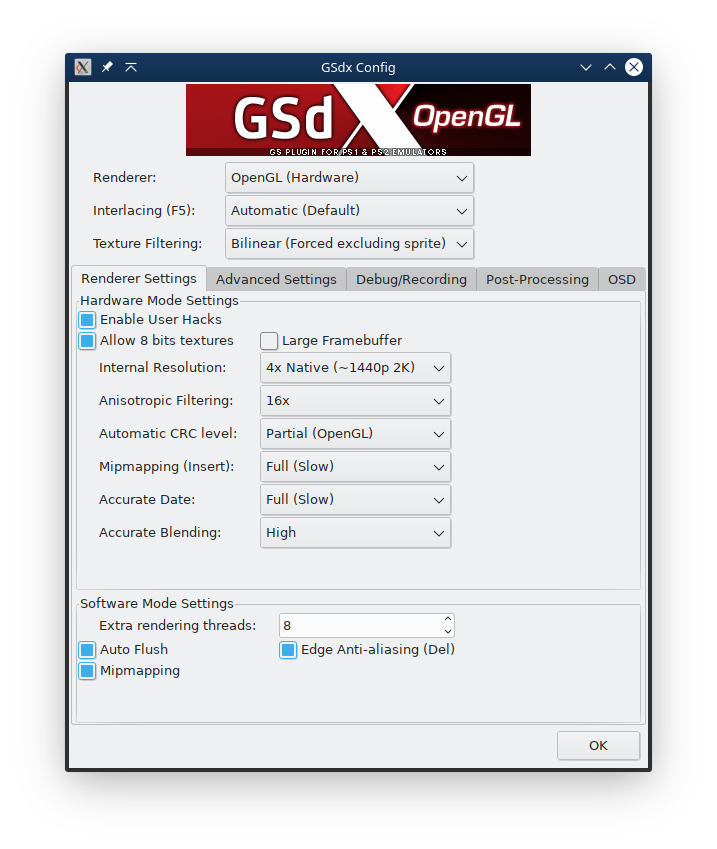
I don't recall Auto Flush being there before, but with it disabled the level runs at about 23 FPS in software mode.
User Hacks is being used solely for trilinear filtering.
I'll leave an update with a much newer build once I can actually build one again.
Hirato
on 16 Jul 2019
Maybe lower blending to basic level?
lightningterror
on 16 Jul 2019
Test no blending. And no crc too.
gregory38
on 16 Jul 2019
Is there really much point without getting a newer build first?
I'm assuming you only want me to check HW mode for those:
Basic Blending: 18-21
No Blending: 18-22
No blending + no CRC: 18-23
Hirato
on 16 Jul 2019
Also try AA to 0.
 bositman
on 16 Jul 2019
bositman
on 16 Jul 2019
That took a lot longer than I hoped it would...
GCC 9.2 just landed in arch, and with it, it seems I can build PCSX2 again (hooray~!)
So I have just built against revision c6b8763ba
The colours and stuff are WAY better though; jak's rendered correctly, less black corrupted textures, etc.
HW Mode: 8b textures enabled too
1x Native, 16xAA, Full Mipmap w/ Trilinear, Partial CRC, Full DATE, High Blending
5.75 FPS
1x Native, 1xAA, Full Mipmap w/ Trilinear, Partial CRC, Full DATE, High Blending
5.80 FPS - Aniso is so cheap, that I really don't expect it to change performance when its this low
1x Native, 16xAA, Full Mipmap w/ Trilinear, Partial CRC, Full DATE, Basic Blending
20-26
1x Native, 16xAA, Full Mipmap w/ Trilinear, Partial CRC, Full DATE, No Blending
21.5-24 - this is better
1x Native, 16xAA, Full Mipmap w/ Trilinear, Partial CRC, no DATE, No Blending
21-26 FPS
1x Native, 16xAA, Full Mipmap w/ Trilinear, No CRC, No DATE, No Blending
21-25 FPS
1x Native, 1xAA, Full Mipmap w/ Trilinear, No CRC, No DATE, No Blending
20-26 FPS (just so show that aniso is largely inconsequential here)
1x Native, 16xAA, Full Mipmap w/ Trilinear, No CRC, No DATE, No Blending
8b textures disabled this time...
23-29 FPS
SW: 8 extra threads
Edge AA + MipMap, no auto flush
15-20 FPS
MipMap, no edge AA + no auto flush
16-21 FPS
No Mipmap, no edge AA, no auto-flush
17-22
Any other settings worth checking?
Hirato
on 8 Oct 2019
Related issues
 jobs-git
·
3Comments
jobs-git
·
3Comments
 IceString3
·
3Comments
IceString3
·
3Comments
 Nezarn
·
6Comments
Nezarn
·
6Comments
 backgamon
·
5Comments
backgamon
·
5Comments
 Levan7
·
3Comments
Levan7
·
3Comments