Pcl: [Windows] Installtion of PCL 1.10.1 for Windows using All in one installer
Hi!. I wanted to work with PCL in my windows system and I also downloaded all in one installer and property sheet and added the bin folder locations of PCL and VTK to the Windows PATH environment variable.
But I am getting error like Cannot open source file "pcl/io/pcd_io.h"
and cannot open include file:"pcl/io/pcd_io.h:No such file or directory"
Please help me to fix this issue.
To be more precise i installed all in one installer which is latest version and added bin folder locations of PCL and VTK to the Windows PATH environment variable. After this i created one empty project in my visual studio 2017 and added existing property sheet file and then created one new main.cpp file and wrote one of the pcl header.And i got this issue.
 sandeepmaddula
All 34 comments
What is the " existing property sheet file " ?
 larshg
on 8 May 2020
larshg
on 8 May 2020
 kunaltyagi
on 8 May 2020
kunaltyagi
on 8 May 2020
The current exiting property sheet file is 1.8.0. There are only two property sheets one for 1.8.0 and other for 1.7.2 as per (https://github.com/PointCloudLibrary/pcl/releases) this source.
sandeepmaddula
on 8 May 2020
Thanks for the info @kunaltyagi . I downloaded property sheet for 1.10.1 and still i am getting same error
sandeepmaddula
on 8 May 2020
Which version have you installed?
Where is it installed?
Does the paths match in the property window of your project, for additional include folders?
ie.
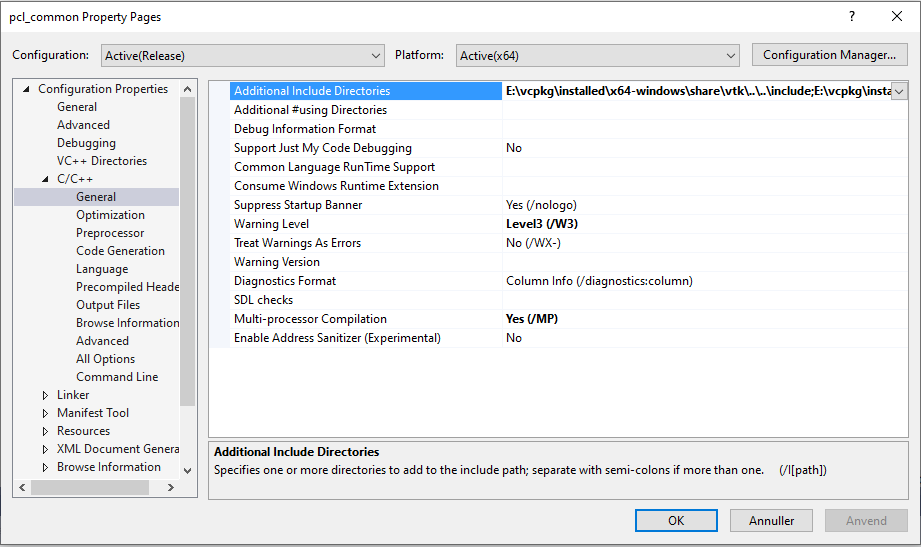
I have used vcpkg, so don't mind my paths.
larshg
on 8 May 2020
Some Windows users don't use/like CMake. I believe this property sheet request it's always from users who don't use CMake. It's a packaging issue and a matter of deciding if we want to support this at some point or not, but the trend exists.
 SergioRAgostinho
on 8 May 2020
SergioRAgostinho
on 8 May 2020
A well written guide could probably help most cases :) I'm not sure if @UnaNancyOwen has made one?
larshg
on 8 May 2020
PCL doesn't officially provide property sheets. PCL's position hasn't changed wrt this since 1.8.1. The link needs updating since the website had changed: new link
A well written guide could probably help most cases
I'm unaware of one on the wiki or website. Would be a welcome addition though (about 2 issues in a week referencing it)
kunaltyagi
on 8 May 2020
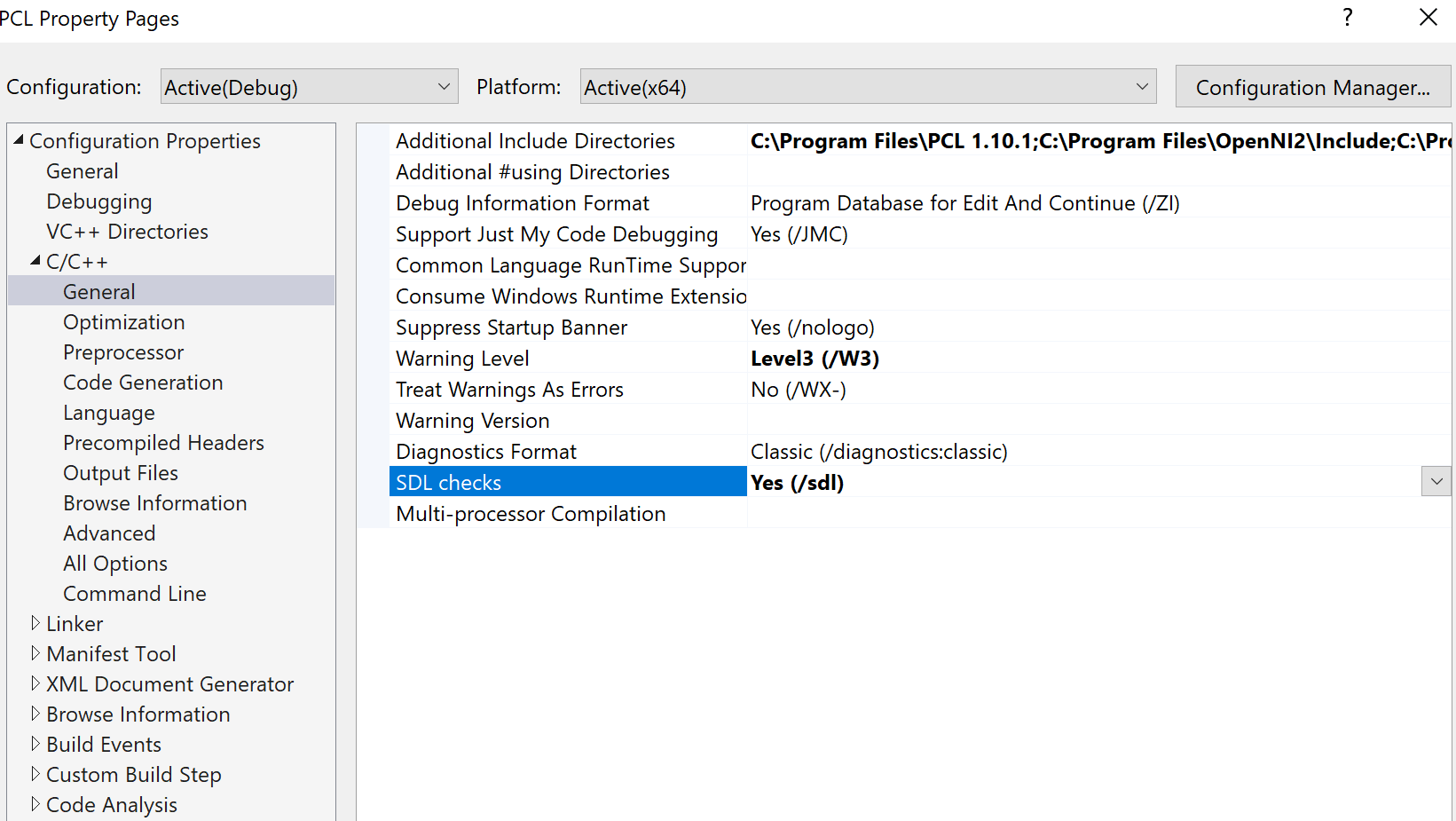
@larshg . This is how it looks in my visual code. To be clear I am still a novice in c++ and using visual code(for c++ though). Till now i was using visual studio code for python but due to some timing problems i wanted to program in c++
sandeepmaddula
on 8 May 2020
The first one, ie:
C:\Program Files\PCL 1.10.1
should probably be:
C:\Program Files\PCL 1.10.1\include\pcl-1.10
Can you try post the expanded image of the additional directories?
larshg
on 8 May 2020
@larshg.

C:\Program Files\PCL 1.10.1
C:\Program Files\OpenNI2\Include
C:\Program Files\PCL 1.10.1\3rdParty\Boost\include\boost-1_72
C:\Program Files\PCL 1.10.1\3rdParty\Eigen\eigen
C:\Program Files\PCL 1.10.1\3rdParty\FLANN\include
C:\Program Files\PCL 1.10.1\3rdParty\Qhull\include
C:\Program Files\PCL 1.10.1\3rdParty\VTK\include\vtk-8.2
Update: Even I changed to :\Program Files\PCL 1.10.1\include\pcl-1.10, but still the error remains
sandeepmaddula
on 8 May 2020
And you can verify that pcl is actually installed in those paths?
larshg
on 8 May 2020
@larshg . I think it is actually installed in that paths. I am not sure properly how to check it.
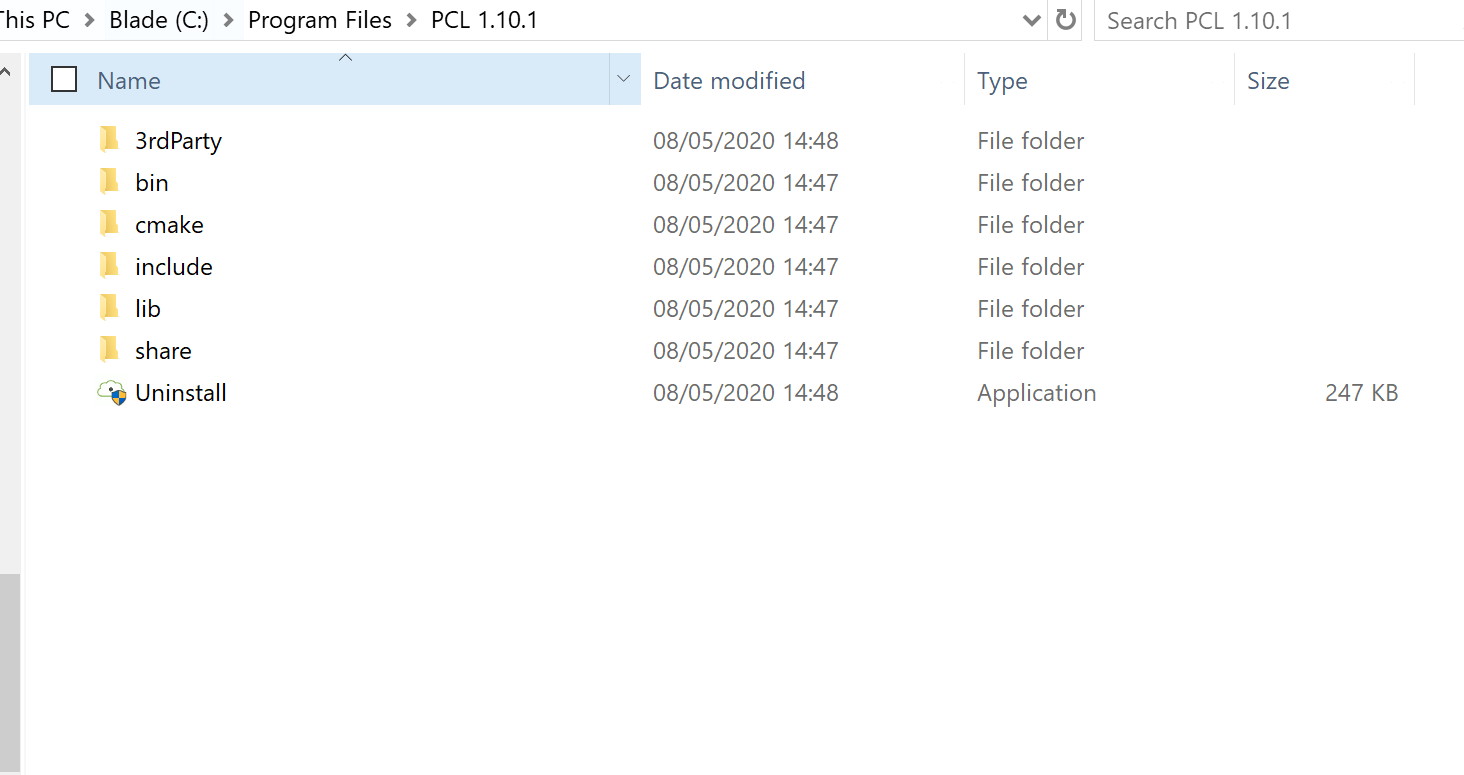
But i think from above pic, i can assume that it installed in that paths only
sandeepmaddula
on 8 May 2020
Can you go into the include folder also and see if pcl-1.10.1 is there?
larshg
on 8 May 2020
should probably be:
C:\Program Files\PCL 1.10.1\include\pcl-1.10
Meeh, I missed a .1 to the end.
C:\Program Files\PCL 1.10.1\include\pcl-1.10.1
larshg
on 8 May 2020
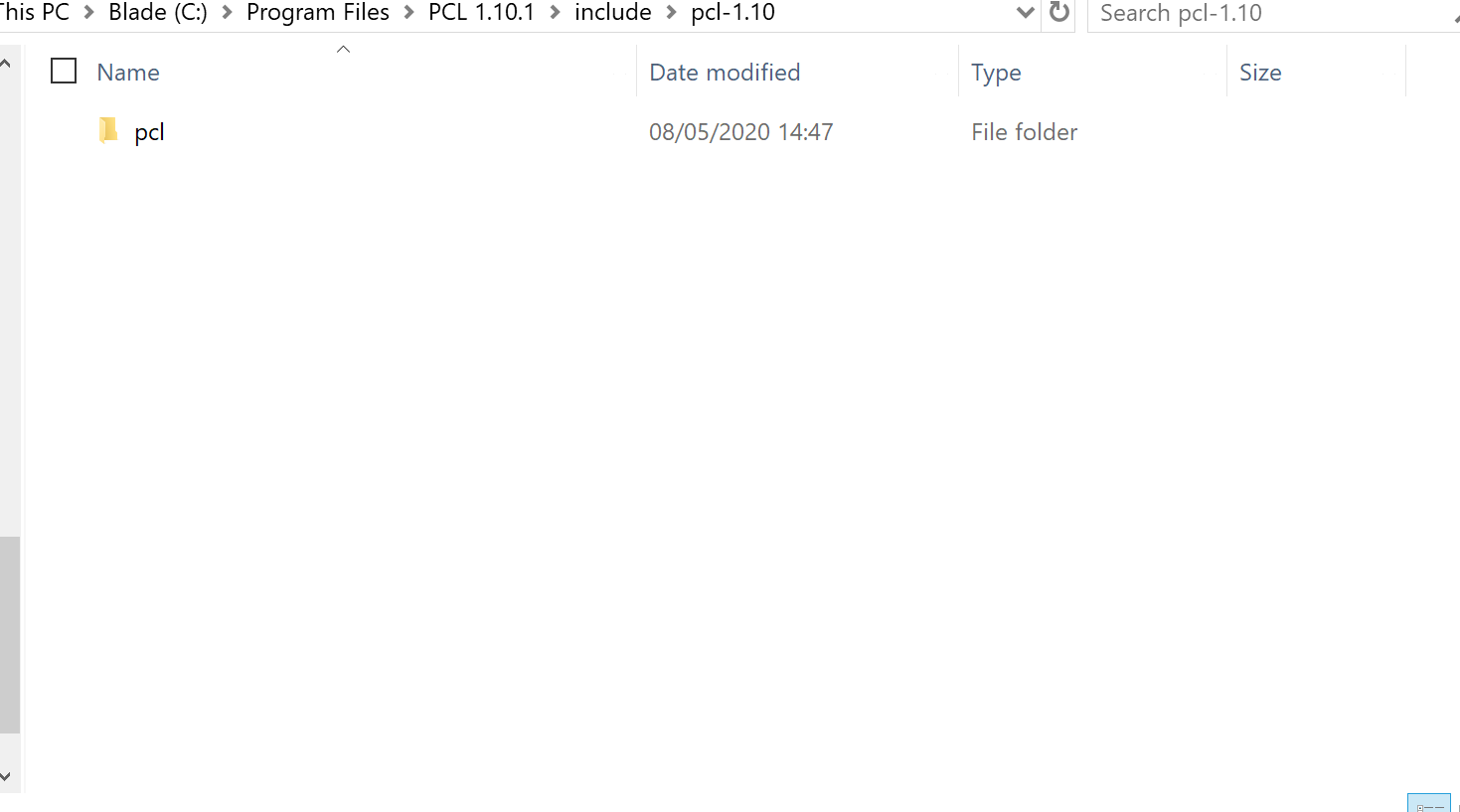
@larshg . It's there
I changed to C:\Program Files\PCL 1.10.1\include\pcl-1.10.1.
sandeepmaddula
on 8 May 2020
It should be the path that is shown in the explorer. You could even try and copy it from there and then add it to the property window.
larshg
on 8 May 2020
@larshg. I did the same I copied path from explorer and added it in the property window.
sandeepmaddula
on 8 May 2020
PCL doesn't officially provide property sheets. PCL's position hasn't changed wrt this since 1.8.1. The link needs updating since the website had changed: new link
A well written guide could probably help most cases
I'm unaware of one on the wiki or website. Would be a welcome addition though (about 2 issues in a week referencing it)
It's one of those actionable items that if we decide to change at some point, will manifest itself in a larger adoption from the newbie windows community.
SergioRAgostinho
on 8 May 2020
@SergioRAgostinho . That would be helpful!
sandeepmaddula
on 8 May 2020
I'll try later tonight to do an install with the all-in-one installer and see if I can figure out whats going on.
If the header files are present and you have the correct path set, it should be found. Can you right click on the include and "go to document" ?
larshg
on 8 May 2020
@larshg . That would be extremely helpful for me.
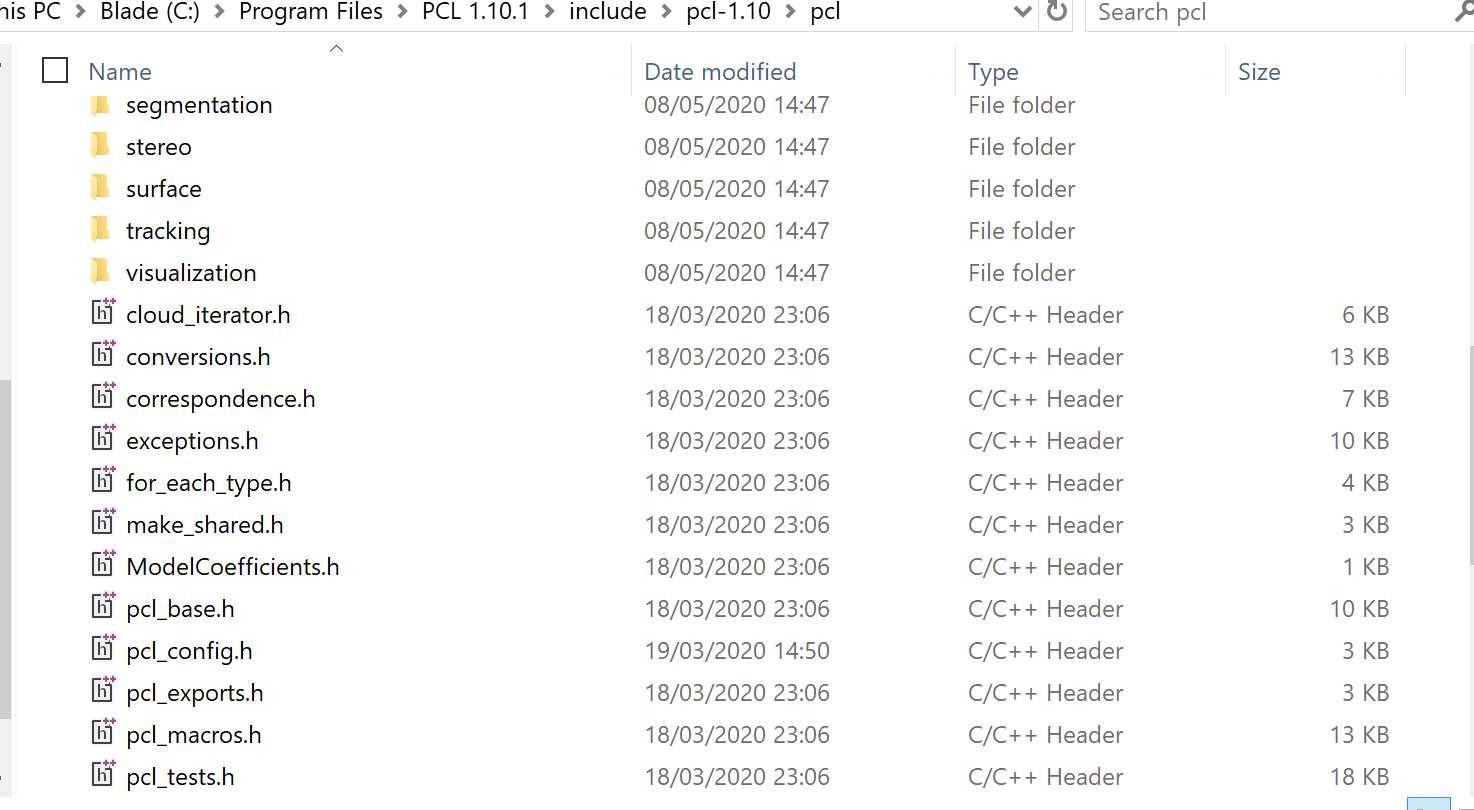 . I was able to find header files if i am in this path. But if i am in C:\Program Files\PCL 1.10.1\include\pcl-1.10.1.i cant find any header files since there is more more folder inside that. I changed path also but still no use. :-(
sandeepmaddula
on 8 May 2020
Marking this as stale due to 30 days of inactivity. It will be closed in 7 days if no further activity occurs.
![stale[bot] picture](https://avatars.githubusercontent.com/in/1724?v=4&s=40) stale[bot]
on 7 Jun 2020
stale[bot]
on 7 Jun 2020
Just mention, we gave up on the All-In-One-Installer and went ahead with VCPKG.
So this might still need some love in regards of better tutorial, but there probably won't be anymore activity here.
larshg
on 8 Jun 2020
It would be great if there is a tutorial for windows users. @larshg helped me with vcpkg and we went ahead. But there might be few persons who might face this problem in near future.
sandeepmaddula
on 8 Jun 2020
Just installed via All-In-One-Installer and wanted to point out that all of the pkgconfig .pc files installed have the wrong prefix path, it appears to be a relic of whoever builds the all-in-one-installer where their install prefix is set.
The installer suggested to install into C:/Program Files/PCL 1.11.0 but wherever you install it, the pkgconfig files will always point to C:/Program Files/PCL

I use PCL as an external dependency in another project I know how to get this working with the pkgconfig prefix issue, so I don't exactly need help. Just more a comment on what might give some people issues.
 WargodHernandez
on 1 Jul 2020
WargodHernandez
on 1 Jul 2020
For the issue mentioned in the last comment. probably the easiest solution is just to create relocatable .pc files using the ${pcfiledir} variable, see https://github.com/ros2/ros2/issues/606#issuecomment-617603006 .
 traversaro
on 1 Jul 2020
traversaro
on 1 Jul 2020
Marking this as stale due to 30 days of inactivity. It will be closed in 7 days if no further activity occurs.
stale[bot]
on 1 Aug 2020
It would be great if there is a tutorial for windows users. @larshg helped me with vcpkg and we went ahead. But there might be few persons who might face this problem in near future.
Hi,I have the same issue with you now,and I have tried everything I can think of,but it does not work. Do you find the solution to this problem? Any suggestions will be appriciated.
 IpandaZll
on 5 Aug 2020
IpandaZll
on 5 Aug 2020
@ipandahuanhuan . Try with vcpkg. It should work
sandeepmaddula
on 5 Aug 2020
Thank you very much. I will try it later.
IpandaZll
on 5 Aug 2020
@ipandahuanhuan . Try with vcpkg. It should work
Hi, I think I've found the cause of the problem.
I copied the path in the include directory to notepad++, then I converted its code to ANSI code. It turned out that some of the paths had "? ".
After that I deleted the "?" , and copied the path back. Surprisingly, the original error has disappeared.
I hope that this is helpful to you.
IpandaZll
on 5 Aug 2020
Marking this as stale due to 30 days of inactivity. It will be closed in 7 days if no further activity occurs.
stale[bot]
on 5 Sep 2020
Closing due to inactivity
kunaltyagi
on 6 Sep 2020
Related issues
 BjoB
·
4Comments
BjoB
·
4Comments
 Micalson
·
4Comments
Micalson
·
4Comments
 rmsalinas
·
3Comments
rmsalinas
·
3Comments
 jacquelinekay
·
5Comments
jacquelinekay
·
5Comments
 Passworteingeben
·
3Comments
Passworteingeben
·
3Comments