Pcl: PCLVisualizer view controls stop working when a renderer is added
When I add a renderer to the render window of PCLVisualizer by doing PCLVisualizer_instance->getRenderWindow()->AddRenderer(myRenderer), the view controls of PCLVisualizer stop working. That is, zooming in/out, scroll etc. using the mouse stop working. Any ideas/suggestions about the cause/fix?
Thanks.
P.S. "myRenderer" is an instance of a subclass of vtkRenderer that renders some additional things on top of the point cloud displayed by PCLVisualizer.
 victoryc
All 7 comments
I guess this might have something to do with InteractorStyle, setupStyle(), and renderer collections (the interactor is not aware of the renderer that you added). Try to dig in this direction. Unfortunately, I can not give any better suggestions.
 taketwo
on 7 Apr 2020
taketwo
on 7 Apr 2020
I found the cause and solution for this. For the benefit of anyone else running into this in future: The crucial function to override is vtkRenderer's GetInteractive() method. Return 1 in that method only when you need the mouse/key inputs to come into your renderer. The relevant code to look at is vtkRenderWindowInteractor::FindPokedRenderer which determines the "current renderer". The way it walks through the renderers, it will end up selecting the last renderer as current if it passes tests like GetInteractive().
victoryc
on 8 Apr 2020
Thanks for sharing!
taketwo
on 8 Apr 2020
That is a great question! I struggled with that once as well. Here is the way I implemented range-rings for my point cloud renderer, hope this helps, good luck and let me now what you find.
std::vector<vtkSmartActor> rangeRingActors;
std::vector<vtkSmartTextActor> rangeRingLabelActors;

if (rangeRingsEnabled) {
    if (rangeRingActors.size() > 0) {
      for (int i = 0; i < rangeRingActors.size(); i++) {
        renderer->AddActor(rangeRingActors[i]);
        renderer->AddActor(rangeRingLabelActors[i]);
      }
    }
    else {
      //setup & add text & range rings on Y Axis
      for (int l = 1; l <= rangeNumRings; l++) {
        //range rings - normal to y-axis
        vtkSmartPointer<vtkRegularPolygonSource> poly
          = vtkSmartPointer<vtkRegularPolygonSource>::New();
        poly->GeneratePolygonOff(); //gen only outline
        poly->SetNumberOfSides(50);
        poly->SetRadius(l * rangeRadiusInMeters);
        poly->SetCenter(0, 0, 0);
        poly->SetNormal(0, 1, 0);

        //range labels -  cm resolution
        sprintf(tmp, "%2.1f", (double)l * rangeRadiusInMeters);
        vtkSmartPointer<vtkVectorText> txtSrc
          = vtkSmartPointer<vtkVectorText>::New();
        txtSrc->SetText(tmp);
        txtSrc->Update();
        vtkSmartPointer<vtkPolyDataMapper> txtMapper =
          vtkSmartPointer<vtkPolyDataMapper>::New();
        txtMapper->SetInputConnection(txtSrc->GetOutputPort());

        //set actor/mapper for text -a follower actor always faces the camera ...
        vtkSmartPointer<vtkFollower> textActor
          = vtkSmartPointer<vtkFollower>::New();
        textActor->SetMapper(txtMapper);
        textActor->SetPosition(0, 0, l * rangeRadiusInMeters);
        textActor->SetScale(graphicsFontSize);
        textActor->GetProperty()->SetColor(legendColor.redF(),
          legendColor.greenF(),
          legendColor.blueF());
        textActor->SetCamera(renderer->GetActiveCamera());

        //setup actor/mapper for circle
        vtkSmartPointer<vtkPolyDataMapper> mapper
          = vtkSmartPointer<vtkPolyDataMapper>::New();
        mapper->SetInputConnection(poly->GetOutputPort());
        vtkSmartPointer<vtkActor> actor = vtkSmartPointer<vtkActor>::New();
        actor->GetProperty()->SetColor(rangeColor.redF(),
          rangeColor.greenF(), rangeColor.blueF());
        actor->GetProperty()->SetOpacity(rangeRingOpacity);
        actor->SetMapper(mapper);

        //give to renderer
        renderer->AddActor(actor);
        renderer->AddActor(textActor);

        //cache for re-use
        rangeRingActors.push_back(actor);
        rangeRingLabelActors.push_back(textActor);
      }

      //set size to number of actors (text/range-rings)
      rangeRingActors.shrink_to_fit();
      rangeRingLabelActors.shrink_to_fit();
    }
  }
  else {
    for (int i = 0; i < rangeRingActors.size(); i++) {
      renderer->RemoveActor(rangeRingActors[i]);
      renderer->RemoveActor(rangeRingLabelActors[i]);
    }
}
 jafrado
on 8 Apr 2020
jafrado
on 8 Apr 2020
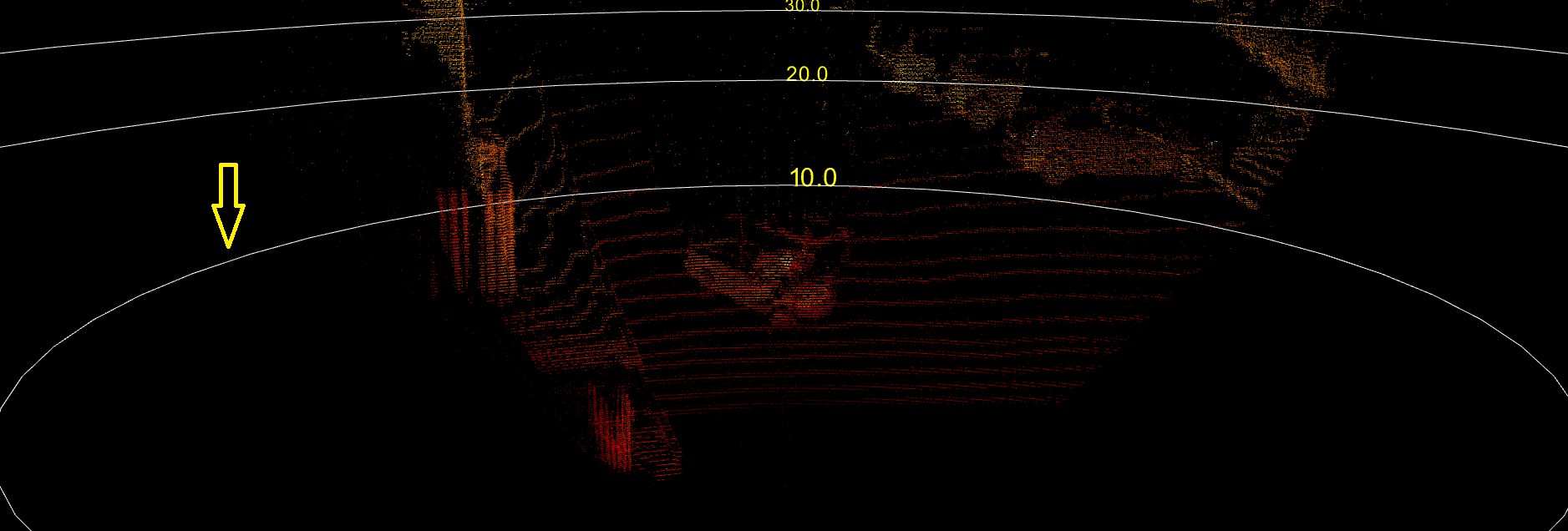
I'm curious, what is a range-ring actor? Can you post a screenshot?
taketwo
on 10 Apr 2020
Sure, have a look at the graphic below ... the arrow is pointing at the rangeRingActor
jafrado
on 10 Apr 2020
Looks good 😄
 kunaltyagi
on 10 Apr 2020
kunaltyagi
on 10 Apr 2020
Related issues
 SiWil
·
4Comments
SiWil
·
4Comments
 BjoB
·
4Comments
taketwo
·
5Comments
BjoB
·
4Comments
taketwo
·
5Comments
 SergioRAgostinho
·
4Comments
taketwo
·
3Comments
SergioRAgostinho
·
4Comments
taketwo
·
3Comments