Pcl: Ugrade vtk api to 8.1 for 1.9
The newly 1.9.0 ship with VTK 8.1 and the visualization will make vtk pop warning window like:
Generic Warning: In c:\vtk-8.1.2\rendering\core\vtkrenderwindow.cxx, line 1480
vtkRenderWindow::GetPainterDeviceAdapter was deprecated for VTK 8.1 and will be removed in a future version.
Yes,it can turn off by set vtk disable warning,but the pre-compiled exe won't.
so ugrade some vtk api call?
 lingerer
All 33 comments
From what I can see, we use GetPainterDeviceAdapter only in a single place: https://github.com/PointCloudLibrary/pcl/blob/e200f0088bd781cfb37135266cb7c29e8b3636f8/visualization/src/vtk/vtkVertexBufferObjectMapper.cxx#L106
This class (vtkVertexBufferObjectMapper) is a compatibility layer used with old (pre-2) OpenGL. I hope that in future we will switch to OpenGL 2 backend and get rid of this class entirely. Perhaps @UnaNancyOwen can comment on the status of switching to OpenGL 2.
 taketwo
on 14 Nov 2018
taketwo
on 14 Nov 2018
Pre-built PCL that include in PCL 1.9.0 All-in-one Installer is linked VTK that rendering backend is OpenGL. The OpenGL rendering backend of VTK is will be deleted in near future. Therefore, the VTK displays a warning.
But, we could not switch it in PCL 1.9.0, because it have a bug yet. We can switch RenderingBackend to OpenGL2 when solved this problem https://github.com/PointCloudLibrary/pcl/issues/1601.
 UnaNancyOwen
on 14 Nov 2018
UnaNancyOwen
on 14 Nov 2018
I follow to #1601 and believe it could be the relative problem,I just not sure if all the warning is about this.
like warning with:
ERROR: In c:\pcl-1.9.0\visualization\src\vtk\vtkvertexbufferobject.cxx, line 216
vtkVertexBufferObject (000002347E527B90): No context specified. Cannot Bind.
lingerer
on 15 Nov 2018
The newly 1.9.0 ship with VTK 8.1 and the visualization will make vtk pop warning window like:
Generic Warning: In c:\vtk-8.1.2\rendering\core\vtkrenderwindow.cxx, line 1480
vtkRenderWindow::GetPainterDeviceAdapter was deprecated for VTK 8.1 and will be removed in a future version.Yes,it can turn off by set vtk disable warning,but the pre-compiled exe won't.
so ugrade some vtk api call?
Hello, could you tell me how to turn off the warning by set vtk disable warning?
 jasonhurray
on 23 Dec 2018
jasonhurray
on 23 Dec 2018
The newly 1.9.0 ship with VTK 8.1 and the visualization will make vtk pop warning window like:
Generic Warning: In c:\vtk-8.1.2\rendering\core\vtkrenderwindow.cxx, line 1480
vtkRenderWindow::GetPainterDeviceAdapter was deprecated for VTK 8.1 and will be removed in a future version.Yes,it can turn off by set vtk disable warning,but the pre-compiled exe won't.
so ugrade some vtk api call?
Hello, could you tell me how to turn off the warning by set vtk disable warning?
This will do the trick:
vtkObject::GlobalWarningDisplayOff();
lingerer
on 24 Dec 2018
The newly 1.9.0 ship with VTK 8.1 and the visualization will make vtk pop warning window like:
Generic Warning: In c:\vtk-8.1.2\rendering\core\vtkrenderwindow.cxx, line 1480
vtkRenderWindow::GetPainterDeviceAdapter was deprecated for VTK 8.1 and will be removed in a future version.Yes,it can turn off by set vtk disable warning,but the pre-compiled exe won't.
so ugrade some vtk api call?
Hello, could you tell me how to turn off the warning by set vtk disable warning?This will do the trick:
vtkObject::GlobalWarningDisplayOff();
I did as you said, like this:
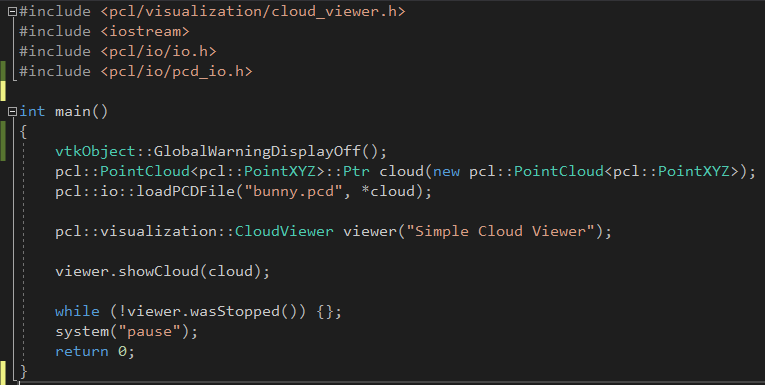
but it still shows this window:
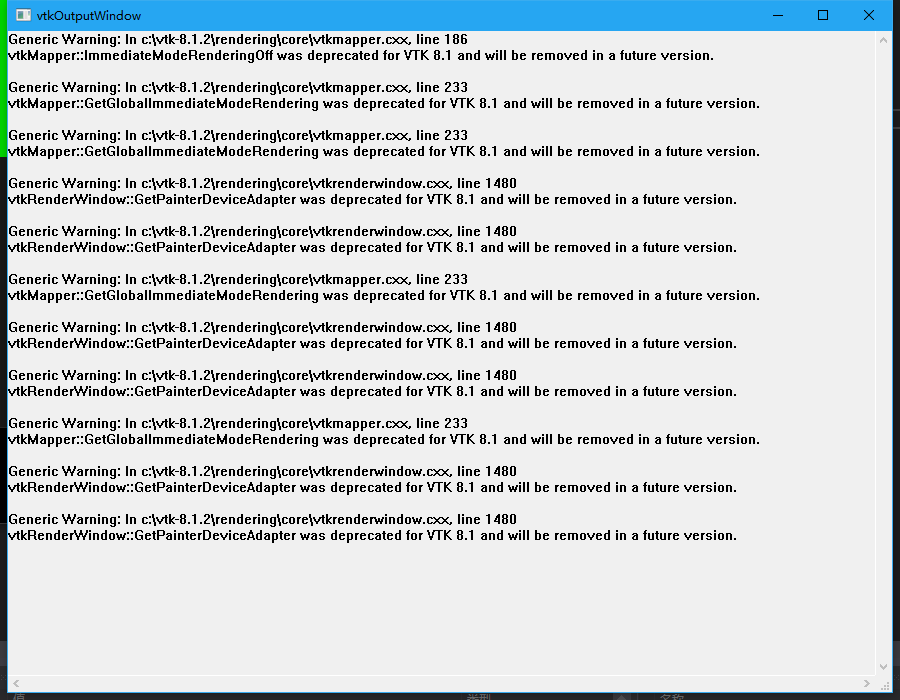
ps: I use vs2017 and pcl1.9.1
jasonhurray
on 24 Dec 2018
Same here, tried doing this,
This will do the trick:
vtkObject::GlobalWarningDisplayOff();I did as you said, like this:
but it still shows this window:
ps: I use vs2017 and pcl1.9.1
Has anyone come up with a fix for this?
 aditya369007
on 25 Feb 2019
aditya369007
on 25 Feb 2019
To make win_->GlobalWarningDisplayOff(); work I added it at the end of the
constructor of the visualizer I was using, then rebuilded PCL.
For example when I use this constructor:
pcl::visualization::PCLVisualizer::PCLVisualizer (const std::string &name,
const bool create_interactor)
I added this to line 158 of pcl_visualizer.cpp.
win_->GlobalWarningDisplayOff();
I'm using visual studio 2017 and followed Tsukasa Sugiura's blog (
http://unanancyowen.com/) to build PCL.
On Mon, Feb 25, 2019 at 5:59 PM Aditya Mulampally notifications@github.com
wrote:
Same here, tried doing this,
This will do the trick:
vtkObject::GlobalWarningDisplayOff();I did as you said, like this:
[image: image]
https://user-images.githubusercontent.com/46080482/50401083-cca81f80-07c6-11e9-9ddf-b70c49954c02.pngbut it still shows this window:
[image: image]
https://user-images.githubusercontent.com/46080482/50401144-43ddb380-07c7-11e9-8735-ca9f233fa386.png
ps: I use vs2017 and pcl1.9.1Has anyone come up with a fix for this?
—
You are receiving this because you are subscribed to this thread.
Reply to this email directly, view it on GitHub
https://github.com/PointCloudLibrary/pcl/issues/2619#issuecomment-467219130,
or mute the thread
https://github.com/notifications/unsubscribe-auth/AlnY6XoXmNwW5bIyPNHJUd6hRpKNW3edks5vRGragaJpZM4YdN0h
.
 anelsalas
on 26 Feb 2019
anelsalas
on 26 Feb 2019
Thanks @anelsalas,
We can consider to add following to PCLVisualizer constructor as temporary measure.
#if VTK_RENDERING_BACKEND_OPENGL_VERSION < 2
win_->GlobalWarningDisplayOff();
#endif
Is the constructor the best place for it? We would need to repeat this in each constructor then. Since we are calling this function on a render window object, maybe it's better to put it into PCLVisualizer::setupRenderWindow?
taketwo
on 10 Mar 2019
it's better to put it into
PCLVisualizer::setupRenderWindow
@taketwo Thanks for advice. I think that is good.
UnaNancyOwen
on 11 Mar 2019
Sorry but I am new to this, but as far as my understanding goes, it is not possible to disable the warning window without recompiling PCL right?
aditya369007
on 11 Mar 2019
PCLVisualizer has an accessor for render window, you should be able to use it to get win_ object and call GlobalWarningDisplayOff() on it.
taketwo
on 11 Mar 2019
PCLVisualizerhas an accessor for render window, you should be able to use it to getwin_object and callGlobalWarningDisplayOff()on it.
apologies for my limited understanding of your solution, but could you please elaborate on how and where exactly to do this?
many thanks in advance
aditya369007
on 11 Mar 2019
PCLVisualizerhas an accessor for render window
Accessor is a function that allows to retrieve a class member field. Such function names typically start with get. We are talking about accessor for render window, so the name is likely to be getRenderWindow(). You can check either source code or documentation to find this function.
use it to get
win_object and callGlobalWarningDisplayOff()on it
According to @anelsalas this should help.
Now in the screenshots you posted you use CloudViewer, which is a simplified interface on top of PCLVisualizer. It does not provide access to the render window. So if you want to get rid of warnings you will need to switch to using PCLVisualizer. Once you have visualizer, you need to call visualizer.getRenderWindow()->GlobalWarningDisplayOff().
taketwo
on 11 Mar 2019
PCLVisualizerhas an accessor for render windowAccessor is a function that allows to retrieve a class member field. Such function names typically start with
get. We are talking about accessor for render window, so the name is likely to begetRenderWindow(). You can check either source code or documentation to find this function.use it to get
win_object and callGlobalWarningDisplayOff()on itAccording to @anelsalas this should help.
Now in the screenshots you posted you use
CloudViewer, which is a simplified interface on top ofPCLVisualizer. It does not provide access to the render window. So if you want to get rid of warnings you will need to switch to usingPCLVisualizer. Once you have visualizer, you need to callvisualizer.getRenderWindow()->GlobalWarningDisplayOff().
GlobalWarningDisplayOff() is a static method,this can't pass under VS 2017
lingerer
on 13 Mar 2019
@anelsalas reported that he used VS 2017 :confused:
taketwo
on 13 Mar 2019
It did work in the constructor in vs2017
I will test today adding it to PCLVisualizer::setupRenderWindow as
suggested.
I remember trying to use get win_ object and it didn't work but will try
that option again once I finish figuring out why flann is not being added
in the additional dependencies field in VS2017.
Anel Salas
On Wed, Mar 13, 2019 at 4:37 AM Sergey Alexandrov notifications@github.com
wrote:
@anelsalas https://github.com/anelsalas reported that he used VS 2017 😕
—
You are receiving this because you were mentioned.
Reply to this email directly, view it on GitHub
https://github.com/PointCloudLibrary/pcl/issues/2619#issuecomment-472328267,
or mute the thread
https://github.com/notifications/unsubscribe-auth/AlnY6Wd2uT0PzROgB43yc46Maeg5Eb77ks5vWLizgaJpZM4YdN0h
.
anelsalas
on 13 Mar 2019
Indeed adding GlobalWarningDisplayOff to setupRenderWindow removes the vtk warnings in PCLVisualizer. I'm using pcl 1.9.1 and VS2017.
I added it right after the NULL check.
void pcl::visualization::PCLVisualizer::setupRenderWindow (const std::string& name)
{
  if (!win_)
  PCL_ERROR ("Pointer to render window is null");

#if VTK_RENDERING_BACKEND_OPENGL_VERSION < 2
  win_->GlobalWarningDisplayOff();
#endif

  win_->SetWindowName (name.c_str ());
  // By default, don't use vertex buffer objects
  use_vbos_ = false;

  // Add all renderers to the window
  rens_->InitTraversal ();
  vtkRenderer* renderer = NULL;
  while ((renderer = rens_->GetNextItem ()) != NULL)
    win_->AddRenderer (renderer);
}
Indeed adding GlobalWarningDisplayOff to setupRenderWindow removes the vtk warnings in PCLVisualizer. I'm using pcl 1.9.1 and VS2017.
I added it right after the NULL check.
void pcl::visualization::PCLVisualizer::setupRenderWindow (const std::string& name)
{
  if (!win_)
  PCL_ERROR ("Pointer to render window is null");

#if VTK_RENDERING_BACKEND_OPENGL_VERSION < 2
  win_->GlobalWarningDisplayOff();
#endif

  win_->SetWindowName (name.c_str ());
  // By default, don't use vertex buffer objects
  use_vbos_ = false;

  // Add all renderers to the window
  rens_->InitTraversal ();
  vtkRenderer* renderer = NULL;
  while ((renderer = rens_->GetNextItem ()) != NULL)
    win_->AddRenderer (renderer);
}
I believe this edit has to be done to the source .cpp file, but in my case I am using the precompiled libs. Do you have any suggestions for my case?
I did switch to the PCLVisualizer as @taketwo suggested me to, but still the issue prevails.
Many thanks in advance.
aditya369007
on 13 Mar 2019
@aditya369007 You can build PCL and apply the change yourself or wait for this fix to be released.
Other option may be that you find a way for me to send you the dll (pcl_visualization_release.dll). Then you can replace it in your bin folder, probably in C:\Program Files\PCL 1.9.1\bin if you are using the all in one installer.
anelsalas
on 14 Mar 2019
That would be amazing! Thank you so for taking the time to do so.
My email id would be aditya.[email protected]
aditya369007
on 14 Mar 2019
@anelsalas Could you please send me the pcl_visualization_release.dll too. this problem bothers me a lot too, thank you very much! My email is [email protected]
 Austin1511
on 28 Mar 2019
Austin1511
on 28 Mar 2019
@Austin1511 Here is the dll for the release version without the vtk warnings.
https://github.com/anelsalas/PCL_1_9_1_prebuild_pcl_visualization_release.dll
anelsalas
on 28 Mar 2019
@anelsalas Thanks a ton!
Austin1511
on 29 Mar 2019
Problem solved , thanks!
 cybe-robot
on 13 Aug 2019
cybe-robot
on 13 Aug 2019
Once you have visualizer, you need to call
visualizer.getRenderWindow()->GlobalWarningDisplayOff().
If I don't decclare win_->GlobalWarningDisplayOff(); in the setupRenderWindow method, then put visualizer.getRenderWindow()->GlobalWarningDisplayOff(). after visualizer created, the vtk warning window still pop up. I have tested this in my environment?
pcl::visualization::PCLVisualizer viewer("3D Viewer");
viewer.getRenderWindow()->GlobalWarningDisplayOff();
Am I right? @taketwo
 caibf
on 13 May 2020
caibf
on 13 May 2020
Those warnings probably mean something, so they should be debugged. But the easiest thing to do is simply call vtkObject::GlobalWarningDisplayOff()
 jafrado
on 16 May 2020
jafrado
on 16 May 2020
@aditya369007 You can build PCL and apply the change yourself or wait for this fix to be released.
Other option may be that you find a way for me to send you the dll (pcl_visualization_release.dll). Then you can replace it in your bin folder, probably in C:\Program Files\PCL 1.9.1\bin if you are using the all in one installer.
Hello @anelsalas, can you please also send the debug version of the dll? Thanks!
 mzeeshanarshad
on 19 May 2020
mzeeshanarshad
on 19 May 2020
@anelsalas my project will use pcl 1.9.1 for a long time,I also want the debug vision of the dll ,my email is [email protected]. thank you very much!
 fellenB
on 21 May 2020
fellenB
on 21 May 2020
1.11 works fine now。
lingerer
on 26 May 2020
@UnaNancyOwen Can this be closed?
 kunaltyagi
on 16 Jun 2020
kunaltyagi
on 16 Jun 2020
@kunaltyagi Yes. This problem has been solved.
UnaNancyOwen
on 16 Jun 2020
Related issues
 ltphy
·
4Comments
ltphy
·
4Comments
 jacquelinekay
·
5Comments
taketwo
·
3Comments
jacquelinekay
·
5Comments
taketwo
·
3Comments
 SunBlack
·
4Comments
SunBlack
·
4Comments
 jasjuang
·
3Comments
jasjuang
·
3Comments