Paypal-checkout-components: [Bug] Unexpected error when rerendering "detected container element removed from DOM"
🐞 Describe the Bug
When the html container that the PayPal component is attached to is removed from the DOM, an exception is thrown in the PayPal SDK.
🔬 Minimal Reproduction
Render the PayPal button then remove the container it's rendered to using JavaScript.
Steps to reproduce on my server:
- Navigate to Product page
- Add item to cart then navigate to checkout page Checkout page
- Click F12 and review console log. If you don't see the error initially, trigger a re-render by changing the billing country.
😕 Actual Behavior
When the html container that the PayPal button is rendered inside is removed from the DOM, an exception is thrown. Error: Detected container element removed from DOM.
🤔 Expected Behavior
No exception should be thrown by the PayPal SDK because it can interfere with JS code downstream. It is not uncommon for eCommerce solutions to dynamically replace html based on user inputs. For example, in WooCommerce the checkout page html is dynamically updated when a user selects their billing country. This results in a re-render in which the PayPal button's container is replaced with the new html. That scenario triggers the error.
🌍 Environment
- Browser version: -
- OS version: -
- SDK version (
window.paypal.version): - 5.0.187
Affected browsers
What browser(s) are affected?
- Chrome
- Safari
- Firefox
- Edge
- IE
- Chrome Mobile/Tablet
- Safari Mobile/Tablet
- Web View / Safari ViewController
- Other
➕ Additional Context
This error was not present up until the most recent release of the PayPal SDK. I have been testing the function button.close() which appears to destroy the PayPal button cleanly. I have not implemented a workaround yet but the issue appears to be resolved if before the html re-render, the button is closed then the button is re-created and rendered.
 paymentplugins
All 19 comments
I second this issue, we started to receive this exception thrown the other day.
 savtrip
on 27 Dec 2020
savtrip
on 27 Dec 2020
+1
 indigodp
on 28 Dec 2020
indigodp
on 28 Dec 2020
Hi @paymentplugins, thanks for providing a reproduction of the issue. Here are are some more details about it.
Release on 12/17
On 12/17/2020 we deployed a new version of the PayPal JS SDK which includes the latest release of the zoid dependency. In the latest release of zoid, new logic has been introduced to watch for components that are unexpectedly removed from the DOM and clean them up as quickly as possible. It's important to clean these unused zoid components up for performance reasons. The is done by calling close() and logging an error. Here's the source code for this logic:
- https://github.com/krakenjs/zoid/blob/master/src/parent/parent.js#L768
- https://github.com/krakenjs/belter/blob/master/src/dom.js#L897
When the container unexpectedly disappears from the DOM, the following error is logged:
Detected container element removed from DOM
This error is an informational message and should not break any other JS code on the page.
Preventing the "element removed from DOM" error
To prevent this error from occurring when rerendering the paypal buttons, call the close() function to cleanup instead of removing the container from the DOM. This close function takes care of removing the related DOM elements and also the post message listeners for it. Ex:
let buttons;
function renderButtons() {
if (buttons && buttons.close) {
buttons.close();
}
buttons = window.paypal.Buttons();
buttons.render('#container-element');
}
Issue with Messages component
@paymentplugins I was able to reproduce this error with your demo (https://paypal.paymentplugins.com/cart/). When debugging it, I noticed that the error is being thrown from the Messages component and not the Buttons component. Can you disable the credit messaging component from your demo to confirm that it's the cause of the error?
I was going to recommend the same solution for the messages component but just learned that it does not expose a close function 🤔
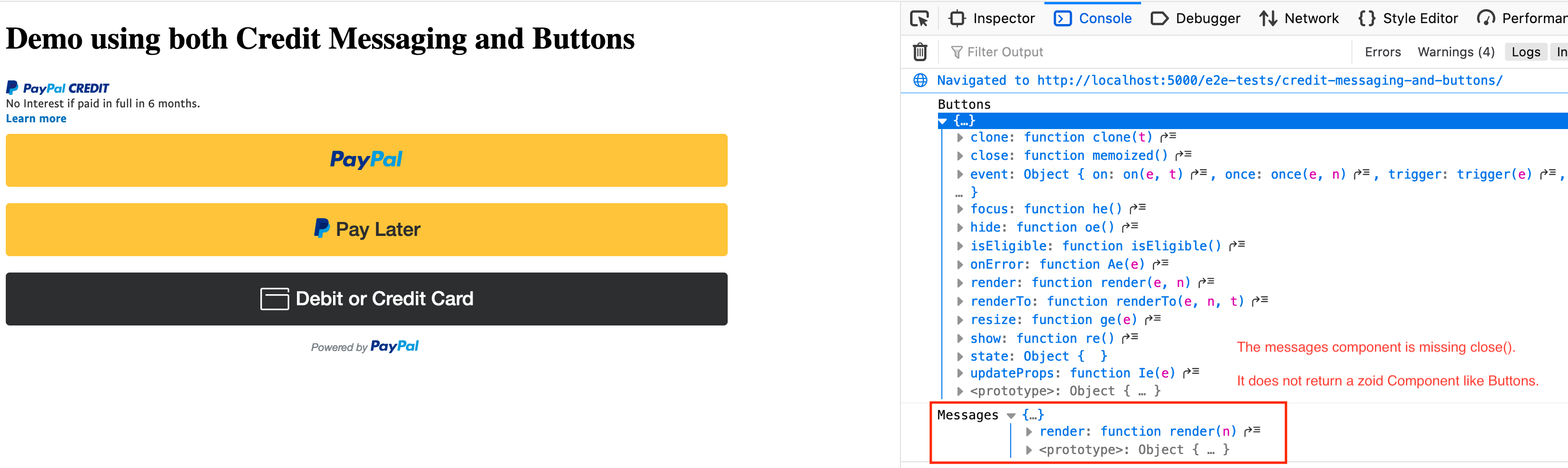
Based on this, I'm unsure how to prevent this error when rerendering the Messages component. I plan on following up with the team internally about this next week (everyone is out on PTO this week).
cc: @bluepnume and @Seavenly
 gregjopa
on 28 Dec 2020
gregjopa
on 28 Dec 2020
Edit: My issue was solved as I was actually recreating the button somewhere after calling close.
I confirmed this issue by directly using the SDK js files and not using paypal-checkout-components lib. I even called .close() and still getting this error. I call .close and navigate away from my view, and get the error once I navigate away from the view. How do I disable the credit messaging? I wanna give this a try
 mohyeid
on 30 Dec 2020
mohyeid
on 30 Dec 2020
I had the same problem. When ever i reload the page i got the error. I could fixed it with an timeout. Not elegant but it works.
function renderButtons(containerID) {
setTimeout(function () {
if (payPalSubscribeButtons && payPalSubscribeButtons.close) {
payPalSubscribeButtons.close();
}
payPalSubscribeButtons = window.paypal.Buttons();
payPalSubscribeButtons.render(containerID);
}, 1);
}
 vexa
on 30 Dec 2020
vexa
on 30 Dec 2020
@vexa could you share your full integration code? It's unclear to me why the setTimeout() is needed.
gregjopa
on 30 Dec 2020
i cant show you the whole implementation because i integrated it in the vaadin framework. So the only Js Code i needed was this.
I think i had the problem because of render timing. I think vaadin does something with the dom what results in the error. The setTimeout is only for waiting one render browser tick and it worked. as i said not a beautiful solution, but a solution.
vexa
on 30 Dec 2020
Hi @gregjopa,
Apologies for the late response. I disabled credit messaging and confirmed that the error was not thrown with as much frequency. I have also added a check to my code so that if the buttons already exist they are not removed from the DOM and re-created. It seems like the error is encountered if the container of the button/message is removed, not some parent container higher up in the DOM.
I have updated my demo with those code changes if you would like to review. I also confirmed that even if the error is thrown it does not interfere with downstream JS.
Kind Regards,
paymentplugins
on 4 Jan 2021
@vexa For a more elegant solution then setting a timeout, you could execute the renderButtons() on DOMContentLoaded or load it at the end of the page if that is feasible in your scenario.
 mnicpt
on 4 Jan 2021
mnicpt
on 4 Jan 2021
+1
 LordCarlosMP
on 10 Jan 2021
LordCarlosMP
on 10 Jan 2021
+1
 Ffarnos
on 9 Feb 2021
Ffarnos
on 9 Feb 2021
Thanks @gregjopa for your answers, that helped me a lot !
Personaly, I'm rendering the paypal button into a modal that I empty and close when done.
The original error (detected container element removed from DOM) happened on slow connections, or when closing the modal quickly.
After using your code
let buttons;
function renderButtons() {
if (buttons && buttons.close) {
buttons.close();
}
buttons = window.paypal.Buttons();
buttons.render('#container-element');
}
I ran into another error: Uncaught Error: Component closed.
After 2 hours of investigation, it appears that you can't close the button if it's not done rendering yet. So you have to wait for the rendering:
let buttons;
let hasRendered = false;
function renderButtons() {
if (buttons && buttons.close && hasRendered) {
buttons.close();
hasRendered = false;
}
buttons = window.paypal.Buttons();
buttons.render('#container-element').then(() => {
hasRendered = true;
});
}
Hope that this can avoid some headaches ;)
 MaximeArbisa
on 22 Feb 2021
MaximeArbisa
on 22 Feb 2021
I am seeing this error sporadically on our page appear too. The PayPal button is rendered in a modal with other payment methods. When some other payment methods get selected and the modal is re-rendered the error sometimes appears.
Unfortunately it is not true that it is just an informational message. The exception it throws is propagated to the client code which shouldn't be the case.
 mimunzar
on 7 Mar 2021
mimunzar
on 7 Mar 2021
same issue here, next with react, subscriptions.
solved by sleeping 1 second before rendering, I don't know why, but this has solved the problem.
so my code is:
sleep function:
function sleep(ms) {
return new Promise((resolve) => setTimeout(resolve, ms));
}
paypa; button component:
const paypalRef = useRef();
// options
const btnOptions = {
createSubscription: function (data, actions) {
return actions.subscription.create({
plan_id: planID,
});
},
onApprove: function (data, actions) {
alert(data.subscriptionID);
},
};
// effect, make sure to listen to Paypal library load
useEffect(() => {
(async () => {
await sleep(1000) // sleep second before rendering. <---------------------- solution here;
if (paypalRef.current) {
btn = window.paypal.Buttons(btnOptions);
btn.render(paypalRef.current);
}
})();
}, [window.paypal]);
return <div className={styles.paypal_btn} ref={paypalRef}></div>;
 ahmad-ali14
on 10 Mar 2021
ahmad-ali14
on 10 Mar 2021
Same here, we are using react button paypal.Buttons.driver("react", { React, ReactDOM }) in a popup, which throws this error when being closed/open real quick. I tried to clean up on every render in effect, something like useEffect(() => () => window.paypal.Buttons().close()) but this doesn't seem to be solving anything. Solutions with setTimouts I consider hacky and bug prone. @gregjopa Can we expect any update on this in the near future?
 vibecode
on 12 Mar 2021
vibecode
on 12 Mar 2021
@MaximeArbisa that's a great point about making sure the button was successfully rendered before trying to close it.
For folks rerendering the paypal button, here's an updated code snippet that uses the hasRendered code that @MaximeArbisa suggested and also ignores render errors when the button has already been destroyed.
let buttons;
let hasRendered = false;

function renderButtons() {
  if (buttons && buttons.close && hasRendered) {
    buttons.close();
    hasRendered = false;
  }
  buttons = window.paypal.Buttons();
  buttons.render('#container-element')
    .then(() => {
        hasRendered = true;
    })
    .catch((err) => {
        let selector = document.querySelector('#container-element');

        // button failed to render, possibly because it was closed or destroyed.
        if (selector && selector.children.length > 0) {
            // still mounted so throw an error
            throw new Error(err);
        }

       // not mounted anymore, we can safely ignore the error
       return;


    })
}
When rerendering the paypal button, we need to consider if the button finished rendering or not. The render() call is async. You can throttle your network connection in Dev Tools to slow 3g to see how render needs to finish loading the iframe contents from the server before resolving. We can't close the button when rendering isn't finished. Instead the render() promise will be rejected and we need to catch the error and ignore it. One way to do this is to check to see if the container element has children or not. If it's empty, it's safe to assume it's already been destroyed.
For react implementations, we have a PR to add this logic to the zoid driver that ships with the JS SDK: https://github.com/krakenjs/zoid/pull/335. We also recently fixed this issue in react-paypal-js which uses a ref for the paypal button: https://github.com/paypal/react-paypal-js/blob/main/src/components/PayPalButtons.tsx#L96-L111. If you're using React, I recommend giving react-paypal-js a try.
gregjopa
on 12 Mar 2021
Hi! Just wanted to let you know it still doesn't work for me. Tried all the solutions from above, none of them worked in my case. Also tried different approaches similar to suggested above.
For now, the problem solved by preventing container removal, so I'm not looking for a solution for myself. Just for your info.
Please, let me know if I can help by providing more context or details.
 strangerkir
on 7 Apr 2021
strangerkir
on 7 Apr 2021
Hi @strangerkir can you open a new issue with a reproduction of the problem you are facing?
gregjopa
on 7 Apr 2021
Hi everyone. In angular i have implemented the PayPal buttons in ngoint() so whenever the component loads the button start rendering. and then they are running if you route to another component. so what I did is, instead of ngOninit() I call this in a function separately and render the button when needed.
The snippet is given below
component.ts
  RenderPaypalButton() {
     console.log('start');
     paypal
       .Buttons({
         createOrder: async (data, actions) => {
           return await actions.order.create({
             purchase_units: [
               {
                 description: this.product.description,
                 amount: {
                   currency_code: 'USD',
                   value: this.product.price
                 }
               }
             ]
           });
         },
         onApprove: async (data, actions) => {
           const order = await actions.order.capture();
           console.log(order);
           console.log(data);
           this.paidFor = true;
           this.CheckOut();
           this.CustomStyle['display'] = 'none';

         },
         onError: err => {
           console.log(err);
         }
       })
       .render(this.paypalElement.nativeElement);
   }
and then you can call this funtion on any button where you need paypal transaction
 fazi1live
on 11 May 2021
fazi1live
on 11 May 2021
Related issues
 VivekVikranth
·
6Comments
VivekVikranth
·
6Comments
 bluepnume
·
3Comments
bluepnume
·
3Comments
 AashutoshPrashar
·
5Comments
AashutoshPrashar
·
5Comments
 gastonyelmini
·
3Comments
gastonyelmini
·
3Comments
 mtshare
·
5Comments
mtshare
·
5Comments
Most helpful comment
@MaximeArbisa that's a great point about making sure the button was successfully rendered before trying to close it.
For folks rerendering the paypal button, here's an updated code snippet that uses the
hasRenderedcode that @MaximeArbisa suggested and also ignores render errors when the button has already been destroyed.When rerendering the paypal button, we need to consider if the button finished rendering or not. The
render()call is async. You can throttle your network connection in Dev Tools to slow 3g to see how render needs to finish loading the iframe contents from the server before resolving. We can't close the button when rendering isn't finished. Instead therender()promise will be rejected and we need to catch the error and ignore it. One way to do this is to check to see if the container element has children or not. If it's empty, it's safe to assume it's already been destroyed.For react implementations, we have a PR to add this logic to the zoid driver that ships with the JS SDK: https://github.com/krakenjs/zoid/pull/335. We also recently fixed this issue in react-paypal-js which uses a ref for the paypal button: https://github.com/paypal/react-paypal-js/blob/main/src/components/PayPalButtons.tsx#L96-L111. If you're using React, I recommend giving react-paypal-js a try.