Paypal-checkout-components: [Integration Help] Expected element to be passed to render iframe
🐞 Describe the Bug
Using Paypal in a React app, and loading the paypal script via the NPM package, React Load Script, everything works on the first go around.
The problem is, that if the user navigates away from the payment page and returns, an error is produced same as #1177, which is: Expected element to be passed to render iframe.
The loading of the script is pretty basic:
<Script
url={`https://www.paypal.com/sdk/js?client-id=${
process.env.REACT_APP_PAYPAL_CLIENT_ID
}¤cy=${getCurrency()}&vault=true`}
onCreate={() => handleScriptCreate()}
onError={() => handleScriptError()}
onLoad={() => handleScriptLoad()}
/>
With rather simple scripts:
  const handleScriptCreate = () => {
    setScriptLoaded(false);
  };

  const handleScriptError = () => {
    setScriptError(true);
  };

  const handleScriptLoad = () => {
    setScriptLoaded(true);
    window.paypal
      .Buttons({
        style: {
          shape: "pill",
          color: "gold",
          layout: "vertical",
          label: "subscribe"
        },
        createSubscription: (data, actions) => {
          return actions.subscription.create({
            plan_id: getPlanId()
          });
        },
        onApprove: (data, actions) => {
          setPaymentApprovalDetails(data);
          console.warn(data);
        },
        onError: (error) => {
          console.warn(error);
        }
      })
      .render(paypalContainerRef.current);
  };
paypalContainerRef.current is from a React useRef, that should set the element to null when the page is returned to.
🔬 Minimal Reproduction
Implement this code:
import React, { useEffect, useRef, useState } from "react";
import Script from "react-load-script";
import { Spinner } from "../components/shared/Spinner";
import { useSelector, useDispatch } from "react-redux";
import { useHistory } from "react-router-dom";
import { updateFormalityUser, updateFormalityCompany } from "../actions";
export const SubscriptionPayment = () => {
const paypalContainerRef = useRef(null);
const dispatch = useDispatch();
const history = useHistory();
const {
auth: {
attributes: { "custom:role": role }
},
formality: { selectedPlan },
subscription: { subscriptionPlan: companySubscriptionPlan },
user: { subscriptionPlan: userSubscriptionPlan }
} = useSelector((state) => state);
const [paymentApprovalDetails, setPaymentApprovalDetails] = useState("");
const [scriptLoaded, setScriptLoaded] = useState(false);
const [, setScriptError] = useState("");
useEffect(() => {
if (
paymentApprovalDetails &&
(companySubscriptionPlan || userSubscriptionPlan)
) {
const payload = {
paymentMethod: "paypal",
paypalSubscription: JSON.stringify(paymentApprovalDetails)
};
dispatch(
role === "manager"
? updateFormalityCompany(payload)
: updateFormalityUser(payload)
)
.then(() => {
if (role === "manager") {
dispatch({ type: "UPDATE_COMPANY_SUBSCRIPTION", payload });
} else {
dispatch({ type: "UPDATE_USER", payload });
}
console.warn("what to do here?");
})
.catch((error) => console.warn(error));
}
}, [
companySubscriptionPlan,
dispatch,
paymentApprovalDetails,
role,
userSubscriptionPlan
]);
const getCurrency = () => {
switch (selectedPlan) {
case "ฝรั่งขี้นก":
return "THB";
case "เลขานุการ":
return "HKD";
case "หัวหน้าใหญ่":
return "USD";
default:
break;
}
};
const getPlanId = () => {
switch (selectedPlan) {
case "ฝรั่งขี้นก":
return "P-2Y2777191U4069XXXXXXXXXX";
case "เลขานุการ":
return "P-7RH42591DG4929XXXXXXXXXX";
case "หัวหน้าใหญ่":
return "P-32W865918L2805XXXXXXXXXX";
default:
break;
}
};
const getPaymentTerms = () => {
switch (selectedPlan) {
case "ฝรั่งขี้นก":
return "250 THB per month";
case "เลขานุการ":
return "25 USD per month";
case "หัวหน้าใหญ่":
return "185 HKD per month";
default:
break;
}
};
const handleScriptCreate = () => {
setScriptLoaded(false);
};
const handleScriptError = () => {
setScriptError(true);
};
const handleScriptLoad = () => {
setScriptLoaded(true);
window.paypal
.Buttons({
style: {
shape: "pill",
color: "gold",
layout: "vertical",
label: "subscribe"
},
createSubscription: (data, actions) => {
return actions.subscription.create({
plan_id: getPlanId()
});
},
onApprove: (data, actions) => {
setPaymentApprovalDetails(data);
console.warn(data);
},
onError: (error) => {
console.warn(error);
}
})
.render(paypalContainerRef.current);
};
return (
<>
<Script
url={`https://www.paypal.com/sdk/js?client-id=${
process.env.REACT_APP_PAYPAL_CLIENT_ID
}¤cy=${getCurrency()}&vault=true`}
onCreate={() => handleScriptCreate()}
onError={() => handleScriptError()}
onLoad={() => handleScriptLoad()}
/>
<div className="container d-flex flex-column align-items-center justify-content-center text-center vh-100">
{scriptLoaded ? (
<>
<h1 className="display text-muted mb-3">Subscription Payment</h1>
{paymentApprovalDetails ? (
<>
<p className="lead mb-3">
Thank you for subscribing to XXX!
</p>
<button
className="btn btn-outline-primary my-3"
onClick={() => history.push("/")}
>
Continue
</button>
</>
) : (
<>
<p className="lead mb-3">
You are about to pay for a subscription to XXX.
</p>
<ul className="list-group mb-4 w-100" style={{ maxWidth: 480 }}>
<li className="d-flex align-items-center justify-content-between list-group-item">
<span className="lead">Selected Plan:</span>
<span className="lead">{companySubscriptionPlan}</span>
</li>
<li className="d-flex align-items-center justify-content-between list-group-item">
<span className="lead">Subscription price:</span>
<span className="lead">{getPaymentTerms()}</span>
</li>
</ul>
<div
className="w-100"
ref={paypalContainerRef}
id="paypal-button-container"
style={{ maxWidth: 420 }}
/>
<button
className="btn btn-link text-muted"
onClick={() => {
dispatch({ type: "CLEAR_SUBSCRIPTION_DATA" });
history.push("/");
}}
>
cancel
</button>
</>
)}
</>
) : (
<Spinner color="primary" size={200} type="circle" />
)}
</div>
</>
);
};
😕 Actual Behavior
The smart button does not render after leaving the page and returning to the page.
🤔 Expected Behavior
The smart button should render.
🌍 Environment
- Browser version: - n/a
- OS version: - n/a
- SDK version (
window.paypal.version): - the latest
Affected browsers
What browser(s) are affected? All Browsers
➕ Additional Context
I realize that this may not be a bug, per se, but it's really a puzzlement how to get this to work without good docs, which I cannot find.
If there's a better way to implement this, I'm all ears!
 kimfucious
All 12 comments
Issue-Label Bot is automatically applying the label 🐞 bug to this issue, with a confidence of 0.95. Please mark this comment with :thumbsup: or :thumbsdown: to give our bot feedback!
Links: app homepage, dashboard and code for this bot.
![issue-label-bot[bot] picture](https://avatars.githubusercontent.com/in/27079?v=4&s=40) issue-label-bot[bot]
on 24 Jul 2020
issue-label-bot[bot]
on 24 Jul 2020
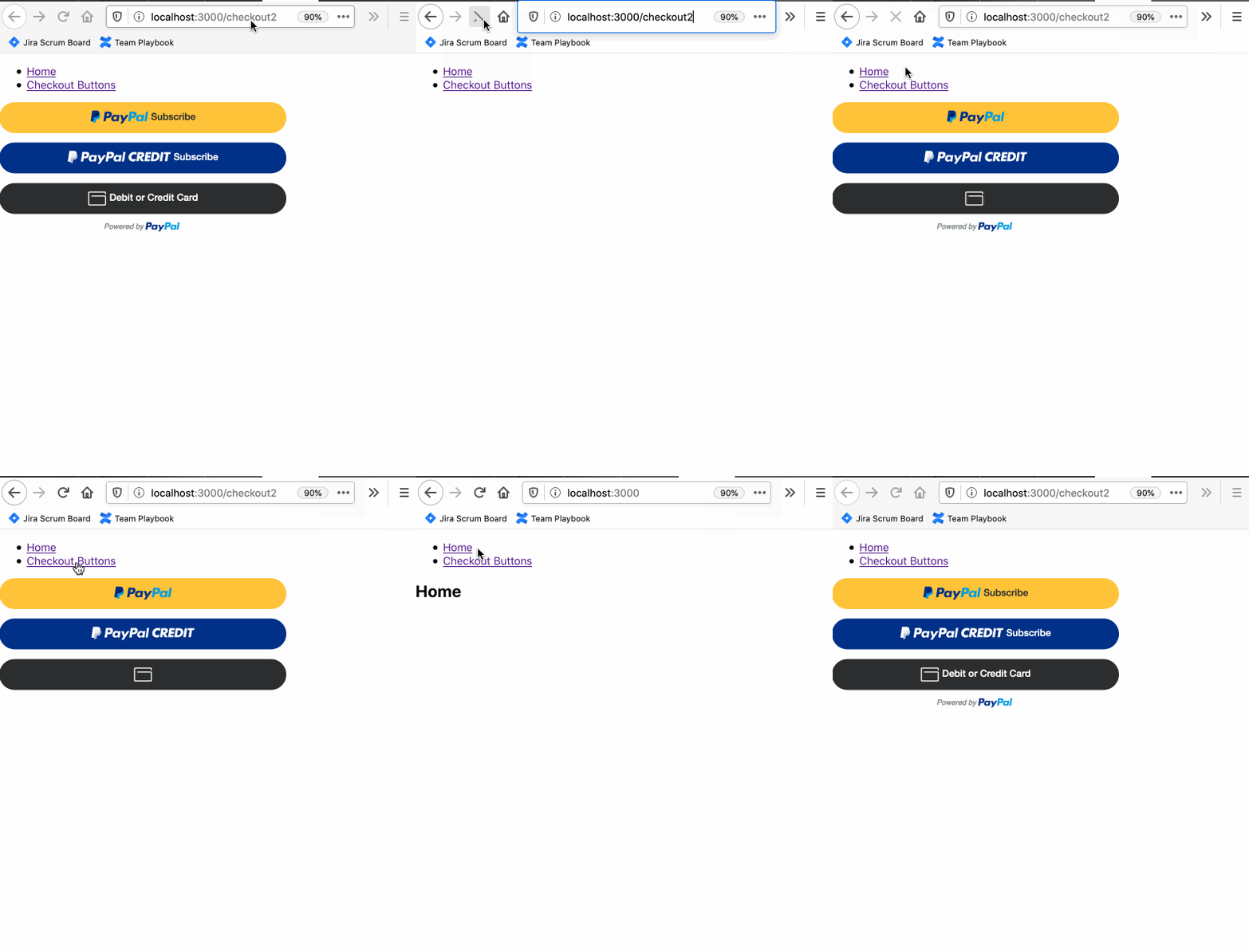
Hi @kimfucious, thanks for opening the issue. One tricky thing with the PayPal JS SDK is you cannot load it twice on the page (at least not with out doing some cleanup work). So we recommend separating out loading from rendering. You can do this by checking window.paypal to see if the JS SDK has already been loaded. If so, just render the buttons. Here's an example to better illustrate:
import React, { useEffect, useRef, useState } from 'react';

export default function Checkout() {
    const paypalContainerRef = useRef(null);
    const [_scriptLoaded, setScriptLoaded] = useState(false);

    useEffect(() => {
        // check if PayPal JS SDK is already loaded
        if (window.paypal) {
            setScriptLoaded(true);
            renderButtons();
        } else {
            insertScriptElement({
                url: 'https://www.paypal.com/sdk/js?client-id=sb',
                callback: () => {
                    setScriptLoaded(true);
                    renderButtons();
                }
            })
        }
    }, []);

    const renderButtons = () => {
        window.paypal
          .Buttons({
            style: {
              shape: "pill",
              color: "gold",
              layout: "vertical",
              label: "subscribe"
            },
            onError: (error) => {
              console.warn(error);
            }
          })
          .render(paypalContainerRef.current);
    };

    return (
        <div
            ref={paypalContainerRef}
            id="paypal-button-container"
            style={{ maxWidth: 420 }}
        />
    );
}

function insertScriptElement({ url, attributes = {}, properties = {}, callback }) {
    const newScript = document.createElement('script');
    newScript.onerror = (err => console.error('An error occured while loading the PayPal JS SDK', err));
    if (callback) newScript.onload = callback;

    Object.keys(attributes).forEach(key => {
        newScript.setAttribute(key, attributes[key]);
    });

    document.head.appendChild(newScript);
    newScript.src = url;
}
 gregjopa
on 27 Jul 2020
gregjopa
on 27 Jul 2020
Thanks for this, @gregjopa
Per your reply, I've removed npm react-load-script and have implemented the below, based on your example:
...
const [scriptLoaded, setScriptLoaded] = useState(false);
const getCurrency = useCallback(() => {
switch (selectedPlan) {
case "ฝรั่งขี้นก":
return "THB";
case "เลขานุการ":
return "HKD";
case "หัวหน้าใหญ่":
return "USD";
default:
break;
}
}, [selectedPlan]);
const getPlanId = useCallback(() => {
switch (selectedPlan) {
case "ฝรั่งขี้นก":
return "P-2Y2777191U406962XXXXXXXX";
case "เลขานุการ":
return "P-7RH42591DG492925XXXXXXXX";
case "หัวหน้าใหญ่":
return "P-32W865918L280584XXXXXXXX";
default:
break;
}
}, [selectedPlan]);
const getPaymentTerms = () => {
switch (selectedPlan) {
case "ฝรั่งขี้นก":
return "250 THB per month";
case "เลขานุการ":
return "25 USD per month";
case "หัวหน้าใหญ่":
return "185 HKD per month";
default:
break;
}
};
const renderButtons = useCallback(() => {
window.paypal
.Buttons({
style: {
shape: "pill",
color: "gold",
layout: "vertical",
label: "subscribe"
},
createSubscription: (data, actions) => {
return actions.subscription.create({
plan_id: getPlanId()
});
},
onCancel: (data) => {
setIsProcessingSubscription(false);
},
onApprove: async (data, actions) => {
try {
setIsProcessingSubscription(true);
const formValues =
subscribingAs === "company" ? subscription : user;
const payload = {
paymentMethod: "paypal",
paypalSubscriptionId: data.subscriptionID,
contactId: currentUserId,
...formValues
};
await dispatch(
subscribingAs === "company"
? saveCompanyRegistrationInfomation(payload)
: updateFormalityUser(payload)
);
setPaymentApprovalDetails(data);
setIsProcessingSubscription(false);
} catch (error) {
console.warn(error);
setError(error);
}
},
onError: (error) => {
console.warn(error);
}
})
.render(paypalContainerRef.current);
}, [currentUserId, dispatch, getPlanId, subscribingAs, subscription, user]);
useEffect(() => {
// check if PayPal JS SDK is already loaded
if (window.paypal) {
setScriptLoaded(true);
renderButtons();
} else {
insertScriptElement({
url: `https://www.paypal.com/sdk/js?client-id=${
process.env.REACT_APP_PAYPAL_CLIENT_ID
}¤cy=${getCurrency()}&vault=true`,
callback: () => {
setScriptLoaded(true);
renderButtons();
}
});
}
}, [getCurrency, renderButtons]);
const insertScriptElement = ({
url,
attributes = {},
properties = {},
callback
}) => {
const newScript = document.createElement("script");
newScript.onerror = (err) =>
console.error("An error occured while loading the PayPal JS SDK", err);
if (callback) newScript.onload = callback;
Object.keys(attributes).forEach((key) => {
newScript.setAttribute(key, attributes[key]);
});
document.head.appendChild(newScript);
newScript.src = url;
};
...
Sadly, I'm still in the same spot, where navigating away and back to the page, throws the following error with the buttons not rendered:
Error: Expected element to be passed to render iframe
I know this is probably me doing something wrong, I just can't figure that out yet.
kimfucious
on 1 Aug 2020
I got a bit frustrated and implemented this react-paypal-button-v2.
While I normally don't like to use packages, if I don't really have to, this seems to work well, and it handles the script loading such that navigating away and back to the page renders the buttons as expected.
I'm gonna look under the hood to see if I can figure out what it's doing right that I'm doing wrong.
kimfucious
on 2 Aug 2020
Hi @kimfucious. Sorry to hear that. I reviewed your code snippet and I think you're close. What does your useRef() implementation look like? I don't see it in the snippet. The container using the ref needs to be in the DOM when rendering to it.
Error: Expected element to be passed to render iframe
I was able to reproduce this error by calling window.paypal.Buttons(options).render(buttonsContainerRef.current) without having the ref in the DOM.
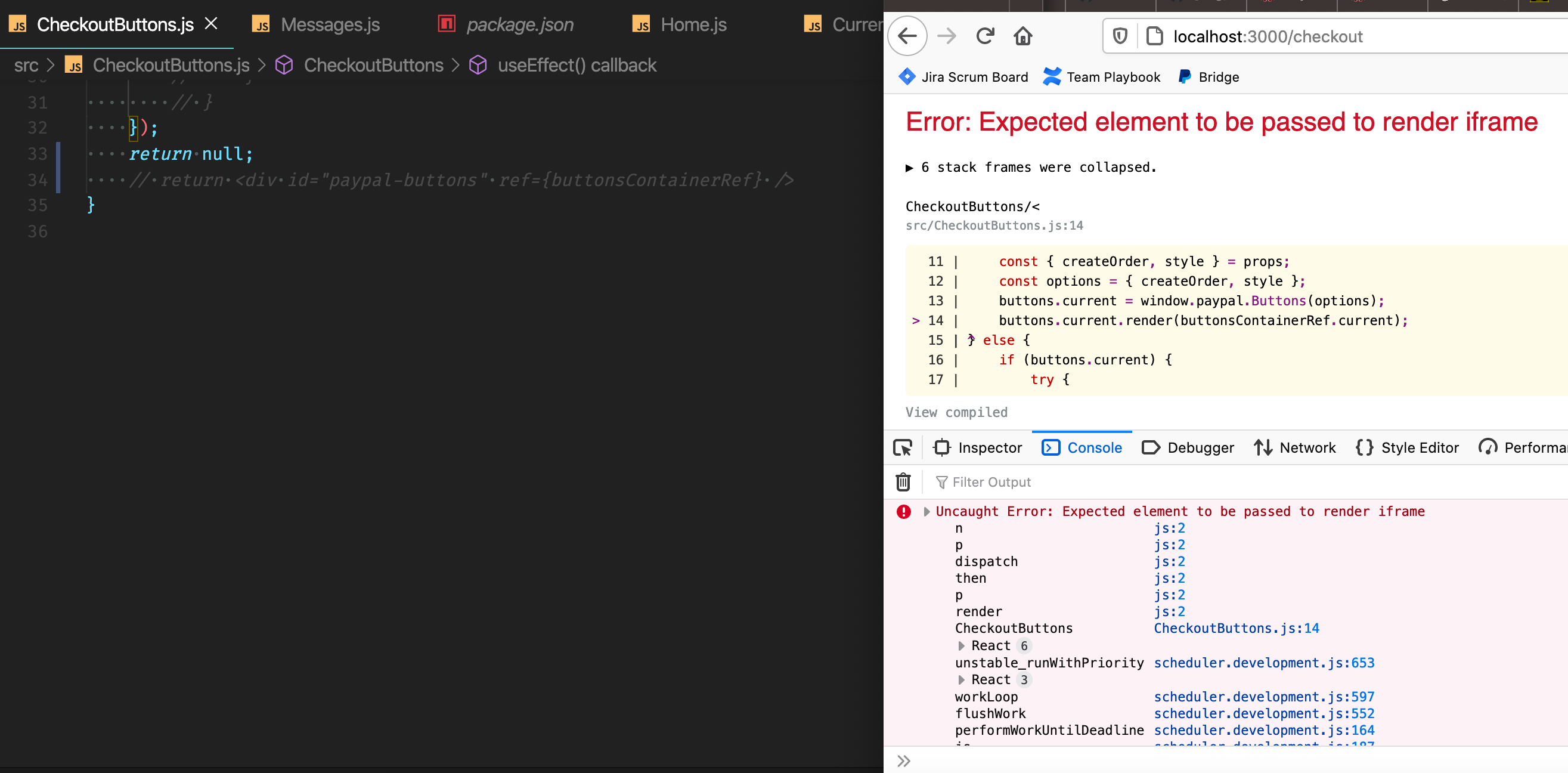
I recommend having your React component always display the div container of the ref like so:
return <div id="paypal-buttons" ref={buttonsContainerRef} />
Note that the react component you mentioned does not use the ref approach and instead uses the react driver shipped with zoid (https://github.com/Luehang/react-paypal-button-v2/blob/master/src/index.tsx#L183). That works too but you can accomplish the same thing with the ref approach.
Please try updating your react component ref implementation to see if that helps. If not, please let me know and we can continue troubleshooting.
gregjopa
on 3 Aug 2020
Thanks @gregjopa for that super-helpful response.
Let me have a go, and I'll reply here soonest.
kimfucious
on 3 Aug 2020
No luck yet...
Below is the code for the payment/subscription page that I'm working on.
useRef is a React hook, that starts out as null (line 9).
Sorry for all the extra noise, but there's going to be some logic surrounding the type of subscription, so it's kind of necessary to illustrate what I'm trying to do.
import React, { useRef, useState, useEffect, useCallback } from "react";
import { Spinner } from "../components/shared/Spinner";
import { useSelector, useDispatch } from "react-redux";
import { useHistory } from "react-router-dom";
import {
updateFormalityUser,
saveCompanyRegistrationInfomation
} from "../actions";
export const SubscriptionPayment = () => {
const paypalContainerRef = useRef(null);
const dispatch = useDispatch();
const history = useHistory();
const {
auth: {
id: { currentUserId }
},
formality: { selectedPlan, subscribingAs },
subscription,
user
} = useSelector((state) => state);
const [error, setError] = useState("");
const [isProcessingSubscription, setIsProcessingSubscription] = useState(
false
);
const [paymentApprovalDetails, setPaymentApprovalDetails] = useState("");
const [scriptLoaded, setScriptLoaded] = useState(false);
const getCurrency = useCallback(() => {
switch (selectedPlan) {
case "ฝรั่งขี้นก":
return "THB";
case "เลขานุการ":
return "HKD";
case "หัวหน้าใหญ่":
return "USD";
default:
break;
}
}, [selectedPlan]);
const getPlanId = useCallback(() => {
switch (selectedPlan) {
case "ฝรั่งขี้นก":
return "P-2Y2777191U406962SL4XXXXX";
case "เลขานุการ":
return "P-7RH42591DG492925AL4XXXXX";
case "หัวหน้าใหญ่":
return "P-32W865918L280584LL4XXXXX";
default:
break;
}
}, [selectedPlan]);
const getPaymentTerms = () => {
switch (selectedPlan) {
case "ฝรั่งขี้นก":
return "250 THB per month";
case "เลขานุการ":
return "25 USD per month";
case "หัวหน้าใหญ่":
return "185 HKD per month";
default:
break;
}
};
const renderButtons = useCallback(() => {
window.paypal
.Buttons({
style: {
shape: "pill",
color: "gold",
layout: "vertical",
label: "subscribe"
},
createSubscription: (data, actions) => {
return actions.subscription.create({
plan_id: getPlanId()
});
},
onCancel: (data) => {
setIsProcessingSubscription(false);
},
onApprove: async (data, actions) => {
try {
setIsProcessingSubscription(true);
const formValues =
subscribingAs === "company" ? subscription : user;
const payload = {
paymentMethod: "paypal",
paypalSubscriptionId: data.subscriptionID,
contactId: currentUserId,
...formValues
};
await dispatch(
subscribingAs === "company"
? saveCompanyRegistrationInfomation(payload)
: updateFormalityUser(payload)
);
setPaymentApprovalDetails(data);
setIsProcessingSubscription(false);
} catch (error) {
console.warn(error);
setError(error);
}
},
onError: (error) => {
console.warn(error);
}
})
.render(paypalContainerRef.current);
}, [currentUserId, dispatch, getPlanId, subscribingAs, subscription, user]);
useEffect(() => {
// check if PayPal JS SDK is already loaded
if (window.paypal) {
setScriptLoaded(true);
renderButtons();
} else {
insertScriptElement({
url: `https://www.paypal.com/sdk/js?client-id=${
process.env.REACT_APP_PAYPAL_CLIENT_ID
}¤cy=${getCurrency()}&vault=true`,
callback: () => {
setScriptLoaded(true);
renderButtons();
}
});
}
return () => {
// how to clean this up?
};
}, [getCurrency, renderButtons]);
const insertScriptElement = ({
url,
attributes = {},
properties = {},
callback
}) => {
const newScript = document.createElement("script");
newScript.onerror = (err) =>
console.error("An error occured while loading the PayPal JS SDK", err);
if (callback) newScript.onload = callback;
Object.keys(attributes).forEach((key) => {
newScript.setAttribute(key, attributes[key]);
});
document.head.appendChild(newScript);
newScript.src = url;
};
return (
<>
<div className="container d-flex flex-column align-items-center justify-content-center text-center vh-100">
{scriptLoaded ? (
<>
<h1 className="display text-muted mb-3">Subscription Payment</h1>
{error ? (
<>
<p className="lead mb-3">Something's not right</p>
<p className="lead mb-3 text-danger">{error}</p>
<button
className="btn btn-outline-primary my-3"
onClick={() => {
setError("");
alert("I don't do anything yet!");
}}
// onClick={() => history.push("/")}
>
Try Again
</button>
</>
) : null}
{isProcessingSubscription && !error ? (
<>
<Spinner color="primary" size={72} type="moon" />
<p className="lead mb-3 mt-3">Processing...</p>
<button
className="btn btn-outline-primary my-3"
onClick={() => history.push("/")}
>
Cancel
</button>
</>
) : null}
{!isProcessingSubscription && paymentApprovalDetails ? (
<>
<p className="lead mb-3">
Thank you for subscribing to Thai Formality!
</p>
<button
className="btn btn-outline-primary my-3"
onClick={() => history.push("/")}
>
Continue
</button>
</>
) : null}
{!isProcessingSubscription && !paymentApprovalDetails ? (
<>
<p className="lead mb-3">
You are about to pay for a subscription to Thaiformality.
</p>
<ul className="list-group mb-4 w-100" style={{ maxWidth: 480 }}>
<li className="d-flex align-items-center justify-content-between list-group-item">
<span className="lead">Selected Plan:</span>
<span className="lead">{selectedPlan}</span>
</li>
<li className="d-flex align-items-center justify-content-between list-group-item">
<span className="lead">Subscription price:</span>
<span className="lead">{getPaymentTerms()}</span>
</li>
</ul>
<div
className="w-100"
ref={paypalContainerRef}
id="paypal-button-container"
style={{ maxWidth: 420 }}
/>
<button
className="btn btn-link text-muted"
onClick={() => {
dispatch({ type: "STOP_SUBSCRIPTION_PROCESS" });
history.push("/");
}}
>
cancel
</button>
</>
) : null}
</>
) : (
<Spinner color="primary" size={72} type="moon" />
)}
</div>
</>
);
};
@kimfucious I haven't had a chance to run this yet but one thing jumps out at me. I noticed that you're conditionally rendering the div containing the ref:
{!isProcessingSubscription && !paymentApprovalDetails ? (
    <>
    <div
        className="w-100"
        ref={paypalContainerRef}
        id="paypal-button-container"
        style={{ maxWidth: 420 }}
    />
This container needs to be in the DOM before .render(paypalContainerRef.current) runs. For troubleshooting purposes can you try moving it so it's always in the DOM?
 return (
    <>
      <div className="container d-flex flex-column align-items-center justify-content-center text-center vh-100">
      // test out having the div container always render regardless of state
      <div
        className="w-100"
        ref={paypalContainerRef}
        id="paypal-button-container"
        style={{ maxWidth: 420 }}
      />
        {scriptLoaded ? (
          <>
            <h1 className="display text-muted mb-3">Subscription Payment</h1>
If that works, then try adding it back under the scriptLoaded conditional.
I also noticed you're removing the div container from the DOM in the onApprove() callback to show your own loading state. Removing the container while the order is still processing seems like it will break things. If you really need to "hide" it can you try doing that with css instead? That way the container with the ref will still remain in the DOM while you're finalizing a subscription.
gregjopa
on 4 Aug 2020
Thanks, @gregjopa
I got distracted with something, and I've not tried your suggestions yet.
Kindly keep this open, and I'll report in when I can.
Best,
Kim
kimfucious
on 7 Aug 2020
Hi @kimfucious, just wanted to follow up. Have you had time to test out the suggestions?
gregjopa
on 11 Aug 2020
Hi @gregjopa,
Thanks for the pro follow-up.
I got a chance to work on this, and you are correct.
Basically, I was using React conditional logic to show the buttons after the script was loaded for UX reasons, which resulted in the PayPal container not being in the DOM, as you mentioned.
Per your suggestion, I've changed things so that the PayPal container is always rendered. The UX now is such that the the PayPal container is given a height of 0 until the script is loaded. This effectively hides the blank spot on the screen during the time-window when the script is loading.
I've put a spinner in there that does get conditionally rendered, based on whether or not the script is loaded, so that the user knows something is happening while the script loads. Though it's only a second or so, it's a better for the user, IMHO.
...
<div
  className={`${
    isScriptLoaded && !isApproved && !error // isApproved is set to true upon "onApprove" in renderButtons()
      ? "animate__animated animate__fadeIn" // This project uses the Animate.css library
      : "no-height" // this is just a custom class with `display: none and height: 0`;
  } w-100`}
  ref={payPalContainerRef}
  id="paypal-button-container"
  style={{ maxWidth: 420 }}
/>
{!isScriptLoaded && !error ? (
  <div
    className={`d-flex justify-content-center align-items-center ${
      !isScriptLoaded
        ? "animate__animated animate__fadeIn"
        : ""
    }`}
    style={{ height: 132 }}
  >
    <Spinner color="muted" size={72} type="moon" />
  </div>
...
With this, the button is still there upon navigating away and back to the the page.
I had to work out a few kinks when onApprove happens, but I won't bore you with those details.
All in all, your expert advice has got me where I wanted to be, and I can do away with an unnecessary library.
Thank you very much for your superb support! 🌮
kimfucious
on 15 Aug 2020
Thank you for the kind words @kimfucious! You made my day 😊
It's great to hear your react integration is successfully working. I think the loading spinner is a good idea as well. I'm going to close this one out. Please open up a new issue if you encounter any other integration challenges 🍻
gregjopa
on 17 Aug 2020
Related issues
 JeromeDeLeon
·
4Comments
JeromeDeLeon
·
4Comments
 VivekVikranth
·
6Comments
VivekVikranth
·
6Comments
 gastonyelmini
·
3Comments
gastonyelmini
·
3Comments
 hosseinfs
·
6Comments
hosseinfs
·
6Comments
 AashutoshPrashar
·
5Comments
AashutoshPrashar
·
5Comments
Most helpful comment
Issue-Label Bot is automatically applying the label
🐞 bugto this issue, with a confidence of 0.95. Please mark this comment with :thumbsup: or :thumbsdown: to give our bot feedback!Links: app homepage, dashboard and code for this bot.