Paypal-checkout-components: [Feature] Vue.js examples
🚀 Feature Proposal
vuejs integration
Motivation
I see angular and react in examples but not vuejs and we're broadly using vuejs on our company projects
 realtebo
All 18 comments
Hi @realtebo, which Angular and React examples are you referring to? Can you drop a link here?
We're working on some clearer React, Angular and Vue docs right now and publishing them soon. We'd love your feedback on them!
/cc @mnicpt
 mstuart
on 18 Jun 2020
realtebo
on 18 Jun 2020
mstuart
on 18 Jun 2020
realtebo
on 18 Jun 2020
@realtebo Thank you for reaching out! As Mark mentioned, we have been working on providing some clearer docs around Single Page Application integration examples. I will add this request to provide a driver and a working example for Vue.js as well. In the meantime, I can help you with something in the short term if you would like to help you integrate with Vue.js.
 mnicpt
on 18 Jun 2020
mnicpt
on 18 Jun 2020
@realtebo We will be publishing a doc soon that includes Vue.js integration. Here are the sections related to Vue.js:

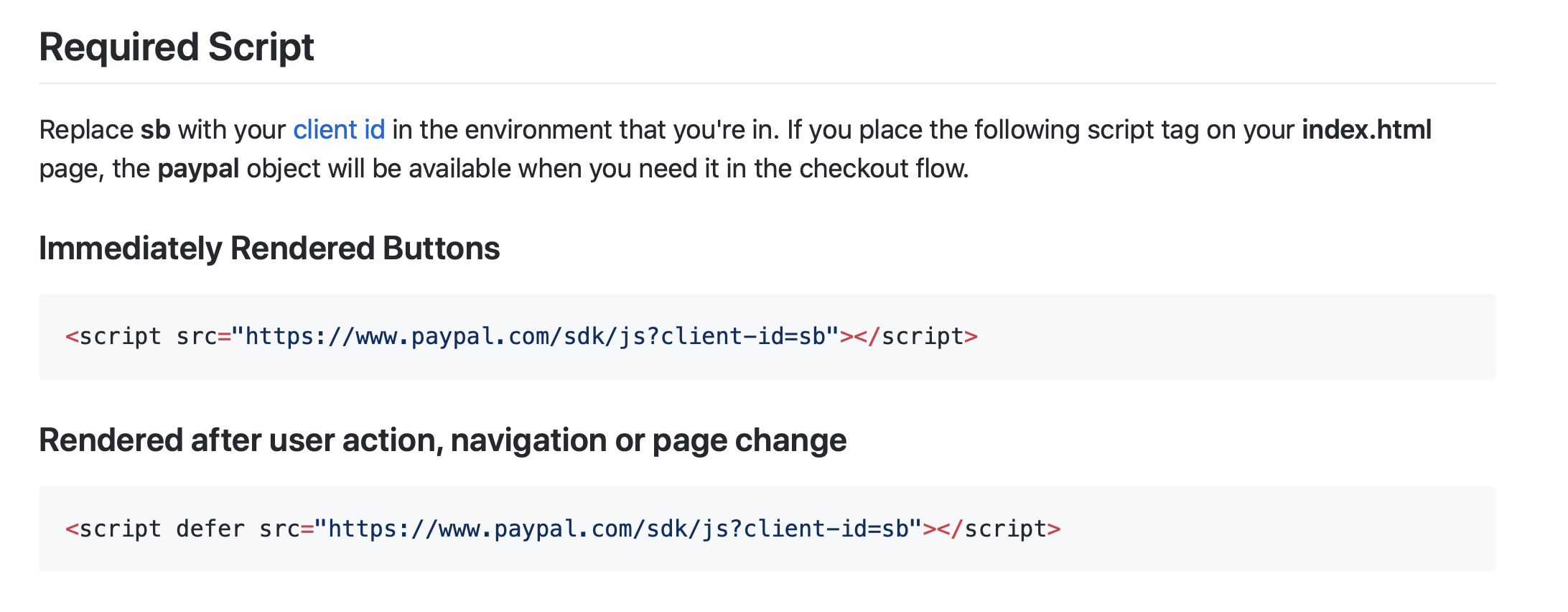

The entire doc has been submitted for review and should be live soon. Please provide feedback.
mnicpt
on 18 Jun 2020
@realtebo Wanted to reach back out to you as what I've posted above doesn't until Vueis initialized. The updated docs will ensure this is the case.
mnicpt
on 23 Jun 2020
@mnicpt I forwarded the linkt to this thread to my coworker who inherited the task about paypal and vue. Personally, I'm sorry, I've not tried yet, but I'am of course interested and so I'm here to confirm that I appreciate your help
realtebo
on 23 Jun 2020
The update would be this: const PayPalButton = paypal.Buttons.driver('vue', window.Vue);
mnicpt
on 23 Jun 2020
@realtebo Here is the full example with some other changes as well: ```
```
mnicpt
on 23 Jun 2020
paypal.Buttons is undefined..
 z1haze
on 8 Feb 2021
z1haze
on 8 Feb 2021
@z1haze Have you loaded the JS SDK prior to executing the code above?
mnicpt
on 9 Feb 2021
Cannot change the amount it keeps defaulting 0.01
it's as if createOrder is not even getting called.
the buttons are showing up just fine BTW
`import Vue from "vue";
// import { PayPalButton } from "boot/paypal";
const PayPalButton = paypal.Buttons.driver("vue", Vue);
export default {
components: {
"paypal-buttons": PayPalButton
},
computed: {
createOrder(data, actions) {
console.log(data);
console.log(`-----------------------------------`);
console.log(actions);
return actions.order.create({
purchase_units: [
{
amount: {
value: "20.00"
}
}
]
});
},
onAuthorize(data, actions) {
console.log(data);
console.log(`-----------------------------------`);
console.log(actions);
return actions.order.capture();
}
}
};
`
 Theorian
on 10 Feb 2021
Theorian
on 10 Feb 2021
Bomp
 souldia18
on 10 Feb 2021
souldia18
on 10 Feb 2021
@z1haze Have you loaded the JS SDK prior to executing the code above?
Yes, i figured out my issue. For whatever reason you guys decided to change from paypal.Button to paypal.Buttons` when going from the checkout.js to the sdk. was confusing.
z1haze
on 10 Feb 2021
@Theorian I wrote my own component that extends their vue driver. It actually worked pretty well. you just have to make sure you are loading the correct sdk (i had an issue there). I am happy to share it with you.
<paypal-buttons env="sandbox" />
<template>
    <!-- eslint-disable-next-line vue/attribute-hyphenation  -->
    <paypal-buttons env="sandbox" :onApprove="paypalOnApprove" :createOrder="paypalCreateOrder" />
</template>

<script>
import Vue from 'vue';

export default {
    components: {
        'paypal-buttons': window.paypal.Buttons.driver('vue', Vue)
    },

    data () {
        return {
            paypalRequestId: ''
        };
    },

    methods: {
        paypalCreateOrder () {
            return this.$store.dispatch('paypalCreate')
                .then(({data}) => {
                    this.paypalRequestId = data.requestID;

                    return data.token;
                });
        },

        paypalOnApprove (data) {
            const formData = {
                requestId           : this.paypalRequestId,
                billingAgreementFlag: false,
                paymentID           : data.paymentID,
                payerID             : data.payerID,
                isPayPalCredit      : false
            };

            return this.$store.dispatch('paypalSubmit', formData)
                .then(() => {
                    // do something
                });
        }
    }
};
</script>
this reminds me -- someone at paypal please update your lib so that we can pass the props down to the component the recommended way prop-name instead of propName is what is recommended -- so :create-order and :on-approve would be correct here
z1haze
on 10 Feb 2021
I'm pretty sure I'm including the correct SDK at the top of the file as
outlined in their documentation. I wish this actually helped me it seems
like because you're using VUEX and you didn't include everything. I'm not
even able to see where the data variable is coming from.
I really wish established companies would provide better documentation.
Although I really appreciate all of your help @z1haze
On Wed, Feb 10, 2021 at 10:23 AM Stephen Hendricks notifications@github.com
wrote:
@Theorian https://github.com/Theorian I wrote my own component that
extends their vue driver. It actually worked pretty well. you just have to
make sure you are loading the correct sdk (i had an issue there). I am
happy to share it with you.
Related issues
 Warix3
·
4Comments
Warix3
·
4Comments
 hosseinfs
·
6Comments
hosseinfs
·
6Comments
 MrMooky
·
3Comments
MrMooky
·
3Comments
 PhilibertDugas
·
5Comments
PhilibertDugas
·
5Comments
 deejbee
·
5Comments
deejbee
·
5Comments
Most helpful comment
@Theorian I wrote my own component that extends their vue driver. It actually worked pretty well. you just have to make sure you are loading the correct sdk (i had an issue there). I am happy to share it with you.
<paypal-buttons env="sandbox" />this reminds me -- someone at paypal please update your lib so that we can pass the props down to the component the recommended way
prop-nameinstead ofpropNameis what is recommended -- so :create-order and :on-approve would be correct here