Paypal-checkout-components: Paypal Smart Payment buttons cause error when selecting credit card
Hello there.
I've implemented Paypal Smart Payment buttons, which worked fine for a couple of weeks. After that, I started receiving complaints from my costumers about them not being able to pay with the credit cards the plugin allows (visa, master card and american express). I could not reproduce the issue inmediately (and still do not know exactly how to reproduce it) but lately with my own PC I've faced the issue. Leaving some screen shots here:

Also, I'm calling the api trought the following url:
https://www.paypal.com/sdk/js?client-id=
Im writting from Mexico. We have faced this issue trougth Windows, MacOS and Android. @khanghoang
Thanks in advance for your help!
Greetings
 cerecerorodrigo
All 81 comments
@khanghoang could you take a look? Thanks!
 bluepnume
on 8 Oct 2019
bluepnume
on 8 Oct 2019
Same error here from Brazil, including even the demo in the documentation (https://developer.paypal.com/docs/checkout/#try-the-buttons) throws "Something went wrong. We'll take you back to checkout so you can try again." when credit card selected.
Edit.: in my case, the error is fired on Firefox and Safari, on Chrome the popup (not inline) opens even when clicking the card brands.
 leomp12
on 16 Oct 2019
leomp12
on 16 Oct 2019
When I set locale param an error is logged on console after selecting a card, would it help if i paste the error stack here?
Also, I've tried with debug param and didn't see any debug related to this error specifically.
leomp12
on 16 Oct 2019
Same bug happens here. But no error is shown on console, even using locale parameter. Any news on this?
Also, I have noticed the same error on Smart Buttons demo site.
 fstilman
on 26 Oct 2019
fstilman
on 26 Oct 2019
In my case standard card fields didn't work at all, I talked to the people of PayPal Brazil and they confirmed me it's not available for Brazil yet.
Not sure, but may not be available for Mexico either...
leomp12
on 4 Nov 2019
@leomp12 @fstilman sorry for the late reply, for some reason this wasn't on top of my inbox.
As of today, Standard Card Fields doesn't support buyers in MX, BR and RU. The popup will be shown after buyers in those countries click on the credit card icons. (you can test it by a) passing the locale to the sdk's url or b) setting en_MX as your primary locale in your browser)
We also do another release to remove merchants from those countries out of the blacklist, which in turn resolves the error message in your screenshot.
Please let me know if you have any question. I'm more than happy to help.
 khanghoang
on 5 Nov 2019
khanghoang
on 5 Nov 2019
I still have it on windows using Chrome. Weird some users can pay and some cannot since it seems to not be supporting Mexico
cerecerorodrigo
on 8 Nov 2019
I'm getting the same error from Brazil on a Safari set to english.
It shows a black button "Debit or Credit Card" that starts the inline flow.
If I set Safari language to portuguese (Brazil) then it renders the credit cards buttons (visa, mastercard, ames, etc) that starts the popup flow.
It seems the SDK can't detect my country on Safari, unless I set it to my country language.
 guimabdo
on 9 Dec 2019
guimabdo
on 9 Dec 2019
@guimabdo
In my case standard card fields didn't work at all, I talked to the people of PayPal Brazil and they confirmed me it's not available for Brazil yet.
Not sure, but may not be available for Mexico either...
Mesmo no popup flow você vai acabar tendo problemas depois com parcelamento, na verdade segundo o pessoal do PayPal Brasil nem esta Checkout API funciona pra nós ainda.
Então apesar de depreciado o jeito é usar o checkous.js https://developer.paypal.com/docs/archive/checkout/ e Payment API...
leomp12
on 9 Dec 2019
when i try to pay through debit or credit card payment in Smart Payment Buttons in cc avenue ,i'm getting the same error "something went wrong please try again"
i got it working
When i gave proper address i got it working
i think it's the address issue. we provide a test address details in sandbox testing.instead of that provide a proper address and zip code related to the selected state.
 unni5593
on 30 Dec 2019
unni5593
on 30 Dec 2019
I'm getting the same issue here in the US. It happens both on the live and sandbox servers. Clicking the _Debit or Credit Card_ button brings up the proper form, but when you enter the payment information and click _Pay Now_ in the inline form, you just get spinning arrows followed by "Something went wrong. We'll take you back to checkout so you can try again." If I'm reading the console correctly, there isn't even any network traffic while the arrows are spinning.
Clicking the _Try Again_ button displays a popup window which works properly.
 samalone
on 11 Jan 2020
samalone
on 11 Jan 2020
I'm facing the same issue testing in the sandbox environment. Only pay with PayPal works. Credit or debit card shows the next message: "Something went wrong. We'll take you back to checkout so you can try again". However the transaction succeeds when I try US cards from the card generator.
EDIT: I got it working for Mexico test cards. I had to specify the locale when loading the javascript API
<script src="https://www.paypal.com/sdk/js?client-id=CLIENT_ID¤cy=MXN&locale=es_MX"></script>
A pop-up window appears requesting the card data. It won't let you procceed to the payment unless you also add the data (email, password and birthdate) to create a new PayPal account. After that the payment succeeds.
 SuarezAlexis
on 23 Jan 2020
SuarezAlexis
on 23 Jan 2020
Hi there guys first time here. Sorry in advance for my english, I am from Costa Rica so english is not my mother language.
It is "great" not to feel alone with this issue I am having since months ago and seems PayPal has not fixed it so far.
I am creating an app that use the smart payment buttons which I consider are very useful, except for this annoying error.
Hey @khanghoang, how are you man? Any news from PayPal? For me it is extremely needed to be solved this ASAP.
Thank you in advance for you help.
Anyone else have the solution for this?
Thank you guys!
Regards,
Luis
 dingomecloud
on 23 Jan 2020
dingomecloud
on 23 Jan 2020
hi folks, I'm really sorry for the late reply.
to all: we display the Something went wrong. We'll take you back to checkout so you can try again message for various errors. It could be:
- Wrong addresses
- Wrong card numbers or cards have been used multiple times (this issue is on us since it should work on sandbox env)
@samalone what was the credit card you used to test? The 4111 1111 1111 1111 does not work for the Inline Guest.
@SuarezAlexis can you please post the card generator link you've found here so folks can use it?
@dingomecloud can you elaborate it? do you have a website that I can test it myself?
khanghoang
on 24 Jan 2020
https://developer.paypal.com/developer/creditCardGenerator/
It works just fine for me. I only had to specify the locale.
SuarezAlexis
on 24 Jan 2020
Hi guys and thank you @khanghoang for your response.
Khang, you wrote that the error shoud/must be because:
- Wrong addresses
- Wrong card numbers or cards have been used multiple times (this issue is on us since it should work on sandbox env)
Ok, about the wrong addresses, is not my case, the addresses are complete and properly specified.
About the wrong cards is not my case either because we are trying this months ago and the credit cards numbers are good in this side.
Anyway, this Something Wrong should not appear Khang. A simple validation could solve this and I think this is not the case.
I appreciate if you can take a look of my code at:
Thank you so much guys and @khanghoang.
Regards,
Luis
dingomecloud
on 28 Jan 2020
I had the error again minutes ago and as you can see @khanghoang, the data submitted is correct.
dingomecloud
on 28 Jan 2020
I had the same error, and after I read @khanghoang response and using a correct credit card to test it worked fine; although this is still an issue to show such a generic error message to an incorrect field on a form or using an invalid testing card.
I was able to deliver a better user experience with a change on the behavior of this button when it is specified the onShippingChange callback. This causes the button to open another window, the same as the PayPal button does, but to enter the credit/debit card information as you can see in the image below. This doesn't fix the issue but this window provides the user better feedback.

Edit: Here is the code inside from the live demo at the back of the picture to reproduce
`
<!-- Include the PayPal JavaScript SDK -->
<script src="https://www.paypal.com/sdk/js?client-id=sb¤cy=USD"></script>
<script>
// Render the PayPal button into #paypal-button-container
paypal.Buttons({
// Set up the transaction
createOrder: function(data, actions) {
return actions.order.create({
purchase_units: [{
amount: {
value: '0.01'
}
}]
});
},
// Finalize the transaction
onApprove: function(data, actions) {
return actions.order.capture().then(function(details) {
// Show a success message to the buyer
alert('Transaction completed by ' + details.payer.name.given_name + '!');
});
},
//Changes credit/debit button behavior to "old" version
onShippingChange: function(data,actions){
//if not needed do nothing..
return actions.resolve();
}
}).render('#paypal-button-container');
</script>
`
 GJQP
on 11 Feb 2020
GJQP
on 11 Feb 2020
Hi @GJQP and @khanghoang, I hope you are well guys!
Gustavo, let me try to understand... are you saying to me that you could change the "mode" of payment and by default you show this "old/version" first?
I agree that this "popup" window is a better experience for the user!!! You are great man!
How can I do this Gustavo?
My email is [email protected], we can talk about it via email if you need or want.
Finally good news after a long time.
By the way, I will tell you guys what Support from PayPal told me in a lot of emails we had like 15 days ago.
Literally, they say this generic error can be produced by a lot of reasons, but never told me even one acceptable reason to believe, I think even them, just don't know exactly what is causing this, I could bet it is provoked by a bad line in the Javascript. They checked my integration and they told me was right and without error mistakes, so the error comes from PayPal.
@khanghoang, dude, we as you can see, we need a satisfactory closing of this case, I mean, we need this SPB be totally finished and optimized, this "phantom" error could kill our initiatives and we had worked SO HARD to make our apps function correct, so it is necessary PayPal do their part. I could bet it is something easy to fix.
Thank you guys!
dingomecloud
on 11 Feb 2020
Our solution was to switch to Stripe.
samalone
on 11 Feb 2020
@khanghoang : how is status of this error?
 h3d-thanhlx
on 29 Feb 2020
h3d-thanhlx
on 29 Feb 2020
Hi Paypal team, we are also facing the same issue, when we enter the credit card information on production, it gives us the same error that please try again.
I tried debugging and the hook onCancel was getting triggered with the orderId, which was strange as i didn't cancel the order.
Would appreciate if the team can prioritise this as multiple people are facing the same issue.
 mc-lovin
on 11 Apr 2020
mc-lovin
on 11 Apr 2020
@mc-lovin would you mind creating another issue for your case?
@dingomecloud sorry for the late reply. Can you please adhere your testing page?
@h3d-thanhlx what was the issue in your case exactly? do you have a testing page?
khanghoang
on 13 Apr 2020
First time going live, and I get this Something went wrong error... back to check out page... type in my Mastercard... and I get "cannot accept this card, please try another card" error. What's going on inPaypal? After founders all cashed out, no more enthusiasm left?
 monoto
on 13 Apr 2020
monoto
on 13 Apr 2020
@monoto I'd contact the Customer Support team in your case since they have more context about your transaction and your account.
khanghoang
on 14 Apr 2020
@khanghoang Does smart buttons accept credit/debit cards without paypal account? My account allows guest purchases. And I still get "Cannot add this card, try a different card." error.
monoto
on 15 Apr 2020
@khanghoang And the "something went wrong" error persists.
monoto
on 15 Apr 2020
@monoto yes, SPB has an option for credit/debit cards.
There are a lot of reasons that can cause the "something went wrong" error, some of them are:
- Wrong billing addresses.
- Wrong card numbers or that card have been used multiple times on multiple accounts.
- Denied by PayPal Risk.
khanghoang
on 15 Apr 2020
Woah PayPal, looks like you really need to pull this together, sorry but this is a nightmare.
 fabiosussetto
on 19 Apr 2020
fabiosussetto
on 19 Apr 2020
When I rose this issue I was told this error was due to unavailability in my country, but as some users have stated (including @samalone) even this is an issue in the US. This answer is a little bit discouraging, since the buttons work every now and then at the "card payment option" as they are supposed, but suddenly stop working for no reason. Therefore, the problem should not be the country, but the software itself. This problems is arising from all over the world guys!
My solution so far has been disabling this option and allowing only costumers to pay with their PayPal accounts, but this has meant monetary looses for both PayPal and my personal business. Please developers, take this issue seriously and stop going around it or state permanently that you do not want to solve it. This thread has been around for months now and no specific answer has been given on how to overcome it.
cerecerorodrigo
on 19 Apr 2020
Hi everybody! Sorry for my english in advance, it is not my mother language.
They say (PayPal) this error is "by design". They say this error can be for a lot of reasons. It is sad. Take a look of the response from @khanghoang :
- Wrong billing addresses.
- Wrong card numbers or that card have been used multiple times on multiple accounts.
- Denied by PayPal Risk.
They say everything is fine. Of course it is not and guys from PayPal, What do you need to understand we need you fix this bug entirely?
Thanks to Gustavo from Venezuela (a genius), he helped me to "solve" it by disabling the "new" interface and putting back the "old" interface. Thank you again Gustavo @GJQP. Gustavo was the man, say thanks to him!
Do this:
Follow the steps to add the smart payment options buttons on the web page, you can copy the code at the live demo:
https://developer.paypal.com/demo/checkout/#/pattern/checkoutInside the Buttons add the following property onShippingChange. As you can see on the file attached.
No more buggy form inside your webpage!
You can download the demo he made from my webpage at:
http://dingome.com/GitHub/issue.html
PayPal developers, whats is going on? I do not think you cannot solve this.
@khanghoang , It is something you are not telling us? It is PayPal to kill this in the very next future?
I hope this can help you as helped me to "patch" this while the PayPal Developers fix this at all.
Regards,
Luis
dingomecloud
on 19 Apr 2020
@khanghoang I think this should be fix. Having generic errors will confuse any client when making a purchase. I think the errors should be specific. For Example today I just run into this error but I though there was something wrong with the PayPal API...... terms out thats by design thats not a good design plan.
 daiky00
on 20 Apr 2020
daiky00
on 20 Apr 2020
@khanghoang, I think we all agree with @daiky00.
As @cerecerorodrigo said before: "This thread has been around for months now and no specific answer has been given on how to overcome it."
Really @khanghoang, dude, we really do not want to disturb you with this and actually, we are frustrated and sorry. I think you are a nice person who is trying to do something and you take time from your personal time to be here and say something, but we need your mates at PayPal do the effort to fix this and I think you and us will be very happy!
Personally, I consider the Smart buttons as a very great and cool thing. This is the reason I continue implementing it into my app.
Thank you @khanghoang for taking the time to read and pass our concerns to your team.
dingomecloud
on 20 Apr 2020
Folks, thanks for the feedback.
@daiky00 @dingomecloud I never said that this is fine. In fact, I've mentioned in another issue that I personally think the message is vague and we need to work on it. However, we need to prioritize it with other tasks as well.
I genuinely try to help. That's why I always ask for a test page or anything that I can test. It's impossible for me to see what went wrong without any example.
Also, in the network tab, there is a "graphql" request when the buyers submit the form. So if you can grab the "paypal-debug-id" in the response header for that request, it will be extremely helpful.
khanghoang
on 20 Apr 2020
Hi @khanghoang and friends of battle,
Khang, dude, really thank you for your time man. We understand you work for PayPal and well, there are a lot of more tasks you and your team surely have to do and really I know and feel you that you genuinely try to help, we know that and we say thank you.
The main thing here dude, is that it seems that you is like you do not believe in us, I mean, how many other proofs you need to know that this "Something wrong" problem is happening?
I will create today, a test page where you can check this by yourself in case you never seen this issue.
Also, can you tell me please where is this "Network tab" and the GraphQL? I do not know what you are talking, but I will do anything you need to help you to fix this.
Thank you again Khang and sorry for our frustration.
Regards,
Luis
dingomecloud
on 20 Apr 2020
@dingomecloud I think I found the gaps between us.
You can follow this gist https://gist.github.com/khanghoang/4c85b758ad9ba057191303579aba7c7e to get the debug-id.
That debug-id is really helpful to pull the logs for the transaction, and either I or the PayPal's customer team can use it to see what happens to the transaction.
PLEASE ONLY COPY THE DEBUG ID, DO NOT TAKE SCREENSHOT. Because the sensitive information of the form might be in the screenshot.
khanghoang
on 21 Apr 2020
Thanks for putting this doc together Khang! Could you work with Tiona to get this included in the main troubleshooting section of the docs on developer.paypal.com? Thanks!
bluepnume
on 22 Apr 2020
Hi @khanghoang, thank you so much!
I will take a look and try it in a couple of days when I finish some things here.
Thank you and any help it is super very well received.
Thank you @bluepnume for your help too!
dingomecloud
on 23 Apr 2020
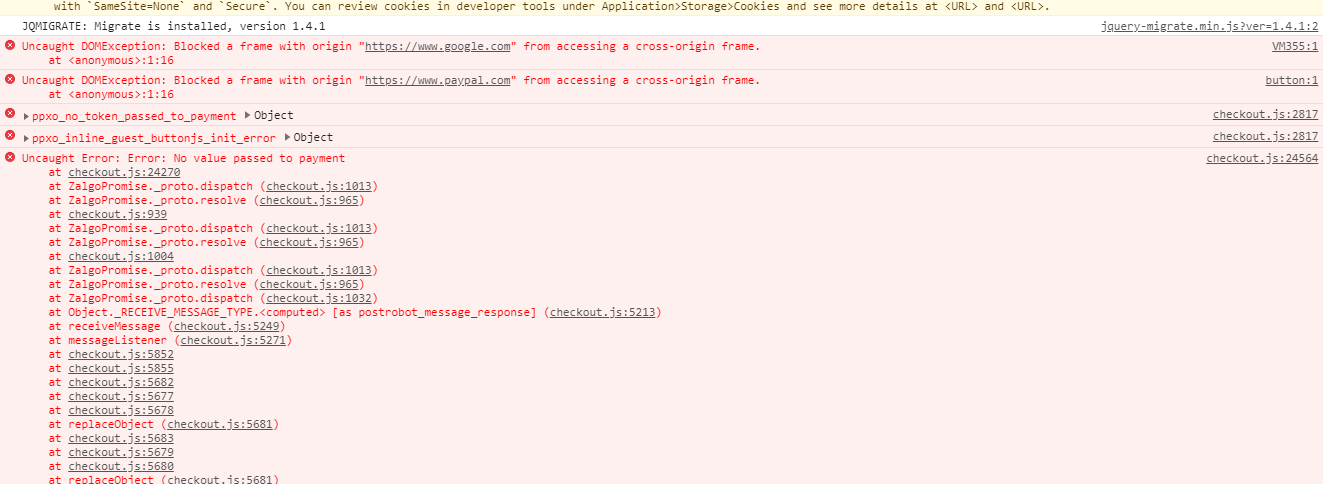
I have the same problem when trying to pay with the credit card buttons
 graficar23
on 24 Apr 2020
graficar23
on 24 Apr 2020
Excellent @graficar23 , any proof/detail you can add about this issue, will help PayPal developers to fix it!
Thank you again!
dingomecloud
on 24 Apr 2020
@graficar23 I think you forgot to return a Promise from the payment function. Can you send us the code that can reproduce the issue?
khanghoang
on 27 Apr 2020
I was facing the same issue in sandbox and was able to solve it by generating a new credit card
https://developer.paypal.com/developer/creditCardGenerator/ with my account, apparently the issue was solved with that.
 starl1n
on 3 May 2020
starl1n
on 3 May 2020
@starl1n I've tried to generate new credit card multiple times but still didn't work :(
 migumelar
on 4 May 2020
migumelar
on 4 May 2020
@igumigu could you please follow this gist to get the debug id https://gist.github.com/khanghoang/4c85b758ad9ba057191303579aba7c7e
I may help you to figure out what went wrong with your tests.
khanghoang
on 5 May 2020
Facing the same issue in production.
When the credit/debit option is chosen, it first detects incorrect country US ( i am from India )

Then, on selecting the correct country ( India ) and filling the credit card form with actual credit card details it shows the "Something went wrong. We'll take you back to checkout so you can try again." error.
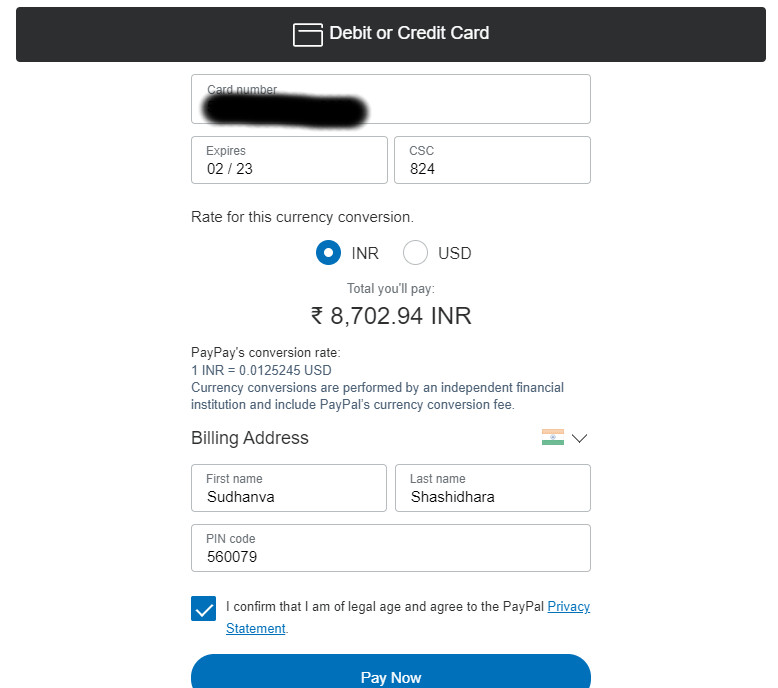
I was able to get the debug id and the counter.cgi request url:
paypal-debug-id: 4cbf536b5c942
counter.cgi => https://b.stats.paypal.com/v2/counter.cgi?p=1MA49056W8427920J&s=INLINE_GUEST
Any additional information to reduce error cases would be really helpful.
 SudhanvaShashidhara
on 7 May 2020
SudhanvaShashidhara
on 7 May 2020
I have also seen a cross-origin error come up on occasion but unable to reproduce that consistently.

SudhanvaShashidhara
on 7 May 2020
Excellent @SudhanvaShashidhara, your approach help so much for our cause that is to provide the necessary information to the PayPal developers!
Thank you so much!
I think/hope we are close to detect the bug is causing this error!
dingomecloud
on 7 May 2020
@SudhanvaShashidhara all right, let's talk about those issues separately:
When the credit/debit option is chosen, it first detects incorrect country US ( i am from India )
It could be PayPal SDK script was loaded with the locale=en_US set in the URL.
Then, on selecting the correct country ( India ) and filling the credit card form with actual credit card details it shows the "Something went wrong. We'll take you back to checkout so you can try again." error.
Standard Card Fields doesn't fully support for IN yet. The reason that you saw the form in the first place was because the locale was hard-coded to en_US (I'm not 100% sure, though. I need to check your test page)
I have also seen a cross-origin error come up on occasion but unable to reproduce that consistently.
And this is why we don't fully support in IN yet.
khanghoang
on 7 May 2020
Hey @khanghoang, Thanks for the reply.
It could be PayPal SDK script was loaded with the locale=en_US set in the URL.
This hasn't been done in our case. The PayPal SDK script we use is https://www.paypal.com/sdk/js?client-id=<
Standard Card Fields doesn't fully support for IN yet. The reason that you saw the form in the first place was because the locale was hard-coded to en_US (I'm not 100% sure, though. I need to check your test page)
Although the screenshots and the debug ID were from my purchase in India, this was done after the client noticed the error while doing a purchase from Los Angeles, CA. Their business is primarily focused in Los Angeles. However, I was unable to get the PayPal debug ID during that purchase.
Let me know if there is something else I need to share from my end to resolve this issue.
SudhanvaShashidhara
on 8 May 2020
hmmmm, since you cannot get any debug id, I highly recommend you contact the PayPal support team because they can help to look up your merchant account and give you more accurate answer.
khanghoang
on 8 May 2020
Hi @SudhanvaShashidhara,
Can you do us a favor please?
When you receive the answer from the PayPal support team (@khanghoang recommendation), Can you tell us here what it's their answer please?
Thank you in advance and thank you so much for your contribution to help us solve this because we feel your pain because are in this too since a long time!
Thank you again @SudhanvaShashidhara !
@khanghoang, since you belong to the PayPal developer team, Could you say to them that would be very nice if they read this GitHub post please? Thank you @khanghoang for your time here! Really appreciated!
dingomecloud
on 9 May 2020
@khanghoang,
Sorry, I mean, Could you say to the Support Team that would be very nice if they read this GitHub post. THX dude!
dingomecloud
on 9 May 2020
Hi @SudhanvaShashidhara,
Do you have any update from the PayPal support team?
Kind regards,
Antoine
 antoineMano
on 1 Jun 2020
antoineMano
on 1 Jun 2020
Hi all there!
This is it! Today was my last day trying to make this "solution" work. I though finally PayPal have solved all the things this thread is talking and requesting for months and months... and well... Today not only the "Smart Payment button" still not working properly, but now it is forcing to consumers to open a PayPal Account... and even if the user fill the open account extra fields, guess what... the sh$# solution does nothing... so this is it.
I have use the very last version of your code but I think things are worst:
https://www.paypal.com/buttons/smart?flowloggingId=8a47de0f82d54
Sometimes in life, when something just doesn't do anything is because God is forcing us to evolve, to change of road, to change our view to another better thing but we are so blind to see it.
From now, I will focus all my effort in crypto currencies that it is not only the future but the very fresh present we have.
PayPal, it is just a simple piece of whatever you want to imagine. Really, I just do not know how the heck PayPal just cannot FIX like a normal company the things are supposed to run normally.
I cannot describe the frustration I feel with PayPal.
But again, my advice to everybody is to place your sight at cryptos and forget about PayPal and this obsolete business model that even does not work properly.
Thank you @khanghoang, I know you wanted to help man, but well, you are not the owner of the company, so there is nothing you can do. Thank you anyway and God bless you.
To the rest: My message is very simple.... EVOLVE and forget the past. Sometimes you just need to let it go!!! Again, to evolve!
Thank you PayPal, because for your incompetence you forced me to go to the future and have a better solution for me and my clients.
If you take a look, this thread was opened on october 7th 2019 and seems it will go to the year without a solid response, without a solution, without anything.
All you guys that want to follow me, I will open a new thread with new options, integrations and all the info I can collect from the new research I will do. My start points will be Stripe for USD and BitPay for cryptos. Everybody will be very welcome to my new journey. (Sorry again for my english, I speak spanish).
Farewell battle partners, see you in the future!
dingomecloud
on 2 Jun 2020
Got the same issue.
I reveive and OAS_VALIDATION_ERROR (nothing else) and have no paypal-debug-id, but a correlationId _20f02b5281304_.
Using a pre-paid mastercard here (live).
Got it in sandbox too, OAS_VALIDATION_ERROR stating INVALID_LAST_NAME too, correlationId _4783750aa7a83_.
When I try to show a "real custom" form (using Drupal commerce) then paypal.HostedFields.isEligible() !== true.
The seller did not yet complete the onboarding and isn't a business account.
Pressing the try again button opens a pop-up where the user is forced to create a paypal account (which I don't want).
 ytsurk
on 3 Jun 2020
ytsurk
on 3 Jun 2020
I wonder why this issue has not been resolved from last year.
On click of credit/debit card button I am still getting error as image below.
Although i submitted a valid address and card details.
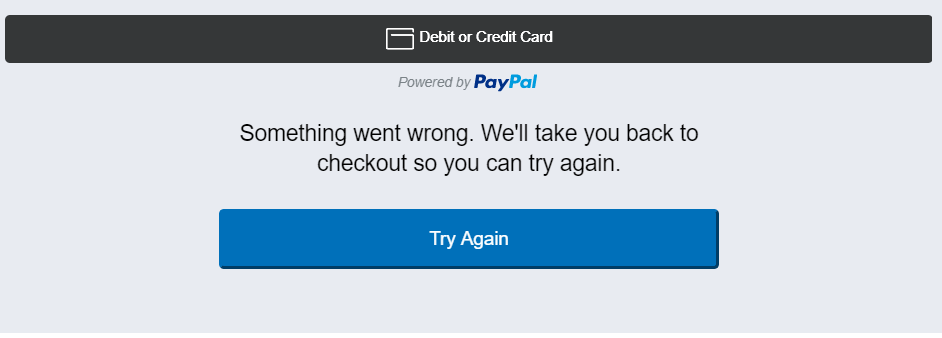
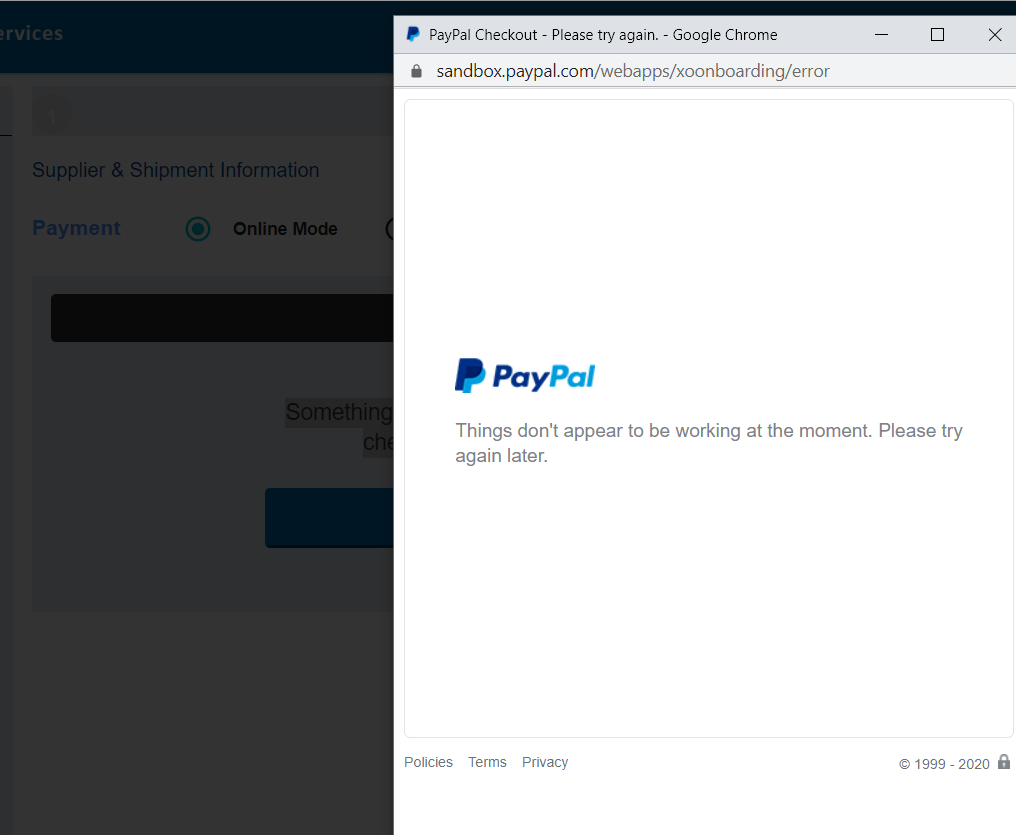
After click on Try again I am getting the error below in image
 masoodqss
on 4 Jun 2020
masoodqss
on 4 Jun 2020
@masoodqss same thing is happening to me; as soon as i click the debit or credit card button, the form loads and a second after I get that screen. Here are the errors it logs:

EDIT: after doing some more digging, it seems that (atleast for me) the paypal sdk is trying to parse a json which is already a json, which throws an error on paypal's sdk and inherently causes the whole debit/credit card form to throw an error and instantly goes to that "something went wrong" state.
 kraj011
on 11 Jun 2020
kraj011
on 11 Jun 2020
I have ran into to very similar issue.
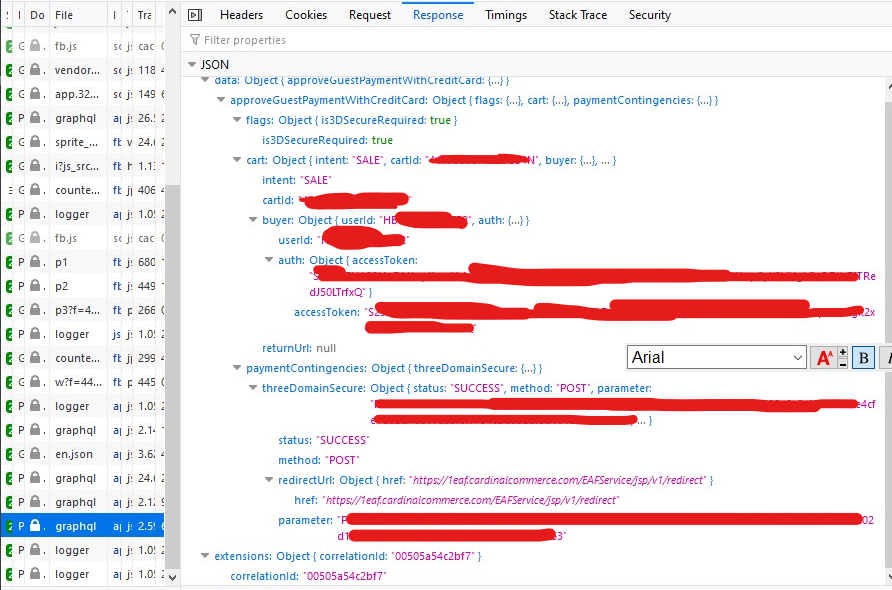
Paypal debug id: 00505a54c2bf7
Other details
Business Registered in India. User also has indian card and trying to pay in INR.
Smart button loaded inside iframe. Pay with "Paypal" button works from paypal account. Pay with card doesn't work. (Tried with the same card which is added in paypal account. From paypal account i am able to pay successfully using same card).
In india 3d secure is enabled, which asks for OTP on each payment. The above graphql request(debug id given) returned response having threeDomainSecure object with success status, redirect url and other params but I was not redirected anywhere. It kept showing loading animation(with lock icon) on top of the form even after receiving the response from graphql method.
The console shown the error "SecurityError: Permission denied to access property "document" on cross-origin object"
Hope the above details are enough to debug and solve the issue.
Code I have used can be seen at https://jsfiddle.net/8jc2ewd4/1/ (Standard code from paypal. changed amount only)
Uploaded screenshot of the response.

 hridayeshgupta-iticks
on 11 Jun 2020
hridayeshgupta-iticks
on 11 Jun 2020
So did anybody find a solution? I am dealing with the OAS_VALIDATION_ERROR and have no clue how to deal with it
 jeshoro
on 6 Jul 2020
jeshoro
on 6 Jul 2020
Folks, I hate to be this person, but with no helpful response from PayPal, I will share our solution:
We switched all credit card processing to Stripe.
samalone
on 6 Jul 2020
Original author here. For further reference, our solution has been also migrating to Stripe.
cerecerorodrigo
on 6 Jul 2020
Switched to GPay and soon to Stripe as a second processor. Thank you PayPal!
We should create a new group and share the new integrations and solutions!
dingomecloud
on 11 Jul 2020
Is there any solution other than just switching to Stripe? Because I see a lot of comments doing that and I wonder what kind of solution is that to a thread that has been open since October 2019.
 Anderlyn
on 3 Aug 2020
Anderlyn
on 3 Aug 2020
Does any have any solution ? Seems like many have faced this issue and this thread is open for quite long.
 chinmaygmail
on 13 Aug 2020
chinmaygmail
on 13 Aug 2020
Same problem here, but after disabling adblock (Chrome on Windows) it works. Did anyone else try the same?
 UserName9793
on 15 Aug 2020
UserName9793
on 15 Aug 2020
I ran into this issue when I entered trash data. It complains about first/last name, but the UI shows

In the console I see {message: "OAS_VALIDATION_ERROR", stack: "Error: OAS_VALIDATION_ERROR↵ at guestCheckout (…s/dist/src/graphql/data/Guest/checkout.js:160:33)"}
In the network request I see POST https://www.sandbox.paypal.com/graphql with the request body
{
  "query": "\n        mutation payWithCard(\n            $token: String!\n            $card: CardInput!\n            $phoneNumber: String\n            $firstName: String\n            $lastName: String\n            $shippingAddress: AddressInput\n            $billingAddress: AddressInput\n            $email: String\n            $currencyConversionType: CheckoutCurrencyConversionType\n        ) {\n            approveGuestPaymentWithCreditCard(\n                token: $token\n                card: $card\n                phoneNumber: $phoneNumber\n                firstName: $firstName\n                lastName: $lastName\n                email: $email\n                shippingAddress: $shippingAddress\n                billingAddress: $billingAddress\n                currencyConversionType: $currencyConversionType\n            ) {\n                flags {\n                    is3DSecureRequired\n                }\n                cart {\n                    intent\n                    cartId\n                    buyer {\n                        userId\n                        auth {\n                            accessToken\n                        }\n                    }\n                    returnUrl {\n                        href\n                    }\n                }\n                paymentContingencies {\n                    threeDomainSecure {\n                        status\n                        method\n                        redirectUrl {\n                            href\n                        }\n                        parameter\n                    }\n                }\n            }\n        }\n        ",
  "variables": {
    "token": "redacted",
    "card": {
      "cardNumber": "6011828927350072",
      "expirationDate": "12/2021",
      "postalCode": "12345",
      "securityCode": "123"
    },
    "phoneNumber": "7784443334",
    "firstName": "asdf",
    "lastName": "asdf",
    "billingAddress": {
      "givenName": "asdf",
      "familyName": "asdf",
      "line1": "asdf",
      "line2": "asdf",
      "city": "asdf",
      "state": "AS",
      "postalCode": "12345",
      "country": "US"
    },
    "shippingAddress": {
      "givenName": "asdf",
      "familyName": "asdf",
      "line1": "asdf",
      "line2": "asdf",
      "city": "asdf",
      "state": "AS",
      "postalCode": "12345",
      "country": "US"
    },
    "email": "[email protected]",
    "currencyConversionType": "PAYPAL"
  },
  "operationName": null
}
Here's the response body I got
{
  "errors": [
    {
      "data": [
        {
          "fields": [
            "user.first_name"
          ],
          "code": "INVALID_FIRST_NAME"
        },
        {
          "fields": [
            "user.last_name"
          ],
          "code": "INVALID_LAST_NAME"
        }
      ],
      "message": "OAS_VALIDATION_ERROR",
      "path": [
        "approveGuestPaymentWithCreditCard"
      ],
      "stack": "Error: OAS_VALIDATION_ERROR\n    at guestCheckout (/dependencies/xobuyernodeserv/cronus/scripts/dist/src/graphql/data/Guest/checkout.js:160:33)",
      "checkpoints": [
        "onboard_user"
      ],
      "meta": {},
      "contingency": true,
      "statusCode": 200
    }
  ],
  "data": {
    "approveGuestPaymentWithCreditCard": null
  },
  "extensions": {
    "tracing": {
      "version": 1,
      "startTime": "2020-10-17T01:10:59.213Z",
      "endTime": "2020-10-17T01:10:59.806Z",
      "duration": 593510722,
      "execution": {
        "resolvers": [
          {
            "path": [
              "approveGuestPaymentWithCreditCard"
            ],
            "parentType": "Mutation",
            "fieldName": "approveGuestPaymentWithCreditCard",
            "returnType": "CheckoutSession",
            "startOffset": 5811476,
            "duration": 584515554
          }
        ]
      }
    },
    "correlationId": "747aebeb7afec"
  }
}
Clearly the response says first/last name are bad. The UI should not crash in face of that.
 Pyrolistical
on 17 Oct 2020
Pyrolistical
on 17 Oct 2020
This issue has been automatically marked as stale. If this issue is still affecting you, please leave any comment (for example, "bump"), and we'll keep it open. We are sorry that we haven't been able to prioritize it yet. If you have any new additional information, please include it with your comment!
![github-actions[bot] picture](https://avatars.githubusercontent.com/in/15368?v=4&s=40) github-actions[bot]
on 15 Jan 2021
github-actions[bot]
on 15 Jan 2021
bump
 chezterman
on 17 Jan 2021
chezterman
on 17 Jan 2021
Same error here!
 phyr0s
on 22 Jan 2021
phyr0s
on 22 Jan 2021
same error, please help!
 wzc0415
on 29 Jan 2021
wzc0415
on 29 Jan 2021
@Pyrolistical I have the same issue. Any luck resolving?
 renegade428
on 29 Jan 2021
renegade428
on 29 Jan 2021
@renegade428 nope
Pyrolistical
on 29 Jan 2021
We had the same issue with Smart Payment Buttons. PayPal payment is working fine. Credit Card payment is only working with the "old" popup window but stopped working with the inline form. As workaround we implemented GJQP's work-around to force the popup window.
I don't think the issue is location related in our case, because we are based in Germany. I have a feeling it's related to 3D Secure / PSD2
 weshouldfight
on 17 Mar 2021
weshouldfight
on 17 Mar 2021
In the UK it's affecting Safari and Firefox with all plugins disabled, but Chrome is working.
I'm using GJQP's work-around as well, which is a passable solution.
This might be a bit cynical, but I think PayPal aren't interested in fixing this issue because it makes paying by card appear less reliable and more inconvenient and therefore incentivizes more people to register a PayPal account.
If we didn't have other systems integrated with PayPal here we would be switching to Stripe too.
 BennyTheBen
on 22 Mar 2021
BennyTheBen
on 22 Mar 2021
i m integrating the paypal payment for web application i m able to pay but getting the error only when i put last name "sng"
i donot why this is occuing but getting the error .
can any body help me to fix this.
here is the json response i m geting when entering last name "sng"
{
"errors": [
{
"data": [
{
"fields": [
"user.last_name"
],
"code": "INVALID_LAST_NAME"
}
],
"message": "OAS_VALIDATION_ERROR",
"path": [
"approveGuestPaymentWithCreditCard"
],
"checkpoints": [
"onboard_user"
],
"meta": {
  },
  "contingency": true,
  "statusCode": 200
}
],
"data": {
"approveGuestPaymentWithCreditCard": null
},
"extensions": {
"tracing": {
"version": 1,
"startTime": "2021-04-05T04:02:35.457Z",
"endTime": "2021-04-05T04:02:38.657Z",
"duration": 3199912302,
"execution": {
"resolvers": [
{
"path": [
"approveGuestPaymentWithCreditCard"
],
"parentType": "Mutation",
"fieldName": "approveGuestPaymentWithCreditCard",
"returnType": "CheckoutSession",
"startOffset": 1736284,
"duration": 3197512669
}
]
}
},
"correlationId": "900a85dfa82bb"
}
}
 GurpreetMatta
on 5 Apr 2021
GurpreetMatta
on 5 Apr 2021
Same Issue here, we were also facing this issue via debit note. Now using GJQP's work-around. The workaround leads to the fact that the German specific payments via "Giropay" and "Sofortüberweisung" are no longer available/displayed, but credit card and debit note are more relevant for us.
I've readdressed this to the business support and asked to fix this.
 Tiefstapler
on 7 Jun 2021
Tiefstapler
on 7 Jun 2021
@Paypal: This is a critical Bug in Production!
I seriously can not believe that this critical error exists since October and has not been fixed until today. An acceptable time to fix for such a serious bug would be within hours.
Tiefstapler
on 18 Jun 2021
Same Issue here, we were also facing this issue via debit note. Now using GJQP's work-around. The workaround leads to the fact that the German specific payments via "Giropay" and "Sofortüberweisung" are no longer available/displayed, but credit card and debit note are more relevant for us.
I've readdressed this to the business support and asked to fix this.
Did you ever get a response from the business support?
 danielehrhardt
on 23 Jun 2021
danielehrhardt
on 23 Jun 2021
Same Issue here, we were also facing this issue via debit note. Now using GJQP's work-around. The workaround leads to the fact that the German specific payments via "Giropay" and "Sofortüberweisung" are no longer available/displayed, but credit card and debit note are more relevant for us.
I've readdressed this to the business support and asked to fix this.Did you ever get a response from the business support?
yes, but they asked me to write a ticket to the technical support and specify the bug more detailed. I did this and received the following answer:
if a customer has troubles paying, they should try a different funding source, contact their card issuer, or contact PayPal Customer Support by clicking Contact at the bottom of any PayPal page to have their payment attempt reviewed further.
I explained again (in a friendly manner) that this is a general bug and also mentioned that we tested it end-to-end with real customers and received the following answer:
I can assure you there is no technical issue to address. Our technical logs specifically showed a decline. Since this is not a technical issue I will close our ticket.
My reply to this most ignorant user support I experienced in my whole life, was not as friendly as the previous mails, but I did not receive any further response.
A few days later I contacted the Business Support and informed them that they have a critical production problem, which I would suggest to escalate to someone who might be responsible, but nothing has happened and thats all what I can do as as customer regarding my energy and frustration tolerance.
Tiefstapler
on 28 Jun 2021
Same Issue here, we were also facing this issue via debit note. Now using GJQP's work-around. The workaround leads to the fact that the German specific payments via "Giropay" and "Sofortüberweisung" are no longer available/displayed, but credit card and debit note are more relevant for us.
I've readdressed this to the business support and asked to fix this.Did you ever get a response from the business support?
yes, but they asked me to write a ticket to the technical support and specify the bug more detailed. I did this and received the following answer:
if a customer has troubles paying, they should try a different funding source, contact their card issuer, or contact PayPal Customer Support by clicking Contact at the bottom of any PayPal page to have their payment attempt reviewed further.I explained again (in a friendly manner) that this is a general bug and also mentioned that we tested it end-to-end with real customers and received the following answer:
I can assure you there is no technical issue to address. Our technical logs specifically showed a decline. Since this is not a technical issue I will close our ticket.My reply to this most ignorant user support I experienced in my whole life, was not as friendly as the previous mails, but I did not receive any further response.
A few days later I contacted the Business Support and informed them that they have a critical production problem, which I would suggest to escalate to someone who might be responsible, but nothing has happened and thats all what I can do as as customer regarding my energy and frustration tolerance.
Insane.
danielehrhardt
on 28 Jun 2021
Wow... adding the following worked for the most part, as the inline CC form would append the wrong country to the form (e.g. a computer set to ES / Spanish, the address would assume Spain as a country, so using a US credit card would always fail)... doing the following forces the old interface which seems to work.
However, the old interface doesn't always show up, which is a problem...
  //Changes credit/debit button behavior to "old" version
  onShippingChange: function(data,actions){
      //if not needed do nothing..
      return actions.resolve();
  }
I'm also looking into migrating to Stripe / using Stripe as a backup processor LOL
 janzheng
on 15 Jul 2021
janzheng
on 15 Jul 2021
Related issues
 Soulpancake000
·
5Comments
Soulpancake000
·
5Comments
 webdeb
·
3Comments
webdeb
·
3Comments
 hosseinfs
·
6Comments
hosseinfs
·
6Comments
 deejbee
·
5Comments
deejbee
·
5Comments
 AashutoshPrashar
·
5Comments
AashutoshPrashar
·
5Comments
Most helpful comment
Original author here. For further reference, our solution has been also migrating to Stripe.