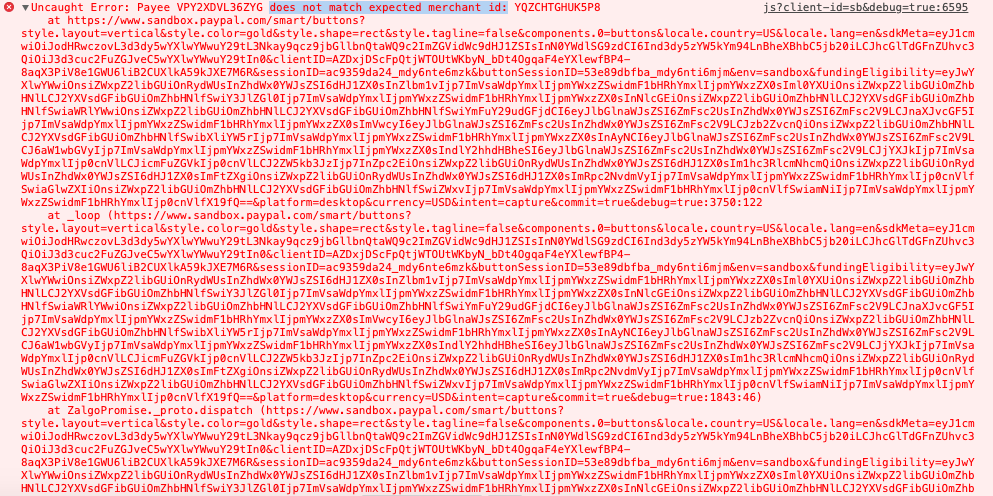
Paypal-checkout-components: Uncaught Error: Payee xxx does not match expected merchant id: yyy
Description
Paypal Smart Buttons suddenly encounter error regarding payee not matching merchant id. It was working yesterday, but not today, so the new release may have done something.

Steps to reproduce
Follow steps to setup a smart payment button defined at: https://developer.paypal.com/docs/checkout/
Affected browsers
- [ x ] Chrome
- [ x ] Safari
 drey101
All 36 comments
Are you passing a cusom payee when you set up the transaction?
And if so, are you passing merchant-id to the sdk? https://developer.paypal.com/docs/checkout/reference/customize-sdk/#merchant-id -- you would need to do this
 bluepnume
on 8 Aug 2019
bluepnume
on 8 Aug 2019
I initially tried it with payee, passing an email address, and got the error.
    const request = new PAYPAL_SDK.orders.OrdersCreateRequest();
    request.prefer('return=representation');
    request.requestBody({
      intent: 'CAPTURE',
      purchase_units: [
        {
          amount: {
            currency_code: 'USD',
            value: amount,
          },
          payee: {
            email_address: email,
          },
        },
      ],
      application_context: {
        shipping_preference: 'NO_SHIPPING',
        user_action: 'PAY_NOW',
        payee_preferred: 'IMMEDIATE_PAYMENT_REQUIRED',
      },
    });
I also tried it by removing the payee, but the error still occurs
    const request = new PAYPAL_SDK.orders.OrdersCreateRequest();
    request.prefer('return=representation');
    request.requestBody({
      intent: 'CAPTURE',
      purchase_units: [
        {
          amount: {
            currency_code: 'USD',
            value: amount,
          },
        },
      ],
      application_context: {
        shipping_preference: 'NO_SHIPPING',
        user_action: 'PAY_NOW',
        payee_preferred: 'IMMEDIATE_PAYMENT_REQUIRED',
      },
    });
Needing to pass the merchant id would be difficult then... is there a way to retrieve the merchant id from a given email address?
Prior to the update, this was working without any issue, so it seems kind of backward that you'll remove the capability to use a custom payee, especially when it's not documented at all in the guide:
https://developer.paypal.com/docs/checkout/integration-features/custom-payee/
drey101
on 9 Aug 2019
I've figured out why it doesn't work even if I don't add a payee, apparently using sb as the parameter for the client-id doesn't work. I need to pass my own client-id so that it would properly resolve the merchant-id and client-id, even though I don't define the payee anymore.
Doesn't work:
<script src="https://www.paypal.com/sdk/js?client-id=sb"></script>
Works:
<script src="https://www.paypal.com/sdk/js?client-id=<XXXXXXXXXXX>"></script>
Hmmn, so how does one go about defining a custom payee using an email address now? If we're required to pass the merchant id to the button, that seems to be quite restrictive, as I don't think I've spotted anything in the rest api/sdk that allows me to retrieve the merchant-id from an email address.
drey101
on 9 Aug 2019
Also having this exact issue.
This has broken our production checkout implementation.
How are we now meant to facilitate a custom payee using an email address, and if a merchant-id is needed how can this be obtained? Really struggling to find clear documentation on this.
 jwoodmansey
on 9 Aug 2019
jwoodmansey
on 9 Aug 2019
Same problem here. I am reaching paypal support for help. Until before yesterday it worked just fine like you all say.
 lfarks
on 9 Aug 2019
lfarks
on 9 Aug 2019
We're suffering this same issue.
It broke our PayPal integration for our ecommerce system on all live client sites, and in every other occurrence we had, test environments, local development etc.
The dead giveaway that something had changed on PayPal's side was that we hadn't deployed any changes to production in a month, and everything was working fine up until two days ago, when our error monitoring first started picking up the issue.
We've confirmed that toggling to checkout.js works in the meantime.
It appears to be related to the changes made here:
https://github.com/paypal/paypal-smart-payment-buttons/commit/bac426f46a584dcef0c626fb7f5b1ddcf3e892e9
With our ecommerce system we transact on the behalf of clients, via the API, who currently provide us with only their PayPal account email address.
If we're expected to make an adjustment on our end to fit with the seemingly changed merchant restriction, please advise what we will need to do.
 knupska
on 9 Aug 2019
knupska
on 9 Aug 2019
Hi all,
Given the number of instances of problems here, I've disabled this check for now. I apologize for the inconvenience. Can you please let me know the client-ids for your integration, and urls where I can test your integrations, so we can make sure you're not affected again.
bluepnume
on 9 Aug 2019
Hi @bluepnume
Thanks for your response.
Our client id is AX17VO9s87hiFXpHLCahoO7sSvP2JHRkjQO6LJE7uza0dE7swJV3PoBiupOz7eExWeU5HGBH_9LWCcdl
And you can test the integration here by clicking 'Buy tickets'.
Or if you'd rather I can send details of our sandbox environment privately.
EDIT: I can confirm this is now working for us.
jwoodmansey
on 9 Aug 2019
@bluepnume Thanks.
Our production client id is:
AY8IEoPa2cTTVpYgjfKAYby35wyUgTE4liI1SEEXCYLGa4F2kdwSoOMSKE82jXXUL1NuXOQ1ARslBF65
However as mentioned we're now running on the legacy checkout.js (which isn't experiencing the problem), until it gets fully resolved just to avoid any downtime for our clients.
I appreciate the removal of the check, but longer term we would prefer to properly comply with whatever restriction should be in effect, simply so that we don't run into it again if/when it is enabled.
Is there a method that you can point us to where we can retrieve the appropriate merchantId from the sellers PayPal account email address? If we can do that, then we can easily provide it to our frontend to have available at the point the sdk is retrieved.
I can provide sandbox testing environment details privately if needed.
knupska
on 9 Aug 2019
We're experiencing the same issue too - this broke payments in our event registration app in production.
Our Client ID is ATZCrZ6_m5JW1cI7AZl29lrYk3DIijxXabVcwiyQVM658ixdm05nGrsYEz-GZgiUD0nE0IJCe1-9DMkk
You can test it here
Thanks
Edit: It's started working for us again as well. Thanks for your responsiveness on this.
 halomademeapc
on 9 Aug 2019
halomademeapc
on 9 Aug 2019
Thanks all,
To everyone asking about how to provide the merchant id across when you only have the seller's email address: we'll be providing detailed instructions for how to do this.
Appreciate your reports and patience on this one
bluepnume
on 9 Aug 2019
Thanks all,
To everyone asking about how to provide the merchant id across when you only have the seller's email address: we'll be providing detailed instructions for how to do this.
Appreciate your reports and patience on this one
Thanks! I've verified it works on our end as well. We're still just applying Paypal integration so I'm just using sandbox accounts.
Closing this for now as it seems to be currently resolved. Will wait for detailed instructions on how to retrieve the merchant id using the seller's email address.
drey101
on 13 Aug 2019
I noticed that the check was re-enabled, (albeit in a different way) shortly after it was disabled, https://github.com/paypal/paypal-smart-payment-buttons/commit/fdbce9da9302e43603737b3a9d9cf40f62ce4170
I'm curious as to what the implementation difference is there?
Does it no longer enforce that the merchanId be passed to the sdk include?
Is it possible to advise if that will be re-added in future?
Just looking to roll from our backup checkout.js back onto the sdk so we're more "future proof", but would prefer to know we're doing "everything right" so we don't experience it again.
knupska
on 13 Aug 2019
Hi @knupska -- the check that's in place now will only validate if you explicitly pass the merchant-id parameter to the sdk.
We're working on adding a way for you to securely pass a payee email address when initializing the sdk. I'll update this thread when that's ready.
In the mean time, please feel free to upgrade again to the sdk when you're ready. We have your client id, and if we roll forwards with this validation again, we'll make sure your app is on the whitelist so your integration doesn't break while you make any changes needed to pass the payee email.
Thanks!
bluepnume
on 13 Aug 2019
That all sounds great to me, thanks @bluepnume.
knupska
on 13 Aug 2019
Hi @bluepnume , can you also add my client id to the whitelist, so won't break in future updates:
client id: ASeuLJMrrdglkgGVsGYgW4LmhfH4s1YMWZTtTN2X94AQXxqcsKPBOZTRgslVixqmO7N7twu7T1A6adUo
lfarks
on 14 Aug 2019
Thanks all,
To everyone asking about how to provide the merchant id across when you only have the seller's email address: we'll be providing detailed instructions for how to do this.
Appreciate your reports and patience on this one
Hi @bluepnume,
Wondering if there were instructions released for this yet?
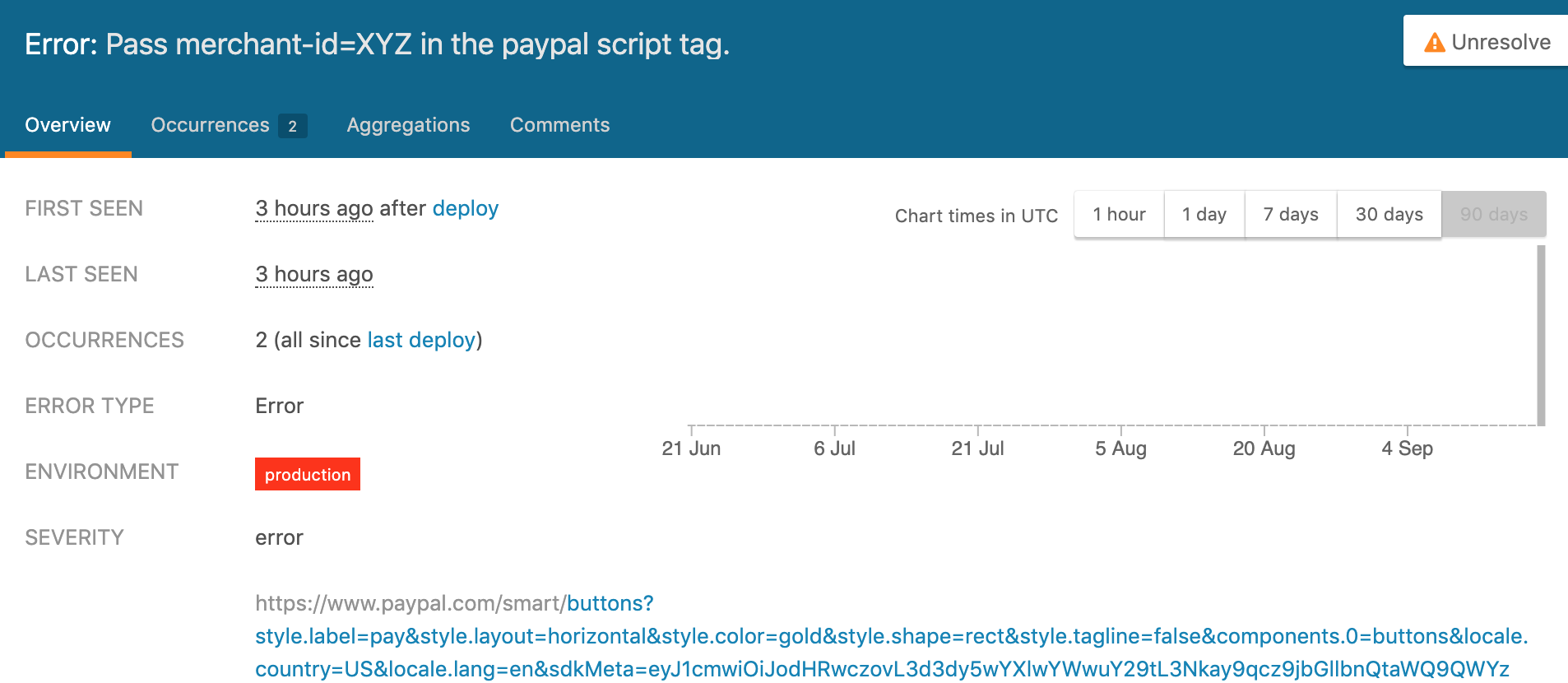
Our Paypal Smart button integration is breaking again and now returning the following error message:
Pass merchant-id=XYZ in the paypal script tag.
It appears to have been introduced in the following commit and deployed on Monday, Sep 16, 2019:
https://github.com/paypal/paypal-smart-payment-buttons/commit/3bb3e5c23bdd4af59947cc4b561d0e5044a9e827
We currently were in the process of trying to backfill the merchant ID in our database based on successful Paypal Orders. But for cases where we still don't have merchant ID and aren't including it the Script URL, we are getting this error.
Wondering if this new validation check was published anywhere. I don't see it in any of the release notes.
Please advise as this is affecting many of our customers! Thank @bluepnume!
 josephajose
on 18 Sep 2019
josephajose
on 18 Sep 2019
Hi,
Can you confirm if this is still happening for you? There was a regression here that we pushed a fix out for yesterday.
Thanks,
Daniel
bluepnume
on 18 Sep 2019
@bluepnume I have confirmed this is still happening. We have a logged failure just 3 hours ago.
josephajose
on 18 Sep 2019
Are you personally able to repro? I'm wondering if there's a cached script somewhere. I'll dig into it.
bluepnume
on 18 Sep 2019
Yes, I attempted to purchase on the same website we logged this error from and was able to reproduce it just now. We are using the following script tag url:
<script src="https://www.paypal.com/sdk/js?client-id=<our_client_id>¤cy=USD&disable-funding=card,credit"></script>
We are creating the order on the client side in the createOrder callback.
Edit: I disabled caching on the browser and was still receiving the error.
josephajose
on 18 Sep 2019
OK I think I've reproduced what you're seeing. Fix in progress.
bluepnume
on 18 Sep 2019
Thanks for jumping on this one @bluepnume! Confirmed the fix you just applied is working! 🎉
josephajose
on 19 Sep 2019
Awesome, really glad to hear! Thanks for verifying
bluepnume
on 19 Sep 2019
@bluepnume just to clarify here: is the recommended way to specify an alternate payee to use the merchant-id SDK param, to pass payee[merchant_id] to the order options, or a combo both?
I see that the referenced commit ensures that payee[merchant_id] is set on the order (and that it matches the SDK’s merchant-id param if set), but are these just failsafes? What’s the “right” way?
 TrevorHinesley
on 26 May 2020
TrevorHinesley
on 26 May 2020
Hi @TrevorHinesley -- yes, ideally please pass both. They're required for different purposes, but yeah annoyingly there's some redundancy here.
bluepnume
on 26 May 2020
Hi @bluepnume - I think I have the same problem, I got this error when I execute it in localhost

I hope you help me, my client-Id "AWD-xA5A1DU202JcShB-b8mZi1LeUzjEyq2gdjLBLpaw1wsPggOvMappz5OtJR5KjIOGjFvwaPGMfwBZ"
 MomenB
on 30 May 2020
MomenB
on 30 May 2020
@MomenB I also getting this error from last week when i capture multiple orders. Did you find any solution for that ..? it used to work fine few weeks back
 Arunaliyanaarachchi
on 31 May 2020
Arunaliyanaarachchi
on 31 May 2020
@MomenB @Arunaliyanaarachchi -- can you please try:
- Pass
&merchant-id=*to the sdk url - Pass
data-merchant-id="abc,xyz"as an attribute to the script tag (these can be alphanumeric merchant ids or email addresses)
e.g.
<script
  src="https://www.paypal.com/sdk/js?client-id=xyz&merchant-id=*"
  data-merchant-id="abc,xyz,[email protected]">
</script>
@weihou -- can you please share any developer docs for passing across multiple merchant ids/emails?
bluepnume
on 31 May 2020
@bluepnume - I tried and it's worked thanks a lot !
MomenB
on 31 May 2020
@Arunaliyanaarachchi Yes this issue appears to me after I add multiple orders with multiple purchase units, but it's worked with bluepnume solution.
MomenB
on 31 May 2020
I seem to have the same issue beginning this week on the sandbox environment. I have one order with multiple purchaseunits because of different shipping methods. That worked last week but now I get the same error. One single purchaseunit works fine. Checkout via https://www.sandbox.paypal.com/checkoutnow?token=MYORDERID also works with multiple purchaseunits.
I cannot pass merchant-id=* because the payee is the same.
Error: Duplicates data-merchant-id. Must pass unique merchant ids to data-merchant-id.
passing a single merchant-id seems to have no effect as it is the same P5C2PD9ADY3TA matching my client id: AU4X6Xr3hPRp8tFYvuETEt9v3wXBv7HKWfE08LTRF_lih83ijuoI3uLFTkswK2hNyCYfOMsftaeTvRcv
 clst
on 3 Jun 2020
clst
on 3 Jun 2020
I just tried again with this tag like the console error message suggested:
<script data-merchant-id='P5C2PD9ADY3TA,P5C2PD9ADY3TA' src='https://www.paypal.com/sdk/js?client-id=AU4X6Xr3hPRp8tFYvuETEt9v3wXBv7HKWfE08LTRF_lih83ijuoI3uLFTkswK2hNyCYfOMsftaeTvRcv&merchant-id=P5C2PD9ADY3TA¤cy=EUR&debug=true'></script>
now I get a different error:
{…}
buttonSessionID: "d66831d600_mtc6mjq6mzm"
env: "sandbox"
merchantID: "[\"P5C2PD9ADY3TA\"]"
payees: "[{\"merchantId\":\"P5C2PD9ADY3TA\",\"email\":{\"stringValue\":\"merchant_test@email\"}},{\"merchantId\":\"P5C2PD9ADY3TA\",\"email\":{\"stringValue\":\"merchant_test@email\"}}]"
referer: "www.sandbox.paypal.com"
sessionID: "a87de498e9_mtc6mjq6mzm"
timestamp: "1591205127649"
Something seems to be broken.
clst
on 3 Jun 2020
we also now need to pass these values to be able to use the sandbox for pp4mp.
@bluepnume is this a bug? or will passing the IDs become a requirement in production, too? so far it just produces a warning in production.
 jaynetics
on 17 Jun 2020
jaynetics
on 17 Jun 2020
Hi,
@clst -- can you let me know if you still see this error? This should have been resolved.
@jaynetics -- can you open a new ticket with specifics of the errors/warnings you're seeing? Thanks!
bluepnume
on 17 Jun 2020
@bluepnume Yes, it works fine now. Thanks a lot.
clst
on 18 Jun 2020
Related issues
 VivekVikranth
·
6Comments
VivekVikranth
·
6Comments
 PhilibertDugas
·
5Comments
PhilibertDugas
·
5Comments
 domtripodi
·
5Comments
domtripodi
·
5Comments
 gastonyelmini
·
3Comments
bluepnume
·
3Comments
gastonyelmini
·
3Comments
bluepnume
·
3Comments
Most helpful comment
Thanks all,
To everyone asking about how to provide the merchant id across when you only have the seller's email address: we'll be providing detailed instructions for how to do this.
Appreciate your reports and patience on this one