Paypal-checkout-components: actions.payment.get() seems to error in the live environment (PERMISSION_DENIED), but works in the sandbox
I am trying to use the PayPal checkout button. I have a sandbox and live environment setup, with a business account and buyer account for each. When using the sandbox, my integration works, but when using live the exact same code produces an error.
I have checked our Client ID's are correct for both sandbox and live. I have an app defined in developer.paypal.com under REST API apps. I'm not using the Secret for anything, should I be?
Now, the payments where the error happens, are actually successful, they appear as normal in our account. The error seems to be triggered by calling actions.payment.get() to get the payment details.
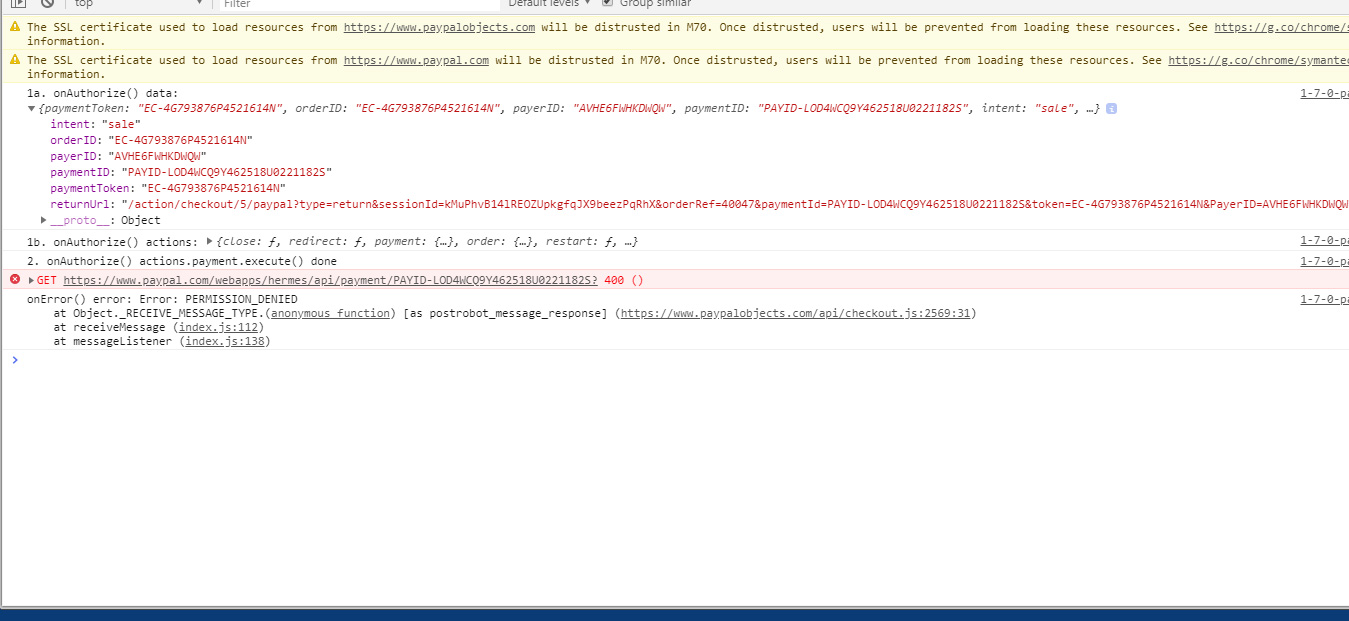
The error is:
GET https://www.paypal.com/webapps/hermes/api/payment/PAYID-LOD4WCQ9Y462518U0221182S
400 Bad Request
xhr-ads.min.js
Error: PERMISSION_DENIED
  at Object._RECEIVE_MESSAGE_TYPE.(anonymous function) [as postrobot_message_response] (https://www.paypalobjects.com/api/checkout.js:2569:31)
  at receiveMessage (index.js:112)
  at messageListener (index.js:138)
I'm not sure what hermes is, I'm guessing it's just a name PayPal have given to something rather than anything to do with the courier company (www.myhermes.co.uk).
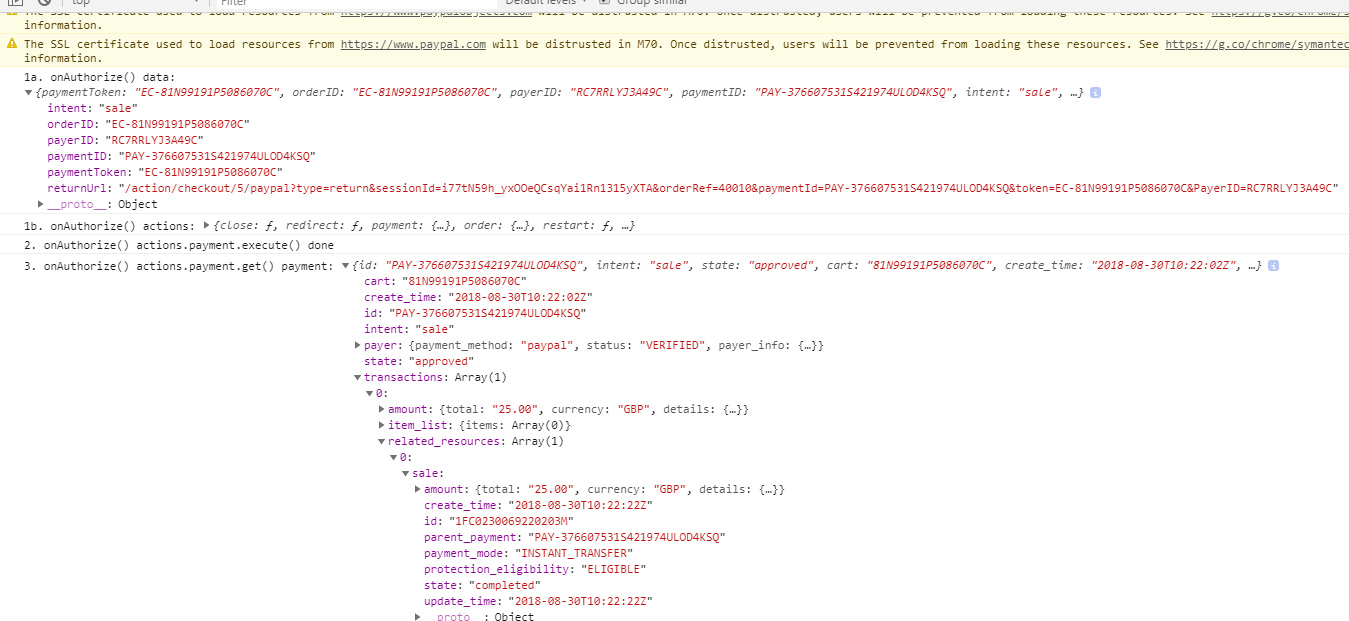
I have a series of console.log's in onAuthorize() showing the data returned, the fact that actions.payment.execute() is called, and the data from actions.payment.get().
This is a sandbox payment with no errors:
This is a live payment with the error (no change to any of my code):
We have had to turn PayPal off for our websites because customers are paying but seeing this error.
Can anyone help..? Anyone at PayPal..?
 stephen-last
All 25 comments
@mcntsh can you take a look?
 bluepnume
on 30 Aug 2018
bluepnume
on 30 Aug 2018
Actually looks like a duplicate of https://github.com/paypal/paypal-checkout/issues/769 -- let's use that issue.
bluepnume
on 30 Aug 2018
@bluepnume Sorry, I'm not sure this is the same issue as https://github.com/paypal/paypal-checkout/issues/769.
My issue is to do with actions.payment.get() which fires an error, but https://github.com/paypal/paypal-checkout/issues/769 doesn't even mention actions.payment.get().
After wasting a lot time I happen to see someone else's code showing that actions.payment.execute() resolves with a payment details object, the same one that actions.payment.get() resolves with (see: https://github.com/paypal/paypal-checkout/issues/841).
After removing actions.payment.get() and using actions.payment.execute().then(function(paymentDetails) {}); instead I no longer get an error.
So I think this issue needs reopening because: actions.payment.get() seems to error in the live environment, but works fine in the sandbox environment.
Obviously having something that works in the sandbox but not the live is not ideal.
stephen-last
on 31 Aug 2018
So I think this issue needs reopening because: actions.payment.get() seems to error in the live environment, but works fine in the sandbox environment.
I have the same issue for the last 2-3 weeks. Thanks @stephen-last for the suggestion to get rid of actions.payment.get() call
 getdatakick
on 5 Sep 2018
getdatakick
on 5 Sep 2018
@getdatakick You're welcome.
@bluepnume Could this issue be reopened..?
stephen-last
on 5 Sep 2018
I've renamed this issue to reflect more precisely what the problem seems to be, that is:
actions.payment.get() seems to error in the live environment (PERMISSION_DENIED), but works fine in the sandbox environment
stephen-last
on 5 Sep 2018
I just had the exact same problem. actions.payment.get() works fine in sandbox mode, but causes errors in production. I only tested it in Chrome, so I don't know if the browser matters or not.
Replacing actions.payment.get() with actions.payment.execute() appears to fix it, so at least there's a good workaround.
Thanks @stephen-last!
 dschnelldavis
on 8 Sep 2018
dschnelldavis
on 8 Sep 2018
@dschnelldavis You're welcome...
@bluepnume or anyone at PayPal, could this issue be reopened..?
stephen-last
on 12 Sep 2018
Yep, reopening, thanks for sharing more details. @mcntsh can you check up on this one?
bluepnume
on 12 Sep 2018
Ack, will follow up on this ticket with my findings.
 mcntsh
on 14 Sep 2018
mcntsh
on 14 Sep 2018
@stephen-last since you're able to repro, could you send me the correlation ID for the Get Payment request? This will help us track down the cause internally.
If you check your network tab, that failed GET request for https://www.paypal.com/webapps/hermes/api/payment/PAYID... should have a Paypal-Debug-Id response header that contains a 13 character ID.
mcntsh
on 14 Sep 2018
@mcntsh Thanks for looking at this!
GET https://www.paypal.com/webapps/hermes/api/payment/PAYID-LONWK2Y9UL31211KT046424W?paypal-debug-id: 1a21d5849a3ab- Error:
PERMISSION_DENIED
This relates to a successful live transaction that I've just done, where I call actions.payment.get() after calling actions.payment.execute().
onAuthorize: (data, actions) => {
return actions.payment.execute().then(async (payment) => {
const payment2 = await actions.payment.get() // -> PERMISSION_DENIED
})
}
Transaction ID: 9NK05412U7627160TGross amount £1.50 GBPPayment status: COMPLETED14 September 2018 at 08:39:13 BSTPaid by: REDACTED
Not that it should matter, but the environment I'm using here is a React component compiled for the browser by Babel/Webpack.
Let me know if you need anything further!
stephen-last
on 14 Sep 2018
Thanks @stephen-last. This is definitely something we are going to need to follow up with our service team about. Could you shed some light how you are creating this payment? Through the REST API or the client-side API? What types of parameters are you passing?
Really appreciate your patience on this.
mcntsh
on 15 Sep 2018
@mcntsh Sure...
It's a client integration, the one outlined here: PayPal Checkout Integration Guide ...using paypal.Button.render().
This is my React component, just with some bits cut out which aren't relevant.
// with https://www.paypalobjects.com/api/checkout.js included...
import React from 'react'
import PropTypes from 'prop-types'
import get from 'lodash/get'
class CheckoutStep5PayPal extends React.Component {
static propTypes = {
sessionId: PropTypes.string.isRequired,
orderPrefix: PropTypes.string.isRequired,
orderRef: PropTypes.string.isRequired,
shopName: PropTypes.string.isRequired,
paymentMethodType: PropTypes.string.isRequired,
paypalClientId: PropTypes.string.isRequired,
querystring: PropTypes.object.isRequired
}
static defaultProps = {}
constructor (props) {
super(props)
this.state = {
error: ``,
loading: true
}
}
componentDidMount () {
const { querystring } = this.props
const qsError = get(querystring, 'error', '')
if (qsError) this.setState({ error: qsError })
this.paypalButton().then(() => {
this.setState({ loading: false })
}).catch((err) => {
this.setState({ loading: false, error: err.message })
})
}
paypalButton = async () => {
const { sessionId, orderPrefix, orderRef, orderTotal, shopName } = this.props
const buttonOptions = {
env: `production`,
client: {
sandbox: ``,
production: `...`
},
commit: true,
locale: 'en_GB',
style: {
size: 'responsive',
color: 'gold',
shape: 'pill',
label: 'pay',
tagline: false,
fundingicons: true
},
payment: (data, actions) => {
return actions.payment.create({
experience: {
input_fields: { no_shipping: 1 },
presentation: { brand_name: shopName }
},
payment: {
transactions: [{
amount: { total: orderTotal, currency: 'GBP' },
description: `Payment for order ${orderPrefix}${orderRef} on the ${shopName} website.`
}],
redirect_urls: {
return_url: `/action/checkout/5/paypal?type=return&sessionId=${sessionId}&orderRef=${orderRef}`,
cancel_url: `/action/checkout/5/paypal?type=cancel&sessionId=${sessionId}&orderRef=${orderRef}`
}
}
})
},
onAuthorize: (data, actions) => {
// console.log('onAuthorize() data:', data)
return actions.payment.execute().then(async (payment) => {
// const paymentFromGet = await actions.payment.get()
// console.log('onAuthorize() actions.payment.get() payment:', paymentFromGet)
// record 'payment' details here
return actions.redirect()
})
},
onCancel: async (data, actions) => {
// console.log('onCancel() data:', data)
return actions.redirect()
},
onError: async (error) => {
console.log('onError() error:', error)
}
}
return window.paypal.Button.render(buttonOptions, '#paypal-button')
}
render () {
// ...
}
}
export default CheckoutStep5PayPal
Where the object passed to actions.payment.create() might look like:
{
experience: {
input_fields: { no_shipping: 1 },
presentation: { brand_name: `Crusader Gifts` }
},
payment: {
transactions: [{
amount: { total: `10.50`, currency: 'GBP' },
description: `Payment for order GS12345 on the Crusader Gifts website.`
}],
redirect_urls: {
return_url: `/action/checkout/5/paypal?type=return&sessionId=9i-JS1R5SqIKDUYPheoqR_LY-3vwIueC&orderRef=12345`,
cancel_url: `/action/checkout/5/paypal?type=cancel&sessionId=9i-JS1R5SqIKDUYPheoqR_LY-3vwIueC&orderRef=12345`
}
}
}
Does that help..?
stephen-last
on 17 Sep 2018
Hey @stephen-last, apologies for the delayed follow up here. Our services team is aware of a bug that is potentially causing error, and are currently working on a solution. I'll update this issue when a fix is out.
mcntsh
on 26 Sep 2018
I have the same problem. The code works in the sandbox, but not live. The payment gets through, but I receive the error as @stephen-last (which stops everything on my end). I use:
onAuthorize: function(data, actions) {
return actions.payment.execute().then(function() {
actions.payment.get().then(function(data) {
// here I do stuff with data - which does not work, because of the error
});
});
}
 manogi
on 5 Oct 2018
manogi
on 5 Oct 2018
Also thanks to @stephen-last for the fix. It works for me too.
manogi
on 5 Oct 2018
So to recap this:
replace
onAuthorize: function(data, actions) {
        return actions.payment.execute().then(function() {
            return actions.payment.get().then(function(data) {
                // here I try to do stuff with data - which does not work, because of the error
            });
        });
}
with
onAuthorize: function(data, actions) {
            return actions.payment.execute().then(function(data) {
                // here I do stuff with data - which does work!
            });
    }
 peterbaral
on 5 Oct 2018
peterbaral
on 5 Oct 2018
@peterbaral yes - sorry! I thought I added the working code to my comment - which I didn't. 🤦♂️
manogi
on 5 Oct 2018
I've requested a docs update relating to this: https://github.com/paypal/paypal-checkout/issues/841 which is still open...
stephen-last
on 5 Oct 2018
Many thanks to you, @stephen-last, for the fix!
peterbaral
on 5 Oct 2018
Hey guys,
Really appreciate you reporting all of your findings and being patient with me to follow up. I know it's been a while but there were a few things going on behind the scenes that we needed to address in order to fix this particular issue.
As you all have realized, the Payment GET API call was failing after execute. The actions.payment.execute method returns the payment object as @stephen-last pointed out in https://github.com/paypal/paypal-checkout/issues/841, and this is a good workaround, but the expected behavior is that you should be able to call actions.payment.get as well. This should now be fixed!
onAuthorize: function(data, actions) {
    return actions.payment.execute().then(function() {
        return actions.payment.get().then(function(data)
            // You should now have `data` and not get an error
        });
    });
}
Please open up another issue if you are still seeing this. Thanks again for your patience guys, and I'm sorry it took so long to get back.
mcntsh
on 6 Nov 2018
Thanks for taking care of this issue!
While it's nice to have it finally fixed, @stephen-last's workaround helped us to re-enable Paypal payments on our web site some weeks ago.
Before we had to turn off Paypal for more than a month, which is problematic to say the least. Luckily we had some other payment options for our customers.
Better and more consolidated documentation would help a lot.
peterbaral
on 8 Nov 2018
Hmm I'm still having this issue. The money doesn't go out, but it fails (fatal JS error)
   paypal.Button.render({

        env: 'production',
        //env: 'sandbox',

        client: {
            sandbox: "ASf-HtX0wuZR1I2c1FsRnLYYe9WL2wbMd_RQjv5nszFKG4uYPhxE1Z1hIjERKUTl73Tsrrs8NTwC8DZx",
            production: "AdtrBKYZlNLbVnBwXjWkFlxPF_jR8gFy1_S63fX378BeaI0nBwy--fbXx2-yeEJIQqZfdXYDMnFp-OMN"
        },

        payment: function() {
            return paypal.rest.payment.create(this.props.env, this.props.client, {
                transactions: [
                    {
                        amount: {
                            total:    parseFloat( window.my_config.amount ),
                            currency: 'USD',
                            details: {
                                  "subtotal": parseFloat(window.my_config.amount)
                            }
                        },
                        description: window.my_config.description
                    }
                ]
            });
        },

        // Display a "Pay Now" button rather than a "Continue" button
        commit: true,

        // Pass a function to be called when the customer completes the payment

        onAuthorize: function(data, actions) {

            return actions.payment.execute().then(function(paymentDetails) {

                return actions.payment.get().then(function(data) {

                    console.dir({ paymentDetails: paymentDetails, data: data});

                });

            });
        },

        // Pass a function to be called when the customer cancels the payment

        onCancel: function(data) {
            //console.log('The payment was cancelled!');
        },
        style: {
          shape:  'rect',
          size: "medium"
        }

    }, '#paypalWrapper');
Gives me at the final step (after confirming the payment);l
Error: Payment could not be executed
handleExecuteError@https://www.paypalobjects.com/js/xo/button.js?date=2020-5-23:4061:31
promise_ZalgoPromise</_proto.dispatch@https://www.paypalobjects.com/api/checkout.js:1023:40
promise_ZalgoPromise</_proto.reject@https://www.paypalobjects.com/api/checkout.js:989:18
promise_ZalgoPromise</_proto.dispatch@https://www.paypalobjects.com/api/checkout.js:1019:37
promise_ZalgoPromise</_proto.reject@https://www.paypalobjects.com/api/checkout.js:989:18
promise_ZalgoPromise</_proto.dispatch@https://www.paypalobjects.com/api/checkout.js:1030:87
promise_ZalgoPromise</_proto.resolve@https://www.paypalobjects.com/api/checkout.js:965:18
promise_ZalgoPromise</_proto.dispatch@https://www.paypalobjects.com/api/checkout.js:1030:53
promise_ZalgoPromise</_proto.resolve@https://www.paypalobjects.com/api/checkout.js:965:18
promise_ZalgoPromise</_proto.dispatch@https://www.paypalobjects.com/api/checkout.js:1032:257
promise_ZalgoPromise</_proto.resolve@https://www.paypalobjects.com/api/checkout.js:965:18
chain/<@https://www.paypalobjects.com/api/checkout.js:1004:39
promise_ZalgoPromise</_proto.dispatch@https://www.paypalobjects.com/api/checkout.js:1013:48
promise_ZalgoPromise</_proto.resolve@https://www.paypalobjects.com/api/checkout.js:965:18
promise_ZalgoPromise</_proto.dispatch@https://www.paypalobjects.com/api/checkout.js:1032:257
promise_ZalgoPromise</_proto.resolve@https://www.paypalobjects.com/api/checkout.js:965:18
chain/<@https://www.paypalobjects.com/api/checkout.js:1004:39
promise_ZalgoPromise</_proto.dispatch@https://www.paypalobjects.com/api/checkout.js:1013:48
promise_ZalgoPromise</_proto.resolve@https://www.paypalobjects.com/api/checkout.js:965:18
promise_ZalgoPromise</_proto.dispatch@https://www.paypalobjects.com/api/checkout.js:1032:257
promise_ZalgoPromise</_proto.resolve@https://www.paypalobjects.com/api/checkout.js:965:18
promise_ZalgoPromise</_proto.dispatch@https://www.paypalobjects.com/api/checkout.js:1032:257
promise_ZalgoPromise</_proto.resolve@https://www.paypalobjects.com/api/checkout.js:965:18
promise_ZalgoPromise</_proto.dispatch@https://www.paypalobjects.com/api/checkout.js:1032:257
promise_ZalgoPromise</_proto.resolve@https://www.paypalobjects.com/api/checkout.js:965:18
chain/<@https://www.paypalobjects.com/api/checkout.js:1004:39
promise_ZalgoPromise</_proto.dispatch@https://www.paypalobjects.com/api/checkout.js:1013:48
promise_ZalgoPromise</_proto.resolve@https://www.paypalobjects.com/api/checkout.js:965:18
promise_ZalgoPromise</_proto.dispatch@https://www.paypalobjects.com/api/checkout.js:1032:257
promise_ZalgoPromise</_proto.resolve@https://www.paypalobjects.com/api/checkout.js:965:18
promise_ZalgoPromise</_proto.dispatch@https://www.paypalobjects.com/api/checkout.js:1032:257
promise_ZalgoPromise</_proto.resolve@https://www.paypalobjects.com/api/checkout.js:965:18
promise_ZalgoPromise</_proto.dispatch@https://www.paypalobjects.com/api/checkout.js:1030:53
promise_ZalgoPromise</_proto.resolve@https://www.paypalobjects.com/api/checkout.js:965:18
promise_ZalgoPromise</_proto.dispatch@https://www.paypalobjects.com/api/checkout.js:1032:257
promise_ZalgoPromise</_proto.resolve@https://www.paypalobjects.com/api/checkout.js:965:18
promise_ZalgoPromise</_proto.dispatch@https://www.paypalobjects.com/api/checkout.js:1032:257
promise_ZalgoPromise</_proto.resolve@https://www.paypalobjects.com/api/checkout.js:965:18
promise_ZalgoPromise</_proto.dispatch@https://www.paypalobjects.com/api/checkout.js:1032:257
promise_ZalgoPromise</_proto.resolve@https://www.paypalobjects.com/api/checkout.js:965:18
ZalgoPromise/<@https://www.paypalobjects.com/api/checkout.js:939:44
httpNative/</<@https://www.paypalobjects.com/js/xo/button.js?date=2020-5-23:2470:28
 youradds
on 23 Jun 2020
youradds
on 23 Jun 2020
This issue has been automatically locked since there has not been any recent activity after it was closed. Please open a new issue for related bugs.
![github-actions[bot] picture](https://avatars.githubusercontent.com/in/15368?v=4&s=40) github-actions[bot]
on 24 Jun 2021
github-actions[bot]
on 24 Jun 2021
Related issues
 VivekVikranth
·
6Comments
VivekVikranth
·
6Comments
 domtripodi
·
5Comments
domtripodi
·
5Comments
 gastonyelmini
·
3Comments
gastonyelmini
·
3Comments
 MrMooky
·
3Comments
MrMooky
·
3Comments
 stevedeighton
·
6Comments
stevedeighton
·
6Comments
Most helpful comment
So to recap this:
replace
with