Paypal-checkout-components: Getting a 403 - permission_denied error
Hi,
I am attempting to use the PayPal checkout button. I have followed the steps listed, but keep getting a 403 permission_denied back from both production and sandbox
Code
paypal.Button.render(
    {
        env: "sandbox", // 'production' Or 'sandbox',

        // Pass the client ids to use to create your transaction on sandbox and production environments

        client: {
            sandbox:
                "AVe0ByastuRu0dqj9qasdMVUcXj9ElPMhpqufBKtwDAstoLotW7f4skWVD2mqLq6qJAUlyMf7Gou_gAM", // from https://developer.paypal.com/developer/applications/
            production:
                "XXXX" // from https://developer.paypal.com/developer/applications/
        },

        // Pass the payment details for your transaction
        // See https://developer.paypal.com/docs/api/payments/#payment_create for the expected json parameters

        payment: function(data, actions) {
            return actions.payment.create({
                transactions: [
                    {
                        amount: {
                            total: "1.00",
                            currency: "USD"
                        }
                    }
                ]
            });
        },

        // Display a "Pay Now" button rather than a "Continue" button

        commit: true,

        // Pass a function to be called when the customer completes the payment

        onAuthorize: function(data, actions) {
            return actions.payment.execute().then(function(response) {
                console.log("The payment was completed!");
            });
        },

        // Pass a function to be called when the customer cancels the payment

        onCancel: function(data) {
            console.log("The payment was cancelled!");
        }
    },
    "#paypal-button"
);
Error
Error: Request to post https://www.sandbox.paypal.com/v1/payments/payment failed with 403 error. Correlation id: 93d723f8b3d2b, 93d723f8b3d2b

{
    "name": "PERMISSION_DENIED",
    "message": "No permission for the requested operation",
    "information_link": "https://developer.paypal.com/docs/api/payments/#errors",
    "debug_id": "93d723f8b3d2b"
}

request/</<@https://www.paypalobjects.com/api/checkout.js:15266:39

./node_modules/post-robot/src/index.js/RECEIVE_MESSAGE_TYPES<@https://www.paypalobjects.com/api/checkout.js?ver=4.9.6:2797:31
receiveMessage@https://www.paypalobjects.com/api/checkout.js?ver=4.9.6:2842:25
messageListener@https://www.paypalobjects.com/api/checkout.js?ver=4.9.6:2863:13

./node_modules/post-robot/src/index.js/RECEIVE_MESSAGE_TYPES<@https://www.paypalobjects.com/api/checkout.js:2797:31
receiveMessage@https://www.paypalobjects.com/api/checkout.js:2842:25
messageListener@https://www.paypalobjects.com/api/checkout.js:2863:13
PayPal version - 4.0.203
Browsers - FF 60.0.1, Chrome 66.0.3359.181
This is running locally, but also tested here - http://robinstrust.org/store/adult-1-year-membership/test/
Also happens at https://developer.paypal.com/demo/checkout/#/pattern/client
 davebeesley
All 32 comments
Same happening here.
Error: Request to post https://www.sandbox.paypal.com/v1/payments/payment failed with 403 error. Correlation id: f34a02121239d, f34a02121239d
{
"name": "PERMISSION_DENIED",
"message": "No permission for the requested operation",
"information_link": "https://developer.paypal.com/docs/api/payments/#errors",
"debug_id": "f34a02121239d"
}
at XMLHttpRequest.<anonymous> (http.js:114)
at Object.postrobot_message_response (types.js:121)
at receiveMessage (index.js:112)
at messageListener (index.js:138)
at Object.postrobot_message_response (types.js:121)
at receiveMessage (index.js:112)
at messageListener (index.js:138)
 edincongo
on 31 May 2018
edincongo
on 31 May 2018
Same here.
Guys @davebeesley @edincongo , do you agree that just copy/pasted the code from here, with replacing the sandbox client_id with one generated from Sandbox Business Account ?
So the problem you're getting on your website also happens on the former page when u replace the client_id ?
I've checked it all out. Still having the issue.
Cheerrz.
 joSFD
on 1 Jun 2018
joSFD
on 1 Jun 2018
@joSFD Yes. Slightly more complex, but that is the core. Same code worked before. I even changed keys, but still having the same issue (talking about sandbox environment, still not in production).
edincongo
on 1 Jun 2018
Mine doesn't work in Sandbox, or production
davebeesley
on 1 Jun 2018
We have a business account and are seeing this error in (what we think is) sandbox mode.
@davebeesley @edincongo @joSFD are you guys getting the api keys from a personal or business account?
 acomito
on 1 Jun 2018
acomito
on 1 Jun 2018
@acomito Business.
edincongo
on 1 Jun 2018
@acomito Business
davebeesley
on 1 Jun 2018
@acomito Business
joSFD
on 1 Jun 2018
That's interesting.
@davebeesley @edincongo @joSFD @abarco maybe below are related?
- https://github.com/paypal/paypal-checkout/issues/701
- https://github.com/paypal/paypal-checkout/issues/356
Has anyone tried this with a personal account (or does that not have payment api permissions)? That may be the next thing I try-- or I may try a different paypal library (or postman maybe) to see if it's a repo-side bug or a paypal side bug.
acomito
on 1 Jun 2018
701 Seems to be related to a personal account.
356 Has a different error, and doesn't have a solution yet
I may try the different script address suggested in #701
davebeesley
on 1 Jun 2018
Still get a 403 - permission_denied on the alternative script
davebeesley
on 1 Jun 2018
Hi guys, this seems to be a problem from our back end services as opposed to the integration script. @davebeesley can you let me know if this happened at a certain time this week? Was it ever working before? Is this your first time integrating with this script? This could help me push this problem forward
 abarco
on 1 Jun 2018
abarco
on 1 Jun 2018
On Paypal's Developer portal (https://developer.paypal.com/developer/applications/) can you guys try accessing your 'REST API apps' section there. Click on your App, and go to 'SANDBOX APP SETTINGS' as pictured below:

Making sure that your 'Accept payments' section is checked. Please let me know if that resolves your problems.
abarco
on 1 Jun 2018
@abarco For me, we just created a business account in the last few days and this is essentially our first time trying to integrate it. So, we can't help pinpoint when it started.
I can give the settings thing I try, but I feel like we did look through that earlier today.
acomito
on 1 Jun 2018
@abarco Everything is fine setup-wise.
edincongo
on 1 Jun 2018
Today I created a new application and it does not work, with the client_id of an old application works well, it seems that happen with the new apps.
 sargilla
on 1 Jun 2018
sargilla
on 1 Jun 2018
Thanks for your report. We're trying to find the right people to take a look at this problem. Will keep this issue open until the problem is resolved.
We thank you for your patience as we work through this problem.
abarco
on 1 Jun 2018
Hi @abarco
Like the others, I only set it up on the day I raised the issue.
I have the following checked in my app
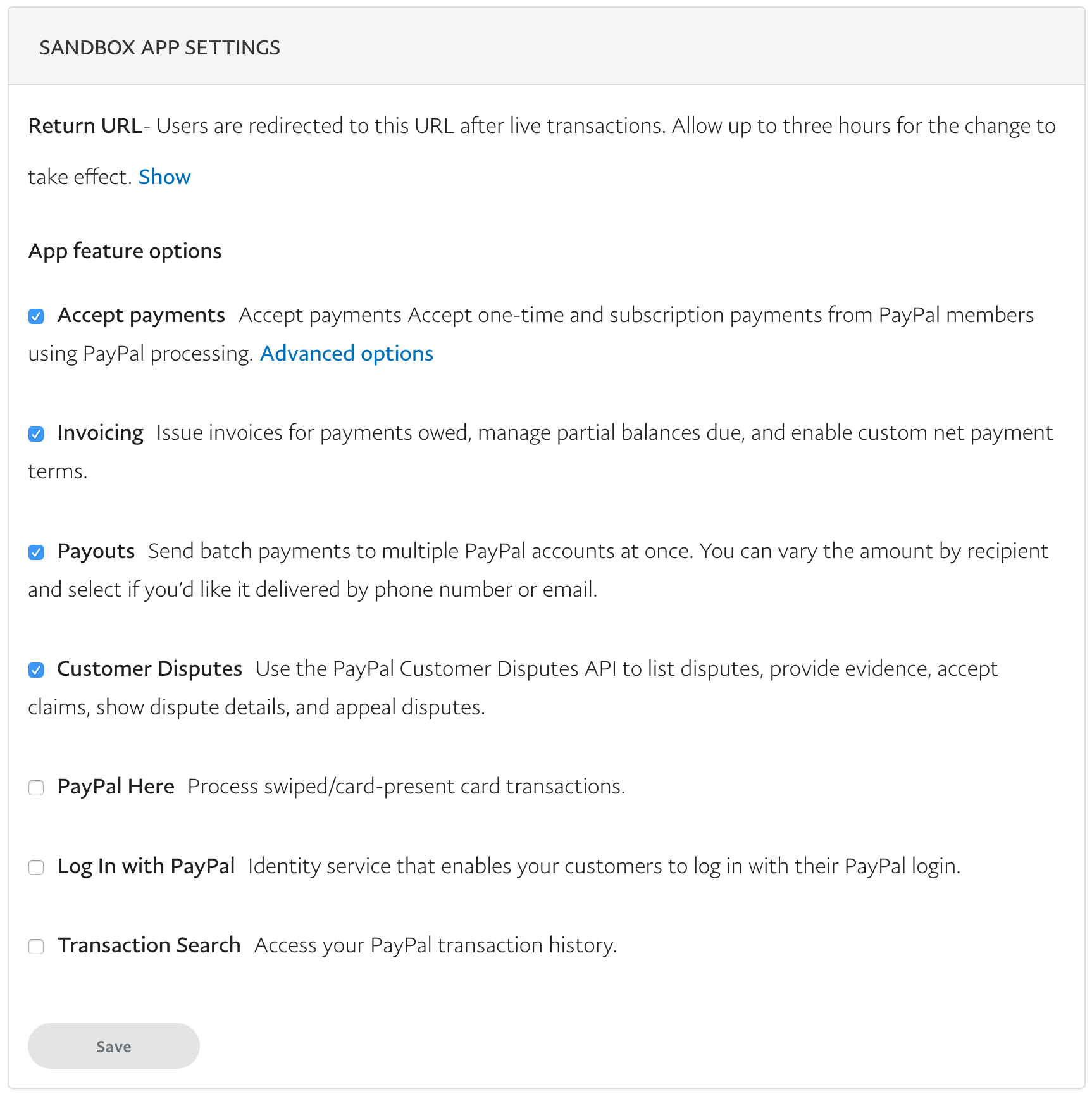
davebeesley
on 2 Jun 2018
If it helps, our business account was created on May 29 between 8AM-11 AM EST
acomito
on 2 Jun 2018
I register new account and create new app but still lucky seeing error message.
 toancong
on 4 Jun 2018
toancong
on 4 Jun 2018
@abarco can we expect some kind of fix this week?
acomito
on 4 Jun 2018
I'm having the exact same issue. Here is the complete error message I get via the error handler:
Error: Request to post https://www.paypal.com/v1/payments/payment failed with 403 error. Correlation id: d59f55b676ad9, d59f55b676ad9
{
"name": "PERMISSION_DENIED",
"message": "No permission for the requested operation",
"information_link": "https://developer.paypal.com/docs/api/payments/#errors",
"debug_id": "d59f55b676ad9"
}at XMLHttpRequest.<anonymous> (https://www.paypalobjects.com/api/checkout.js:15266:39) at Object.postrobot_message_response (https://www.paypalobjects.com/api/checkout.js:2797:31) at receiveMessage (https://www.paypalobjects.com/api/checkout.js:2842:60) at messageListener (https://www.paypalobjects.com/api/checkout.js:2863:13) at Object.postrobot_message_response (https://www.paypalobjects.com/api/checkout.js:2797:31) at receiveMessage (https://www.paypalobjects.com/api/checkout.js:2842:60) at messageListener (https://www.paypalobjects.com/api/checkout.js:2863:13) at XMLHttpRequest.<anonymous> (https://www.paypalobjects.com/api/checkout.js:15266:39) at Object.postrobot_message_response (https://www.paypalobjects.com/api/checkout.js:2797:31) at receiveMessage (https://www.paypalobjects.com/api/checkout.js:2842:60) at messageListener (https://www.paypalobjects.com/api/checkout.js:2863:13) at Object.postrobot_message_response (https://www.paypalobjects.com/api/checkout.js:2797:31) at receiveMessage (https://www.paypalobjects.com/api/checkout.js:2842:60) at messageListener (https://www.paypalobjects.com/api/checkout.js:2863:13) at deserializeError (https://www.paypalobjects.com/api/checkout.js:3578:23) at https://www.paypalobjects.com/api/checkout.js:3599:270 at https://www.paypalobjects.com/api/checkout.js:3331:30 at eachArray (https://www.paypalobjects.com/api/checkout.js:3314:51) at each (https://www.paypalobjects.com/api/checkout.js:3320:35) at replaceObject (https://www.paypalobjects.com/api/checkout.js:3330:13) at https://www.paypalobjects.com/api/checkout.js:3332:169 at eachObject (https://www.paypalobjects.com/api/checkout.js:3317:65) at each (https://www.paypalobjects.com/api/checkout.js:3320:144) at replaceObject (https://www.paypalobjects.com/api/checkout.js:3330:13)
And checkout.js is https://www.paypalobjects.com/api/checkout.js
 LouysPatriceBessette
on 4 Jun 2018
LouysPatriceBessette
on 4 Jun 2018
Hi All, thank you for your patience. The problem is being triaged by the appropriate team. I'll update this issue once functionality is restored. Meanwhile, feel free to integrate with our Server Side solution using RESTful endpoints if you think this could apply to your integration (https://github.com/paypal/paypal-checkout/blob/master/docs/paypal-rest-api.md). Server side functionality is not affected by this problem.
Hope that helps.
abarco
on 5 Jun 2018
Thanks @abarco your help is appreciated :)
davebeesley
on 5 Jun 2018
Update 1:
Our technical teams have applied a fix and the issue has been mitigated as of Jun 5, 23:04 UTC. We are continuing to work towards fixing the REST API applications that were affected during the impact period. We will provide the next update as soon as the affected accounts are restored.
If you generate a new REST app it will work for you now.
 trainerbill
on 6 Jun 2018
trainerbill
on 6 Jun 2018
Awesome, my sandbox version is completing now. Thanks to the team @trainerbill 👍
davebeesley
on 6 Jun 2018
Mine still doesn't seem to be working (I created a new app)
acomito
on 8 Jun 2018
Paste your client ID
trainerbill
on 8 Jun 2018
@trainerbill I still get a PERMISSION_DENIED error when setting the payee.
paypal debug id: 94c33d1265c6f
acomito
on 27 Jun 2018
I'm getting the same error (I'm doing the express checkout integration using PayPal SDK for PHP).
I was able to get the user's access token using the Consent Request but when I try to create the payemnt I get PERMISSION_DENIED. Debug ID: 5217e9bfb0f32
Is there any news about this issue?
 eugechielli
on 29 Jun 2018
eugechielli
on 29 Jun 2018
@eugechielli is it related to this maybe? https://github.com/paypal/paypal-checkout/issues/464
acomito
on 29 Jun 2018
Hi @acomito ! I wasn't including the payee to the transaction. I've just included it to the request (using the email of the Sandbox business account) but I get the same error. Any idea?
eugechielli
on 29 Jun 2018
Related issues
 bluepnume
·
3Comments
bluepnume
·
3Comments
 JeromeDeLeon
·
4Comments
JeromeDeLeon
·
4Comments
 domtripodi
·
5Comments
domtripodi
·
5Comments
 PhilibertDugas
·
5Comments
PhilibertDugas
·
5Comments
 VivekVikranth
·
6Comments
VivekVikranth
·
6Comments
Most helpful comment
Hi All, thank you for your patience. The problem is being triaged by the appropriate team. I'll update this issue once functionality is restored. Meanwhile, feel free to integrate with our Server Side solution using RESTful endpoints if you think this could apply to your integration (https://github.com/paypal/paypal-checkout/blob/master/docs/paypal-rest-api.md). Server side functionality is not affected by this problem.
Hope that helps.