Paypal-checkout-components: Client Credential's are missing
I'm getting error 400 bad requests.
Requests parameters
General
Request URL: https://www.sandbox.paypal.com/v1/oauth2/token
Request Method: POST
Status Code: 400 Bad Request
Remote Address: 173.0.82.77:443
Referrer Policy: no-referrer-when-downgradeResponse Header
Content-Encoding: gzip
Content-Type: application/json
Date: Wed, 25 Apr 2018 11:29:21 GMT
HTTP_X_PP_AZ_LOCATOR: sandbox.slc
paypal-debug-id: 6afcf7e1a1505
paypal-debug-id: 6afcf7e1a1505
Server: Apache
Set-Cookie: X-PP-SILOVER=name%3DSANDBOX3.WEB.1%26silo_version%3D1880%26app%3Dapiplatformproxyserv_web%26TIME%3D2439438426%26HTTP_X_PP_AZ_LOCATOR%3Dsandbox.slc; Expires=Wed, 25 Apr 2018 11:59:21 GMT; domain=.paypal.com; path=/; Secure; HttpOnly
Set-Cookie: X-PP-SILOVER=; Expires=Thu, 01 Jan 1970 00:00:01 GMT
Strict-Transport-Security: max-age=63072000
Transfer-Encoding: chunked
Vary: Authorization,Accept-Encoding
X-Cnection: close
X-PAYPAL-TOKEN-SERVICE: IAASRequest Header
accept: application/json
Accept-Encoding: gzip, deflate, br
Accept-Language: en-US,en;q=0.9,gu;q=0.8,de;q=0.7
authorization: Basic QVpEeGpEU2NGcFF0aldUT1V0V0tieU5fYkR0NE9ncWFGNGVZWGxld2ZCUDQtOGFxWDNQaVY4ZTFHV1U2bGlCMkNVWGxrQTU5a0pYRTdNNlI6
Connection: keep-alive
Content-Length: 29
content-type: application/x-www-form-urlencoded; charset=UTF-8
Cookie: ts=vr%3Dde4402071620a1135024ed8efffb42a4%26vreXpYrS%3D1618818198%26vteXpYrS%3D1524149221%26vt%3Dde4402181620a1135024ed8efffb42a3; LANG=en_US%3BUS; tsrce=hermesnodeweb; nsid=s%3AyQms3fKNArd3V-ov8rVVMTChxEsI66py.QG6JbhflLKFDbo2nT%2FWazu2fqS31y1bkI7xjkroMNVk; x-csrf-jwt=eyJhbGciOiJIUzI1NiIsInR5cCI6IkpXVCJ9.eyJ0b2tlbiI6ImFjQ3ZYUHhDUkFUNjNJTVgtNmR1TkhJZ21nWW5FZFowOG1mUXM3TDItVlExcm8wejFZWHEwbHl4R3hXUHNBak12Q3RVZGZSam5DeGc5c0ZibWJMRU50bzlfSzZDOGF5N2NPM0xYMTZneGZJNmE1TnFvZ1dWUWJlV0E4TFV6VzVKSFNvMThSNXpsdm4tWlRpZ0VkSVFIWGlOMDVsNjJwRmhEZW54MUU5WXBMNGJOTS1oZFVJS01NbE1nMkMiLCJpYXQiOjE1MjQ2NTU2OTcsImV4cCI6MTUyNDY1OTI5N30._inWQ9xzvH7f_HmLOA76GkIXXuxSK6FfL8sv7uRWXJU; X-PP-SILOVER=name%3DSANDBOX3.WEB.1%26silo_version%3D1880%26app%3Dhermesnodeweb%26TIME%3D1801904218%26HTTP_X_PP_AZ_LOCATOR%3Dsandbox.slc
Host: www.sandbox.paypal.com
Origin: https://www.sandbox.paypal.com
Referer: https://www.sandbox.paypal.com/webapps/hermes/button?env=sandbox&locale.x=de_DE&style.label=pay&style.size=responsive&style.shape=rect&style.color=gold&commit=1&sessionID=280c939e95_geytumryhiyti&buttonSessionID=ead1b8624b_geytumryhiytk&funding.disallowed=venmo&logLevel=warn&uid=f33a6afd99&version=4&xcomponent=1
User-Agent: Mozilla/5.0 (Windows NT 6.1; Win64; x64) AppleWebKit/537.36 (KHTML, like Gecko) Chrome/65.0.3325.181 Safari/537.36Form Data
grant_type: client_credentials
Response
{"error":"invalid_client","error_description":"Client credentials are missing"}
Log here
POST https://www.sandbox.paypal.com/v1/oauth2/token 400 (Bad Request)
(anonymous) @ http.js:147
ZalgoPromise @ promise.js:38
request @ http.js:48
Object.time @ rest.js:35
(anonymous) @ util.js:57
createPayment @ rest.js:215
(anonymous) @ serialize.js:37
ZalgoPromise.try @ promise.js:375
(anonymous) @ serialize.js:36
(anonymous) @ types.js:68
ZalgoPromise.try @ promise.js:375
_RECEIVE_MESSAGE_TYPE.(anonymous function) @ types.js:56
receiveMessage @ index.js:112
messageListener @ index.js:138
postMessage (async)
(anonymous) @ strategies.js:54
SEND_MESSAGE_STRATEGIES.(anonymous function) @ strategies.js:53
(anonymous) @ index.js:72
ZalgoPromise.try @ promise.js:375
(anonymous) @ index.js:66
ZalgoPromise.map @ promise.js:362
(anonymous) @ index.js:64
ZalgoPromise.try @ promise.js:375
sendMessage @ index.js:29
(anonymous) @ client.js:157
ZalgoPromise @ promise.js:38
(anonymous) @ client.js:131
(anonymous) @ promise.js:147
ZalgoPromise.dispatch @ promise.js:198
ZalgoPromise.then @ promise.js:231
(anonymous) @ client.js:115
ZalgoPromise.try @ promise.js:375
request @ client.js:33
_send @ client.js:236
wrapper @ serialize.js:157
createPayment @ rest.js:200
(anonymous) @ hacks.js:137
obj.(anonymous function) @ util.js:334
(anonymous) @ component.jsx:327
(anonymous) @ promise.js:147
ZalgoPromise.dispatch @ promise.js:198
ZalgoPromise.then @ promise.js:231
create @ component.jsx:326
(anonymous) @ hacks.js:180
obj.(anonymous function) @ util.js:334
payment @ (index):1475
(anonymous) @ hacks.js:205
ZalgoPromise @ promise.js:38
(anonymous) @ hacks.js:174
ZalgoPromise.try @ promise.js:375
(anonymous) @ component.jsx:357
resultValue @ props.js:88
(anonymous) @ serialize.js:37
ZalgoPromise.try @ promise.js:375
(anonymous) @ serialize.js:36
(anonymous) @ types.js:68
ZalgoPromise.try @ promise.js:375
_RECEIVE_MESSAGE_TYPE.(anonymous function) @ types.js:56
receiveMessage @ index.js:112
messageListener @ index.js:138
postMessage (async)
(anonymous) @ strategies.js:54
SEND_MESSAGE_STRATEGIES.(anonymous function) @ strategies.js:53
(anonymous) @ index.js:72
ZalgoPromise.try @ promise.js:375
(anonymous) @ index.js:66
ZalgoPromise.map @ promise.js:362
(anonymous) @ index.js:64
ZalgoPromise.try @ promise.js:375
sendMessage @ index.js:29
(anonymous) @ client.js:157
ZalgoPromise @ promise.js:38
(anonymous) @ client.js:131
(anonymous) @ promise.js:147
ZalgoPromise.dispatch @ promise.js:198
ZalgoPromise.then @ promise.js:231
(anonymous) @ client.js:115
ZalgoPromise.try @ promise.js:375
request @ client.js:33
_send @ client.js:236
wrapper @ serialize.js:157
memoizeWrapper @ util.js:22
(anonymous) @ component.js:602
obj.(anonymous function) @ util.js:334
(anonymous) @ popupBridge.js:219
doRender @ popupBridge.js:202
Checkout.renderTo @ popupBridge.js:219
callOriginal @ util.js:338
(anonymous) @ hacks.js:106
obj.(anonymous function) @ util.js:334
callOriginal @ util.js:338
(anonymous) @ hacks.js:126
obj.(anonymous function) @ util.js:334
renderCheckout @ checkout.js:129
clickButton @ button.js:50
(anonymous) @ button.js:77
This is only happening sometimes, Can you please help to figure out this issue ?
Many thanks !!
 bhupatbheda
All 27 comments
do you have your sandbox client id in the .render() properties?
paypal.Button.render({

            env: 'sandbox', // sandbox | production

            // PayPal Client IDs - replace with your own
            // Create a PayPal app: https://developer.paypal.com/developer/applications/create
            client: {
                sandbox:    'AZDxjDScFpQtjWTOUtWKbyN_bDt4OgqaF4eYXlewfBP4-8aqX3PiV8e1GWU6liB2CUXlkA59kJXE7M6R',
                production: '<insert production client id>'
            },
 trainerbill
on 25 Apr 2018
trainerbill
on 25 Apr 2018
Same issue happened to me today (was working properly before). Using express checkout, sandbox environment, double checked client id (even tho I did not changed it), also getting 400 on token request (payment() method).
 edincongo
on 25 Apr 2018
edincongo
on 25 Apr 2018
Yeah it looks like an issue in our Sandbox env right now. Demo app is getting the 400 response as well.
trainerbill
on 25 Apr 2018
and there are many issues in the last year with the same problem. e.g.
https://github.com/paypal/paypal-checkout/issues/356
 slava-lu
on 25 Apr 2018
slava-lu
on 25 Apr 2018
We are also experiencing this issue. It seems to have been intermittently happening ~ 12 hours ago but is now occurring every user every request. Only experiencing this in the sandbox env.
 hc-jforsythe
on 25 Apr 2018
hc-jforsythe
on 25 Apr 2018
Also experiencing this issue myself. Same as some of the others where it was happening intermittently yesterday until eventually was consistently able to repro. ClientID and environment are being set and the way they are being set hasn't changed from when it was working.
 eatinasandwich
on 25 Apr 2018
eatinasandwich
on 25 Apr 2018
I am getting this error as well with the same error message. And I can confirm the client id is correct.
Hoping for this error to be resolved soon.
 pink-null
on 25 Apr 2018
pink-null
on 25 Apr 2018
Also received this error all day.
 stephen-scalable
on 26 Apr 2018
stephen-scalable
on 26 Apr 2018
@trainerbill - When you do you think it can be resolved?
bhupatbheda
on 26 Apr 2018
any quick fix in sandbox environment ?
 shahbaz-anjum
on 26 Apr 2018
shahbaz-anjum
on 26 Apr 2018
same issue here.
Even the paypal demo site (https://developer.paypal.com/demo/checkout/#/pattern/client) is facing this issue.
 tp033
on 26 Apr 2018
tp033
on 26 Apr 2018
Same issue here, wasn't able to fix though :/
 Sauerbrei
on 26 Apr 2018
Sauerbrei
on 26 Apr 2018
We are having the same issue - request to https://www.sandbox.paypal.com/v1/oauth2/token fails, but at the same time the same request to https://api.sandbox.paypal.com/v1/oauth2/token works fine. Looks like the www version got broken...
The guide at https://developer.paypal.com/docs/api/overview/#get-an-access-token specifies that the request should go to the api link - so it looks like the link building should be fixed.
 duozersk
on 26 Apr 2018
duozersk
on 26 Apr 2018
Same issue here on sandbox.
 zoidbergg
on 26 Apr 2018
zoidbergg
on 26 Apr 2018
356
This problem already happened, they mark it as closed, but it wasn´t. For someones work if you clear the cache or refresh the page several times, but didn`t work all the time, even when client credential´s are in render and the key is the correct. This problem is mirroring in the developer paypal site, you can´t connect with api calls.
 mrsalitre
on 26 Apr 2018
mrsalitre
on 26 Apr 2018
I'm experiencing this suddenly in our non-prod apps today as well. Nothing changed in our code, so I had assumed it a paypal test/sandbox environment issue. I will be watching for a resolution.
 jjorloff1
on 26 Apr 2018
jjorloff1
on 26 Apr 2018
@duozersk where do you change that url? in the checkout.js file?, I saw the documentation, and yes, url has change.
mrsalitre
on 26 Apr 2018
All, this is a known issue in our sandbox and we have a triage working to resolve it. Currently there is no quick fix / workaround for the client side integration. You can still make the api call server side and fetch it via web service. I will update this issue when we get it resolved.
@duozersk @mrsalitre the urls are correct. www is a proxy app specifically for checkout js.
trainerbill
on 26 Apr 2018
This should now be resolved.
 bluepnume
on 27 Apr 2018
bluepnume
on 27 Apr 2018
Hi, I'm afraid that the issue is still there. On my side the the PayPal buy form is not rendering. Same code used to work a couple of days ago.
Please advise.
 Daniel-Ovidiu-Vintan
on 27 Apr 2018
Daniel-Ovidiu-Vintan
on 27 Apr 2018
@Daniel-Ovidiu-Vintan -- can you raise another issue with specific details?
bluepnume
on 27 Apr 2018
Hello Daniel,
Thank you for you prompt reply.
Meanwhile I found the bug in my javascript code, the structure holding the product’s price was null at the wrong time.
Please let me know if I need to do anything ele.
Regards, Daniel Vintan
Sent from Mail for Windows 10
From: Daniel Brain
Sent: Friday, April 27, 2018 8:28 PM
To: paypal/paypal-checkout
Cc: Daniel-Ovidiu-Vintan; Mention
Subject: Re: [paypal/paypal-checkout] Client Credential's are missing (#669)
@Daniel-Ovidiu-Vintan -- can you raise another issue with specific details?
—
You are receiving this because you were mentioned.
Reply to this email directly, view it on GitHub, or mute the thread.
This email has been checked for viruses by AVG.
http://www.avg.com
Daniel-Ovidiu-Vintan
on 30 Apr 2018
your sandbox is lame guys
i have this error randomly - probably you have some real issue with token re-use or soft delete, or whatever you do there.
Request URL: https://www.sandbox.paypal.com/v1/oauth2/token
Request Method: POST
Status Code: 400 Bad Request
Remote Address: 173.0.82.77:443

paypal-debug-id: 9e671527b16e

{
    "error": "invalid_client",
    "error_description": "Client credentials are missing"
}
maybe i did something wrong, but i doubt it, i'm using https://www.npmjs.com/package/vue-paypal-checkout
regards
 yurii-github
on 27 Nov 2018
yurii-github
on 27 Nov 2018
@yurii-github I have reported the issue and will let you know when its resolved.
trainerbill
on 27 Nov 2018
thanks
it's like playing hearthstone.. pure random
also, i've faced such error recently
Request URL: https://www.sandbox.paypal.com/v1/payment-experience/web-profiles
Request Method: POST
Status Code: 401 Unauthorized
Remote Address: 173.0.82.77:443
Referrer Policy: no-referrer-when-downgrade

paypal-debug-id: 1ae64d5f4d8f9

{"name":"AUTHENTICATION_FAILURE","message":"Authentication failed due to invalid authentication credentials or a missing Authorization header.","links":[{"href":"https://developer.paypal.com/docs/api/overview/#error","rel":"information_link"}]}
for now it looks like this for me
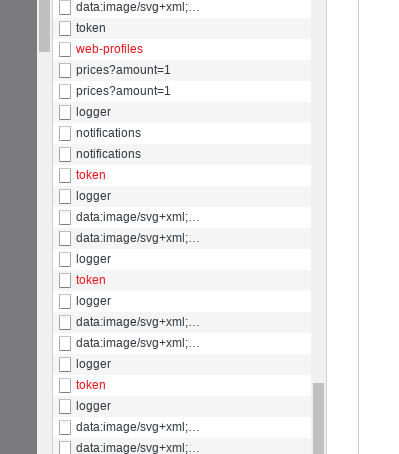
it's random. 2 times failed on token, then on web-profiles.. then popup shows up. or it may not fail 3 times in a row.
anyway, thanks for ultra fast response. i'll return to this issue a bit later after your response
have a nice day
yurii-github
on 27 Nov 2018
I've been having the same issue for a couple of days now, but it seems to work again when I clear all localStorage.
 digggggggggg
on 27 Nov 2018
digggggggggg
on 27 Nov 2018
This issue has been automatically locked since there has not been any recent activity after it was closed. Please open a new issue for related bugs.
![github-actions[bot] picture](https://avatars.githubusercontent.com/in/15368?v=4&s=40) github-actions[bot]
on 13 Dec 2020
github-actions[bot]
on 13 Dec 2020
Related issues
 JeromeDeLeon
·
4Comments
JeromeDeLeon
·
4Comments
 Warix3
·
4Comments
Warix3
·
4Comments
 PhilibertDugas
·
5Comments
PhilibertDugas
·
5Comments
 Wr4i7h
·
4Comments
Wr4i7h
·
4Comments
 Soulpancake000
·
5Comments
Soulpancake000
·
5Comments
Most helpful comment
All, this is a known issue in our sandbox and we have a triage working to resolve it. Currently there is no quick fix / workaround for the client side integration. You can still make the api call server side and fetch it via web service. I will update this issue when we get it resolved.
@duozersk @mrsalitre the urls are correct. www is a proxy app specifically for checkout js.