Patternfly-react: Add component for single-file upload with editable preview (e.g. for SSH Key)
In IMS (https://github.com/ManageIQ/manageiq-v2v) we need a component for the user to provide an SSH key, either by uploading a file or pasting its contents. The mockup for our downstream need of this component looks like this (courtesy of @vconzola):

Such a component already exists in the OpenShift Console (https://github.com/openshift/console/blob/master/frontend/public/components/utils/file-input.tsx, with screengrabs visible in https://github.com/openshift/console/pull/174). It looks like this, with a file path field and browse button above the larger file contents field (image courtesy of @jcaianirh):

I'd like to find a way we can create a reusable component for this that both of these applications can share. I'm not sure if patternfly-react-extensions is the right place for this. My other concern is that the existing component in OpenShift is written in TypeScript, so I'm guessing we would need to convert it to regular JavaScript to be reused (at least if it ends up in pf-react-extensions).
I did notice that we have design consideration for this use case (https://www.patternfly.org/pattern-library/forms-and-controls/file-upload/#editable-preview) but I didn't find any CSS or other implementations of this version of the pattern, and it lacks the file-path-and-browse-button bar at the top.
Any guidance here would be appreciated! Thanks.
 mturley
All 17 comments
This makes sense from the coding side - pinging @mcarrano for design approval. I'd say we put it in patternfly-react-extensions and use js not typescript.
 dgutride
on 29 Jan 2019
dgutride
on 29 Jan 2019
@mturley @dgutride I think that the design presented here looks reasonable. But I do have a couple of questions:
If I upload the SSH key from a file, do the contents still populate the text field? I think I would expect them to?
Is it possible to do something closer to the design pattern shown here? https://www.patternfly.org/pattern-library/forms-and-controls/file-upload/#single-file-upload In this case the user could either paste into the field or click the Browse link without having two controls. @vconzola would be interested in hearing your thoughts here. Do you think these are two ways of doing the same thing or are the use cases unique enough to justify the different approach?
 mcarrano
on 29 Jan 2019
mcarrano
on 29 Jan 2019
@mcarrano for the upload SSH key case, the contents should still populate in the text area.
About the idea of having a single control that wraps the file chooser inside the text area like the link you provided above, at first I thought that might be a nice ux, but then I wonder:
a) You can't see the name of the file uploaded, and if you add a field to display it, you essentially have two fields again.
b) What happens when the user selected the wrong file, and has to reselect? The link in the component has been replaced by the ssh key, and you are looking at a second component again.
c) Then I was looking at the github write comment component, and there is an action bar located inside the text area at the bottom in the comments section where you can click to bring up the file chooser. Is it possible that might be closer to the component you suggested above? Maybe we could add the current filename to the text of the action bar for reference?
Note: This would be a change from the current openshift experience, we would have to have a broader discussion.
@dgutride @mturley thoughts?
 jcaianirh
on 29 Jan 2019
jcaianirh
on 29 Jan 2019
@jcaianirh I like the idea of not having two fields, I think you bring up some valid points.
For (a), does the user really need to see the name of the file if its contents are already loaded and visible? For an SSH key I would think you don't really need to, but it can't hurt if there's a good place to put it.
(b) There is definitely a need for some way to browse for a new file, but it could be as simple as a "remove" link/button or an "X" icon button somewhere adjacent to the field that resets it to the initial empty state.
(c) I think the addition of a status bar with a filename and either a remove or a browse button would solve the problem, but that's essentially what the separate filename/browse field is, just with a different visual style.
It seems like no matter what we do, we either need two fields or a control of some kind outside the text field.
mturley
on 29 Jan 2019
@mcarrano I'm also curious what the UX would be like for allowing the user to paste in the field that contains a "drag your file here or browse" message. When the user clicks in the whitespace of the field to focus their text cursor there, does the message disappear? The message would have to be a layer on top of the text field that can be hidden.
mturley
on 29 Jan 2019
@mturley @jcaianirh I think you both bring up valid points about how the UX should behave if we follow the single text field approach. Since the proposal is to only contribute this to react-extensions, I'm OK with sticking with the OpenShift approach since it creates a viable component for reuse. We should have a broader discussion about the desired UX before pulling into the main PatternFly-react library, however.
Does this approach make sense to you @dgutride ?
mcarrano
on 29 Jan 2019
Here are some options I played with for a Portal project. I didn't include pasting since that's not a use case for me.

The left side shows 3 ideas. I like the concept of making it one regular height input field but it might be too cramped. I imagine with pasting capability it would grow in height after pasting.
The middle one might work best - there's an explicit button for browse, a larger drag and drop target area, and then clicking anywhere that's not the button could be used for pasting. It's a little big though.
The third one copies the PF3 version most but I prefer having a button instead of a link for browse. A button is more appropriate for an action and it's more obvious what to do in this field.
On the right shows the flow of uploading and then the success message of uploading a file. That takes care of the questions about how to see the file name and how to remove it.
@mturley and I plan on talking through this more and trying to come up with a single solution for all of these use cases.
 ajacobs21e
on 8 Feb 2019
ajacobs21e
on 8 Feb 2019
IMO, any design/UX changes should occur at https://www.patternfly.org/pattern-library/forms-and-controls/file-upload/#single-file-upload first. Once that is updated this component can be implemented.
 jeff-phillips-18
on 8 Feb 2019
jeff-phillips-18
on 8 Feb 2019
Per @jeff-phillips-18 's comment perhaps we should clarify. Are we considering this as a contribution for PF3 or PF4? I was thinking that this was a new design we were considering for PF4, but in either case, yes we should begin with a design issue.
mcarrano
on 8 Feb 2019
I created a new issue for this discussion: https://github.com/patternfly/patternfly-design/issues/741
@mcarrano if I didn't do that right please let me know!
ajacobs21e
on 8 Feb 2019
@ajacobs21e thanks for putting that together. @mcarrano it looks like this will be a good contribution to PF4 as well, but for my product I need to have this as a component for PF3. So in addition to the efforts for a PF4 component, I'll plan to build out a PF3 component like the one currently used in OpenShift (pictured at the top of this issue). For the product I also need it to be able to display the contents of the file, and allow copy/paste, so maybe the needs are different enough that these should be two different designs anyway?
mturley
on 8 Feb 2019
This issue has been automatically marked as stale because it has not had recent activity. It will be closed if no further activity occurs.
![stale[bot] picture](https://avatars3.githubusercontent.com/in/1724?v=4&s=40) stale[bot]
on 6 Jun 2019
stale[bot]
on 6 Jun 2019
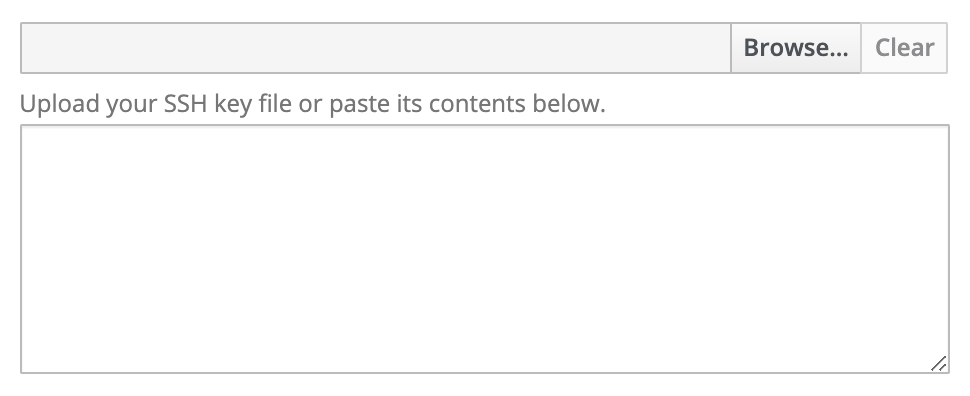
I ended up implementing a downstream version of this in IMS based on the one from OpenShift Console. If it would be useful to contribute this back to patternfly, I can do that, but I imagine we would need to finish the design discussion in https://github.com/patternfly/patternfly-design/issues/741 first. I'm not sure how much need there is right now, so unless someone asks, I'll let this issue go stale for now.
For posterity, the component I built can be found here: https://github.com/ManageIQ/manageiq-v2v/blob/master/app/javascript/react/screens/App/common/forms/TextFileInput/TextFileInput.js
And it looks like this:
mturley
on 6 Jun 2019
We do have File Upload on our PatternFly 4 roadmap and I believe we should contribute this there. I've referenced that issue in the patternfly-next repo. Should we close this issue in that case @dgutride @rachael-phillips @LHinson ?
mcarrano
on 6 Jun 2019
I'm guessing it isn't valuable for me to contribute my component back to patternfly-3-react?
mturley
on 6 Jun 2019
From a design perspective, I'd rather just address this in PatternFly 4 unless someone sees a critical PatternFly 3 need. Is your current implementation available in 'react-extensions' in case someone wants to reuse it @mturley ?
mcarrano
on 6 Jun 2019
@mcarrano I never ended up making a PR to put it into react-extensions, I remember thinking there needed to be some more discussion before that was done. Reading back through this thread I think I misunderstood, though. I'll put that on my backlog.
mturley
on 6 Jun 2019
Related issues
 tadayosi
·
5Comments
mcarrano
·
4Comments
tadayosi
·
5Comments
mcarrano
·
4Comments
 mohd-akram
·
3Comments
mohd-akram
·
3Comments
 priley86
·
3Comments
priley86
·
3Comments
 marshmalien
·
4Comments
marshmalien
·
4Comments
Most helpful comment
@mturley @jcaianirh I think you both bring up valid points about how the UX should behave if we follow the single text field approach. Since the proposal is to only contribute this to react-extensions, I'm OK with sticking with the OpenShift approach since it creates a viable component for reuse. We should have a broader discussion about the desired UX before pulling into the main PatternFly-react library, however.
Does this approach make sense to you @dgutride ?