Patchwork: new alpha installer "nuked" the install folder - 3.12.0-alpha.3
wanted to see if the new alpha installer works.... well big mistake :')
OS: Win10 64bit
it somehow nuked the permission to edit the Programs\ssb-patchwork folder (I think I somehow managed to delete the contents though)
after running 3.12.0 alpha 3 both installers don't work anymore (and 3.12.0 broke during install)

I don't seem to have any permissions to modify the patchwork folder at all
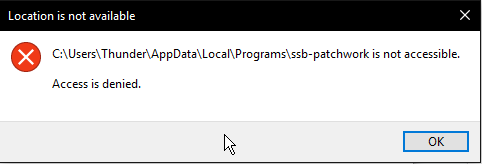
even as admin, trying uncheck read only mode
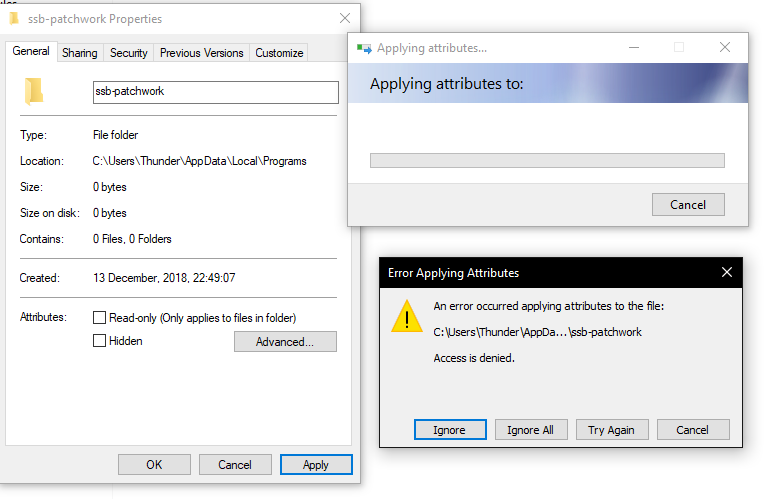
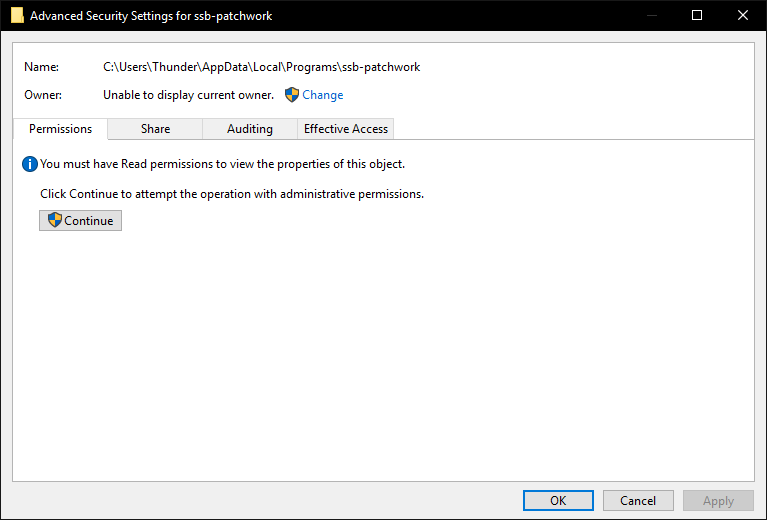
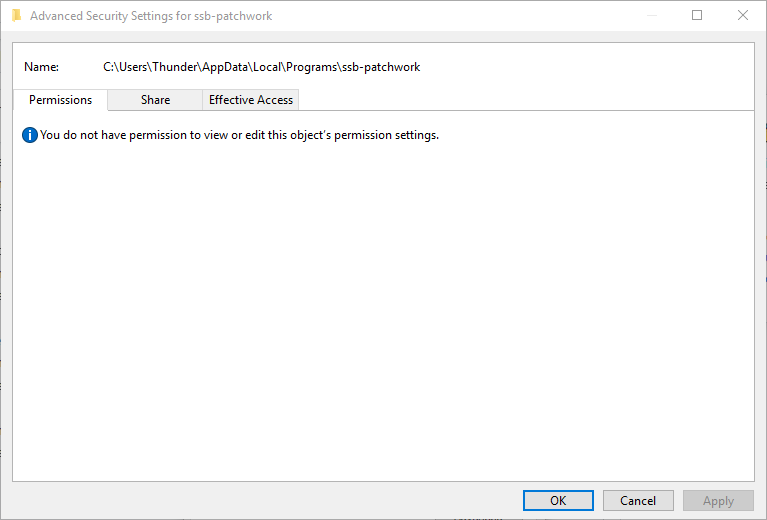
no idea how I can modify the folder now..
any attempts to change anything about it fail
 ThunderFD
All 17 comments
That's... very strange. Sorry that the installer isn't working correctly, that isn't good at all.
Could you walk me through what happened when you double-clicked the new installer? Did it have the usual installation workflow or did it immediately crash as "access denied"? I was under the impression that we [incorrectly] didn't actually use the AppData directory, so I'm not sure why that would break.
Does this error (and weird directory permission) persist across restarts? Thanks for your help debugging this!
 christianbundy
on 29 Apr 2019
christianbundy
on 29 Apr 2019
I'm not 100% sure anymore but I think it crashed like it does now almost instantly:
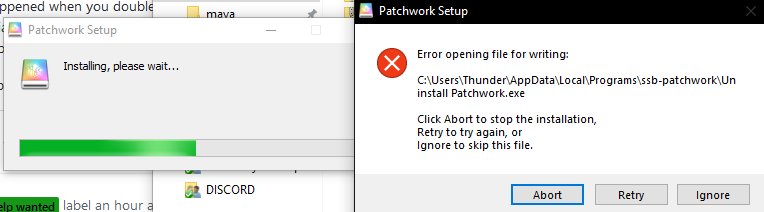
(now)
my previous version was 3.11.4 .... or so, since i wasn't logged in for a while
so it had to uninstall this first and somehow ran into issues?
I did a reboot a few hours ago and the error still persisted, yes.
ThunderFD
on 30 Apr 2019
Hmm, these might be relevant:
- https://github.com/electron-userland/electron-builder/issues/2907
- https://github.com/electron-userland/electron-builder/issues/2992
What happens if you hit "retry"? If that doesn't work, could you try running the installer as an administrator?
christianbundy
on 30 Apr 2019
Hitting Retry just makes the same Error pop up again, same with run as admin. (as last screenshot)
Not sure how it managed to even get rid of permissions from the admin..
edit: looks like I'll have to somehow remove the folder via safe mode or a linux boot stick somehow because I really don't know how I would do this from withing windows
ThunderFD
on 30 Apr 2019
well NEVERMIND I just remembered that in Windows 10 a shutdown is not a proper shutdown just as I pressed the button again before going to bed, and now did a proper reboot:
Issue fixed, I could delete the folder again and the installer worked,
but now no window opens when I launch 3.12.0-alpha.3, there's 3 processes in task manager though.
3.11.6 works (edit: well it's scuttling but I will check if this ends tomorrow)
ThunderFD
on 30 Apr 2019
Could you verify that 3.11.6 is killed (and there are no processes in the task manager) before attempting to start Patchwork 3.12.0-alpha.3 again? It doesn't open a window if another Patchwork is running so I want to make sure we rule that out.
Thanks for restarting your machine!
Btw, the endless "scuttling" bug is a problem with 3.11.6 (see #969), but it's resolved in the latest alpha.
christianbundy
on 30 Apr 2019
yes, I killed all processes named "Patchwork" in task manager, starting it just spawns 3 new ones
ThunderFD
on 30 Apr 2019
Could you try starting it from a command-line? I'm curious whether there's some debugging output somewhere.
christianbundy
on 30 Apr 2019
Also, just to clarify: installing 3.12.0-alpha.3 worked fine but starting it doesn't do anything, is that correct?
christianbundy
on 30 Apr 2019
yes, installing works now, just starting doesn't lauch a window
indeed, there's a bunch of json first (settings?) and then a error message!
Error: \\?\C:\Users\Thunder\AppData\Local\Temp\936f16fd-a203-4774-9d79-1f8ae093bae6.tmp.node is not a valid Win32 application.
\\?\C:\Users\Thunder\AppData\Local\Temp\936f16fd-a203-4774-9d79-1f8ae093bae6.tmp.node
at process.module.(anonymous function) [as dlopen] (ELECTRON_ASAR.js:160:31)
at Object.Module._extensions..node (internal/modules/cjs/loader.js:722:18)
at Object.module.(anonymous function) [as .node] (ELECTRON_ASAR.js:169:18)
at Module.load (internal/modules/cjs/loader.js:602:32)
at tryModuleLoad (internal/modules/cjs/loader.js:541:12)
at Function.Module._load (internal/modules/cjs/loader.js:533:3)
at Module.require (internal/modules/cjs/loader.js:640:17)
at require (internal/modules/cjs/helpers.js:20:18)
at bindings (C:\Users\Thunder\AppData\Local\Programs\ssb-patchwork\resources\app.asar\node_modules\leveldown\node_modules\bindings\bindings.js:84:48)
at Object.<anonymous> (C:\Users\Thunder\AppData\Local\Programs\ssb-patchwork\resources\app.asar\node_modules\leveldown\leveldown.js:3:36)
ThunderFD
on 30 Apr 2019
Hmm, this looks relevant: https://github.com/electron-userland/electron-builder/issues/844
I've tried rebuilding the Windows binary from source, could you test this out?
[removed]
christianbundy
on 30 Apr 2019
Just released 3.12.0-alpha.4 to resolve this problem, could you confirm that it's working correctly now?
christianbundy
on 3 May 2019
uhhm so my pc currently displays a BSOD LOL
edit: after the forced reboot I ran the installer again and everything works
ThunderFD
on 3 May 2019
Sorry, just to be clear are you saying that clicking on the new alpha installer causes a blue screen of death? If so:
- I'm super sorry to hear that, I can't imagine why that would be
- If you could post the crash logs that would be super helpful
On Fri, May 3, 2019, at 02:49, ThunderFD wrote:
uhhm so my pc currently displays a BSOD LOL
Christian Bundy notifications@github.com schrieb am Fr., 3. Mai 2019,
01:52:Just released 3.12.0-alpha.4 to resolve this problem, could you confirm
that it's working correctly now?—
You are receiving this because you authored the thread.
Reply to this email directly, view it on GitHub
https://github.com/ssbc/patchwork/issues/1009#issuecomment-488872176,
or mute the thread
https://github.com/notifications/unsubscribe-auth/AEH5EPZTXEDO2TEWXNGWZPDPTN5CHANCNFSM4HJGQ7LA
.—
You are receiving this because you were assigned.
Reply to this email directly, view it on GitHub https://github.com/ssbc/patchwork/issues/1009#issuecomment-489037213, or mute the thread https://github.com/notifications/unsubscribe-auth/AAEDIZEOWDNETXQJ6GJ5D53PTQDCXANCNFSM4HJGQ7LA.
christianbundy
on 3 May 2019
not sure if you saw my edit since you were responding via email: "edit: after the forced reboot I ran the installer again and everything works"
but yeah, first time I clicked on it I got a BSOD, second time all worked just fine..
crash logs being crash log from the installer or from the BSOD?
where would I find them?
thanks!
ThunderFD
on 3 May 2019
Oops -- no, I hadn't seen your edit, but I'm happy to hear that everything works on Windows in the latest alpha. Does that mean that this issue is ready to be closed?
crash logs being crash log from the installer or from the BSOD?
I don't use Windows so I can't be of much help, but I think each BSOD should be generating a dump that you should be able to read.
christianbundy
on 3 May 2019
I've been digging around but no idea how I can find any useful information about the BSOD, and I wasn't paying attention to the Error when it happened;
maybe it had something to do with my system being in sleep mode before, I had issues with hibernation years ago as well 🤷♂ I need to reinstall everything sometime anyway, this is win 10 upgraded from win 7 and major hardware changes .....
since it worked after a fresh reboot I'll close this one yeah
ThunderFD
on 3 May 2019
Related issues
 cinnamon-bun
·
4Comments
cinnamon-bun
·
4Comments
 adamnovak
·
6Comments
adamnovak
·
6Comments
 justinabrahms
·
5Comments
justinabrahms
·
5Comments
 Logicbloke
·
7Comments
Logicbloke
·
7Comments
 ahdinosaur
·
4Comments
ahdinosaur
·
4Comments
Most helpful comment
uhhm so my pc currently displays a BSOD LOL
edit: after the forced reboot I ran the installer again and everything works