Patchwork: Patchwork stuck [corrupted database]

I don't know what happened, but Patchwork worked fine for about a week (I think I left it open the whole time), and then, everytime I open it it gets stuck on this "Loading" screen.
I can still navigate by clicking on connected pubs, and then from user to user, but I never see feeds anywhere.
I suspect some kind of cache file corruption issue, but I don't know what is safe to delete so I can restart in a clean state.
Also, it doesn't look like there is any error in the console.
 emilecantin
All 14 comments
hmm, try deleting the directories under rm -rf ~/.ssb/db/* and then restart. If you start it from the command line, you'll see some output if something is happening, I think.
 dominictarr
on 7 May 2017
dominictarr
on 7 May 2017
hm, yeah i sometimes run into problems where sbot silently fails, verbosely fails, or hangs for a few minutes. but enough restarts and it eventually works for me. :stuck_out_tongue: hope you're able to scuttle again @emilecantin. :smiley_cat:
 ahdinosaur
on 7 May 2017
ahdinosaur
on 7 May 2017
@dominictarr Yeah, I just tried what you suggested, and it didn't really help... I think I lost my profile (when I launched Patchwork it asked me for my name, picture, etc.) and now it gets stuck at "requesting follow" when I add a pub.
emilecantin
on 8 May 2017
Okay, I just started it from the commandline, and here is what I get:
Error: could not find matching timestamp for index:{"timestamp":1491861730842}
    at /Applications/Patchwork.app/Contents/Resources/app.asar/node_modules/streamview-links/index.js:164:31
    at /Applications/Patchwork.app/Contents/Resources/app.asar/lib/private-with-index.js:85:29
  Error: missing timestamp:1491861730842
    at /Applications/Patchwork.app/Contents/Resources/app.asar/lib/private-with-index.js:85:32
    at /Applications/Patchwork.app/Contents/Resources/app.asar/node_modules/level-sublevel/shell.js:101:15
  NotFoundError: Key not found in database
    at /Applications/Patchwork.app/Contents/Resources/app.asar/node_modules/level-sublevel/shell.js:101:18
    at /Applications/Patchwork.app/Contents/Resources/app.asar/node_modules/level-sublevel/nut.js:121:19
(I omitted a few lines of seemingly normal initialization above that)
emilecantin
on 8 May 2017
@emilecantin thanks - yes that is an error about the indexes.
can you try also deleting rm -rf ~/.ssb/links ~/.ssb/query` then restart, I think that should do it?
dominictarr
on 8 May 2017
@emilecantin hey, did this issue end up being resolved or are you still having trouble loading Patchwork?
ahdinosaur
on 29 May 2017
Also rm -rf ~/.ssb/private
 mmckegg
on 30 May 2017
mmckegg
on 30 May 2017
I think what may have happened here is that @emilecantin deleted the database, but not the custom indexes. So when started up again, the indexes couldn't find the corresponding messages. This threw patchwork into the "errored state" which it doesn't currently recover from.
@emilecantin As long as you haven't actually deleted your ./ssb/secret, you should be able to restore everything if you do the following:
- backup your
~/.ssb/secretfile - completely delete your
~/.ssbdirectory - open patchwork to create a new ssb identity (don't worry about choosing a name or image, press cancel)
- join a pub that you used to be a member of
- wait for sync to complete, then close patchwork
- replace
~/.ssb/secretwith your original backed upsecretfile. - Relaunch patchwork. You should be "you" again!
mmckegg
on 30 May 2017
@mmckegg That did the trick, at last!
I think my local database / index got corrupted on its own the first time, though, so there might still be a bug there.
I think I might have shut down my computer without quitting all apps first (so MacOS quits them all for me), but it's been a long time, so I don't really remember.
emilecantin
on 31 May 2017
Unsure if it's related but sometimes when I launch patchwork, it doesn't even output the initial three [CFG] lines. I have been unable to identify a pattern. Sometimes it works. Currently, it's been connecting to my pub only. Generally it attempts to connect to multiple peers.
$ patchwork
[CFG] Password: NO.
[CFG] TLS: NO.
[CFG] Remote Access: NO.
Patchwork - Copyright (C) 2015-2016 Secure Scuttlebutt Consortium
This program comes with ABSOLUTELY NO WARRANTY.
This is free software, and you are welcome to redistribute it under certain conditions (GPL-3.0).

Starting...
Log level: notice
Serving at http://localhost:7777
Connected drinkbot.org:8008:@kOK9sfSLeFrQMtYaqLQ3nZE19v2IDiEwlpEdAqep3bw=.ed25519
Log history read...
Indexes generated
Disconnected drinkbot.org:8008:@kOK9sfSLeFrQMtYaqLQ3nZE19v2IDiEwlpEdAqep3bw=.ed25519
Connected drinkbot.org:8008:@kOK9sfSLeFrQMtYaqLQ3nZE19v2IDiEwlpEdAqep3bw=.ed25519
Disconnected drinkbot.org:8008:@kOK9sfSLeFrQMtYaqLQ3nZE19v2IDiEwlpEdAqep3bw=.ed25519
Connected drinkbot.org:8008:@kOK9sfSLeFrQMtYaqLQ3nZE19v2IDiEwlpEdAqep3bw=.ed25519
Disconnected drinkbot.org:8008:@kOK9sfSLeFrQMtYaqLQ3nZE19v2IDiEwlpEdAqep3bw=.ed25519
Connected drinkbot.org:8008:@kOK9sfSLeFrQMtYaqLQ3nZE19v2IDiEwlpEdAqep3bw=.ed25519
I'll make a backup of my ~/.ssb dir and node_modules directory before I try Matt's suggestion to resync. Please let me know if there's any way I can help to get more debug info to help track this down.
 gardner
on 18 Jun 2017
gardner
on 18 Jun 2017
@gardner what version of Patchwork are you using? seems like you're using Classic (version 2), i recommend you upgrade to the latest most exciting version! :sparkle:
ahdinosaur
on 19 Jun 2017
Yeah, this was related to me using the deprecated command line version. To confuse things further, there was a graphviz binary named patchwork that was in my path. I am moving to the new electron client now.
gardner
on 20 Jun 2017
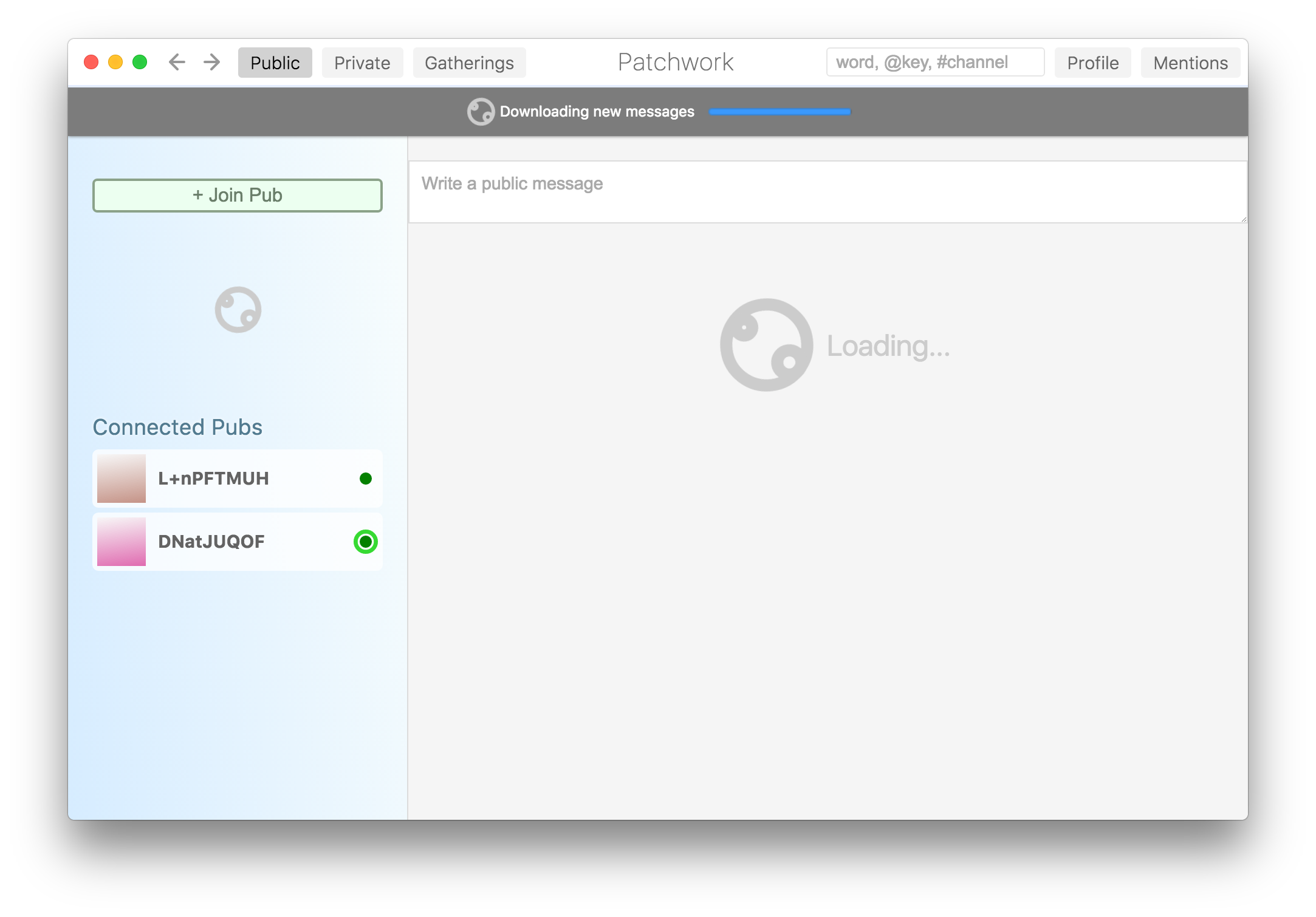
FWIW I've also experienced getting hung in this state on v3.5.1 with the binary release on GitHub.
 benbarclay
on 29 Jun 2017
benbarclay
on 29 Jun 2017
Sounds like this was most likely caused by: https://github.com/ssbc/scuttlebot/issues/427
This bug has now been fixed. Feel free to open this issue again if the problem reappears!
Other possibilities here: https://github.com/ssbc/patchwork/issues/605#issuecomment-337567038
mmckegg
on 18 Oct 2017
Related issues
mmckegg
·
4Comments
 Gaffen
·
4Comments
mmckegg
·
6Comments
mmckegg
·
5Comments
Gaffen
·
4Comments
mmckegg
·
6Comments
mmckegg
·
5Comments
 adamnovak
·
6Comments
adamnovak
·
6Comments
Most helpful comment
I think what may have happened here is that @emilecantin deleted the database, but not the custom indexes. So when started up again, the indexes couldn't find the corresponding messages. This threw patchwork into the "errored state" which it doesn't currently recover from.
@emilecantin As long as you haven't actually deleted your
./ssb/secret, you should be able to restore everything if you do the following:~/.ssb/secretfile~/.ssbdirectory~/.ssb/secretwith your original backed upsecretfile.