Passport: Consuming JavaScript via CreateFreshApiToken not working
Hi, I've been debugging this issue for a little over a week. I've asked on StackOverflow and the Laravel Discord. Multiple people have offered ideas and suggestions and unfortunately nothing has come forward as a working solution.
This is last resort in hopes for a solution. A few others have created an issue -- with the only solution being "rebuild the app on 5.7". (#906, #884)
I'm attempting to install Passport (^7.0) on Laravel 5.7.18 using PHP 7.2.13. This is an upgraded Laravel project from 5.6.
The application consumes the API within itself with JS. (Axios with Vue)
I'm getting a 401 Unauthorized error within the web application console. I've read the documentation and added CreateFreshApiToken to the web Kernel. The laravel_token cookie is in fact setting itself.
I've gone through tinker and added an access token for my user account. From there, I booted up Postman and I successfully ran the query with the access token in the header.
When I login my browser, the laravel_token sets itself but when it makes an API request I get a 401 Unauthorized error.
Http/Kernel:
    protected $middlewareGroups = [
            'web' => [
                \App\Http\Middleware\EncryptCookies::class,
                \Illuminate\Cookie\Middleware\AddQueuedCookiesToResponse::class,
                \Illuminate\Session\Middleware\StartSession::class,
                // \Illuminate\Session\Middleware\AuthenticateSession::class,
                \Illuminate\View\Middleware\ShareErrorsFromSession::class,
                \App\Http\Middleware\VerifyCsrfToken::class,
                \Illuminate\Routing\Middleware\SubstituteBindings::class,
                \Laravel\Passport\Http\Middleware\CreateFreshApiToken::class,
            ],

            'api' => [
                'throttle:60,1',
                'bindings',
            ],
        ];
JavaScript:
    axios.get("api/users/" + id).then(({ data }) => {
        this.user = data;
    });
Auth.php:
    'guards' => [
            'web' => [
                'driver'   => 'session',
                'provider' => 'users',
            ],

            'api' => [
                'driver'   => 'passport',
                'provider' => 'users',
            ],
        ],
Routes (Api.php):
    Route::middleware('auth:api')->group(function () {
        Route::resource('users', 'UserController');
        Route::resource('groups', 'GroupController');
        // .. plus more resources
    });
Axios Config:
    window.axios.defaults.headers.common['X-Requested-With'] = 'XMLHttpRequest';

    var token = document.head.querySelector('meta[name="csrf-token"]');

    if (token) {
      window.axios.defaults.headers.common['X-CSRF-TOKEN'] = token.content;
    } else {
      console.error('CSRF token not found: https://laravel.com/docs/csrf#csrf-x-csrf-token');
    }
 ahinkle
All 35 comments
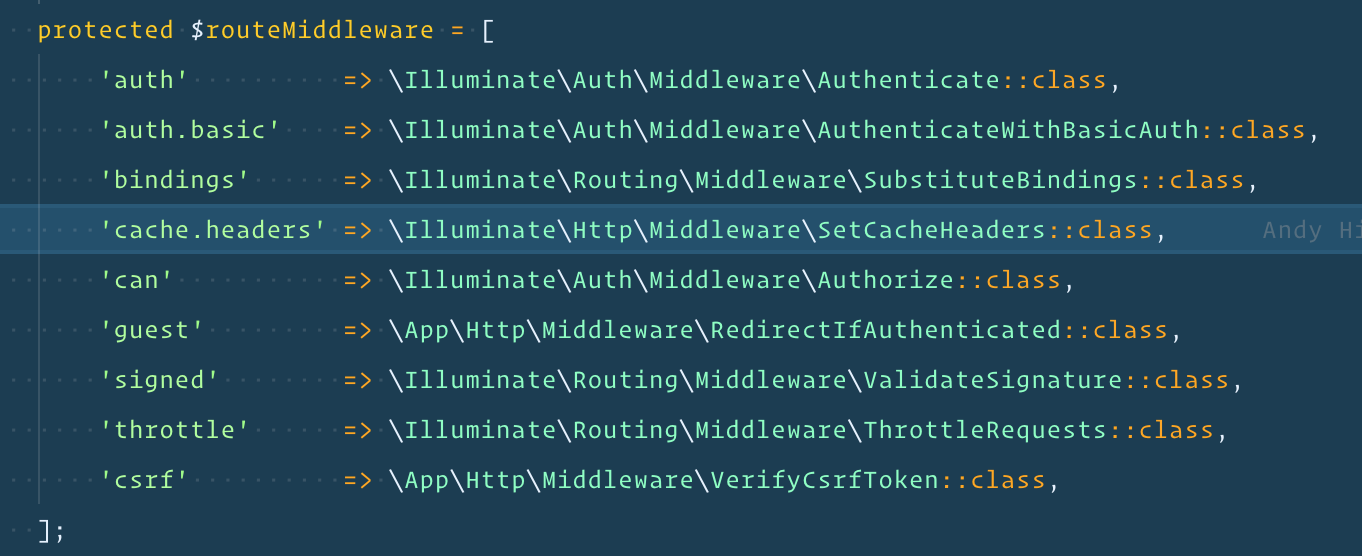
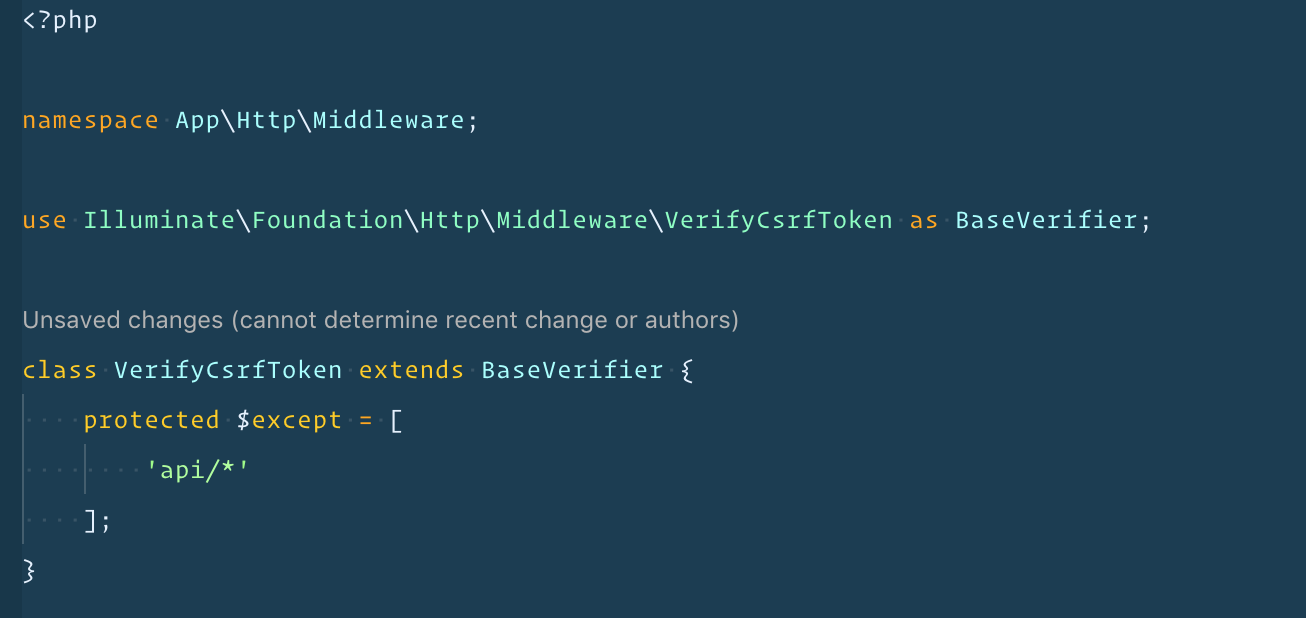
@Chrisx84 Thanks for the suggestions -- I've added both of those fields and i'm still getting a 401 in the browser. Refreshed cache, etc. Anything else I'm missing?
ahinkle
on 21 Dec 2018
Hmm pretty odd. Can't see anything specific doing wrong. I'd remove the except rule in you VerifyCsrfToken again though. Seems like the token gets transferred correctly so that should work.
I see you removed the /user call from your api routes file. Can you re-add it and try again? Don't think this has anything to do with it though..
Route::middleware('auth:api')->get('/user', function (Request $request) {
    return $request->user();
});
As for the rest I'm pretty much at loss here myself. I don't think it's a bug but rather something crucial we're missing. Can you perhaps post the full response/request headers & bodies from a failed request here?
 driesvints
on 21 Dec 2018
driesvints
on 21 Dec 2018
I'm having the same issue... I cannot consume my API via JS even though the laravel_token cookie is set on the request. The API works as expected using Postman.
Request:
General:
Request URL: https://hub.test/api/user
Request Method: GET
Status Code: 401
Remote Address: 127.0.0.1:443
Referrer Policy: no-referrer-when-downgrade

Response Headers:
cache-control: no-cache, private
content-type: application/json
date: Wed, 02 Jan 2019 19:02:32 GMT
server: nginx/1.15.5
set-cookie: XSRF-TOKEN=eyJpdiI6InEwVGdhVWhkVjRqWXc4RmpTemVINVE9PSIsInZhbHVlIjoiTWIrZlJnUHFhQVVheEQrSVRjUXlBdFRydGZ0U2hZVXczM1k1cktYZm9hUFh3ckRmc1l5Rkk4UjBMdThlWWJ1VCIsIm1hYyI6Ijk5Y2M3NmVhZTY4ZWNhM2VjMGYxNjEzZjE3MjZlYTQ0ZDk1NDQ1NjEyZGVjN2IzYTgwYTQ3MWUyOTViYmU2NzEifQ%3D%3D; expires=Wed, 02-Jan-2019 21:02:32 GMT; Max-Age=7200; path=/
set-cookie: flowbird_hub_session=eyJpdiI6IkhId3V0RlhMbDJZNWJOSFlKWldrZEE9PSIsInZhbHVlIjoiNWpPbzM5akNtcmxSXC9rN0c4SUtTK04rY2hDSG1GQWhNRzNVc1cwUHplaDNBZk5zS3o4aWxLWUw5ckN5M3VYdGwiLCJtYWMiOiI1YTVlOWI0ZTZkM2YxMmEyZDIwNTZjY2QyNGM2NDk1ZDYyOGJiZGFmZGY4NDE1MDliY2Q3YzQwNTM1OTEzZmM2In0%3D; expires=Wed, 02-Jan-2019 21:02:32 GMT; Max-Age=7200; path=/; httponly
status: 401
x-powered-by: PHP/7.2.11

Request Headers:
:authority: hub.test
:method: GET
:path: /api/user
:scheme: https
accept: application/json, text/plain, */*
accept-encoding: gzip, deflate, br
accept-language: en-US,en;q=0.9,id;q=0.8
cookie: laravel_token=eyJpdiI6IkpwNHFoTnJHeGxNYVdCb2lxNDVzK2c9PSIsInZhbHVlIjoiME50UzRDR0RUSHRDZ3JzNFAzcGgzc2Z6aThsd1kxZXFpVElwaFwvVzJcL1wvUWY1bGNMQkhnNXpUVU5ZTnFSQXloT0ZaRmtJOWYzXC8wb1lNOEQxSmxsanRNdExaWTJqc2h3Z21SSGh0d2RSQzBzdmp1djlWVXBEbGRxNHNcLzJpNVQxK2FXUVlNQ0VWMGV1V1JZUzN3dXRrY0hmYzd4cHVySnhIMUdHSUhZSUpjKzd6a2VHNkh5NTJQSEd4KzFnMnJZWlRESWdZNzhQSFRxUXNRQkpYaGQ4TXQ1cURtQ1gyNFh0SER5K2xOeW5xN29PY0RZcDg5RVJQRHZZMEFnZ0RpcGxOIiwibWFjIjoiYWNjYzUyZmU1Y2JjYThhMDBiNjQzMGM1YWE1NTMwMDlhMjJiMGRjNTM3MjQ5ZmJjZGEyODQxZmQzODgwZjYwYiJ9; XSRF-TOKEN=eyJpdiI6Im5LZDQ1YmFrNXdvT0VnK3ZjWG14U1E9PSIsInZhbHVlIjoiODhPN3NpVWJCMDJscENGcTdNZmthZnpUa1dHN3d2MlZmWjBzRnppZUFIb3N4WFI4Vmc1TnljeklUZDdkQ0tsSCIsIm1hYyI6ImE2ZTc2ZDAxN2RkYjc0NjQwYTYwM2NlNzQ3OTBjNjJiYzhkNDZiYjZiYWQzMGEyZTkwMTZmNDE4Y2FhNGE2N2EifQ%3D%3D; flowbird_hub_session=eyJpdiI6InlvMmpQMjgreGtENzBMdFNFVTNZZkE9PSIsInZhbHVlIjoiODNTcUpvTTUyc2hvelU2WFRKT1RxSjNFeDdWSXRvTjJkT01zdklrZ0p3V2x3VElJZk5rMUFId2hYaE9wXC9VTFkiLCJtYWMiOiJhNTgzNGExNGM2YzY2OGRhMzBkZDI2ZDcxMmY3ODY2MjI5NTc1NDBhNGFkNzIzNjY2MzI5YTFlYjc4YTNkYWEyIn0%3D
referer: https://hub.test/
user-agent: Mozilla/5.0 (Macintosh; Intel Mac OS X 10_14_2) AppleWebKit/537.36 (KHTML, like Gecko) Chrome/71.0.3578.98 Safari/537.36
x-csrf-token: rIbgh3b3lOzTz1Fnubbu274xI2prFFCYHtohDrdQ
x-requested-with: XMLHttpRequest
x-xsrf-token: eyJpdiI6Im5LZDQ1YmFrNXdvT0VnK3ZjWG14U1E9PSIsInZhbHVlIjoiODhPN3NpVWJCMDJscENGcTdNZmthZnpUa1dHN3d2MlZmWjBzRnppZUFIb3N4WFI4Vmc1TnljeklUZDdkQ0tsSCIsIm1hYyI6ImE2ZTc2ZDAxN2RkYjc0NjQwYTYwM2NlNzQ3OTBjNjJiYzhkNDZiYjZiYWQzMGEyZTkwMTZmNDE4Y2FhNGE2N2EifQ==
 billriess
on 2 Jan 2019
billriess
on 2 Jan 2019
Not the most ideal solution -- I just ended up rebuilding my app (from the ground up) using the latest 5.7 and it worked. I only started this app since 5.6 -- something in the upgrade notes may be missing.
When I get time I'd like to create a new laravel base 5.6 project, upgrade it to 5.7 and then install passport and then a fresh 5.7 w/ passport and compare the two to see what's going on.
ahinkle
on 2 Jan 2019
@billriess can you create a sample app which recreates this behavior so we can test ourselves?
driesvints
on 3 Jan 2019
@billriess is your skeleton of laravel up to date with laravel/laravel?
driesvints
on 3 Jan 2019
I also having the same issue. My original project is using laravel/passport=7.0.3, and I just create a new laravel project which laravel/passport=7.0.5. I run the example passport tutorial, it works fine in 7.0.5. So I run composer update to update my original project to 7.0.5. I still get 401 Unauthorized error.
I look at the cookies. I notice my original project the cookie name is laravel_session, but my new laravel project cookie is ccall laravel_passport_session.
//new laravel project just install half hour ago.
laravel_token=eyJpdiI6IlRUdW1kZVY0RERNRHluN25QYXptNkE9PSIsInZhbHVlIjoib1wvbEpodFdNN2pFeW9yM2JNbGwwaGp6WkJYWmcwSTB4alVNV3Y5b2l0RFpwbTlvcTNNT3FtS2lvNDljaVwvQzJjOTlWZTlHQlBWMU5vMzVPM3UwSjRDaVRhU1crcVwvYjB5Wmw2eUp1cjZmMFE4YjJ2b1lqQTBJZWsyMmVUYnQ3SERqNGg3aHhGVWVDR0R2ZVJ6K0VrU0drMXF2Z0VxWFwvUmxCeVpqTmpudnNOekxUMG9uV2NjVlBSRXI2dWx5VmUzMFAxQjZsTG1OMm50N2xFYnRpQUh5ZEJUMmNFQjhwendPUnd0SzAyVWphUFBETHczRjhBY3U5aTZnRkdBc1BsaDEiLCJtYWMiOiI5YjdhMmIxOTVlNGU2ZDRmMDIyMjVkZTJjYmU5MGJiN2FlMTU3MzJmOGU1ZTI3Nzg4ZDEwNWM1YjlhMGNmNzQ1In0%3D; XSRF-TOKEN=eyJpdiI6IjVpTGptVFJaOGxlb0dCSmc4QlRBdVE9PSIsInZhbHVlIjoiSnJYcFdqTU1zUWdiaTJ0c0pkMXlCbFFKbnJFcGZVYlFUWlZtWnlSazF3V0VxRHF3QWNtZnBBQ1N1dHozR2Z6KyIsIm1hYyI6ImUzYzIyYmRhYjZkZTIzNDIyN2E5NGJhMTgzYmMyYWU2ZDQyMThkODgzNjc5OTgyMmNlMjMwY2E3NTU1OGNkMDEifQ%3D%3D; laravel_passport_session=eyJpdiI6ImJ4NmZROFwvVkwyNzF1eWFsZTZQcEtBPT0iLCJ2YWx1ZSI6InFWNHVROStwTXhDZFNsR3k5VWRmZ1wvMGUzaGZ1cjhtcWkxbjlLbG5yUnBJRmJTMnVPVHJlNjMxQ3R0ZkpkQ1FJIiwibWFjIjoiYTBmMTZiZDY0YWVjY2IyOTBjMmI2ZTYzMTU3MmRhNWRjMTZiNDI2YTdiMGU0MDA4Mzk1Y2NjZmMwZDMzNGIwMyJ9

//This is my original project which was created last week
laravel_token=eyJpdiI6ImtpQVZsR1lsRVhRVGtBdFVlNlY5d3c9PSIsInZhbHVlIjoibjVXUWMxM1I0SCtoajI0czY4QWxFeXp5T1NnMjBHUnJFTmpwQ0VIdW9lUlROa0tTeXNNdENcL2M0cWlrWUhTN0dDQnFGdEpLcHFWb0ZRNTBPdmJpaHdxR2ZvRXprZlN1Y3pmVTFBVmpzVlJOQUFEbVQ2eHV4R0pGQ2dES2cyNFZtbTZmMUh6Q0t1VFwvWGZlRlBlZDRrRnlXa0M1S1dcL1R1cXFqb25scVgxTHFtejFHNHd2eTJyTlwvaU44VVBVUVhURzVnenJGRGl0dHNmUXRhRllRcGF0WGU0SXFXK3ZFNm1hU3F4UDd4alhocWZuQzJER2xENXp1cVBKdjc5VlhUMDMiLCJtYWMiOiJhNmM1NDE2NDdlMDRjYWQwODRjNGIyYjVhNTIxYzA1OGMyZjViNDY1ZTFmNDBlY2MxZWQyZWNkN2EwYTE3NDkwIn0%3D; XSRF-TOKEN=eyJpdiI6Im9kTEh3SWhRbGM3ZHlqazhYdVwvU1pnPT0iLCJ2YWx1ZSI6IjI2UWt6eTNLTU1lWitIUHRSS2xoOUFYVGV1aFNtSTJ2aFAxajRIUmVobUFvbm1iZGpBcWMreUozQ0dndHdXTGciLCJtYWMiOiJhMzUxYmE3OTEyMTM4YmI0OTkxMjE2Yzk5M2MxZjRkNTk1NDU5MmMxZGNlZjY5YzA4ZTg0N2EzZTczODkyODUyIn0%3D; laravel_session=eyJpdiI6IjlQWTM1b0s3WmRkaTgxV2QzNXdYVnc9PSIsInZhbHVlIjoieExMQ0g1WWxTS2xBcXVtQXRKRzlxMXdBeUdHTTVGYUFkVmhYblE1MXlsc1wvaEFnVDdXQWRmbzFaVytTdHY0SmoiLCJtYWMiOiJmZTcxMGU2OTNmNjc5Y2Q4OTVmOTY1NGU2ODA1NWJlYzliNWFmNzQzNTEwOGVhMDY3ZTM4ZDUwYWZhYTY3ODJiIn0%3D
I run php artisan cache:clear also no luck.
 shiroamada
on 3 Jan 2019
shiroamada
on 3 Jan 2019
My project was built fresh from 5.7.
I just updated composer, which upgraded passport from 7.0.3 to 7.0.5 but it's still not working.
billriess
on 3 Jan 2019
I found my issue, my <meta name="csrf-token" content="{{ csrf_token() }}"> wrongly put content= to value=, check your cookie all the request field is it filled?
shiroamada
on 4 Jan 2019
Nice find. However, mine hasn’t changed from content= and it still doesn’t work. Can you verify, @billriess?
ahinkle
on 4 Jan 2019
My template has content= already.
<meta name="csrf-token" content="{{ csrf_token() }}">
After much digging, I've found that the Illuminate\Encryption\Ecrypter is throwing a DecryptException with the message The payload is invalid..
Encrypter.php
/**
     * Get the JSON array from the given payload.
     *
     * @param  string  $payload
     * @return array
     *
     * @throws \Illuminate\Contracts\Encryption\DecryptException
     */
    protected function getJsonPayload($payload)
    {
        $payload = json_decode(base64_decode($payload), true);

        // If the payload is not valid JSON or does not have the proper keys set we will
        // assume it is invalid and bail out of the routine since we will not be able
        // to decrypt the given value. We'll also check the MAC for this encryption.
        if (! $this->validPayload($payload)) {
            throw new DecryptException('The payload is invalid.');
        }

        if (! $this->validMac($payload)) {
            throw new DecryptException('The MAC is invalid.');
        }

        return $payload;
    }
This is invoked by Laravel\Passport\Guards\TokenGuard when it calls decodeJwtTokenCookie that is defined on line 238.
Any help here would be appreciated.
billriess
on 5 Jan 2019
Encrypter.php:183
    protected function getJsonPayload($payload)
    {
        $test = $payload;
        $payload = json_decode(base64_decode($payload), true);

        // If the payload is not valid JSON or does not have the proper keys set we will
        // assume it is invalid and bail out of the routine since we will not be able
        // to decrypt the given value. We'll also check the MAC for this encryption.
        dump(base64_decode($test));
        if (! $this->validPayload($payload)) {
            throw new DecryptException('The payload is invalid.');
        }

        if (! $this->validMac($payload)) {
            throw new DecryptException('The MAC is invalid.');
        }

        return $payload;
    }

Maybe this can help... note the malformed base64_decode() results on the final dump.
billriess
on 6 Jan 2019
Do you try run php artisan passport:keys --force try to regenerate your passport keys.
shiroamada
on 6 Jan 2019
Wow.... I got so fed up with trying to figure out why it wouldn't work that I setup a new build myself and noticed everything was working... I ran a diff between the two projects and found the issue.
One of our devs changed the middleware on RouteServiceProvider.php so that api calls used the web middleware by default... this was driving me nuts. I shall have a long talk with him on Monday.
billriess
on 6 Jan 2019
I just realized this was my issue as well as the api middleware was defaulting to web. After I changed it in the model it started working. Thanks for the digging, @billriess!
ahinkle
on 6 Jan 2019
Please, i have got the same mistake but I still not understand how to change the default api middleware.
 Ganaou
on 10 Jan 2019
Ganaou
on 10 Jan 2019
@Ganaou
Make sure the following is defined in your app/Providers/RouteServiceProvider.php
...

protected function mapApiRoutes()
    {
        Route::prefix('api')
            ->middleware('api')
            ->namespace($this->namespace)
            ->group(base_path('routes/api.php'));
    }

...
Also be sure to call auth:api middleware in your routes/api.php
...

Route::prefix('v1')->middleware('auth:api')->group(function () {
    Route::get('/user', function (Request $request) {
        return $request->user();
    });
    // Some other requests here...
});

...
Hope this helps!
billriess
on 10 Jan 2019
My app/Providers/RouteServiceProvider.php is as follow :
protected function mapWebRoutes()
{
    Route::middleware('web')
         ->namespace($this->namespace)
         ->group(base_path('routes/web.php'));
}

protected function mapApiRoutes()
{
    Route::prefix('api')
         ->middleware('api')
         ->namespace($this->namespace)
         ->group(base_path('routes/api.php'));
}
And here is the routes/api.php
Route::middleware('auth:api')->group(function(){
    Route::get('user', function (Request $request) {
        return $request->user();
    });
...
});
when requesting /api/user for example, I get a 401 response with a redirection to /home
Ganaou
on 11 Jan 2019
@Ganaou Does the page making the ajax request have a laravel_token cookie?
billriess
on 11 Jan 2019
Of course @billriess, It contains the laravel_token.
Ganaou
on 13 Jan 2019
I am working on a Laravel 5.5 project that consumes my own API and it was working normally. After upgrade my PHP to 7.3, I was forced to run composer update and passport just stopped working (always returning 401).
In order to make things work again, I changed EncryptCookies middleware:
<?php

namespace App\Http\Middleware;

use Illuminate\Cookie\Middleware\EncryptCookies as Middleware;

class EncryptCookies extends Middleware
{
    /**
     * The names of the cookies that should not be encrypted.
     *
     * @var array
     */
    protected static $serialize = true;

    /**
     * The names of the cookies that should not be encrypted.
     *
     * @var array
     */
    protected $except = [
        //
    ];
}
Source: https://laravel.com/docs/5.6/upgrade#upgrade-5.6.30
Another trick that makes my Passport works normally here was to upgrade Laravel to 5.7.
 ahlechandre
on 22 Jan 2019
ahlechandre
on 22 Jan 2019
In case anyone else runs into these symptoms, for me it was due to
\Laravel\Passport\Http\Middleware\CreateFreshApiToken::class,
in Kernel.php
being added to the (global) $middleware field. It should be in $middlewareGroups[ 'web' ]. (as the docs clearly state..)
 aphofstede
on 26 Apr 2019
aphofstede
on 26 Apr 2019
SOLVED: I am pretty sure you followed all the configurations of Laravel Passport and you have a functioning login page. Your only issue is that when you try hitting an auth:api protected route you get this 401 error.
MY PROBLEM was that I wasn't sending the bearer token with the request to the route. Now, this might be a BAD way to solve this problem, but it is a start and I am gonna read up on this and find a BETTER way, but well, I started adding this (axios.defaults.headers.common['Authorization'] = 'Bearer ' + localStorage.getItem('token')) to all the actions in the modules of my store wherever an authenticated user should hit the route and the problem was solved.
Keep in mind that you need to save your token (or access_token however you named it) in your localStorage for this particular case to work.
 rbourtoutian
on 16 Jul 2019
rbourtoutian
on 16 Jul 2019
In case it helps someone else having this problem... In my case this error was happening because we had never set X-CSRF-TOKEN in the header for all requests so it was failing here: https://github.com/laravel/passport/blob/7.0/src/Guards/TokenGuard.php#L254-L259
It would be nice if there was logging that could be turned on to see more information about unauthenticated requests. Would be useful for debugging and production API monitoring for us.
 randyclassen
on 16 Aug 2019
randyclassen
on 16 Aug 2019
fixed mine by running this after setup
php artisan optimize:clear
reference:
https://github.com/laravel/passport/issues/839#issuecomment-452889461
 marlocorridor
on 19 Sep 2019
marlocorridor
on 19 Sep 2019
I am working on a Laravel 5.5 project that consumes my own API and it was working normally. After upgrade my PHP to
7.3, I was forced to runcomposer updateand passport just stopped working (always returning401).In order to make things work again, I changed
EncryptCookiesmiddleware:<?php namespace App\Http\Middleware; use Illuminate\Cookie\Middleware\EncryptCookies as Middleware; class EncryptCookies extends Middleware { /** * The names of the cookies that should not be encrypted. * * @var array */ protected static $serialize = true; /** * The names of the cookies that should not be encrypted. * * @var array */ protected $except = [ // ]; }This helped me too (Laravel 5.5.48).
Thanks.
 aircokol
on 11 Dec 2019
aircokol
on 11 Dec 2019
Hey guys, all ways to fix it mentioned above didn't help in my case, so I want to share how I fixed it, what actually helped me in my case.
PHP version: 7.4.3
Laravel version: 6.16.0
Passport version: 8.4.0
In file App/Http/Kernel.php there is $middlewarePriority property. I've added middleware EncryptCookies to the start of this array and CreateFreshApiToken in the end.
Now it looks like here:
/**
     * The priority-sorted list of middleware.
     * This forces non-global middleware to always be in the given order.
     * @var array
     */
    protected $middlewarePriority = [
        EncryptCookies::class,
        StartSession::class,
        ShareErrorsFromSession::class,
        Authenticate::class,
        ThrottleRequests::class,
        AuthenticateSession::class,
        SubstituteBindings::class,
        Authorize::class,
        CreateFreshApiToken::class
    ];
EDITED 04.03.2020:
my solution working only with this line in bootstrap.js
window.axios.defaults.withCredentials = true;
 andriiPalko
on 29 Feb 2020
andriiPalko
on 29 Feb 2020
Interestingly, on my sandbox project where I'm trying out WithFreshAPIToken, switching over from jQuery ajax to axios fixed the issue.
I am using the CDN version of axios:
<script src="https://cdn.jsdelivr.net/npm/[email protected]/lodash.min.js"></script>
... and didn't set any additional headers/configs.
On DevTools, I checked out the difference between request headers generated by axios and jQuery ajax.
On axios (where I'm getting a 200):
Host: l.test
User-Agent: Mozilla/5.0 (Macintosh; Intel Mac OS X 10.15; rv:75.0) Gecko/20100101 Firefox/75.0
Accept: application/json, text/plain, */*
Accept-Language: en-US,en;q=0.5
Accept-Encoding: gzip, deflate
X-XSRF-TOKEN: eyJpdiI6IkNnUW9nRFBWdC8veUErRHREWVY1SVE9PSIsInZhbHVlIjoiTE91OXRqWFAwVGVxT2c2dTVhaGl6aFFnQ1ZHOHhZZkt3UXhBbDZITklSVlZ6SUVuZ2lIYmhsQWJMeEJVZ2EvcyIsIm1hYyI6ImI5MDU3NWNhY2E2NGI5YzIzZDcxNDk5OGJhM2I2ZGU3YzA2N2JiM2FiN2UzMDBlM2IyMzI2YTA2OTY5NDE2ZTYifQ==
DNT: 1
Connection: keep-alive
Referer: http://l.test/consumer/hobbies
Cookie: laravel_token=eyJpdiI6ImZyVEF1c2NGRGEySUQ1SGEwR3Zlemc9PSIsInZhbHVlIjoibjhFdGlRdTJsM0RjNlZEdXlKOWV5WnorU3NtNzJXakliVExMaHlkd3piWUhCTjZjUHViOTZCUnhCYXRFU2NldUZBWVpnalhMdFFNUkRFRUkxYjh2LzVwL2JNQkNhQi9ycXhaR005TjQ2TkNKZTZXekFJeVQvRTgxcHRNMm14NVdzcVF1RTFxZEpSeUNXTXZYVzJqbWpHWEJzMUVUL3BWbnpzcWdjdUFPOUI3cDB0b3piNStTSHdDQytSaTNJWmYwMGNsdWtNSXo3TmJvdCtjQ3NmYlZDSmVYSlV3RWhFbFNZSktGb1p3RUdUWHhjdTFOU1phVkI3eXN6NzlUZWd1OCIsIm1hYyI6IjczNTMxMWQ4Y2RmNmUzMmJhOGQ5MmY1Yjk3OGQ1YTg0YWM0ZmNlODBjODg0ODI0NjgwNjM3NTcwNDZlNzQ3MGUifQ%3D%3D; XSRF-TOKEN=eyJpdiI6IkNnUW9nRFBWdC8veUErRHREWVY1SVE9PSIsInZhbHVlIjoiTE91OXRqWFAwVGVxT2c2dTVhaGl6aFFnQ1ZHOHhZZkt3UXhBbDZITklSVlZ6SUVuZ2lIYmhsQWJMeEJVZ2EvcyIsIm1hYyI6ImI5MDU3NWNhY2E2NGI5YzIzZDcxNDk5OGJhM2I2ZGU3YzA2N2JiM2FiN2UzMDBlM2IyMzI2YTA2OTY5NDE2ZTYifQ%3D%3D; laravel_session=eyJpdiI6IkpPSVNlZHZZYU1YWlJRSFBvVDZtT0E9PSIsInZhbHVlIjoieWNEYmFxRXN2NUd6bzRVamJrcTNINlYvdTk0aVdPcU1aZzhhNmlqdTQ5WmV4N1dlVlJGckJweEp1NUMrN2NuSSIsIm1hYyI6Ijc1NWQyN2QyMGJlNzAxNTk5YmJmODY2OGRjN2EwNWM1OTM2ZjY5Yjc0YzhjMTUyYWU0ZjNiODk0MDdlYTc5YjgifQ%3D%3D
Pragma: no-cache
Cache-Control: no-cache
... and on jQuery ajax (where I'm getting a 401):
Host: l.test
User-Agent: Mozilla/5.0 (Macintosh; Intel Mac OS X 10.15; rv:75.0) Gecko/20100101 Firefox/75.0
Accept: */*
Accept-Language: en-US,en;q=0.5
Accept-Encoding: gzip, deflate
X-Requested-With: XMLHttpRequest
DNT: 1
Connection: keep-alive
Referer: http://l.test/consumer/hobbies
Cookie: laravel_token=eyJpdiI6ImZyVEF1c2NGRGEySUQ1SGEwR3Zlemc9PSIsInZhbHVlIjoibjhFdGlRdTJsM0RjNlZEdXlKOWV5WnorU3NtNzJXakliVExMaHlkd3piWUhCTjZjUHViOTZCUnhCYXRFU2NldUZBWVpnalhMdFFNUkRFRUkxYjh2LzVwL2JNQkNhQi9ycXhaR005TjQ2TkNKZTZXekFJeVQvRTgxcHRNMm14NVdzcVF1RTFxZEpSeUNXTXZYVzJqbWpHWEJzMUVUL3BWbnpzcWdjdUFPOUI3cDB0b3piNStTSHdDQytSaTNJWmYwMGNsdWtNSXo3TmJvdCtjQ3NmYlZDSmVYSlV3RWhFbFNZSktGb1p3RUdUWHhjdTFOU1phVkI3eXN6NzlUZWd1OCIsIm1hYyI6IjczNTMxMWQ4Y2RmNmUzMmJhOGQ5MmY1Yjk3OGQ1YTg0YWM0ZmNlODBjODg0ODI0NjgwNjM3NTcwNDZlNzQ3MGUifQ%3D%3D; XSRF-TOKEN=eyJpdiI6IkNnUW9nRFBWdC8veUErRHREWVY1SVE9PSIsInZhbHVlIjoiTE91OXRqWFAwVGVxT2c2dTVhaGl6aFFnQ1ZHOHhZZkt3UXhBbDZITklSVlZ6SUVuZ2lIYmhsQWJMeEJVZ2EvcyIsIm1hYyI6ImI5MDU3NWNhY2E2NGI5YzIzZDcxNDk5OGJhM2I2ZGU3YzA2N2JiM2FiN2UzMDBlM2IyMzI2YTA2OTY5NDE2ZTYifQ%3D%3D; laravel_session=eyJpdiI6IkpPSVNlZHZZYU1YWlJRSFBvVDZtT0E9PSIsInZhbHVlIjoieWNEYmFxRXN2NUd6bzRVamJrcTNINlYvdTk0aVdPcU1aZzhhNmlqdTQ5WmV4N1dlVlJGckJweEp1NUMrN2NuSSIsIm1hYyI6Ijc1NWQyN2QyMGJlNzAxNTk5YmJmODY2OGRjN2EwNWM1OTM2ZjY5Yjc0YzhjMTUyYWU0ZjNiODk0MDdlYTc5YjgifQ%3D%3D
Pragma: no-cache
Cache-Control: no-cache
You can see that the key differences are:
axios, by default, sends anAcceptsheader with the valueapplication/json, text/plain, */*jQuery ajax, by default, sends anAcceptsheader with the value*/*axios, by default, picks up theX-XSRF-TOKEN, whereasjQuery ajaxdoesn't.
I tried to single out the issue by modifying the axios request and re-sending it and came to the obvious conclusion that the X-XSRF-TOKEN was the missing piece.
 jpcaparas
on 13 Apr 2020
jpcaparas
on 13 Apr 2020
Thanks @marlocorridor .
I did not expect that the source of my problem was the configuration that was being cached.
 ifaniqbal
on 14 May 2020
ifaniqbal
on 14 May 2020
in my case the problem was in the routes/api.php file,
I used
Route::group(['middleware' => ['auth']], function()
and after spending a 15 hours changing everything and even installing a fresh version,
I changed it to
Route::middleware('auth:api')->group(function ()
and it just worked
 AhmedSaleh0
on 19 Jul 2020
AhmedSaleh0
on 19 Jul 2020
I had this issue for like a week now and found the solution. Make sure the route you are using is on the web middleware to generate the laravel_token cookie.
 xorangeday
on 3 Aug 2020
xorangeday
on 3 Aug 2020
I have finally found the most accurate solution that worked for me, it may also be your problem if nothing works after going through all the steps shown in the https://laravel.com/docs/7.x/passport documentation
The issue was that I have forgotten to change token to passport as my driver for the API auth guard.
I had to fix it like this, and it worked after some hours of debugging
'api' => [
            'driver' => 'passport',
            'provider' => 'users',
            'hash' => false,
 ]
Before it was this way, as I've forgotten to update my configuration
'api' => [
            'driver' => 'token',
            'provider' => 'users',
            'hash' => false,
 ]
You can check this @grayloon, @ahinkle
 WinnersProx
on 17 Sep 2020
WinnersProx
on 17 Sep 2020
2021:
Had this issue. Almost went crazy. You have to be on composer v2, do composer install and it'll work.
Installing Passport package using composer v1 would endlessly result in 401 errors.
 spacemudd
on 5 Feb 2021
spacemudd
on 5 Feb 2021
Interestingly, on my sandbox project where I'm trying out
WithFreshAPIToken, switching over fromjQuery ajaxtoaxiosfixed the issue.I am using the CDN version of
axios:<script src="https://cdn.jsdelivr.net/npm/[email protected]/lodash.min.js"></script>... and didn't set any additional headers/configs.
On
DevTools, I checked out the difference between request headers generated byaxiosandjQuery ajax.On
axios(where I'm getting a200):Host: l.test User-Agent: Mozilla/5.0 (Macintosh; Intel Mac OS X 10.15; rv:75.0) Gecko/20100101 Firefox/75.0 Accept: application/json, text/plain, */* Accept-Language: en-US,en;q=0.5 Accept-Encoding: gzip, deflate X-XSRF-TOKEN: eyJpdiI6IkNnUW9nRFBWdC8veUErRHREWVY1SVE9PSIsInZhbHVlIjoiTE91OXRqWFAwVGVxT2c2dTVhaGl6aFFnQ1ZHOHhZZkt3UXhBbDZITklSVlZ6SUVuZ2lIYmhsQWJMeEJVZ2EvcyIsIm1hYyI6ImI5MDU3NWNhY2E2NGI5YzIzZDcxNDk5OGJhM2I2ZGU3YzA2N2JiM2FiN2UzMDBlM2IyMzI2YTA2OTY5NDE2ZTYifQ== DNT: 1 Connection: keep-alive Referer: http://l.test/consumer/hobbies Cookie: laravel_token=eyJpdiI6ImZyVEF1c2NGRGEySUQ1SGEwR3Zlemc9PSIsInZhbHVlIjoibjhFdGlRdTJsM0RjNlZEdXlKOWV5WnorU3NtNzJXakliVExMaHlkd3piWUhCTjZjUHViOTZCUnhCYXRFU2NldUZBWVpnalhMdFFNUkRFRUkxYjh2LzVwL2JNQkNhQi9ycXhaR005TjQ2TkNKZTZXekFJeVQvRTgxcHRNMm14NVdzcVF1RTFxZEpSeUNXTXZYVzJqbWpHWEJzMUVUL3BWbnpzcWdjdUFPOUI3cDB0b3piNStTSHdDQytSaTNJWmYwMGNsdWtNSXo3TmJvdCtjQ3NmYlZDSmVYSlV3RWhFbFNZSktGb1p3RUdUWHhjdTFOU1phVkI3eXN6NzlUZWd1OCIsIm1hYyI6IjczNTMxMWQ4Y2RmNmUzMmJhOGQ5MmY1Yjk3OGQ1YTg0YWM0ZmNlODBjODg0ODI0NjgwNjM3NTcwNDZlNzQ3MGUifQ%3D%3D; XSRF-TOKEN=eyJpdiI6IkNnUW9nRFBWdC8veUErRHREWVY1SVE9PSIsInZhbHVlIjoiTE91OXRqWFAwVGVxT2c2dTVhaGl6aFFnQ1ZHOHhZZkt3UXhBbDZITklSVlZ6SUVuZ2lIYmhsQWJMeEJVZ2EvcyIsIm1hYyI6ImI5MDU3NWNhY2E2NGI5YzIzZDcxNDk5OGJhM2I2ZGU3YzA2N2JiM2FiN2UzMDBlM2IyMzI2YTA2OTY5NDE2ZTYifQ%3D%3D; laravel_session=eyJpdiI6IkpPSVNlZHZZYU1YWlJRSFBvVDZtT0E9PSIsInZhbHVlIjoieWNEYmFxRXN2NUd6bzRVamJrcTNINlYvdTk0aVdPcU1aZzhhNmlqdTQ5WmV4N1dlVlJGckJweEp1NUMrN2NuSSIsIm1hYyI6Ijc1NWQyN2QyMGJlNzAxNTk5YmJmODY2OGRjN2EwNWM1OTM2ZjY5Yjc0YzhjMTUyYWU0ZjNiODk0MDdlYTc5YjgifQ%3D%3D Pragma: no-cache Cache-Control: no-cache... and on
jQuery ajax(where I'm getting a401):Host: l.test User-Agent: Mozilla/5.0 (Macintosh; Intel Mac OS X 10.15; rv:75.0) Gecko/20100101 Firefox/75.0 Accept: */* Accept-Language: en-US,en;q=0.5 Accept-Encoding: gzip, deflate X-Requested-With: XMLHttpRequest DNT: 1 Connection: keep-alive Referer: http://l.test/consumer/hobbies Cookie: laravel_token=eyJpdiI6ImZyVEF1c2NGRGEySUQ1SGEwR3Zlemc9PSIsInZhbHVlIjoibjhFdGlRdTJsM0RjNlZEdXlKOWV5WnorU3NtNzJXakliVExMaHlkd3piWUhCTjZjUHViOTZCUnhCYXRFU2NldUZBWVpnalhMdFFNUkRFRUkxYjh2LzVwL2JNQkNhQi9ycXhaR005TjQ2TkNKZTZXekFJeVQvRTgxcHRNMm14NVdzcVF1RTFxZEpSeUNXTXZYVzJqbWpHWEJzMUVUL3BWbnpzcWdjdUFPOUI3cDB0b3piNStTSHdDQytSaTNJWmYwMGNsdWtNSXo3TmJvdCtjQ3NmYlZDSmVYSlV3RWhFbFNZSktGb1p3RUdUWHhjdTFOU1phVkI3eXN6NzlUZWd1OCIsIm1hYyI6IjczNTMxMWQ4Y2RmNmUzMmJhOGQ5MmY1Yjk3OGQ1YTg0YWM0ZmNlODBjODg0ODI0NjgwNjM3NTcwNDZlNzQ3MGUifQ%3D%3D; XSRF-TOKEN=eyJpdiI6IkNnUW9nRFBWdC8veUErRHREWVY1SVE9PSIsInZhbHVlIjoiTE91OXRqWFAwVGVxT2c2dTVhaGl6aFFnQ1ZHOHhZZkt3UXhBbDZITklSVlZ6SUVuZ2lIYmhsQWJMeEJVZ2EvcyIsIm1hYyI6ImI5MDU3NWNhY2E2NGI5YzIzZDcxNDk5OGJhM2I2ZGU3YzA2N2JiM2FiN2UzMDBlM2IyMzI2YTA2OTY5NDE2ZTYifQ%3D%3D; laravel_session=eyJpdiI6IkpPSVNlZHZZYU1YWlJRSFBvVDZtT0E9PSIsInZhbHVlIjoieWNEYmFxRXN2NUd6bzRVamJrcTNINlYvdTk0aVdPcU1aZzhhNmlqdTQ5WmV4N1dlVlJGckJweEp1NUMrN2NuSSIsIm1hYyI6Ijc1NWQyN2QyMGJlNzAxNTk5YmJmODY2OGRjN2EwNWM1OTM2ZjY5Yjc0YzhjMTUyYWU0ZjNiODk0MDdlYTc5YjgifQ%3D%3D Pragma: no-cache Cache-Control: no-cacheYou can see that the key differences are:
axios, by default, sends anAcceptsheader with the valueapplication/json, text/plain, */*jQuery ajax, by default, sends anAcceptsheader with the value*/*axios, by default, picks up theX-XSRF-TOKEN, whereasjQuery ajaxdoesn't.I tried to single out the issue by modifying the
axiosrequest and re-sending it and came to the obvious conclusion that theX-XSRF-TOKENwas the missing piece.
Thanks a lot. This help me to solve the problem.
 optox
on 22 Mar 2021
optox
on 22 Mar 2021
Related issues
 nilsbrychzy
·
52Comments
nilsbrychzy
·
52Comments
 halaei
·
33Comments
halaei
·
33Comments
 mabumusa1
·
41Comments
mabumusa1
·
41Comments
 tobecwb
·
30Comments
tobecwb
·
30Comments
 taitrongnguyen107
·
50Comments
taitrongnguyen107
·
50Comments
Most helpful comment
fixed mine by running this after setup
php artisan optimize:clearreference:
https://github.com/laravel/passport/issues/839#issuecomment-452889461