Parse-server: Sessiontoken renewal
New Feature / Enhancement Checklist
- [✓] I am not disclosing a vulnerability.
- [✓] I am not just asking a question.
- [✓] I have searched through existing issues.
Current Limitation
Parse hasn't a strategy to renew a session token after it expires: so the user, to authenticate itself, must insert the credential agains. This is a big limitation in mobile applications.
Originally discussed in the community forum.
Feature / Enhancement Description
Add endpoint to renew the session token expire time together with new configuration parameters to define the renewal strategy
 FunnyDevs
All 51 comments
@mtrezza, I will reference here and close the topic that opens so as not to become a duplicate topic.
 jjunineuro
on 8 Mar 2021
jjunineuro
on 8 Mar 2021
@dblythy According to avoid long life token, there are two main reasons:
1) Security: if someone intercepts the token, he can use it to authenticate to the server. With short life token (with a refresh token) if someone intercepts the token he can use it only for a very short period (the token duration); if he is able to intercept even the refreshtoken, he can use it to refresh the token only 1 time because both the sessiontoken both the refreshtoken change at every refresh token action.
2) Better UX on mobile applications: every famous app (twitter,facebook,instagram...etc) use short life token together with refresh token, otherside they should show you login page after the token expiration time.
FunnyDevs
on 8 Mar 2021
@dblythy exactly the OAuth 2.0 proposal, as you mentioned:
Better UX on mobile applications: every famous app (twitter,facebook,instagram...etc) use short life token together with refresh token, otherside they should show you login page after the token expiration time.
jjunineuro
on 8 Mar 2021
Thanks for the detail in explaining this. I'd figure it would lead to greater discussion if we're all clear on the pros and cons of this implementation.
So if I understand correctly:
Current:
- Session tokens will expire 1 year after the login, meaning that after one year users will be forced to re-login
- If the session token is leaked, it can be used for the whole year by a malicious user
With Oauth2.0:
- Access tokens expire much sooner (e.g 30 days), but are "refreshed" when this happens, meaning that the users won't be forced to re-login
- If the access token is leaked, it can only be used until the
If that's the case, I'm in favour of adding the option for using OAuth, where Parse developers can opt in to allowing it in their configuration. Then, I'd expect that:
- Old "session tokens" will still work until their expiry
- New logins will use the newer "access token" and refresh system
- Opting in would depend that the SDKs associated support "access token" (e.g, if the Flutter SDK doesn't support Oauth, a Flutter Dev wouldn't opt in to Oauth on their Parse Server)
I'm not overly familiar with OAuth2.0 but as you've explained it, it seems to be a welcome improvement on the current auth system.
 dblythy
on 8 Mar 2021
dblythy
on 8 Mar 2021
@dblythy a primary outline follows.

Please read this introductory document on what is the JWT
The idea is not to change the structure of the current Parse Server, but to implement the OAuth 2.0 rules.
So, even if the choice is to use "oauth", Parse will continue to work with "sessions", it will only generate accessToken to allow access, as follows.

In the verification mechanisms when reading the header "X-Parse-Session-Token" (with "oauth" enabled) the SDK's instead of passing the sessionToken will pass the accessToken.
1) Parse Server will validate that the accessToken is valid and is not expired and will retrieve the "sub" attribute that is simply the sessionToken.
2) It will return the existing routine. And the request will be authenticated.
Important points:
1) When using "oauth", set the time if "sessionLength" to extreme values, eg 50 years
2) The refreshToken will be saved in a new column in the "_Sessions" class and will be generated automatically using pseudo bytes with SHA-256 keys.
3) The logout method when removing the session, removes the refreshToken consequently maintaining integrity.
4) SDK's must continue to keep accessToken, refreshToken safe.
In my case I use Parse Server for iOS, Android and the Web.
For the Web (if the request uses the X-Parse-Javascript-Key), I decline to send the refreshToken, due to the weakness in not securely maintaining the refreshToken.
In mobile developments, iOS (keychain) I can safely store just like in Android (Keystore) the refreshToken.
jjunineuro
on 8 Mar 2021
Just to throw this in: a migration scenario would be interesting to consider. It is not unusual that online services require all users to sign-in in again when they make a major shift to a more secure auth mechanism that supersedes a former best practice mechanism.
 mtrezza
on 8 Mar 2021
mtrezza
on 8 Mar 2021
keeping "oauth" (Parse Server Options) as default (oauth: false), nothing will change, the same function remains.
@mtrezza if I understood correctly, the migration scenario would be how SDK's should respond in the case of authentication by OAuth?
jjunineuro
on 8 Mar 2021
Yes, I mentioned the migration just to be considered on a high level. I can imagine that there will be developers who are interested in using OAuth2 and would want to migrate. If it's just a switch in the options, then it only requires to read the docs and maybe adapt the app, but if it requires more, then this may be something to think about.
mtrezza
on 8 Mar 2021
there will be a change for the SDK's, for the developer, it will only be necessary to set "oauth" = true.
I will prepare a scope of the change that should be made for the SDK's. Thanks @mtrezza
jjunineuro
on 8 Mar 2021
Great!
How does this play with the Auth Adapter overhaul in https://github.com/parse-community/parse-server/pull/7079? @Moumouls put quite some effort into this, but I'm not sure what the current state of the PR is, i.e. when it will be merged. It looks almost done.
mtrezza
on 8 Mar 2021
Speaking from the Parse-Swift SDK, the flow mentioned in https://github.com/parse-community/parse-server/issues/7248#issuecomment-792918767 seems straight-forward and can probably be done quickly.
@jjunineuro question, you mentioned the client needs to check expiration time. This seems like it “may” be slightly problematic as it’s dependent on a local device clock as oppose to a centralized server clock. Meaning it’s hard to enforce a device stays on the same clock, even if it’s the originating clock. My guess here, if a local clock changes and thinks the accessToken expires early, there’s no issue as it will just refresh before the expiration time. If a client still thinks it’s 1B accessToken` is valid, when it’s really not, does the server state it’s expired? If so, this sounds like it’s dependent on 2 clocks, which is also problematic. Now, this might be mitigated if by checking for expiration time you mean “always check against the server clock” and not a local clock. Can you clarify how this would work?
 cbaker6
on 9 Mar 2021
cbaker6
on 9 Mar 2021
Hello @cbaker6 , both the creation date and the expiration of the token are sent in timestamp, which I believe the time of the device with the time of the server should not interfere.
In the previous scheme I was wrong to put the formatted date, but it will be sent in timestamp.
What can be done is as follows, the SDK's will check the expiration time (timestamp) and check if it has already expired, if it is expired, request the renewal of the token, to obtain the new access.
Token example:
eyJhbGciOiJIUzI1NiIsInR5cCI6IkpXVCJ9.eyJzdWIiOiJyOmFjOTBiZDYxMGY2ZWFlOTA1ZjIzZWU0OGM1Yjg2MjU5IiwiaWF0IjoxNjE1MzAwNDcxLCJleHAiOjE2MTUzMDA3NzF9.umGIfZtryFyA-6JHzWVb5KJoYpj6Y2bqC4LmsJu5ZTE

Return of the login / signup request:
{
   "objectId": "PIW64IyKDS",
   "username": "mylogin",
   "email": "[email protected]",
   "createdAt": "2021-03-07T10:22:55.602Z",
   "updatedAt": "2021-03-07T10:22:55.602Z",
   "ACL":{
      "*":{
         "read": true
      },
      "PIW64IyKDS":{
         "read": true,
         "write": true
      }
   },
   "accessToken": "eyJhbGciOiJIUzI1NiIsInR5cCI6IkpXVCJ9.eyJzdWIiOiJyOmFjOTBiZDYxMGY2ZWFlOTA1ZjIzZWU0OGM1Yjg2MjU5IiwiaWF0IjoxNjE1MzAwNDcxLCJleHAiOjE2MTUzMDA3NzF9.WabWg5Jdux3NMXKLWPj_vQMofzF1BgrZhzZI1pLVA7o",
   "refreshToken": "9d78221ae718662e5b765183cce87011184a5c68370af2c3a0d7e12e46410c9b",
   "expires_in": 1615300771
}
I started the sketch, but it is not yet finished. I still have to elaborate the schema for the SDK´s as @mtrezza asked.
jjunineuro
on 9 Mar 2021
the creation date and the expiration of the token are sent in timestamp, which I believe the time of the device with the time of the server should not interfere.
If the timestamps and determining expiration is solely dependent on the local device, it opens up the attack surface for a malicious user as they can simply manipulate the local wall clock or never ask for a refresh token. If it's using both clocks (local and server), there's no way to guarantee these clocks are in sync, even if you are using a value to represent time like 1615300771. If you are using only 1 clock (the server clock like the current sessionToken implementation) you are okay, assuming the server isn't under control of the malicious user. Maybe the OAuth2 RFC has something in its documentation to address this? I'm not familiar with implementing OAuth, but I don't see them not addressing this issue.
cbaker6
on 9 Mar 2021
The expiration timestamp is sent only to the device to check if the "accessToken" is still valid to find out whether to request the update.
When submitting the request with "accessToken" Parse Server will validate the token, if it is changed, it becomes invalid, because the third part of the token is signed with the key "oauthKey" that will be included in the Parse Server options .
Therefore, it is not possible to change any data in the token.
jjunineuro
on 9 Mar 2021
Firebase, with jwt, does exactly the same: when you login It returns token, refresh and validity. Another mechanism to know if the token Is expired Is ti control the response ( usually a 403 auth error, but it could be the current session token expiration error).
FunnyDevs
on 9 Mar 2021
When submitting the request with "accessToken" Parse Server will validate the token, if it is changed, it becomes invalid, because the third part of the token is signed with the key "oauthKey" that will be included in the Parse Server options .
Therefore, it is not possible to change any data in the token.
I see, since the server still validates the time, it addresses the problem I mentioned. This means everything depends on the server (centralized) clock, which is perfectly fine. The device can use its local clock to determine if it needs to request a refresh, but even if its clock is out of sync or has been tampered with, the server will still say it's expired and needs to refresh?
cbaker6
on 9 Mar 2021
I've done the following steps
- [x] Create refreshToken session
- [x] Login return "accessToken", "refreshToken" and "expires_in"
- [x] "url/parse/me" returns the same data
- [x] Signup (I'm having trouble handling the return)
- [x] Renew the token "/parse/refresh"
- [x] Delete a session in logout "/parse/logout"
- [x] Revoke method "/parse/revoke"
jjunineuro
on 9 Mar 2021
I see, since the server still validates the time, it addresses the problem I mentioned. This means everything depends on the server clock, which is perfectly fine. The device can use its local clock to determine if it needs to request a refresh, but even if its clock is out of sync or has been tampered with, the server will still say it's expired and needs to refresh?
@cbaker6, even if the device time is changed, the request will be invalid.
For example: Access token expires 2021-03-09 17:40:00, I change the device time to 2021-03-09 17:20:00 and make the request with the token.
- If you change the token, the server invalidates the request.
- If the token remains unchanged, the server will invalidate the request.
What will prevail is the expiration date (timestamp) that is in the valid token.
jjunineuro
on 9 Mar 2021
@jjunineuro you are right, having an ISO OAuth 2 endpoint for parse server login/signup will be a nice addition ! And also will permit an easier use of parser from other services (like Zapier, Intergromat, etc...)
@mtrezza My PR for the auth adapter system could be used but it won't play correctly since Oauth 2 spec need special endpoint and in my refactor all data needed for signup/login should be passed under authData during signup/login, so it won't be ISO.
Here i think it's better to have a dedicated endpoint (following OAuth 2 spec) and new field in user response login/signup as mentioned by @jjunineuro
OLD ANSWER
Hi all !

Session token renewal is currently not implemented automatically in parse server.
I implemented a token renewal system for parse server for one of my customer following this spec:

- Parse server token life time is set to 3 days (you can adjust the time depending of your app needs)
- User login
- After the login, a front cron start in background when user is on the app (ex: a call each 1min)
- Each cron call a "getSession" cloud function (in my case it was a specific graphql endpoint on viewer type)
- If the session token is under is 70% life time, thee function return the client provided token (token in auth request params)
- if the session token has only 30% life time remaining before expiration, the function create and return a new session token for the next 3 days
- If front client receive a new token, the new token is then used by the Parse Client (or Apollo Client in graphql case).

If the user do not open the app or visit the website during 3 days then on the next visit he is asked to login again.

During the auth rework i'havent implemented this kind of feature. It could be interesting to implement a special endpoint to handle this one. The Pr could be easy and also a new params "sessionRenewalThreshold" could be a nice addition.

Then after the parse server PR validation, an internal system could be added on each common SDK (JS, Swift, Android, etc...) 🙂

PS: @mtrezza i think this one is not directly related to the Auth refactor, it's an additional endpoint that we need here, if i understand correctly
 Moumouls
on 9 Mar 2021
Moumouls
on 9 Mar 2021
@Moumouls for this proposal, also does not use the device time. The intention is to optionally implement the OAuth 2.0 protocol. Nothing will change the current structure of the Parse Server, just increase one more option. I kindly ask you to take a look at the diagram above where I explain in more detail the implementation.
As @FunnyDevs explained, Firebase uses the same method.
jjunineuro
on 9 Mar 2021
@jjunineuro my proposed spec do not use the client clock (since remaining time threshold is computed on server side)
So here the user can change his device clock as he want, it will have no effect. 🙂
Yup, this seems like what I stated here:
I see, since the server still validates the time, it addresses the problem I mentioned. This means everything depends on the server (centralized) clock, which is perfectly fine.
cbaker6
on 9 Mar 2021
That's right, sorry, I wanted to try to explain it again. Translation error. :)
jjunineuro
on 9 Mar 2021
Let me know when you all need help with the client side in Parse-Swift. I should be able to quickly write an implementation that you can test/verify in Swift Playgrounds.
If there are ideas you want to bounce off of me on the client side, feel free and I can give input there as well.
cbaker6
on 9 Mar 2021
Thanks @cbaker6
jjunineuro
on 9 Mar 2021
@jjunineuro sorry for my wrong answer, i missed some points and also the closed issue link about the Oauth 2 proposal as a login mechanism:
My reply has been updated: https://github.com/parse-community/parse-server/issues/7248#issuecomment-794216048
Moumouls
on 9 Mar 2021
@Moumouls didn't miss a point. We are here to collaborate together.
I'm having a hard time dealing with the return of the Signup method.
I added the "handleCreate ()" metoro in UsersRoute.js, but I can't handle the return.
handleCreate(req) {
    return rest.create(
      req.config,
      req.auth,
      this.className(req),
      req.body,
      req.info.clientSDK,
      req.info.context
    )
    .then(response => {
      ///
    });
  }
Yes @jjunineuro the auth system of Parse server is quite complex, that's why i worked on https://github.com/parse-community/parse-server/pull/7079,
Here some example on how to return additional data in UserRouter: https://github.com/parse-community/parse-server/pull/7079/files#diff-f11af7a88828d21067e0ce14792d599fc9bd94a9ad8715299ad514ce48544a71
I think my PR could help you on the server side integration, in my PR i've added authDataResponse to user creation/login/signup; you can use the same login to implement oAuth fields
And use challenge endpoint example to implement refresh logic :)
Note: The OAuth 2 implementation will not conflict with my authData rework normally
Moumouls
on 9 Mar 2021
@Moumouls see if you can help me, I need to handle the response from rest.create (), I did it at login and it worked perfectly. But not here :(
handleCreate(req) {
    return rest.create(
      req.config,
      req.auth,
      this.className(req),
      req.body,
      req.info.clientSDK,
      req.info.context
    )
    .then(response => {
      if(req.config.oauth === true) {
        const token = Auth.createJWT(response.sessionToken, req.config.oauthKey);
        response.accessToken = token.accessToken;
        response.expires_in = token.expires_in;
        delete response.sessionToken;
      }
      return response;
    });
  }
@Moumouls resolved already.
jjunineuro
on 9 Mar 2021
I've done the following steps
- [x] Create refreshToken session
- [x] Login return "accessToken", "refreshToken" and "expires_in"
- [x] "url/parse/me" returns the same data
- [x] Signup (I'm having trouble handling the return)
- [x] Renew the token "/parse/refresh"
- [x] Delete a session in logout "/parse/logout"
- [x] Revoke method "/parse/revoke"
I need some guidance, I have to create a new POST method "/ parse / refresh" that will receive the data:
{
   "clientId": "CLIENT objectID",
   "code": "REFRESHTOKEN"
}
The method:
  handleRefresh(req) {
    - obtain "clientId" parameter;

    - obtain parameter "code";

    - perform a query in "_Sessions" with a filter in the user's "objectId" and in the "refreshToken", if you find the record, perform the next action;

    - update the registry with the new "refreshToken"
  }
@jjunineuro if you can open a draft PR it will be perfect and easier to collaborate on the feature :)
Moumouls
on 9 Mar 2021
@Moumouls I'm going to do this ... I'm just going to comment on the code I already made to be in compliance,
jjunineuro
on 9 Mar 2021
Hello, fortunately I was able to finalize all methods for the perfect functioning of OAuth 2.0.
I will leave the documentation on how the routines can be consumed and what modifications the SDK's must perform.
1) The purpose of this PR is to implement the OAuth 2.0 method, using the JSON Web Token (JWT) as an authentication key.
2) Using the Parse Server default settings, nothing is changed. If you want to use OAuth on Parse Server, just add the following parameters in ParseServer Options:
const config = {
databaseURI: 'mongodb://localhost:27017/parse',
cloud: __dirname + '/cloud/main.js',
appId: 'appid',
clientKey: 'clientkey',
masterKey: 'masterkey', //Add your master key here. Keep it secret!
javascriptKey: 'javascriptkey',
restAPIKey: 'restkey',
serverURL: 'http://localhost:1337/parse', // Don't forget to change to https if needed
oauth: true, // Default value is false
oauthKey: 'OAUTH_SECRET_KEY', // Add your OAuth Key here. Keep it secret!
oauthTTL: 300, // Optional, by default the value is 1800 seconds (30 minutes)
expireInactiveSessions: false, // Highly recommended
liveQuery: {
classNames: ['categories', 'Posts', 'Comments'], // List of classes to support for query subscriptions
},
};
3) When requesting the login/signup, the answer will be:
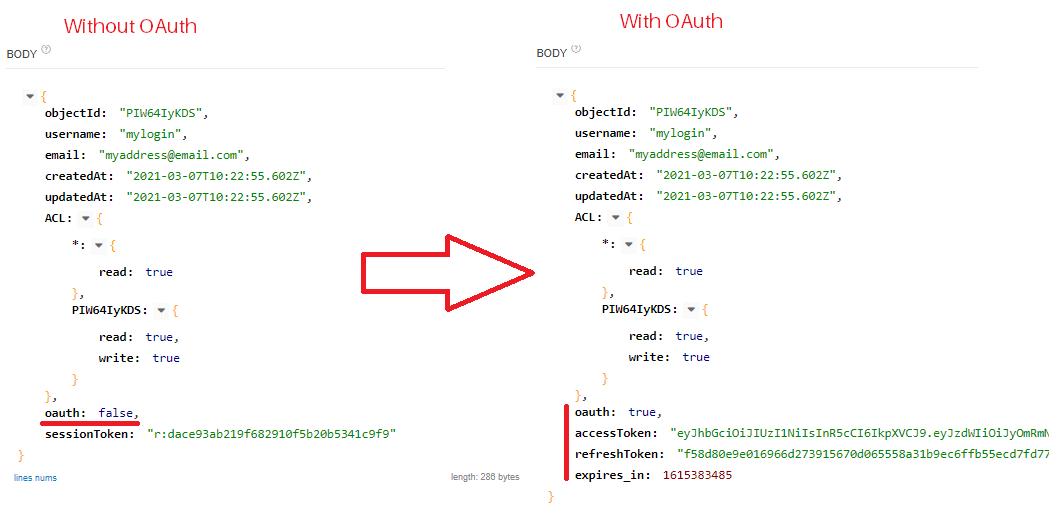
a) Changes to the SDK's. In all "login" or "signup" requests if the "oauth" parameter is set to true, instead of storing the "sessionToken", the "accessToken", "refreshToken" and "expires_in" must be stored.
- accessToken: it is the authentication JWT, it must be informed in place of "sessionToken" in all requests with the header "X-Parse-Session-Token";
- refreshToken: hash responsible for requesting the renewal of the "accessToken" if it has expired.
- expires_in: timestamp date and time to check if the "accessToken" has expired. It must be converted.
4) Example of Validating Session Tokens / Retrieving Current User;
- If the accessToken is invalid it will return an "Invalid session token" exception
curl -X GET \
  -H "X-Parse-Application-Id: appid" \
  -H "X-Parse-REST-API-Key: restapi" \
  -H "X-Parse-Session-Token: eyJhbGciOiJIUzI1NiIsInR5cCI6IkpXVCJ9.eyJzdWIiOiJyOjMxMmY3NDlmZWU4OTA1NmQ1Mjc1NDBhMmM1NDU5MzNlIiwiaWF0IjoxNjE1Mzg1MDgwLCJleHAiOjE2MTUzODUzODB9.zn-O_JwY-KdK-aO8zaussXdGZS9g1EPgHS4untxQ1o8" \
  https://YOUR.PARSE-SERVER.HERE/parse/users/me
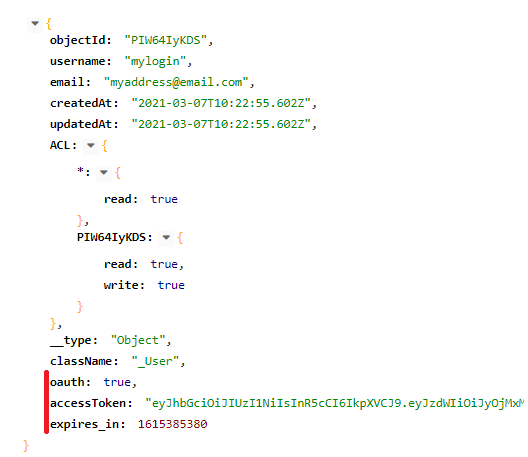
5) New method to renew accessToken if it is expired:
curl -X POST \
  -H "X-Parse-Application-Id: appid" \
  -H "X-Parse-REST-API-Key: restapi" \
  -H "Content-Type: application/json" \
  -d '{"client":"OBJECT_ID_FROM_USER", "code":"REFRESH_TOKEN"}' \
  https://YOUR.PARSE-SERVER.HERE/parse/users/refresh
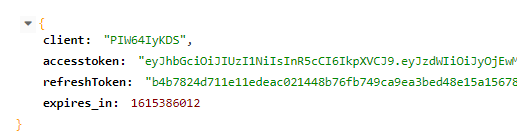
b) The SDK´s when requesting the renewal of accessToken upon receiving the response, must update the new "accessToken", "refreshToken" and "expires_in", as the previous ones are invalidated.
6) When using OAuth 2, instead of using the "/ parse / logout" method, "/ parse / revoke" should be used, as in the following example:
curl -X POST \
  -H "X-Parse-Application-Id: appid" \
  -H "X-Parse-REST-API-Key: restapi" \
  -H "Content-Type: application/json" \
  -d '{"code":"REFRESH_TOKEN"}' \
  https://YOUR.PARSE-SERVER.HERE/parse/users/revoke
If the "refreshToken" entered does not exist, it will cause an "Invalid session token" error, otherwise it will return an empty HTTP Code 200, just like in the "/ parse / logout" method.
Important!
- I tried to follow as much as possible the suggestions given in the dialogues prior to the development
- I will prepare the PR so that everyone can perform the tests
jjunineuro
on 10 Mar 2021
Does the parse dashboard show these changes automatically or it must be edited too?
FunnyDevs
on 10 Mar 2021
In the Parse Dashboard, it displays the change. When setting "oauth" to true, the only field that will be saved is "refreshToken" in the "_Session" class. No more data is saved.
jjunineuro
on 10 Mar 2021
Some suggestions:
- Instead of using
oauth: false/truemaybe use a more versatile field likeauth:'oauth2.0'so that this can be adapted for future OAuth versions or other auth mechanisms; or add aoauth20: trueto be more specific. - If using the default "sessionToken" authentication, I suggest to not transmit a
oauth: falseorauth:'...'to reduce data traffic; the SDK should simply fall back to default in the absence of that parameter.
mtrezza
on 10 Mar 2021
Some suggestions:
- Instead of using
oauth: false/truemaybe use a more versatile field likeauth:'oauth2.0'so that this can be adapted for future OAuth versions or other auth mechanisms.
Good, I will make this change.
- If using the default "sessionToken" authentication, I suggest to not transmit a
oauth: falseorauth:'...'to reduce data traffic; the SDK should simply fall back to default in the absence of that parameter.
I put this parameter as a way to facilitate SDK´s. But I will fix.
So, the SDK should check if "sessionToken" exists, if it should not work with "oauth".
jjunineuro
on 10 Mar 2021
I just edited my previous comment.
I put this parameter as a way to facilitate SDK´s
I mentioned this because we would not want to increase data traffic for existing deployments that may not even use that feature.
So, the SDK should check if "sessionToken" exists, if it should not work with "oauth".
That sounds like default would be oauth, but I understood so far that the default would still be the sessionToken?
If so, I think the SDK would check whether auth: '...' exists and if not, fall back to default of using the sessionToken. Like:
switch (auth) {
  case 'oauth' ...
  case 'somethingElse' ...
  default: //use the sessionToken
}
For those who use for mobile and web, it is a great reinforcement. I will implement it myself and create a PR to meet this parameter in Flutter.
Yes the default for authentication validation is OAuth, I am using the sessions to not have to change the entire structure of the Parse Server and not to have to write a session structure again for the OAuth protocol. The way I implemented it, I reduced to a minimum a structural change of the system and continues perfectly to comply with the specifications of OAuth as well as maintaining the characteristics of Parse Server.
In the description of the Parse Server Options, I describe that when using OAuth, it is advisable to define that the sessions do not expire due to inactivity, and the expiration period (default 1 year) of 100 years. Let's say we have refreshToken from a session that was invalidated, breaking OAuth's philosophy.
jjunineuro
on 10 Mar 2021
In the tests I performed, when activating "oauth", and later disallowing it, Parse Server continues to carry out the authentication work successfully.
jjunineuro
on 10 Mar 2021
In the tests I performed, when activating "oauth", and later disallowing it, Parse Server continues to carry out the authentication work successfully.
That would have been my next question :-) Great!
Note for review: That is something important that should be covered in the CI tests.
mtrezza
on 10 Mar 2021
The OAuth protocol actually remains using a session, but encapsulates that information within the Json Web Token (JWT) and signs that information. What is made available to the user's device is the JWT.
As the Parse Server already has a whole system to work the sessions, it would not be possible for me to create another structure that would have the same result.
So I just perfected the return treatment.
jjunineuro
on 10 Mar 2021
A question, in "../src/Options/Definitions.js", if the parameter "oauth" is different from null (I'll change it to string), can I set the values of "expireInactiveSessions = false" and "sessionLength = 31536000 * 100"?
jjunineuro
on 10 Mar 2021
@dplewis can you give me an example, please?
I fixed the corrections you indicated and the @mtrezza improvements
jjunineuro
on 10 Mar 2021
src/Options/Definitions.js is an autogenerated file. Can you give me an example of what you are trying to do?
 dplewis
on 10 Mar 2021
dplewis
on 10 Mar 2021
If the "oauth20" parameter is different from empty, you must define:
- expireInactiveSessions = false
- sessionLength = sessionLength * 100
jjunineuro
on 10 Mar 2021
The logic to set config default values is in Config.js where you'd also do the validation of the parameter values, e.g. take a look at the securityCheck config group, however:
you must define:
expireInactiveSessions = false
sessionLength = sessionLength * 100
The usual approach would be to set default values for these 2 parameters and let the developer override the defaults if necessary. The defaults should reflect the most likely, most commonly used configuration a development would seek.
Then, in the auth logic, the values of these 2 parameters would only be considered if oauth20 is set, otherwise ignored. The same is done in the securityCheck or pagesRouter config group for example.
mtrezza
on 10 Mar 2021
An excellent idea, but in "../src/Config.js" I didn't find "securityCheck"
jjunineuro
on 10 Mar 2021
Sorry, it's actually called security, only been merged into master some minutes ago. Steaming fresh!
mtrezza
on 10 Mar 2021
Committed with the suggested changes. @mtrezza and @dplewis
jjunineuro
on 10 Mar 2021
I just need to correct the commit tests I performed, it is failing in the new functions implemented. I don't really know how to implement the tests.
jjunineuro
on 11 Mar 2021
Related issues
 mohmagdy
·
3Comments
mohmagdy
·
3Comments
 dcdspace
·
3Comments
dcdspace
·
3Comments
 yuzeh
·
3Comments
yuzeh
·
3Comments
 okaris
·
4Comments
okaris
·
4Comments
 jiawenzhang
·
4Comments
jiawenzhang
·
4Comments
Most helpful comment
Let me know when you all need help with the client side in Parse-Swift. I should be able to quickly write an implementation that you can test/verify in Swift Playgrounds.
If there are ideas you want to bounce off of me on the client side, feel free and I can give input there as well.