Parse-server: Schema mismatch expected Number but got String (Rest API)
Hi
I am trying to save number variable of one of my classes on my backend but received this error:
"schema mismatch for Coins.price; expected Number but got String"
100% I am sending a number
In the Postman the error is the same screenshot: https://drive.google.com/file/d/1pSrAMlAnW4fn-YhzlF6aJtMnshq2R7JQ/view?usp=sharing
Data:
curl -X PUT
-H "X-Parse-Application-Id: APPLICATIONID"
-H "Content-Type: application/x-www-form-urlencoded"
-d '{"price":2}'
https://MY.PARSE-SERVER/parse/classes/Coins/ObjectId
The same problem when:
curl -X POST
-H "X-Parse-Application-Id: APPLICATIONID"
-H "Content-Type: application/x-www-form-urlencoded"
-d '{"price":2}'
https://MY.PARSE-SERVER/parse/classes/Coins
String variables work and saved fine
Server
- parse-server version 3.0.0
- Remote server: Heroku
Database
- MongoDB version: 3.6.6
- Remote server: AWS
 adamofsky
All 11 comments
Well, you're using application/x-www-form-urlencoded which isn't supported. Parse-server only supports application/json.
 flovilmart
on 20 Aug 2018
flovilmart
on 20 Aug 2018
No man I tried also application/json and also: utf8,javascript,gzip
The utf8 does not have this error but also not saving anything
application/x-www-form-urlencoded works for strings fine
adamofsky
on 21 Aug 2018
Changed data to raw in Postman fixed the issue
adamofsky
on 21 Aug 2018
well man, I'm just pointing out that anything but application/json doesn't make sense (unless you have your own bodyparser middleware in front of the server (bad idea btw)).
So, man, I just tested in the Dashboard:
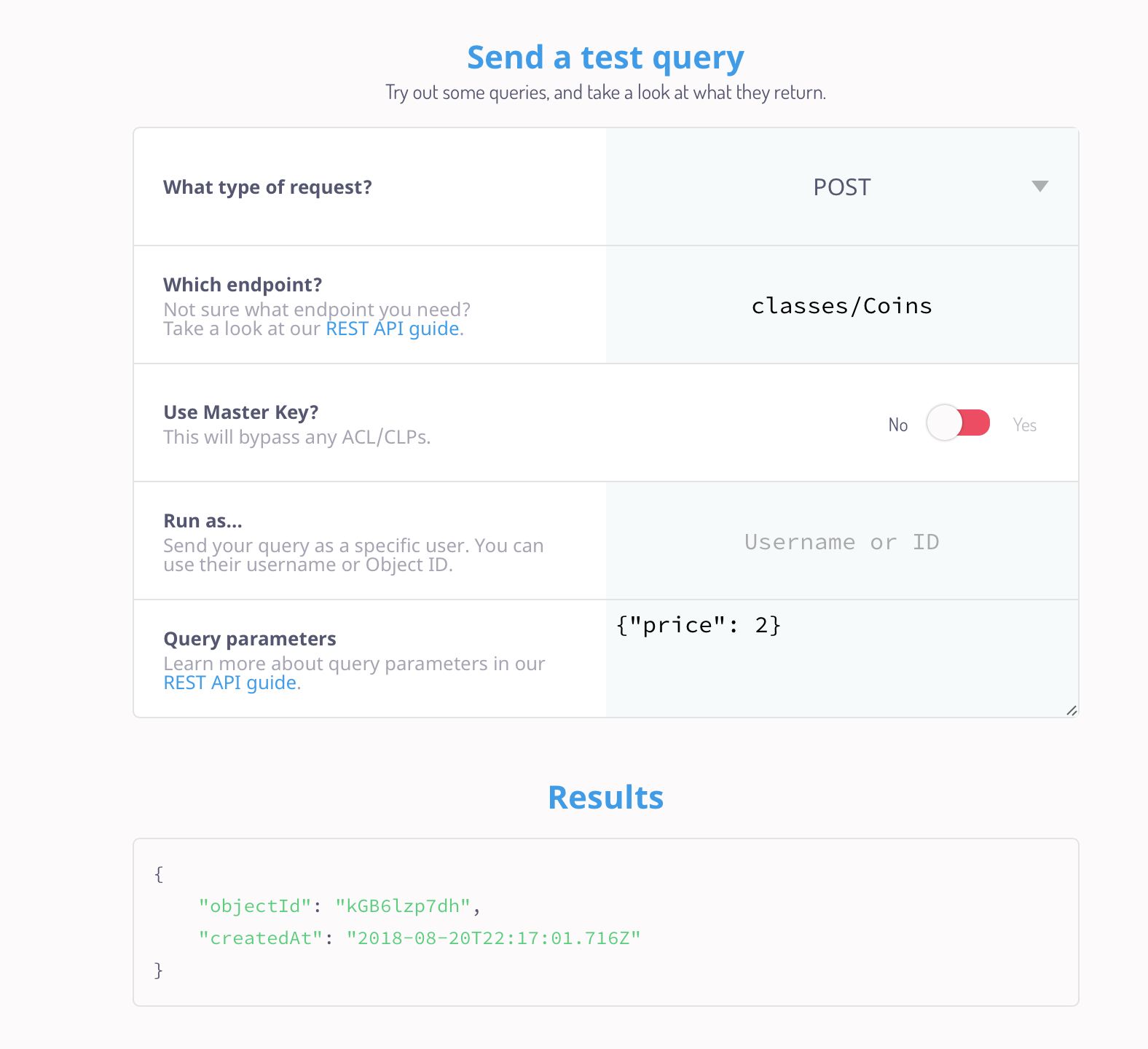
And it just works fine. Can you provided the logs when running with VERBOSE=1 (btw as requested in the template)?
You should see something like:
verbose: REQUEST for [POST] /parse/classes/Coins: {
  "price": 2
} method=POST, url=/parse/classes/Coins, host=localhost:1337, user-agent=curl/7.54.0, accept=*/*, x-parse-application-id=myAppId, content-type=application/x-form-urlencoded, content-length=11, price=2
verbose: RESPONSE from [POST] /parse/classes/Coins: {
  "status": 201,
  "response": {
    "objectId": "3bhWs8EhjI",
    "createdAt": "2018-08-20T22:20:19.836Z"
  },
  "location": "http://localhost:1337/parse/classes/Coins/3bhWs8EhjI"
} status=201, objectId=3bhWs8EhjI, createdAt=2018-08-20T22:20:19.836Z, location=http://localhost:1337/parse/classes/Coins/3bhWs8EhjI
However if you pass a string:
verbose: REQUEST for [POST] /parse/classes/Coins: {
  "price": "2"
} method=POST, url=/parse/classes/Coins, host=localhost:1337, user-agent=curl/7.54.0, accept=*/*, x-parse-application-id=myAppId, content-type=application/x-form-urlencoded, content-length=13, price=2
error: Error generating response. ParseError {
  code: 111,
  message: 'schema mismatch for Coins.price; expected Number but got String' } code=111, message=schema mismatch for Coins.price; expected Number but got String
error: schema mismatch for Coins.price; expected Number but got String code=111, message=schema mismatch for Coins.price; expected Number but got String
@adamofsky so much for 100% I am sending a number
flovilmart
on 21 Aug 2018
Dear @flovilmart
Thanks for help
_man_ ;-)
Regards
adamofsky
on 21 Aug 2018
I’m not your man, what if I identified as non binary? Your condescending tone is not welcome and I’d appreciate you keep your communications professional next time. And also, perhaps evaluate the need to open such issue as you demonstrated a clear lack of self criticism about your own code. Next time, expect such issues to be closed without answer.
flovilmart
on 21 Aug 2018
Dear @flovilmart
I didn't want to hurt you by calling you _'man'_, so I am sorry if I hurt you.
I can call to my friends '_man_' and it is ok for us. Of course, you are not my friend but you tried to help me and you really helped me. So your help it is a friendly act an I really appreciate it. So I called you like I call my friend '_man_', and again I am sorry if I did hurt you.
I don't think it is not professional, because I can call my team leader '_man_' and it is ok, it is a friendly relationship. Part of our job with colleagues it is, first of all, be humans and friends to work in the friendly atmosphere, and not always be official like a robot.
There is no way to criticism about my own code because I asked about the request in 'Postman'. It is not worked in 'Postman' and I can't critic 'Postman'. But I can critic that I did something wrong and I did, I told that I changed data to raw format to fix the issue, so people can understand that it is my fault.
Parse Server not only supports 'application/json' but also 'urlencode', in queries, you can see it in Rest API documentation:
curl -X GET
-H "X-Parse-Application-Id: ${APPLICATION_ID}"
-H "X-Parse-REST-API-Key: ${REST_API_KEY}"
-G
--data-urlencode 'where={
"playerName": {
"$nin": [
"Jonathan Walsh",
"Dario Wunsch",
"Shawn Simon"
]
}
}'
https://YOUR.PARSE-SERVER.HERE/parse/classes/GameScore
Maybe this is the reason that it works for string variables in objects, so it is a little bit confusing, and there is no similar ticket with this problem so I decided to open a ticket.
All these things I told you, not because you threaten to me that you will close my issue next time without an answer, I can create a new account and still open the issue.
All these things I told you because it is important to me that you understand that I am really don't wanted to hurt you.
And I think that to be friendly and simple with your colleagues makes our lives easier and better.
Kind Regards
adamofsky
on 21 Aug 2018
Just because you think it’s OK to call s/o man or be familiar, doesn’t make it OK.
Your issue reports was inaccurate, and actually, untested. I responded to the best of my abilities.
I don’t threat to close automatically your issue reports, BUT, your report didn’t include the required logs, and with those logs you would have found the solution by yourself, so in the future, I may be more direct with incomplete issue reports (they are getting automated, that’s not only for you).
Also, I’m pretty sure you didn’t try curl calls with application/json (because those work).
As for url encoded, GET requests should not have bodies, that’s why we use urlencoded JSON.
flovilmart
on 21 Aug 2018
Got the same Issue: I was trying to add new object for Product class and product rate "rate" was a Number type
I'm using JavaScript for Parse
Using parseInt before getting the field input helped solve the problem -->
var res = await product.save({
product_name: document.forms["addProduct"]["pname"].value,
measure_unit: document.forms["addProduct"]["measureunit"].value,
rate: parseInt(document.forms["addProduct"]["rate"].value)
});
What happened was - Parse sends the data all in string as it uses JSON format. So, using parseInt seems to pass the data in integer format.. Hope it helps some people who are new like me and getting this sort of problem and searching for alternate solutions.
 Barsha96
on 18 Jan 2019
Barsha96
on 18 Jan 2019
@Barsha96 @flovilmart @wasnotrice @gdeglin Kindly assist here https://stackoverflow.com/questions/55714246/how-to-clear-schema-collection-in-mongodb
 Edijae
on 16 Apr 2019
Edijae
on 16 Apr 2019
Related issues
 dcdspace
·
3Comments
dcdspace
·
3Comments
 LtrDan
·
4Comments
LtrDan
·
4Comments
 ugo-geronimo
·
3Comments
ugo-geronimo
·
3Comments
 kilabyte
·
4Comments
kilabyte
·
4Comments
 yuzeh
·
3Comments
yuzeh
·
3Comments