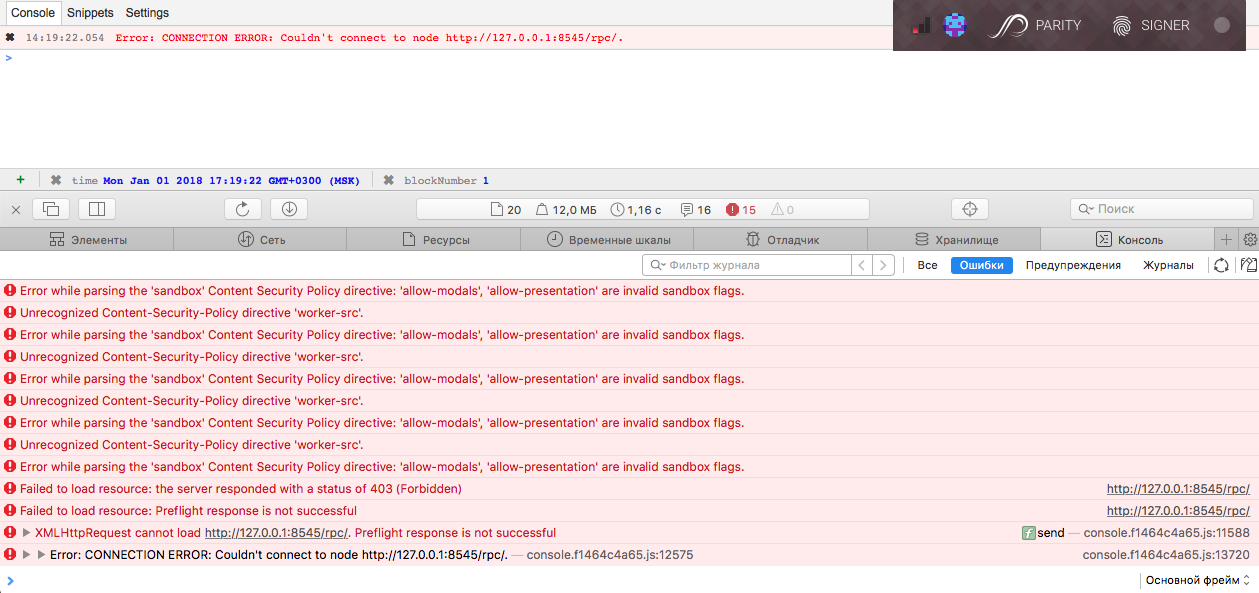
Parity-ethereum: dev-chain: Couldn't connect to node http://127.0.0.1:8545/rpc/ in web-browser
I'm running:
- Which Parity version?: Parity/v1.7.11-stable-a5ed4cf-20171228/x86_64-macos/rustc1.22.1
- Which operating system?: MacOS
- How installed?: via homebrew
- Are you fully synchronized?: no
- Did you try to restart the node?: yes
_Your issue description goes here below. Try to include actual vs. expected behavior and steps to reproduce the issue._
I expecte: there is no error :)
What I did (by my memory):
brew update
brew upgrade
brew tap ethereum/ethereum
brew install geth
brew tap paritytech/paritytech
brew install parity --stable

parity --base-path ./test-net-7 --chain dev ui
 Starting Parity/v1.7.11-stable-a5ed4cf-20171228/x86_64-macos/rustc1.22.1
2018-01-01 17:14:08  Keys path ./test-net-7/keys/DevelopmentChain
2018-01-01 17:14:08  DB path ./test-net-7/chains/DevelopmentChain/db/125ccdc70e48df86
2018-01-01 17:14:08  Path to dapps ./test-net-7/dapps
2018-01-01 17:14:08  State DB configuration: fast
2018-01-01 17:14:08  Operating mode: active
2018-01-01 17:14:08  Configured for DevelopmentChain using InstantSeal engine

Open: http://127.0.0.1:8180/#/auth?token=YcA6-RgOp-MnAA-Hfqq
to authorize your browser.
Or use the generated token:
YcA6-RgOp-MnAA-Hfqq
2018-01-01 17:14:08  Public node URL: enode://1b503236bfde36a7ed826ebfce06f4ed9ddb9360d726088483e4393cf763fde6bb7b9425e76e45cc687c37c0aacfac1dac1af039de70d399b7812d296c48dafe@192.168.1.10:30303


md5-e3087ccbc1a07dc68f8409c5a054171e


14:09:51.766
Error: CONNECTION ERROR: Couldn't connect to node http://127.0.0.1:8545/rpc/.


md5-991a2875779a30828dd4915cf64c8a96


$ geth attach http://localhost:8545/rpc/
Welcome to the Geth JavaScript console!

instance: Parity//v1.7.11-stable-a5ed4cf-20171228/x86_64-macos/rustc1.22.1
coinbase: 0x00a329c0648769a73afac7f9381e08fb43dbea72
at block: 1 (Mon, 01 Jan 2018 12:23:28 MSK)
 modules: eth:1.0 net:1.0 parity:1.0 parity_pubsub:1.0 pubsub:1.0 rpc:1.0 secretstore:1.0 traces:1.0 web3:1.0

>
 klimenko
All 7 comments
Please run parity in development mode with --force-ui if you want to use the interface. Thanks :)
 5chdn
on 2 Jan 2018
5chdn
on 2 Jan 2018
i encountered the same error. do you solve it?
 WYANG008
on 14 Jan 2018
WYANG008
on 14 Jan 2018
--force-ui didn't help me
as result I used geth as console
klimenko
on 14 Jan 2018
I can confirm that --force-ui doesn't fix the problem. Happens to me on both Kovan and Ropsten chains. My current workaround is geth attach http://localhost:8545/rpc/ which works like a charm.
 Sofoca
on 15 Jan 2018
Sofoca
on 15 Jan 2018
Please try with --jsonrpc-cors all.
 tomusdrw
on 15 Jan 2018
tomusdrw
on 15 Jan 2018
👍2
@tomusdrw Works, thanks!
Sofoca
on 15 Jan 2018
In config.toml, I used the following to enable the
[rpc]
cors="127.0.01:8180"
 AntoniosHadji
on 25 Feb 2018
AntoniosHadji
on 25 Feb 2018
Was this page helpful?
0 / 5 - 0 ratings
Related issues
 jordipainan
·
3Comments
jordipainan
·
3Comments
 uluhonolulu
·
3Comments
uluhonolulu
·
3Comments
 vmenond
·
3Comments
vmenond
·
3Comments
 barakman
·
3Comments
barakman
·
3Comments
 jacogr
·
4Comments
jacogr
·
4Comments
Most helpful comment
Please try with
--jsonrpc-cors all.