Parity-ethereum: Trusted Signer Problem: "Unable to make a connection to the Parity Secure API."
_Before filing a new issue, please provide the following information._
I'm running:
- Parity version: 1.7.2 Beta
- Operating system: Linux (Debian 9)
- And installed: binaries
Currently running a reverse proxy to connect to Parity UI. I have done this before with success.
The Parity UI comes up when I navigate to http://mydomain.com:8180/ (also tested with http://127.0.0.1:8180) however it asks me for a trusted signer code.
When I provide one that I create at that moment, the page does not go away.
When I add "--ui-no-validation" to the Parity command, it behaves exactly as just described.
Time on both computers is synced to within a few seconds (both computers running ntpdate).
EDIT:
1 - Have also tried accessing UI via HTTP on localhost. Result is exactly the same.
2 - Does not happen with Parity 1.6.0
3 - Does happen with Parity 1.7.0
EDIT with another question: Could this problem be connected to libssl1.0.0 in any way? I was/am having trouble with that since it is not part of Debian 9. I have manually installed the package with dpkg but I wonder if there is a dependency that dpkg did not find that could cause this problem.
 stone212
All 25 comments
1.7 requires a WebSockets port to be exposed/proxied as well. By default it's 8546. Also the dapps are now served over :8545 instead of :8080 so it's required as well.
 tomusdrw
on 27 Sep 2017
tomusdrw
on 27 Sep 2017
@tomusdrw Please help me understand by answering a few things:
If 8545 is where dapps are hosted then does the RPC interface (that I use with curl queries embedded into PHP) change?
Why is Parity using port 8080 if it is not used anymore?
What does Websockets have to do with the UI and authentication?
stone212
on 28 Sep 2017
- The RPC and dapps servers have been merged (you can do RPC queries on :8545 and it also serves the dapps)
- Parity 1.7, does not use
:8080at all. The UI is served on:8180 - The WebSockets interface is required by the UI.
tomusdrw
on 28 Sep 2017
@tomusdrw Thank you but 3 doesn't really answer my question. It's "required" okay. But what is the connection you are suggesting between WebSockets and the "Unable to make a connection to the Parity Secure API" error? Any why would it prevent --ui-no-validation for having its usual effect?
stone212
on 29 Sep 2017
You need to allow the UI to connect to websockets. Disabling the UI validation does not bypass websockets security.
 5chdn
on 29 Sep 2017
5chdn
on 29 Sep 2017
--ui-no-validation is a feature that should never be used (it was created for a specific use case of UI development).
Instead please try --unsafe-expose which is actually what you need - it exposes all servers and disables the validation for them.
Re. 3: Parity Secure API = WebSockets + Authorization
tomusdrw
on 29 Sep 2017
@tomusdrw I have not had the opportunity to test --unsafe-expose with the same server I filed the report for. Instead I tried on a system running Parity 1.6.0. It tells me "--unsafe-expose" is an Unknown flag.
But this does not solve the problem. The problem is that the trusted signer token is not being accepted. I want security. I also want the key that I generate to work. :) The --ui-no-validation was an attempt to fix the problem not something I desired.
stone212
on 2 Oct 2017
@tomusdrw I have tried --unsafe-expose. Parity does not invoke and this is the error:
UI WALLET address 0.0.0.0:8180 is already in use, make sure that another instance of an Ethereum client is not running or change the address using the --ui-port and --ui-interface options.
If I disable my reverse proxy then this error goes away. But if I am not using the reverse proxy, there is nothing to "expose" so there is no reason to use --unsafe-expose. :)
Is there a way to disable the trusted signer? I do not permanently want to do this but if there is a correct way to do this then I can add the result to this bug report and hopefully it will help your team to give a final fix to this issue.
stone212
on 2 Oct 2017
what happens if you set --ws-interface?
5chdn
on 2 Oct 2017
Hi! i'm running the same issue trying to run parity inside a docker-compose , which works fine with v1.6 but i cannot make it work with v1.7
i've added --ws-interface 0.0.0.0 but it keeps requesting for token
log says
parity-local_1  | 2017-10-02 21:32:06 UTC Blocked connection from http://127.0.0.1:8180 using invalid token.
parity-local_1  | 2017-10-02 21:32:06 UTC Blocked connection to WebSockets server from untrusted origin: Some("http://127.0.0.1:8180")
 reiven
on 2 Oct 2017
reiven
on 2 Oct 2017
@5chdn When I add --wd-interface="all" there is no change. I still get the box telling me to create and paste a new signer token. But when I do this, the interface takes the token and briefly changes the display to say "Connecting to the Parity Secure API" for a moment. Then the same screen is displayed asking me for a token. This happens with the reverse proxy and it also happens when I am using an SSH tunnel and then connecting at a port forward for 127.0.0.1:8180.
stone212
on 3 Oct 2017
@tomusdrw @5chdn I changed the title of this Issue to be more clear. The problem is not access to the UI. I think the problem is Trusted Signer is not accepting the tokens.
stone212
on 3 Oct 2017
Ok, let me get this straight. The setup you need is:
- Going to
http://<someip>:8180should render Parity Wallet. - Nginx listening at
<someip>and proxying ports:8180, :8545, :8546 (websockets)to127.0.0.1:<port> - Parity running with options:
$ parity \
   --ui-hosts <someip>:8180 \
   --jsonrpc-hosts <someip>:8545 \
   --ws-hosts <someip>:8546 --ws-origins <someip>:8180 \
This is a setup that should work correctly for you. <someip> can also be replaced with a domain name.
If the tokens are still not accepted please make sure that the time is synchronized between client and host and include parity logs.
tomusdrw
on 3 Oct 2017
@reiven please run with --ws-origins 127.0.0.1:8180
tomusdrw
on 3 Oct 2017
@tomusdrw no, i cannot make it work with v1.7.x, inside a docker-compose
FYI i've created a gist to show the parameters i'm using for 1.6, which works fine, and 1.7 which i cannot find a way to make it work yet
FYI the clocks are sync’ed and the logs are not showing errors at all , or any other useful information
reiven
on 3 Oct 2017
@reiven Please use this instead:
command: --jsonrpc-interface all --jsonrpc-cors * --ui-interface all --ws-interface all --ws-origins all --chain dev
Thanks a lot @tomusdrw with that parameters it is working fine!
reiven
on 3 Oct 2017
@tomusdrw Thank you but this did cause anything to change. Actually it raised more questions so I will try to go through everything:
Just a reminder that I do not have this problem with 1.6.10.
I am using apache2, not nginx but anyway it works with 1.6.10 so I don't think we can blame apache2. Also I have the same problem with an SSH tunnel and access to 127.0.0.1:8180. I mention this only to be thorough.
Why should it be necessary to proxy the RPC port? That seems dangerous. I did it as you said but I would like to understand the relationship please.
I am 100% sure that the two computers are synced. They both run network time protocols and I checked once again now.
EDIT: removed
I have tried the exact configuration you suggested. The result is the same. I opened port 8586 in the firewall, set up the reverse proxy, etc.
I also tried the command you suggested to reiven. There was something in that line that Parity did not accept. I got an "Invalid arguments" error and Parity did not start. (please see screenshot)
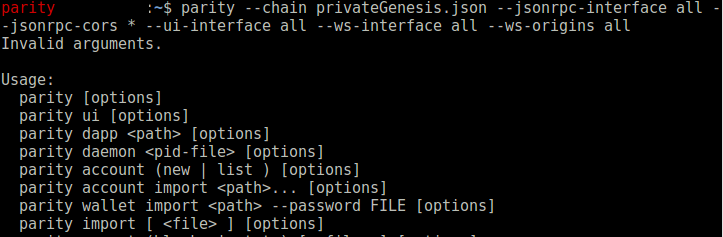
When you ask for the "parity logs" what do you mean? Is there a log other than the console display when I start Parity? The are the .log files in ~/.parity/chains/
/db/
Thank you. I do not mean to frustrate you. I appreciate the help. I hope that this thread helps other people also.
stone212
on 4 Oct 2017
Re 1. As I mentioned earlier - WebSockets were added in 1.7 and UI requires them to work.
Re 3. The RPC port in 1.7 is also a dapps server in 1.7, if you don't plan to use dapps you don't need to do it. Exposing any ports without a proper firewall whitelisting is dangerous since anyone can trigger RPCs on your node.
Re 6: the port is 8546 not 8586
Re 7: you need to put * in quotes: "*" (or just use all there - should work the same)
Re 8: I meant the log displayed when you start Parity. It should log a warning if the connection is rejected because of some issues with synchornization or origin whitelisting.
No frustration on my side. We need to document that properly.
tomusdrw
on 4 Oct 2017
agree on add documentation for this
reiven
on 4 Oct 2017
@tomusdrw
Re re 6: I have 8546 open. I typed it wrong in the comment but it is correct on the server
Re re 7: I managed to figure this out after I wrote but this could be made explicit on the Basic Usage page, since other options do not require the "" and because most examples on that page don't use the quotes.
Re re 8: The log displayed when I start Parity does not throw any errors. The only error is that Trusted Signer is not working correctly. Specifically, the UI continues to ask for a token after I provide a new one.
I do have a general idea that the problem is in Web Sockets. Because it works in 1.6.10. Because it continues not to work when I access via 127.0.0.1 instead of reverse proxy (so it's probably not apache2), because the UI comes up but Trusted Signer is not behaving as expected. But I don't know how else to debug. There are definitely no errors on the console when I try to access the UI or any other time. Port 8546 is definitely open and I have it reverse proxied.
stone212
on 4 Oct 2017
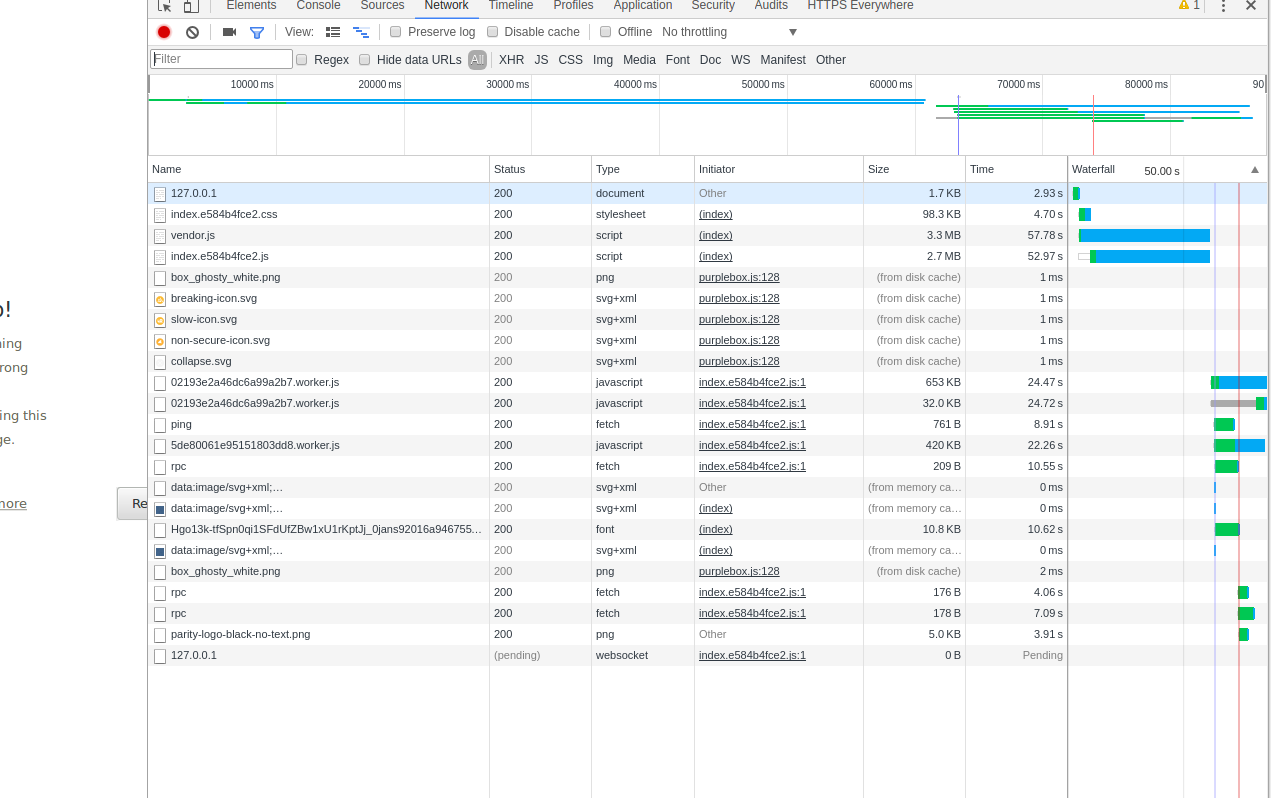
@stone212 Please open Chrome Dev Tools and refresh the UI. Then post a screenshot of what you see in network tab.
tomusdrw
on 5 Oct 2017
@tomusdrw I tried this in Chrome and the page crashes instead of loading. I have not investigated more than this so far. I just discovered the problem. I attached a screenshot as you asked.
stone212
on 7 Oct 2017
stone212
on 7 Oct 2017
Okay. I now can access the UI from the localhost. I made no changes. Gremlins.
I can also access the UI from the remote IP. To do this, I re-set the --ws-interface to the external IP.
Everything is working. I currently do not understand why. The only thing I did was to reboot the nodes and my own computer.
stone212
on 7 Oct 2017
Related issues
 BillSantos
·
3Comments
BillSantos
·
3Comments
 vmenond
·
3Comments
vmenond
·
3Comments
 mr-older
·
3Comments
mr-older
·
3Comments
 jordipainan
·
3Comments
jordipainan
·
3Comments
 bryaan
·
3Comments
bryaan
·
3Comments
Most helpful comment
@reiven Please use this instead: