Parity-ethereum: Unable to make a connection to the Parity Secure API.
After update to Parity 1.7.0, I'm unable to connect to Parity UI. Generating new token does not help, the same message appears in Firefox.
I'm running parity on a local server and connect to the UI with my laptop. The clocks on both machines are in sync.
I'm running Parity via systemd service with --dapps-hosts all --dapps-interface 192.168.10.80 --ui-interface 192.168.10.80 --rpcaddr 192.168.10.80 arguments.
Also I installed Parity from Arch repository.
 Alko89
All 25 comments
You need to add --ws-interface 192.168.10.80 --ws-origins http://192.168.10.80:8180 now.
 tomusdrw
on 7 Aug 2017
tomusdrw
on 7 Aug 2017
Thank you! Are there any arguments that are not needed anymore?
Alko89
on 7 Aug 2017
Yeah, --daps-* are obsolete. The dapps server and jsonrpc server have been merged together.
Also --rpcaddr is a geth-compatible version of --jsonrpc-interface.
tomusdrw
on 7 Aug 2017
I'm having similar trouble. I have the same setup, but I'm trying to connect via a ssh tunnel. I create the tunnel with "ssh -L 8180:localhost:8180 192.168.1.50" (on the laptop) after I run parity with no options (on the server) and in the browser (laptop) I get the error message with the token and clock warnings. I entered the generated token and checked the clocks, but the message persists. That problem appeared after I updated from 1.6.82 to 1.7 . Am I right to expect the ssh tunneling to just work with no arguments passed to partiy? Any help would be appreciated.
 petko10
on 28 Aug 2017
petko10
on 28 Aug 2017
@petko10 1.7 requires port 8546 to be tunnelled as well. Can you try with ssh -L 8180:localhost:8180 8546:localhost:8546 192.168.1.50?
tomusdrw
on 28 Aug 2017
@tomusdrw Worked like a charm, thank you !
petko10
on 28 Aug 2017
Sorry I'm a newb. But where do I even go to type in these lines/settings?
 danmatuszak
on 4 Sep 2017
danmatuszak
on 4 Sep 2017
@dmatuszak92 what are you trying to do?
 5chdn
on 4 Sep 2017
5chdn
on 4 Sep 2017
I have the error message unable to reach time api. I'm running windows 10
danmatuszak
on 4 Sep 2017
I've tried manually resyncing my time but didn't work
danmatuszak
on 4 Sep 2017
You can ignore that warning. Do you experience any other issues?
5chdn
on 4 Sep 2017
@5chdn yeah but if I ignore it, my balance doesnt show up for me to make a tx. I know I have eth in from looking at the explorer. But in my wallet its not syncing
danmatuszak
on 4 Sep 2017
Yes, that's a known annoyance. Please just leave it syncing for a while.
Could you open the status tab on the left and scroll down and copy the logs here?
5chdn
on 4 Sep 2017
[9/4/2017 3:23:11 AM]
Syncing snapshot 130/305 #131 7/25 peers 147 KiB chain 4 MiB db 0 bytes queue 10 KiB sync RPC: 1 conn, 8 req/s, 87 µs
[9/4/2017 3:22:49 AM]
Syncing snapshot 126/305 #131 7/25 peers 147 KiB chain 4 MiB db 0 bytes queue 10 KiB sync RPC: 1 conn, 6 req/s, 117 µs
[9/4/2017 3:22:06 AM]
Syncing snapshot 124/305 #131 6/25 peers 147 KiB chain 4 MiB db 0 bytes queue 10 KiB sync RPC: 1 conn, 5 req/s, 192 µs
[9/4/2017 3:21:57 AM]
Syncing snapshot 120/305 #131 6/25 peers 147 KiB chain 4 MiB db 0 bytes queue 10 KiB sync RPC: 1 conn, 6 req/s, 505 µs
[9/4/2017 3:21:48 AM]
Syncing snapshot 114/305 #131 6/25 peers 147 KiB chain 4 MiB db 0 bytes queue 10 KiB sync RPC: 1 conn, 4 req/s, 187 µs
[9/4/2017 3:21:23 AM]
Syncing snapshot 111/305 #131 6/25 peers 147 KiB chain 4 MiB db 0 bytes queue 10 KiB sync RPC: 1 conn, 5 req/s, 126 µs
[9/4/2017 3:21:09 AM]
Syncing snapshot 109/305 #131 6/25 peers 147 KiB chain 4 MiB db 0 bytes queue 10 KiB sync RPC: 1 conn, 4 req/s, 96 µs
[9/4/2017 3:21:01 AM]
Syncing snapshot 108/305 #131 6/25 peers 147 KiB chain 4 MiB db 0 bytes queue 10 KiB sync RPC: 1 conn, 5 req/s, 100 µs
[9/4/2017 3:20:25 AM]
Syncing snapshot 105/305 #131 6/25 peers 147 KiB chain 4 MiB db 0 bytes queue 10 KiB sync RPC: 1 conn, 5 req/s, 127 µs
[9/4/2017 3:19:54 AM]
Syncing snapshot 102/305 #131 6/25 peers 147 KiB chain 4 MiB db 0 bytes queue 10 KiB sync RPC: 1 conn, 5 req/s, 100 µs
[9/4/2017 3:19:32 AM]
Syncing snapshot 100/305 #131 6/25 peers 147 KiB chain 4 MiB db 0 bytes queue 10 KiB sync RPC: 1 conn, 4 req/s, 68 µs
[9/4/2017 3:19:25 AM]
Syncing snapshot 99/305 #131 6/25 peers 147 KiB chain 4 MiB db 0 bytes queue 10 KiB sync RPC: 1 conn, 4 req/s, 91 µs
[9/4/2017 3:19:16 AM]
Syncing snapshot 95/305 #131 6/25 peers 147 KiB chain 4 MiB db 0 bytes queue 10 KiB sync RPC: 1 conn, 5 req/s, 76 µs
[9/4/2017 3:19:08 AM]
Syncing snapshot 93/305 #131 6/25 peers 147 KiB chain 4 MiB db 0 bytes queue 10 KiB sync RPC: 1 conn, 4 req/s, 109 µs
[9/4/2017 3:18:43 AM]
Syncing snapshot 91/305 #131 6/25 peers 147 KiB chain 4 MiB db 0 bytes queue 10 KiB sync RPC: 1 conn, 4 req/s, 91 µs
[9/4/2017 3:18:36 AM]
Syncing snapshot 90/305 #131 6/25 peers 147 KiB chain 4 MiB db 0 bytes queue 10 KiB sync RPC: 1 conn, 5 req/s, 94 µs
[9/4/2017 3:18:27 AM]
Syncing snapshot 89/305 #131 6/25 peers 147 KiB chain 4 MiB db 0 bytes queue 10 KiB sync RPC: 1 conn, 5 req/s, 58 µs
[9/4/2017 3:18:20 AM]
Syncing snapshot 87/305 #131 6/25 peers 147 KiB chain 4 MiB db 0 bytes queue 10 KiB sync RPC: 1 conn, 5 req/s, 60 µs
[9/4/2017 3:18:11 AM]
Syncing snapshot 85/305 #131 6/25 peers 147 KiB chain 4 MiB db 0 bytes queue 10 KiB sync RPC: 1 conn, 5 req/s, 112 µs
[9/4/2017 3:17:59 AM]
Syncing snapshot 82/305 #131 6/25 peers 147 KiB chain 4 MiB db 0 bytes queue 10 KiB sync RPC: 1 conn, 5 req/s, 141 µs
[9/4/2017 3:17:43 AM]
Syncing snapshot 76/305 #131 6/25 peers 147 KiB chain 4 MiB db 0 bytes queue 10 KiB sync RPC: 1 conn, 4 req/s, 100 µs
[9/4/2017 3:17:36 AM]
Syncing snapshot 74/305 #131 6/25 peers 147 KiB chain 4 MiB db 0 bytes queue 10 KiB sync RPC: 1 conn, 4 req/s, 106 µs
[9/4/2017 3:17:08 AM]
Syncing snapshot 71/305 #131 6/25 peers 147 KiB chain 4 MiB db 0 bytes queue 10 KiB sync RPC: 1 conn, 3 req/s, 75 µs
[9/4/2017 3:16:14 AM]
Syncing snapshot 68/305 #131 6/25 peers 147 KiB chain 4 MiB db 0 bytes queue 10 KiB sync RPC: 1 conn, 5 req/s, 114 µs
[9/4/2017 3:16:06 AM]
Syncing snapshot 65/305 #131 6/25 peers 147 KiB chain 4 MiB db 0 bytes queue 10 KiB sync RPC: 1 conn, 1 req/s, 150 µs
danmatuszak
on 4 Sep 2017
@5chdn now it's stuck at "Connecting to the Parity Node. If this informational message persists, please ensure that your Parity node is running and reachable on the network."
danmatuszak
on 4 Sep 2017
It's syncing the latest snapshot. Everything is fine.

It's probably better you wait for some time till the synchronization is finished.
5chdn
on 4 Sep 2017
Hi,
I'm trying to put Parity 1.7.0 behing a nginx reverse proxy on a remote server with external IP x.x.x.x, and I'm facing a similar issue.
So far I am only proxing the RPC and WS ports. Parity binds the UI to the external IP.
Unfortunately when I try to access the UI at http://x.x.x.x:8180 the browser console shows the following error:
Firefox can't establish a connection to the server at ws://127.0.0.1:8546/
This is expected given Parity configuration below, however I cannot figure out how to have the UI to connect to ws://x.x.x.x:8546/, whichi would be forwared by nginx to 127.0.0.1:8546
I do not want to expose the RPC and WS by binding to 0.0.0.0 or the external IP.
Parity config:
[parity]
chain = "kovan"
[network]
nat = "x.x.x.x"
[ui]
interface = "x.x.x.x"
[rpc]
interface = "127.0.0.1"
hosts = ["all"]
origins = ["http://x.x.x.x:8180"]
[websockets]
interface = "127.0.0.1"
origins = ["http://x.x.x.x:8180"]
hosts = ["all"]
[misc]
log_file = "parity.log"`
 wnz99
on 12 Sep 2017
wnz99
on 12 Sep 2017
@tomusdrw When I add the flag --ws-interface 192.168.10.80, I get the error: Unknown flag: '--ws-interface'. Did you mean '--ui-interface'? Any idea why I can't set flags prefixed with --ws?
 leopoldjoy
on 17 Sep 2017
leopoldjoy
on 17 Sep 2017
@leopoldjoy ws interface is only available in 1.7.0 and later.
5chdn
on 17 Sep 2017
Hi, I am having problems running parity on my computer. It give an error of 'Connecting to the Parity Node. If this informational message persists, please ensure that your Parity node is running and reachable on the network. ' even after running it for 5-6 hours, it still display this error message. Anyone can help?
Thanks
 charcoal3256
on 20 Sep 2017
charcoal3256
on 20 Sep 2017
@charcoal3256 which operating system? which parity version? how did you install it? how do you run it?
5chdn
on 20 Sep 2017
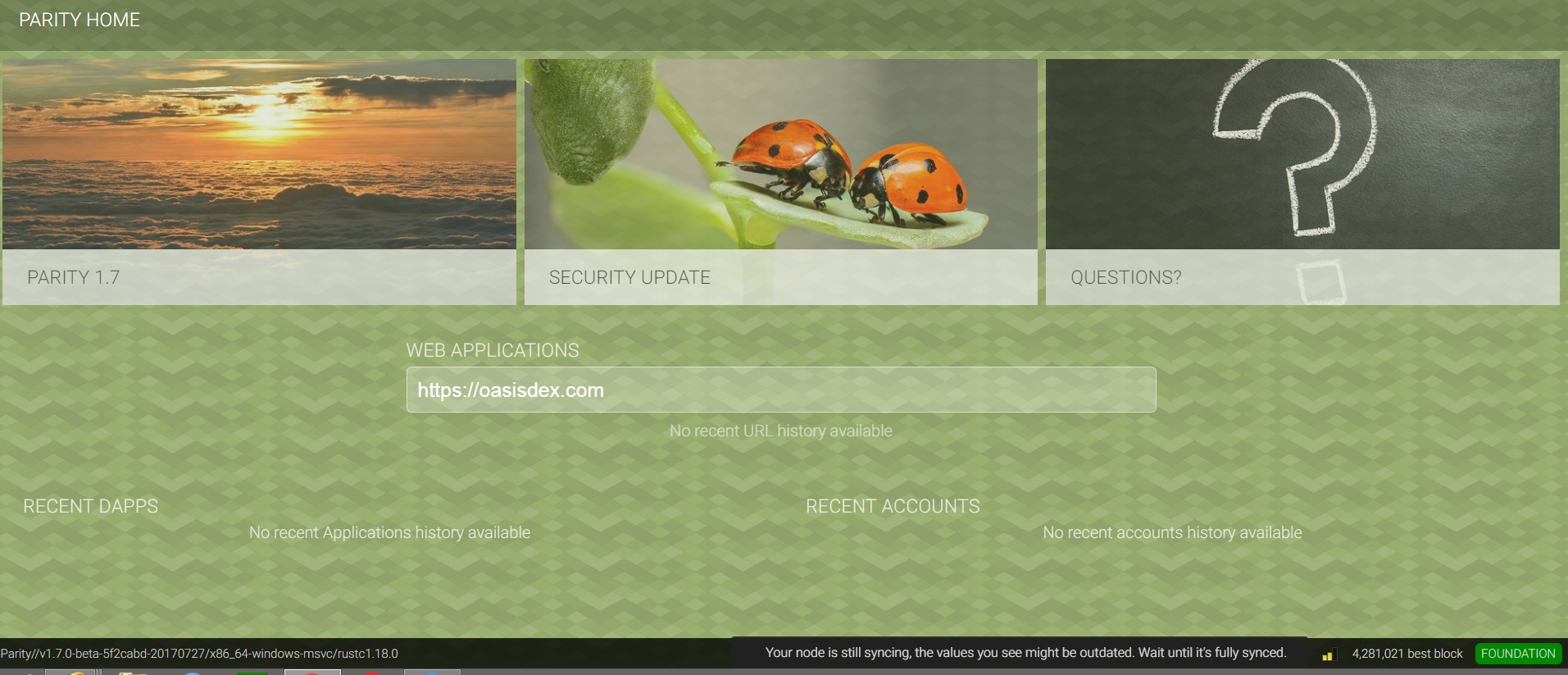
@5chdn Windows 8, parity 1.7, I install it by downloading from parity.io, I just installed it and let it run.
I managed it get into the login in page after 7 hrs, but it says that 'your node is still syncing, the values you see might be outdated, wait until it's fully sync.
charcoal3256
on 21 Sep 2017
Oh yes, please upgrade to 1.7.2 :)
5chdn
on 21 Sep 2017
Awesome. Issue is solved after upgrading. Thanks!
charcoal3256
on 21 Sep 2017
i am getting the same issue . chain synchronized, and i have 3/25 peers, but still getting time synchronized as NO. i have check my time.is and it's exact!
i was trying to make transaction, it never went out. transaction showing under Signer tab, local transaction.... if i try to cancel or anything, it creates a zero value transaction between me and myself! within the wallet, and keep going
 fidaaayoub
on 4 Oct 2017
fidaaayoub
on 4 Oct 2017
Related issues
 stone212
·
3Comments
stone212
·
3Comments
 famfamfam
·
3Comments
famfamfam
·
3Comments
 area
·
3Comments
area
·
3Comments
 jacogr
·
4Comments
jacogr
·
4Comments
 tzapu
·
3Comments
tzapu
·
3Comments
Most helpful comment
Yeah,
--daps-*are obsolete. The dapps server and jsonrpc server have been merged together.Also
--rpcaddris a geth-compatible version of--jsonrpc-interface.