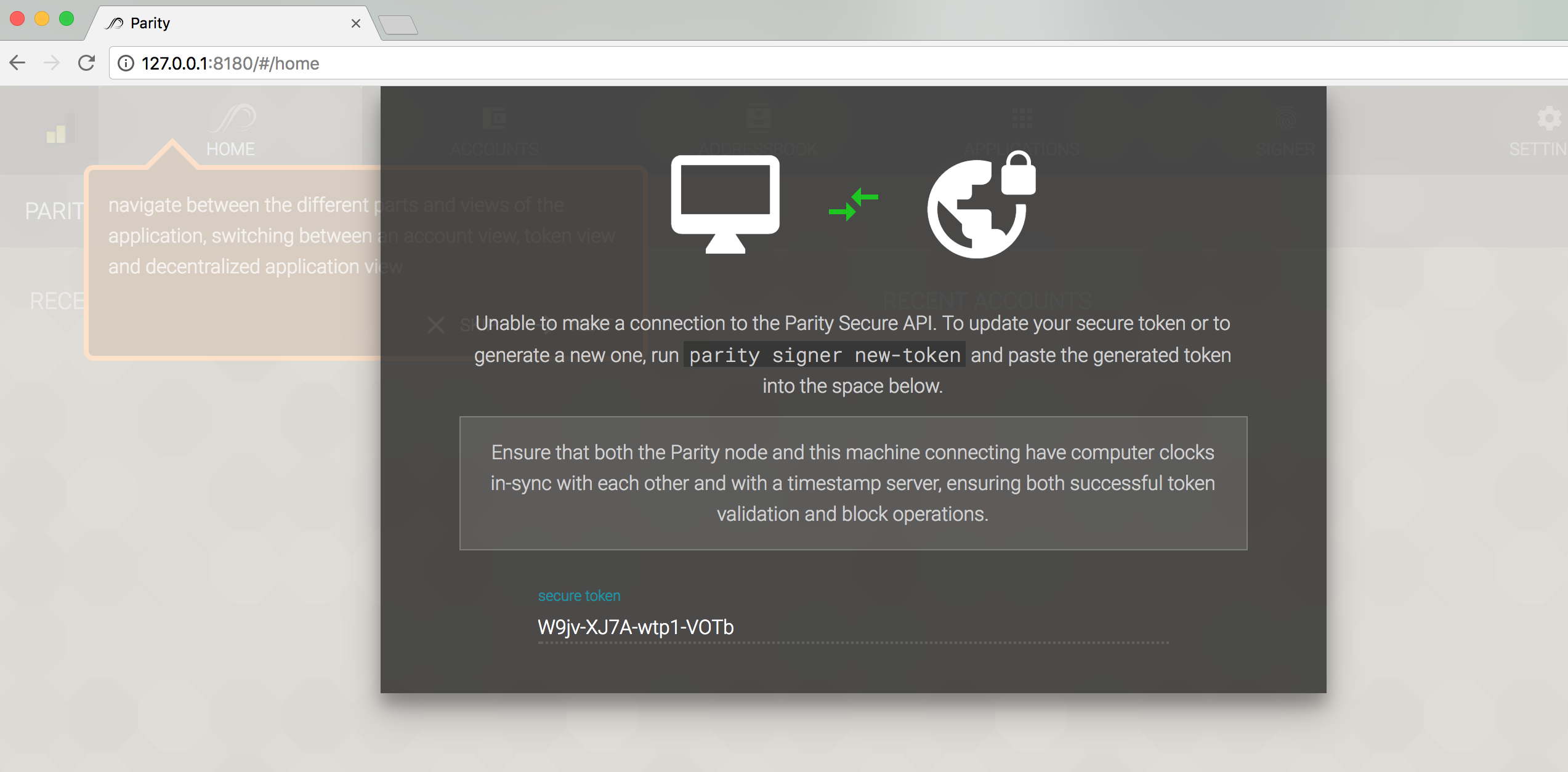
Parity-ethereum: Unable to make a connection to the Parity Secure API
Followed https://github.com/paritytech/parity/wiki/Wallet-Remote-Access this guide to connect to my linux box running parity with UI. Worked wirh 1.6.x but with 1.7.0 it will not accept any tokens generated with
parity signer new-token
Time is exact on both the linux box and the pc where I connect from, it comes back with: Unable to make a connection to the Parity Secure API
Reverted back to 1.6.10 --> That works.
I start with commandline:
parity --nat extip:[MYIP] --identity SomeName
 MeganerdNL
All 18 comments
Additional ports are required to be exposed on Parity 1.7.
I've updated documentation, thanks for the heads up.
 tomusdrw
on 2 Aug 2017
tomusdrw
on 2 Aug 2017
I have the same problem
 sonpython
on 5 Sep 2017
sonpython
on 5 Sep 2017
@sonpython what's your exact problem?
 5chdn
on 5 Sep 2017
5chdn
on 5 Sep 2017
@5chdn The parity GUI does not accept the new created token using
parity signer new-token
Unable to make a connection to the Parity Secure API
I'm using parity 1.7
It used to work before
sonpython
on 5 Sep 2017
@sonpython which operating system? which user is running the parity client?
5chdn
on 5 Sep 2017
@5chdn
Distributor ID: Ubuntu
Description: Ubuntu 16.04.3 LTS
Release: 16.04
Codename: xenial
I'm running parity under root
sonpython
on 5 Sep 2017
@sonpython so you have to run sudo parity signer new-token (or simply as root)
or grab one valid token from /root/.local/share/io.parity.ethereum/signer/authcodes
5chdn
on 5 Sep 2017
@5chdn
sudo parity signer new-token ==> also NOT WORK
but the token grabbed from /root/.local/share/io.parity.ethereum/signer/authcodes worked
thank you man!!
sonpython
on 5 Sep 2017
Which ports needs to be open and where's the documentation ?
 PavelNiedoba
on 16 Oct 2017
PavelNiedoba
on 16 Oct 2017
@PavelNiedoba Link to documentation is in original post: https://github.com/paritytech/parity/wiki/Wallet-Remote-Access
The ports required are 8180, 8545 and 8546
 folsen
on 16 Oct 2017
folsen
on 16 Oct 2017
@folsen thank you. I stil cannot figure out how to access wallet thorough corporate proxy which allows only ports 433 (and 80 which is not an option). I can open parity on https default port, but "parity signer new-token" will not work even when time is right
PavelNiedoba
on 16 Oct 2017
@PavelNiedoba IMHO the best way to access the node in such restricted environment would be:
- Start an SSH server on port 443 on the host machine.
- Create an SSH tunnel from Client to Host (since 443 is open that should go through, unless there is some http-only proxy on the way)
- Setup port mapping as described in the docs.
If that's not an option you need to:
- Setup two domains pointing to the host machine (say, 'parity' and 'ws-parity').
- Setup an nginx server running on Host machine.
- Use VirtualHosts and proxy_pass
paritytolocalhost:8180andws-paritytolocalhost:8546 - Run parity with
--ws-hosts ws-parityand--ui-hosts parity.
tomusdrw
on 16 Oct 2017
Thank you, I got it working. I had to add --ws-origins=all to make it work
```
/opt/parity/parity \
--chain=ropsten \
--db-path=/disk2/ethereumBlockchain \
--jsonrpc-apis=all \
--jsonrpc-interface=127.0.0.1 \
--ws-hosts parity-ws.domain.com \
--ws-origins all \
--ui-hosts parity-web.domain.com
````
PavelNiedoba
on 23 Oct 2017
@tomusdrw could you please paste link here for the documentation resolving this problem on Windows
It may help for further reference of the users who stuck with this issue.
Thanks.
 Office-Julia
on 29 Oct 2017
Office-Julia
on 29 Oct 2017
how to solve this problem???
 lucas7788
on 12 Jan 2018
lucas7788
on 12 Jan 2018
Same issue... followed the wiki for Nginx setup.
I'm running parity on a local server and connect to the UI with my laptop. The clocks on both machines are in sync.
Local server runs debian 9 with nginx 1.10.3, andParity/v1.8.6-beta-2d051e4-20180109/x86_64-linux-gnu/rustc1.22.1
 shadowpho
on 12 Jan 2018
shadowpho
on 12 Jan 2018
I am stuck with this issue too.
Parity version : v1.11.8-stable-c754a028e-20180725
parity UI version : 0.3.4
OS : Win 10.
Sometimes, I have this error in the peer logs :
writing illegal frame; state=Init, frame=Body { bytes: 47 }
 CorentinPacaud
on 27 Aug 2018
CorentinPacaud
on 27 Aug 2018
@CorentinPacaud this is a very old and closed issue. Could you please open your own with your details what did you do, what happen etc..
 Tbaut
on 27 Aug 2018
Tbaut
on 27 Aug 2018
Related issues
 bryaan
·
3Comments
bryaan
·
3Comments
 m-thomson
·
3Comments
m-thomson
·
3Comments
 mr-older
·
3Comments
mr-older
·
3Comments
 danfinlay
·
3Comments
danfinlay
·
3Comments
 vmenond
·
3Comments
vmenond
·
3Comments
Most helpful comment
how to solve this problem???
