Parcel: Problem with SCSS/Autoprefixer setup
🐛 bug report
I have Parcel set up with Sass and Autoprefixer. I'm having some problems...
When I run the dev server, the JS and the CSS don't run at all. However, I can see in my editor that the files compiled properly and they are in the
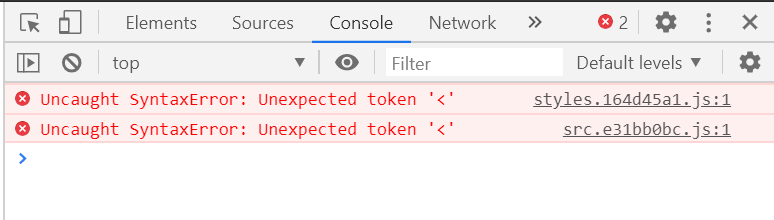
distfolder. I am getting this error for bothsrc.[hash].jsandstyles.[hash].js:Uncaught SyntaxError: Unexpected token '<'I have a JS _and_ a CSS file for the styling. Is that supposed to happen?
The Autoprefixer isn't actually working. For example, I tested it out with
box-sizing(which I know needs a vendor prefix for Firefox), but it never added this to my stylesheet. It doesn't seem to be working withbuildordev.
🎛 Configuration + 💻 Code Sample
package.json (I only added the useful stuff)
{
  "main": "src/index.js",
  "scripts": {
    "dev": "npx parcel src/index.html --public-url ./",
    "build": "npx parcel build src/index.html --public-url ./"
  },
  "dependencies": {},
  "devDependencies": {
    "@babel/core": "^7.10.2",
    "autoprefixer": "^9.8.0",
    "parcel-bundler": "^1.12.4",
    "parcel-plugin-clean-dist": "0.0.6",
    "postcss-modules": "^2.0.0",
    "sass": "^1.26.7"
  }
}
.babelrc
{
  'presets': [
    [
      '@babel/preset-env',
      {
        'modules': false
      }
    ]
  ]
}
postcss.config.js
module.exports = {
  plugins: [
    require('autoprefixer')
  ]
};
src/index.html
<head>
  <title>Basic Setup</title>
  <link rel="stylesheet" href="./styles.scss">
  <script src="./index.js" charset="utf-8"></script>
</head>

<body>
  <p>Some demo text to make sure it's working.</p>
</body>
src/index.js
console.log('test');
src/styles.scss
* {
  box-sizing: border-box;
}

p {
  color: red;
  transition: color 1s;
}

p:hover {
  color: black;
}
🤔 Expected Behavior
When I run both dev and build, Autoprefixer should compile my CSS after it has been converted from SCSS. In the current case it should add the -moz-box-sizing: border-box property.
When I run dev my JS should successfully execute console.log('test'), and my CSS should set the <p> to be red and when I hover over it, it should turn black.
😯 Current Behavior
Autoprefixer isn't doing anything.
When I run npm run build everything works fine (except Autoprefixer). When I run npm run dev, I get the error Uncaught SyntaxError: Unexpected token '<' at src.e31bb0bc.js:1 and styles.164d45a1.js:1, and neither my stylesheet or JS do anything.
💁 Possible Solution
Related:
- https://github.com/parcel-bundler/parcel/issues/3022
- https://github.com/parcel-bundler/parcel/issues/2855
- https://github.com/parcel-bundler/parcel/issues/1376
🔦 Context
I'm just trying to get my setup with some basic functionality created before I begin my actual project.
🌍 Your Environment
| Software | Version(s) |
| ---------------- | ---------- |
| Parcel | 1.12.4
| Node | 12.14.1
| npm/Yarn | npm 6.13.4
| Operating System | Windows 10 x64
 applemonkey496
All 4 comments
You need to add a browserslist config that specifies the browsers your are targeting (that require these additional declarations in your case), e.g. add this package.json:
{
  // ...,
  "browserslist": "last 4 version"
}
 mischnic
on 3 Jun 2020
mischnic
on 3 Jun 2020
@mischnic Thanks! That fixed the Autoprefixer problem on build, but I'm still getting the Unexpected token '<' error on dev. How can I fix that one?
applemonkey496
on 3 Jun 2020
Generally, this is because src.XXXXX.js cannot be found by the dev server and so it serves the HTML bundle (to make SPA apps work). In this case it's "solved" by removing the publicurl from the dev server invocation. I think this should work for you?
mischnic
on 4 Jun 2020
It works! 🎉 Thanks @mischnic
applemonkey496
on 5 Jun 2020
Related issues
 dotdash
·
3Comments
dotdash
·
3Comments
 devongovett
·
3Comments
devongovett
·
3Comments
 dsky1990
·
3Comments
dsky1990
·
3Comments
 philipodev
·
3Comments
philipodev
·
3Comments
 will-stone
·
3Comments
will-stone
·
3Comments
Most helpful comment
Generally, this is because
src.XXXXX.jscannot be found by the dev server and so it serves the HTML bundle (to make SPA apps work). In this case it's "solved" by removing the publicurl from the dev server invocation. I think this should work for you?