Parcel: "Name already registered with serializer" with parcel@next on yarn@berry pnp
🐛 bug report
When I run parcel build I receive a "Name already registered with serializer" error
🎛 Configuration (.babelrc, package.json, cli command)
Blank project with yarn2#pnp and parcel@next
🤔 Expected Behavior
No error while building
😯 Current Behavior
/yarnparcel/.yarn/cache/@parcel-core-npm-2.0.0-nightly.65-a3573223f8-1.zip/node_modules/@parcel/core/lib/serializer.js:28
    throw new Error('Name already registered with serializer');
    ^

Error: Name already registered with serializer
    at registerSerializableClass (/yarnparcel/.yarn/cache/@parcel-core-npm-2.0.0-nightly.65-a3573223f8-1.zip/node_modules/@parcel/core/lib/serializer.js:28:11)
    at Object.<anonymous> (/yarnparcel/.yarn/$$virtual/@parcel-package-manager-virtual-dab9d78bc4/0/cache/@parcel-package-manager-npm-2.0.0-nightly.67-6d59c584b3-1.zip/node_modules/@parcel/package-manager/lib/Npm.js:82:37)
    at Module._compile (internal/modules/cjs/loader.js:956:30)
    at Object.Module._extensions..js (internal/modules/cjs/loader.js:973:10)
    at Module.load (internal/modules/cjs/loader.js:812:32)
    at Function.module_1.Module._load (/yarnparcel/.pnp.js:24084:14)
    at Module.require (internal/modules/cjs/loader.js:849:19)
    at require (internal/modules/cjs/helpers.js:74:18)
    at Object.<anonymous> (/yarnparcel/.yarn/$$virtual/@parcel-package-manager-virtual-dab9d78bc4/0/cache/@parcel-package-manager-npm-2.0.0-nightly.67-6d59c584b3-1.zip/node_modules/@parcel/package-manager/lib/index.js:19:12)
    at Module._compile (internal/modules/cjs/loader.js:956:30)
💁 Possible Solution
No Idea, sorry ¯\_(ツ)_/¯
🔦 Context
I'm trying to setup a project with bleeding-edge tooling :)
💻 Code Sample
This installs yarn@berry GLOBALLY, creates a sample project and produces the error
mkdir yarnparcel
cd yarnparcel
npm i -g yarn@berry
yarn init
yarn add parcel@next
echo "<h1>Hello</h1>" > index.html
yarn run parcel build index.html
🌍 Your Environment
| Software | Version(s) |
| ---------------- | ---------- |
| Parcel | 2.0.0-alpha.3.2
| Node | 12.13.0
| Yarn | 2.0.0-rc.27
| Operating System | MacOS 10.14
 Xiphe
Xiphe
All 29 comments
FYI - I don't see this issue when reverting to 2.0.0-alpha.3.1
 crazy4groovy
on 30 Jan 2020
crazy4groovy
on 30 Jan 2020
@crazy4groovy thanks for the feedback! I do get the same error on 2.0.0-alpha.3.1
mkdir yarnparcel
cd yarnparcel
npm i -g yarn@berry
yarn init
yarn add [email protected]
echo "<h1>Hello</h1>" > index.html
yarn run parcel build index.html
I find it odd that the error comes from a nightly build. Seems as if the sub-packages are not pinned to the @next version but use the @nightly ?!
$ yarn why @parcel/core
└─ parcel@npm:2.0.0-alpha.3.2
   └─ @parcel/core@npm:2.0.0-nightly.65 (via npm:^2.0.0-alpha.3.2)
(PnP isn't supported just yet: https://github.com/parcel-bundler/parcel/pull/3582)
 mischnic
on 17 Feb 2020
mischnic
on 17 Feb 2020
I also had this meaningless error seemingly without reason. My project is almost empty, I'm trying to upgrade from v1
For anyone else who arrives here, try deleting the .cache folder in your project as well.
 fregante
on 4 Apr 2020
fregante
on 4 Apr 2020
Using npm to install parcel 2 instead of yarn fixes this for me with 2.0.0-alpha.3.2
npm install parcel@next
 talkingtab
on 5 Apr 2020
talkingtab
on 5 Apr 2020
Migrating from parcel 1, same error. Project has nothing but an html file.
Deleting .cache and node_modules doesn't seem to fix it.
 YassienW
on 8 Apr 2020
YassienW
on 8 Apr 2020
Same problem with Yarn V2.
 pojntfx
on 11 Apr 2020
pojntfx
on 11 Apr 2020
Just tried with #3582 and yarn add -D [email protected] - still doesn't work.
pojntfx
on 18 Apr 2020
Deleting node_modules and re-installing worked for me.
 brandon-pereira
on 19 Apr 2020
brandon-pereira
on 19 Apr 2020
Can someone help me reproduce this with Yarn 2? Seems to work for me:
niklas@nmb:berry $ yarn set version berry
Resolving berry to a url...
Downloading https://github.com/yarnpkg/berry/raw/master/packages/berry-cli/bin/berry.js...
Saving it into /Users/niklas/Desktop/berry/.yarn/releases/yarn-berry.js...
Updating /Users/niklas/Desktop/berry/.yarnrc.yml...
Done!
niklas@nmb:berry $ yarn init
{
  name: 'berry'
}
$ yarn add -D parcel@nightly
...
➤ YN0000: Done with warnings in 35.11s
$ echo "<h1>Hello</h1>" > index.html
$ yarn parcel index.html
ℹ️ Server running at http://localhost:1234
✨ Built in 1.01s
I'm getting this on my server now. I can help debug if needed. I'm running node v12.16.2 on Ubuntu 18.04.2 LTS
brandon-pereira
on 19 Apr 2020
@mischnic Just tried to reproduce your commands on my system (macOS Catalina), the error seems to have been fixed!
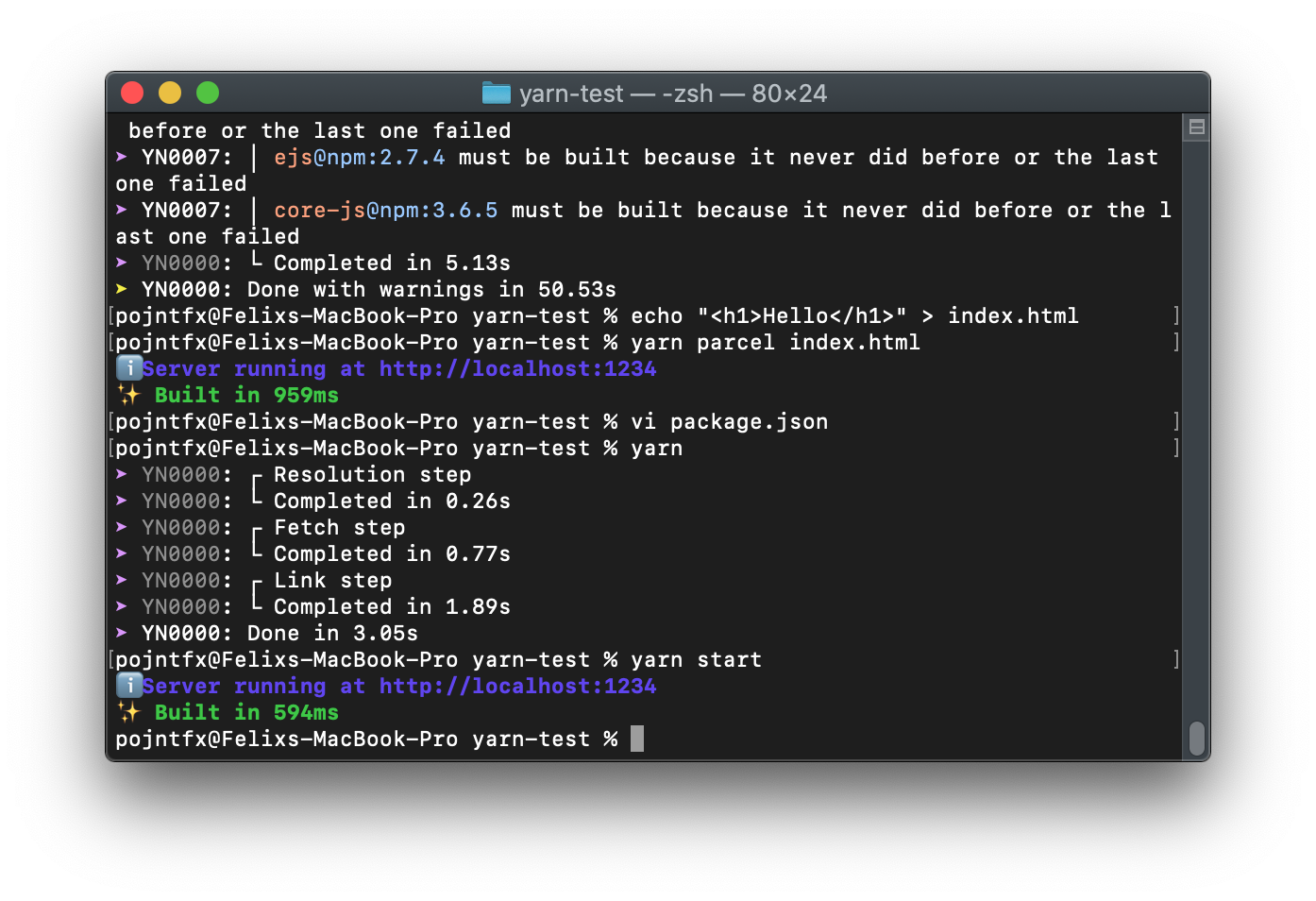
pojntfx
on 20 Apr 2020
This error happens for me, while being on yarn v1.22.0, ^2.0.0-nightly.227, windows pro 1909.
Tried clearing all node_modules, ect, it's pretty inconsistent, i have one repo with the same parcel version that has the bug, and another one that doesn't have the bug.
The repo that has the bug is in a monorepo, while the other that doesn't have the bug, isn't in a monorepo.
 Banou26
on 21 Apr 2020
Banou26
on 21 Apr 2020
This happens when there are have two instances of @parcel/fs, @parcel/package-manager or @parcel/workers that are loaded at the same time when running Parcel.
mischnic
on 21 Apr 2020
Shouldn't we re-open this then ?
Banou26
on 22 Apr 2020
@mischnic and is there a workaround?
YassienW
on 22 Apr 2020
I'm asking once again:
Can someone help me reproduce this?
mischnic
on 22 Apr 2020
I was getting this issue after trying to switch from parcel-v1 to parcel-v2.
Deleting node_modules and reinstalling didn't help (using npm).
Deleting node_modules _as well as_ package-lock.json did.
 steelcracker
on 24 Apr 2020
steelcracker
on 24 Apr 2020
I was migrating from nodeLinker: node-modules to PnP, both in yarn v2. The following didn't work:
- Blowing away
node_modulesfolders that were sitting around - Blowing away
yarn.lock - Blowing away
.yarn/cache - Blowing away
.yarn/cacheandyarn.lock
The following did work:
- Blowing away
.yarnentirely, as well asyarn.lockand.yarnrc.yml, then just completely reinstalling yarn v2 (and plugins) and re-adding all my packages. I probably also did a VS Code window reload somewhere in there too.
I'm thinking it might be in .yarn/build-state.yml, perhaps, which has diffs after reinstalling everything.
 huw
on 10 May 2020
huw
on 10 May 2020
@mischnic I believe this occurs when you are building your app with parcel@2 and one of your app's dependencies has a dependency on parcel-bundler@1. In my particular scenario, I have [email protected] to build my app and [email protected] as a dependency of one of my app's dev dependencies.
 pittst3r
on 18 Jun 2020
pittst3r
on 18 Jun 2020
@pittst3r You are absolutely right. I removed a dev dependency which relies in parcel@1 and it worked.
 marc2332
on 14 Jul 2020
marc2332
on 14 Jul 2020
Unfortunately I'm getting this error when I use Yarn 2 in Windows with the nodeLinker: node-modules option to still generate node_modules as I have other dependencies that are not PnP ready.
 jupl
on 23 Sep 2020
jupl
on 23 Sep 2020
This happened to me after migrating from 1 to 2. If someone is interested, I can create a public reproducible repo.
But it is really simple:
Order of uninstalling 1 and installing 2 is important here.
When upgrading from 1 to 2, you should first uninstall 1 and then install version 2.
// Wrong, this causes the error
npm install -D parcel@next
npm uninstall -s parcel-bunder
// Correct, this will work
npm uninstall -s parcel-bunder
npm install -D parcel@next
Deleting package-lock.json and node_modules also fixes the problem
 fawmi
on 23 Sep 2020
fawmi
on 23 Sep 2020
I'm getting this same error. To reproduce:
{
  "name": "test",
  "main": "dist/index.js",
  "scripts": {
    "build": "parcel build src/index.js"
  },
  "devDependencies": {
    "parcel": "next"
  }
}
My src/index.js contains the following:
function foo() {
  console.log('foo');
}

foo();
Then I run:
yarn set version berry
I updated my yarnrc.yml to use node_modules instead of PnP:
nodeLinker: node-modules
yarnPath: ".yarn/releases/yarn-berry.cjs"
Then yarn and yarn build.
Same happens with parcel@nightly.
I've realised that if I remove my nodeLinker line from yarnrc.yml and use PnP instead, then parcel works fine (but we need node_modules).
 jjenzz
on 7 Dec 2020
jjenzz
on 7 Dec 2020
This happened to me after migrating from 1 to 2. If someone is interested, I can create a public reproducible repo.
But it is really simple:
Order of uninstalling 1 and installing 2 is important here.
When upgrading from 1 to 2, you should first uninstall 1 and then install version 2.// Wrong, this causes the error npm install -D parcel@next npm uninstall -s parcel-bunder// Correct, this will work npm uninstall -s parcel-bunder npm install -D parcel@nextDeleting package-lock.json and node_modules also fixes the problem
Anyone running into this issue should follow this.
 lucksp
on 7 Dec 2020
lucksp
on 7 Dec 2020
@lucksp what if you're not migrating but creating a new project from scratch, such as my steps above?
jjenzz
on 8 Dec 2020
I am not running yarn or berry so i cannot say for sure, but it felt like a conflict of deps.
lucksp
on 8 Dec 2020
I'm not using yarn, just npm.
@mischnic Here's a reproduction: https://github.com/trusktr/solid-jsx-typescript-parcel-starter
node -v # v14.15.1
npm -v # 6.14.4, v7 has too many critical issues

git clone [email protected]:trusktr/solid-jsx-typescript-parcel-starter.git
cd solid-jsx-typescript-parcel-starter
git checkout 6054b0326dffde2422714094ff4b69fbb43bb0be # specific commit where I know the problem exists
npm install
npm start # Error: Name already registered with serializer
 trusktr
on 16 Dec 2020
trusktr
on 16 Dec 2020
Related issues
 davidnagli
·
3Comments
davidnagli
·
3Comments
 urbanhop
·
3Comments
urbanhop
·
3Comments
 oliger
·
3Comments
oliger
·
3Comments
 devongovett
·
3Comments
devongovett
·
3Comments
 donaldallen
·
3Comments
donaldallen
·
3Comments
Most helpful comment
I was getting this issue after trying to switch from parcel-v1 to parcel-v2.
Deleting node_modules and reinstalling didn't help (using npm).
Deleting node_modules _as well as_
package-lock.jsondid.