Parcel: TypeError: Cannot read property 'TYPED_ARRAY_SUPPORT' of undefined #803
🐛 bug report
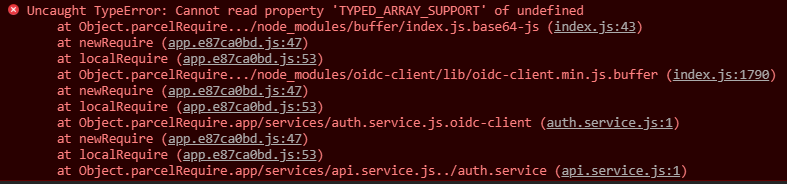
When I import oidc-client and write "new UserManager({...})" in a parcel bundled project, I get this issue:
"Uncaught TypeError: Cannot read property 'TYPED_ARRAY_SUPPORT' of undefined"
I tried it without parcel and it worked. So the issue should be caused by parcel.
🎛 Configuration (.babelrc, package.json, cli command)
{
  "name": "my-project",
  "version": "0.1.0",
  "license": "UNLICENSED",
  "author": "Me",
  "scripts": {
    "start": "parcel src/index.html --no-cache --port 8080",
    "start:build": "http-server dist/ -o",
    "build": "parcel build src/index.html --no-cache"
  },
  "dependencies": {
    "lit-element": "^2.1.0",
    "oidc-client": "^1.7.0"
  },
  "devDependencies": {
    "http-server": "^0.11.1",
    "parcel-bundler": "^1.12.3",
    "parcel-plugin-webcomponents": "^1.2.0"
  },
  "browserslist": [
    "last 2 chrome version",
    "last 2 firefox version",
    "last 2 edge version",
    "last 2 safari version",
    "not dead"
  ]
}
🤔 Expected Behavior
oidc-client should just work.
😯 Current Behavior
💁 Possible Solution
No idea
🔦 Context
I just tried to use oidc-client in a parcel bundled project. Everything worked under webpack.
💻 Code Sample
import { UserManager } from 'oidc-client'

const userManager = new UserManager({})
🌍 Your Environment
| Software | Version(s) |
| ---------------- | ---------- |
| Parcel | 1.12.3
| Node | 11.11.0
| npm | 6.7.0
| Operating System | Windows 10
 lazylazyllama
All 16 comments
This part works fine for me:
import { UserManager } from 'oidc-client'
const userManager = new UserManager({});
Does that error happen during the import or during a function call later?
Somehow, Buffer is undefined when the Buffer polyfill code runs...
 mischnic
on 23 Mar 2019
mischnic
on 23 Mar 2019
Oh that's my bad. I didn't realize things would work in a normal script.
So I didn't provide enough information here.
In my case I need to import my script as a ES-Module. Which usually doesn't work because of this whole parcelRequire bug thing, but (and don't ask me why) everything works fine if you include a css file first.
So this is my code:
index.html:
<!DOCTYPE html>
<html>
<head>
<title>My App</title>
<meta charset="UTF-8">
<meta name="theme-color" content="#fff">
<meta name="viewport" content="width=device-width, initial-scale=1">
<link href="./style.css" rel="stylesheet">
<script type="module" src="./app.js"></script>
</head>
<body>
hello world!
</body>
</html>
app.js
import { UserManager } from 'oidc-client'
const userManager = new UserManager({})
Now you should see the error I mentioned above.
lazylazyllama
on 24 Mar 2019
To save you some time I created a simple repository, which has this issue.
lazylazyllama
on 24 Mar 2019
The buffer polyfill for browsers contains this code
Buffer.TYPED_ARRAY_SUPPORT = global.TYPED_ARRAY_SUPPORT !== undefined
  ? global.TYPED_ARRAY_SUPPORT
  : "DEFAULT";
If you run the parcel script in a type="module" script (which is unsupported), Parcel can't get the global object using this because that's forbidden in this context. Figuring out the global object is actually not trivial: https://github.com/tc39/proposal-global
Which usually doesn't work because of this whole parcelRequire bug thing, but (and don't ask me why) everything works fine if you include a css file first.
Doesn't work for me... (#1401)
mischnic
on 24 Mar 2019
If you run the parcel script in a type="module" script (which is unsupported)
So is there any alternative way for me to include es modules to the unsupported script type=module" tag?
Doesn't work for me...
So you still get this parcelRequire error?
Parcel can't get the global object using this because that's forbidden in this context.
What about globalThis then?
lazylazyllama
on 24 Mar 2019
So is there any alternative way for me to include es modules to the unsupported script type=odule" tag?
No....
So you still get this parcelRequire error?
Yes, but I hacked around that with globalThis and then I got your original error.
What about globalThis then?
Quite a new language feature and badly supported across browsers: https://developer.mozilla.org/en-US/docs/Web/JavaScript/Reference/Global_Objects/globalThis#Browser_compatibility
mischnic
on 24 Mar 2019
If you run the parcel script in a type="module" script (which is unsupported), Parcel can't get the global object using this because that's forbidden in this context.
But what about using "window" in this specific situation then?
lazylazyllama
on 24 Mar 2019
But what about using "window" in this specific situation then?
In this case, yes. But for workers, it needs to be self and for Node global.
There's a PR regarding this, but I don't know it's approach works everywhere: https://github.com/parcel-bundler/parcel/pull/2809/files
mischnic
on 24 Mar 2019
In this case, yes. But for workers, it needs to be self and for Node global.
Yeah, but that shouldn't be a problem if parcel just checks them all and figures out which one isn't undefined in our current context ;)
lazylazyllama
on 24 Mar 2019
Just like they do it in the globalThis proposal.
var getGlobal = function () {
    // the only reliable means to get the global object is
    // `Function('return this')()`
    // However, this causes CSP violations in Chrome apps.
    if (typeof self !== 'undefined') { return self; }
    if (typeof window !== 'undefined') { return window; }
    if (typeof global !== 'undefined') { return global; }
    throw new Error('unable to locate global object');
};
The PR "https://github.com/parcel-bundler/parcel/pull/2809/files" you mentioned before does not fix my problem. So I did some research and fixed it myself. :)
Here is my PR: https://github.com/parcel-bundler/parcel/pull/2839
What do you think about it?
lazylazyllama
on 24 Mar 2019
I saw this:
  Buffer: asset => {
    asset.addDependency('buffer');
    return 'var Buffer = require("buffer").Buffer;';
  },
This is the root cause.
I didn't found any way to toggle it off, for all people that it's causing issues (like me)
Also the assumption identifier "Buffer" need it is wrong.
In my case it breaks the polyfill I am using
Is there an option to move it to external Babel polyfill or make it optional in any way?
P.S.
node-libs-browser not up to date, actually if you use Buffer in the latest version it will work.
 idanilt
on 8 Jul 2019
idanilt
on 8 Jul 2019
Is there an option to move it to external Babel polyfill or make it optional in any way?
Currently not, we should consider that.
mischnic
on 8 Jul 2019
I have started to create a pull request, replace node-libs-browser with the original libs.
But I can't understand why it's there, I can't think about any reason why I need my bundler to try guessing my dependencies for me.
Are you sure this part need fix, not depreciation?
idanilt
on 9 Jul 2019
Please don't use <script type="module"> with parcel. There is no reason to do so as Parcel already compiles es6 modules away.
 devongovett
on 9 Jul 2019
devongovett
on 9 Jul 2019
This issue has been automatically marked as stale because it has not had recent activity. It will be closed in 30 days if no further activity occurs. Thank you for your contributions.
![stale[bot] picture](https://avatars3.githubusercontent.com/in/1724?v=4&s=40) stale[bot]
on 17 Jan 2020
stale[bot]
on 17 Jan 2020
Related issues
 medhatdawoud
·
3Comments
medhatdawoud
·
3Comments
 466023746
·
3Comments
466023746
·
3Comments
 oliger
·
3Comments
oliger
·
3Comments
 mnn
·
3Comments
mnn
·
3Comments
 davidnagli
·
3Comments
davidnagli
·
3Comments
Most helpful comment
The buffer polyfill for browsers contains this code
If you run the parcel script in a
type="module"script (which is unsupported), Parcel can't get the global object usingthisbecause that's forbidden in this context. Figuring out the global object is actually not trivial: https://github.com/tc39/proposal-globalDoesn't work for me... (#1401)