Parcel: TypeScript source maps don't match lines
Just started a new project yesterday and sourcemaps debugging doesn't hit the correct lines in chrome. Using "build": "parcel build ./src/index.ts --out-dir chrome-extension"
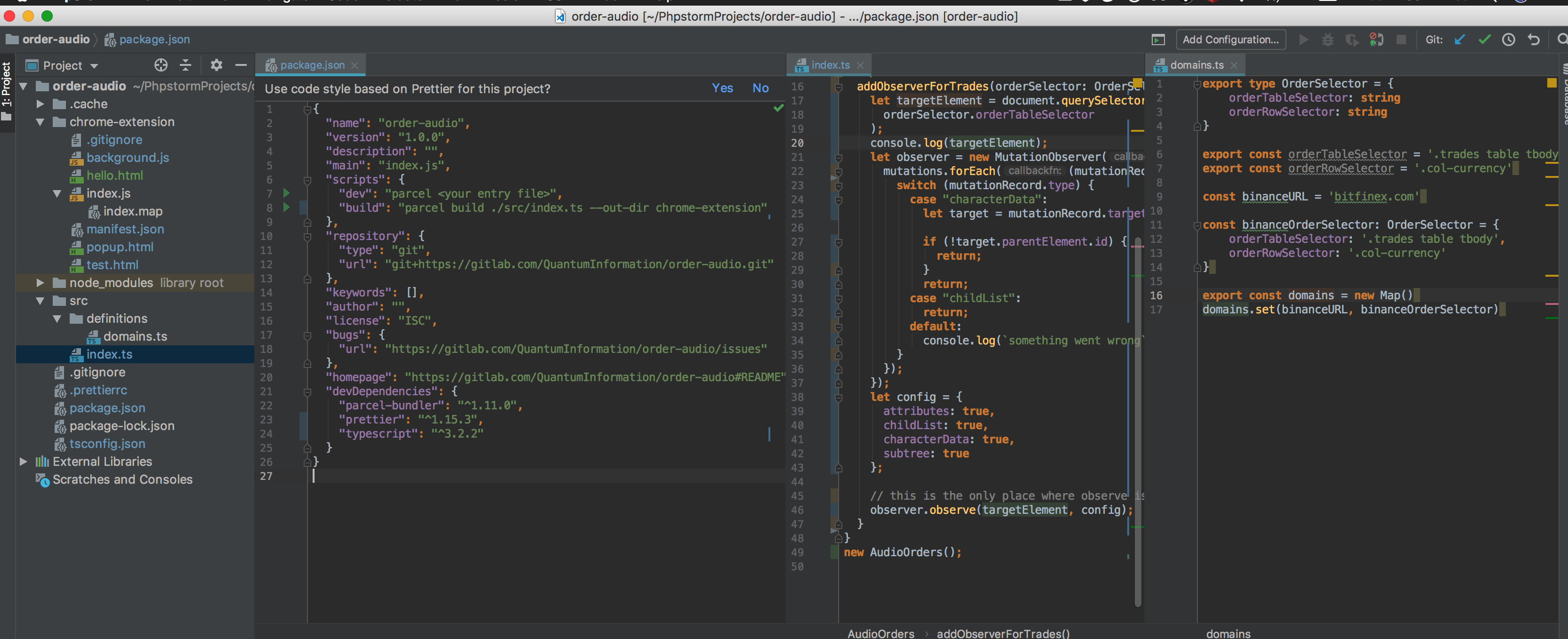
can't hit my breakpoints

 quantuminformation
All 28 comments
Any reproducable example?
 DeMoorJasper
on 2 Jan 2019
DeMoorJasper
on 2 Jan 2019
Sorry I have migrated to webpack already.
quantuminformation
on 2 Jan 2019
lol, @QuantumInformation this is not very useful. You come on our issue tracker, complain about a possible bug, but give us no information. Then you just close it without any more details since you migrated to another tool? We would like to help you and others out that might have this bug, but we need more info in order to do that. 🤷♂️
 devongovett
on 2 Jan 2019
devongovett
on 2 Jan 2019
Ok, my apologies, my decision timescales are so quick I didn't think of the social aspects this time.
quantuminformation
on 2 Jan 2019
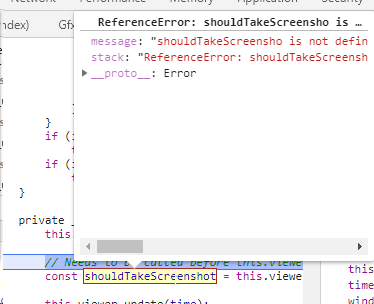
I can't reproduce this, but something has gone very wrong: in the second screenshot, there is a possible breakpoint location in the middle of a variable.
 mischnic
on 4 Jan 2019
mischnic
on 4 Jan 2019
I'm seeing similar behavior in my project, but it's quite big. I can't seem to reproduce it in a smaller project. Would it be OK using that to debug?
 magcius
on 7 Jan 2019
magcius
on 7 Jan 2019
I'm seeing similar behavior in my project, but it's quite big. I can't seem to reproduce it in a smaller project. Would it be OK using that to debug?
If this happens consistently and you're willing to share the project, of course!
mischnic
on 7 Jan 2019
The project is here: https://github.com/magcius/noclip.website
It requires a bit of setup. git checkout c3aaf4e6a614fd0719d29db23af252f55d5ec821 -- data/sm64ds. Then make sure dist/data is symlinked to data/ -- if it's not, make it or copy the files over.
Then start up Parcel and navigate to http://localhost:1234/#sm64ds/1. From there you can try to hit pause during execution and look at the local variables. They'll be messed up like this:
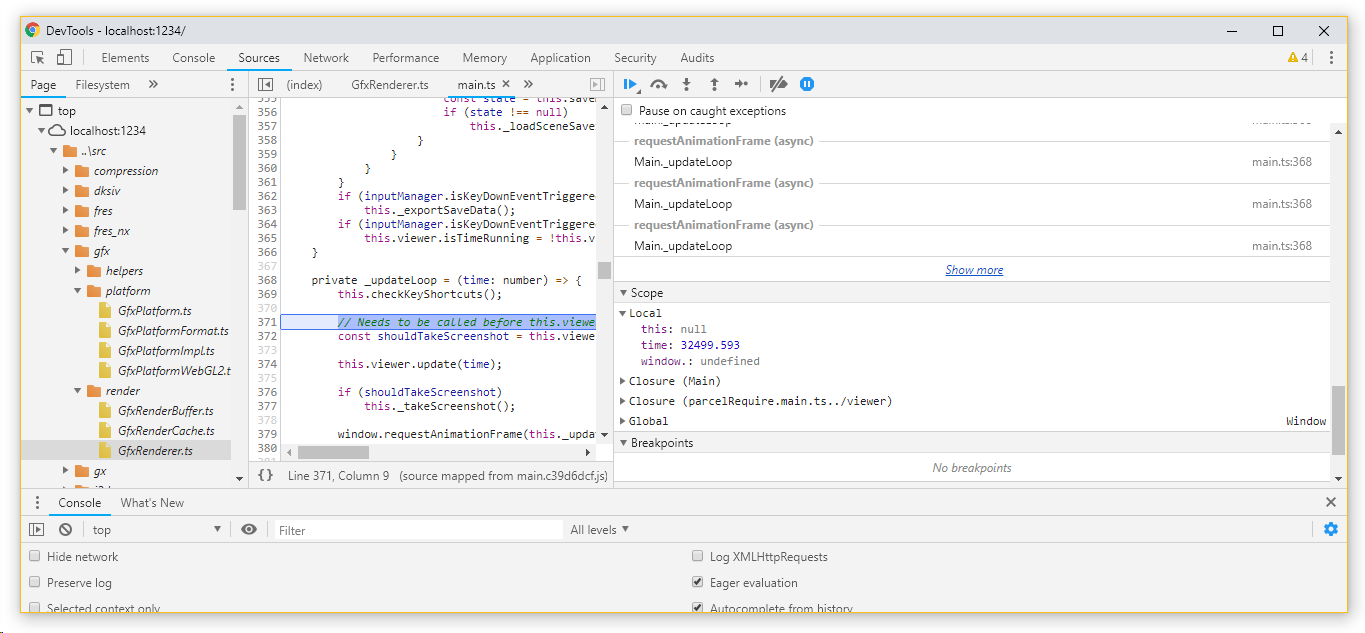
"this" is null, time looks correct, and the third variable is called "window." Hovering over "shouldTakeScreenshot" says "shouldTakeScreensho" is not defined:
If there's a better way to contact you about this if you are having difficulty setting it up, please let me know: Twitter DMs, Discord, etc.
I'm a noob to the whole JavaScript/TypeScript ecosystem so it's entirely possible I'm doing something stupid. Please let me know.
magcius
on 7 Jan 2019
"this" is null, time looks correct, and the third variable is called "window." Hovering over "shouldTakeScreenshot" says "shouldTakeScreensho" is not defined:
Are you using a recent parcel? Works fine for me:

You could try deleting the cache folder
mischnic
on 10 Jan 2019
Also, is this only after a hmr or also on initial?
Sent with GitHawk
DeMoorJasper
on 10 Jan 2019
I the "throw exception" trick to turn off HMR entirely. It doesn't work for me. My version of Parcel is about 20 days old. I will try deleting the cache directory entirely.
magcius
on 10 Jan 2019
I updated Parcel and deleted the cache directory to no effect. Please let me know if I can provide any other details about my current setup.
magcius
on 10 Jan 2019
@mischnic are you on windows? Perhaps this is an issue with windows, although I doubt it.
@magcius You've already shared the code, so not sure what else you can provide if this happens all the time. You could provide reproduction steps if this only happens sporadically
DeMoorJasper
on 10 Jan 2019
It appears to be completely consistent for me.
There might be something else in my workflow or environment that might be affecting it (I'm not sure I always trust yarn lockfiles), but I'm not sure what it might be.
magcius
on 10 Jan 2019
are you on windows? Perhaps this is an issue with windows, although I doubt it.
Running parcel on macOS and viewed in Chrome on Windows, because my mac doesn't support WebGL 🙈 . How could this be platform specific?
mischnic
on 10 Jan 2019
Line endings, perhaps? I should probably check what line endings I'm using locally.
magcius
on 10 Jan 2019
Yeah not sure why this could be platform specific (line endings and paths possibly), but it's tbh the only thing I can think of at the moment. I'm just guessing at what the issues can be
DeMoorJasper
on 10 Jan 2019
I think this was a Chrome bug, since updating Chrome appeared to have fixed it.
magcius
on 20 Jan 2019
this is when I last used parcel
https://github.com/QuantumInformation/audio-orders/tree/23ee4fa2a14c42e92e2661bad59f01a9001b5350
should have the bug in there
quantuminformation
on 21 Jan 2019
What is the status? I am having the same issue. On windows and ubuntu (elementary os).
As it seems the issue appears when and HMR event takes place. However, reloading the page doesn't cut. Stoping parcel and running again is working.
 aalpgiray
on 26 Apr 2019
aalpgiray
on 26 Apr 2019
Yes. It was fixed a while back, but I recently updated Parcel and started seeing this again. My repro instructions above manifest the issue now.
magcius
on 28 Apr 2019
@aalpgiray Could you please provide a reproduction?
Sourcemaps don't work with HMR, I've tried to fix this but no browser would support the current approach by Parcel (https://github.com/parcel-bundler/parcel/issues/643).
mischnic
on 3 May 2019
The project is internal. However, I will create a simpler copy of the project at the weekend. If we are lucky that would have the same problems as well. :)
aalpgiray
on 3 May 2019
@mischnic hi again I'd published the repo. https://github.com/aalpgiray/parcel-web/tree/43f54b6c28e02592c7b64448f4f65fb663772687. you can modify todos.tsx file while having yarn start running. Best of luck. Cheers.
aalpgiray
on 3 May 2019
Probably not the same thing that caused OP's issue, but in my case I was debugging from a hostname other than localhost. Adding --host myhostname to my parcel command fixed the issue for me.
 kbtz
on 9 Jun 2019
kbtz
on 9 Jun 2019
Still seeing this on my project. After a while, the source maps will break. When it happens, restarting Parcel will solve the issue. I don't need to clear the cache.
magcius
on 15 Aug 2019
I've discovered a few bugs in sourcemaps when working on sourcemaps for Parcel 2. I doubt sourcemaps will be further improved for v1 unfortunately.
So my guess is this is fixed in Parcel 2.
Gonna leave this issue open until it's confirmed, would be great to get this confirmed once Parcel 2 reaches an even more stable state as I really wanna make sourcemaps very reliable in Parcel 2
DeMoorJasper
on 15 Aug 2019
This issue has been automatically marked as stale because it has not had recent activity. It will be closed in 14 days if no further activity occurs.
![github-actions[bot] picture](https://avatars2.githubusercontent.com/in/15368?v=4&s=40) github-actions[bot]
on 11 Feb 2020
github-actions[bot]
on 11 Feb 2020
Related issues
 dotdash
·
3Comments
devongovett
·
3Comments
dotdash
·
3Comments
devongovett
·
3Comments
 oliger
·
3Comments
oliger
·
3Comments
 466023746
·
3Comments
466023746
·
3Comments
 urbanhop
·
3Comments
urbanhop
·
3Comments