Parcel: Windows paths with brackets in them are recognised as glob pattern
🐛 Bug report
Our windows build server suddenly stopped building the files after updating parcel to 1.9.7 even though parcel logs no errors. I discovered that this is due to the path O:\path\to\jenkins\Our software Name (Dev)\frontend\src\index.pug not being handled correctly.
🤔 Expected Behavior
O:\path\to\jenkins\Our software Name (Dev)\frontend\src\index.pug to be used as entry asset
😯 Current Behavior
__No Error given__, and no entry assset set!
💁 Possible Solution
Test if the given path is a path on the system, since we simply cannot know if the path given is meant as a abstract (glob) or real path.
Should be changed into:
(Sidenote parcel mainly used fs.exists which is marked as deprecated, so i sticked with that for this example)
    // Match files as globs
    return entryFiles
      .reduce((p, m) => {
        let mResult;

        // Check if the path exists, instead of treating certain non-alphabetic character
        // as glob information
        if (fs.exists(m)) {
          mResult = m;
        } else {
          mResult = glob.sync(m);
        }

        return p.concat(mResult);
      }, [])
      .map(f => Path.resolve(f));
🌍 Your Environment
| Software | Version(s) |
| ---------------- | ---------- |
| Parcel | 1.9.7
| Node | 8.9.3
| npm/Yarn | 1.5.1 yarn
| Operating System | Win 10
 Hammster
All 8 comments
Is this error has same roots?
I wanted to use square brackets in filenames, like Sapper does, but stuck with this :(
 victordidenko
on 22 Jan 2020
victordidenko
on 22 Jan 2020
@victordidenko what version are you using? v1 or v2?
I can probably add a unit test for it and fix it if it's a Parcel 2 bug
 DeMoorJasper
on 22 Jan 2020
DeMoorJasper
on 22 Jan 2020
$ parcel --version
1.12.4
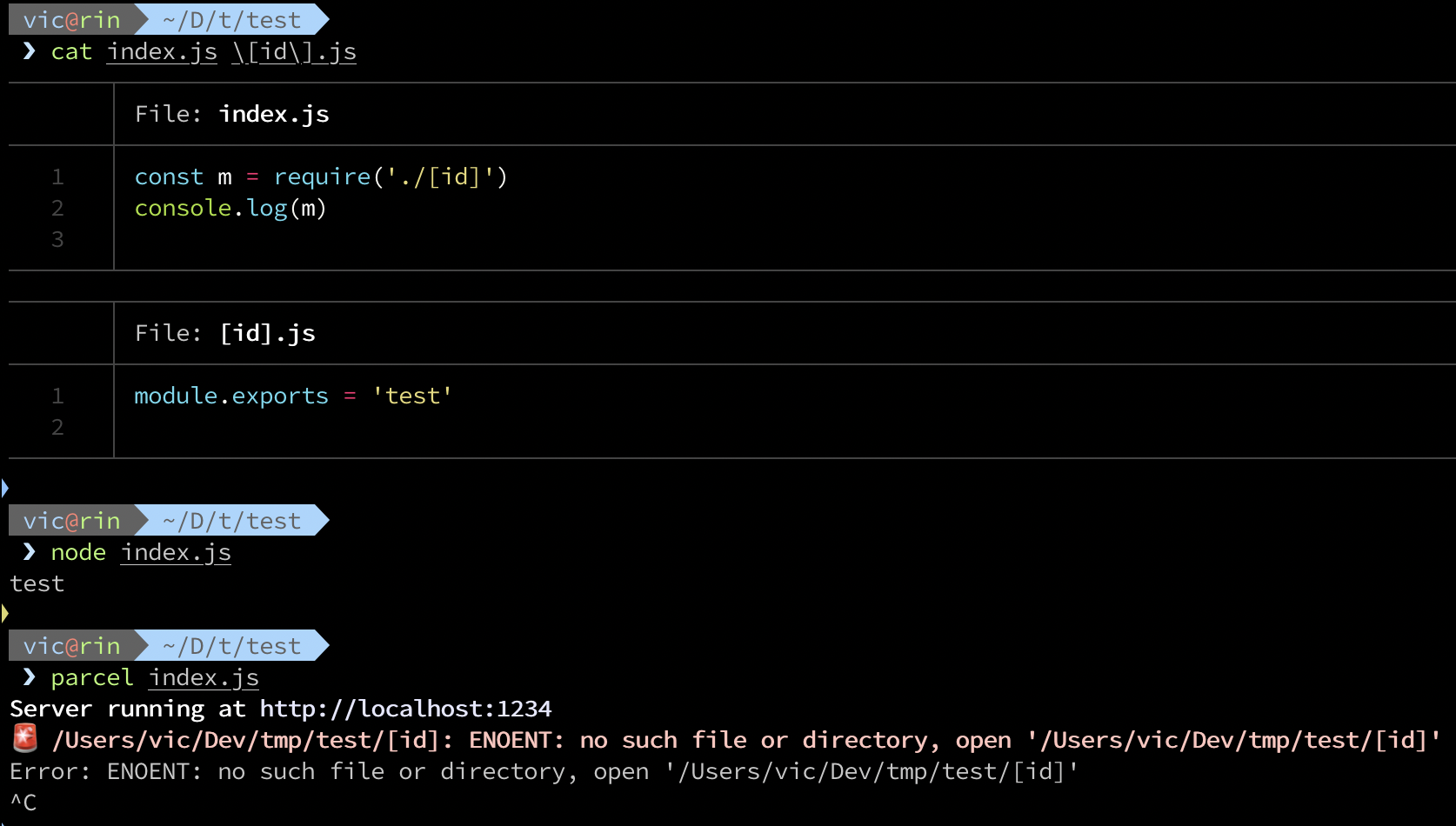
I've tried Parcel v2 in docker, with same files, looks like it stucks in infinite loop:
root@330d0f9d1a64:/app# cat index.js
const m = require('./[id]')
console.log(m)

root@330d0f9d1a64:/app# cat \[id\].js
module.exports = 'test'

root@330d0f9d1a64:/app# node index.js
test

root@330d0f9d1a64:/app# npx parcel build index.js
⠧ Building [id]...
^C

root@330d0f9d1a64:/app# npx parcel --version
2.0.0-alpha.3.2
No stale, please, dear bot
victordidenko
on 21 Jul 2020
@victordidenko sorry for not coming back to you on this earlier, but can you create a small example with which I can reproduce this? Preferably in a github repo.
This is also the real purpose of the Stale bot, to ensure we don't forget about old issues :)
DeMoorJasper
on 21 Jul 2020
Hm. I tried with version 2.0.0-beta.1 and looks like my issue is resolved, there is no infinite loop no more.
I didn't try op @Hammster's case though.
victordidenko
on 21 Jul 2020
@victordidenko awesome, than I'll close this for now, we can always re-open it or open a new issue
DeMoorJasper
on 21 Jul 2020
Related issues
 dotdash
·
3Comments
dotdash
·
3Comments
 oliger
·
3Comments
oliger
·
3Comments
 mnn
·
3Comments
mnn
·
3Comments
 termhn
·
3Comments
termhn
·
3Comments
 algebraic-brain
·
3Comments
algebraic-brain
·
3Comments
Most helpful comment
I've tried Parcel v2 in docker, with same files, looks like it stucks in infinite loop: