Parcel: Code Splitting puts file in wrong location
🐛 bug report
When building a big collection of .vue files into separate .js files using globs, the folder structure stays intact. However, files that are being asynchronously imported using import() _inside_ one of these .vue files are being put in the root output folder. The actual bundle tries loading it from the nested path however, resulting in a:
GET http://localhost/api/public/extensions/core/interfaces/code/javascript.5fa78bf9.js 404 (Not Found)
As you can see in the screenshot below, every file is correctly put in their nested folder, except for the async import()ed one (javascript.js):
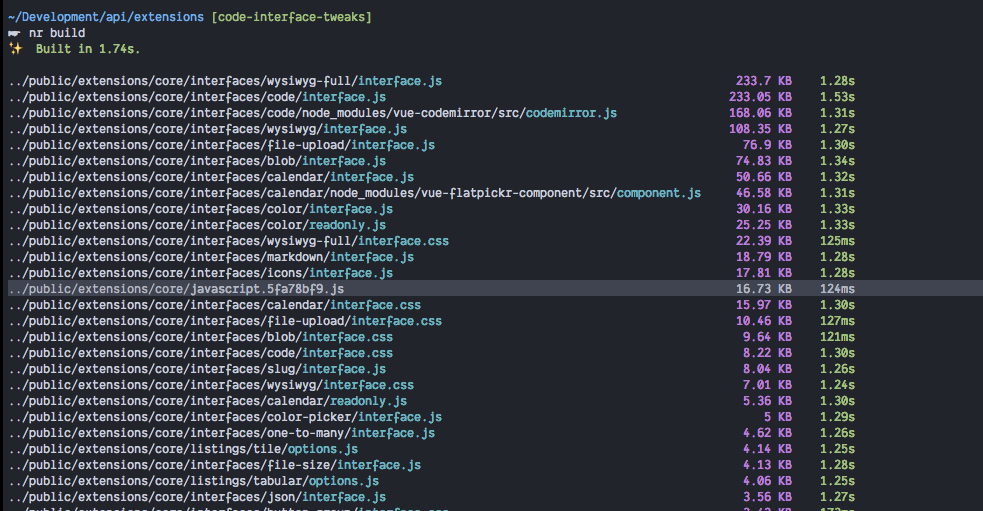
My folder structure looks like:
extensions/                            (input)
  core/
    interfaces/
      <interface-name>/
        interface.vue

public/                                (output)
  extensions/
    core/

      javascript.js                             <<< Actual location

      interfaces/
        <interface-name>/
          interface.js
          javascript.js                          <<< Expected here
🎛 Configuration (.babelrc, package.json, cli command)
parcel build \"core/**/*.vue\" -d ../public/extensions/core --no-source-maps --global __DirectusExtension__
(Run from the /extensions folder as an npm script npm run build)
🤔 Expected Behavior
The import()ed file should be in the same folder as the other "regularly" imported files
😯 Current Behavior
The file get put in the root output folder as specified by the -d flag
💁 Possible Solution
🤷♀️
🔦 Context
I'm working on a Headless CMS where these bundled JS files are being distributed as standalone plugins. That's why it's important all the files they use are in the same folder. It also the reason why I'm bundling multiple .vue files into multiple .js bundles.
💻 Code Sample
~The repo where this is the problem as of right now is https://github.com/directus/api~
~You can reproduce this exact setup and problem by cding into the /extensions folder and running npm install followed by npm run build. Note how the file markdown.[hash].js is put into /public/extensions/core/ instead of (the expected) /public/extensions/core/interfaces/code/ folder.~
Edit: we removed this usage to continue working on the platform without this causing errors
🌍 Your Environment
| Software | Version(s) |
| ---------------- | ---------- |
| Parcel | 1.9.7
| Node | 10.0.0
| npm/Yarn | 6.1.0
| Operating System | macOS High Sierra 10.13.6
 rijkvanzanten
All 10 comments
I'd love to help out getting this resolved, but I have no idea how and where.. Any pointers on where to start?
rijkvanzanten
on 6 Aug 2018
Well everything that isn't an entrypoints gets bundle hashed and put into the provided outDir(/rootDir). That's just how it currently works.
And dynamic requires create new bundles, resulting in a hash and being put in the root
 DeMoorJasper
on 6 Aug 2018
DeMoorJasper
on 6 Aug 2018
Okay that makes sense. In that case, where does it create the URL it uses to fetch the file? That's using the URL with all the folders included
rijkvanzanten
on 6 Aug 2018
This is how it collects and adds the dynamic deps
Here is where the name gets generated:
https://github.com/parcel-bundler/parcel/blob/1a6fd756d1eef0876537e17489540e5ef3509e08/src/Asset.js#L236-L240
And in production also this:
https://github.com/parcel-bundler/parcel/blob/1a6fd756d1eef0876537e17489540e5ef3509e08/src/Asset.js#L242-L262
It's probably better if you just explore further yourself from here, as I can pretty much run you through the entire parcel core, as it's a pretty core feature
DeMoorJasper
on 6 Aug 2018
In short it's just how parcel does naming at the moment.
Every new bundle that isn't an entrypoint gets a hashed name and added to the root
DeMoorJasper
on 6 Aug 2018
Got it. But that would still mean that this is a bug right? The file gets put in the root, but the Parcel-module-code-fetcher (for lack of a better name) tries to fetch that file at another URL
rijkvanzanten
on 6 Aug 2018
Ow damn, didn’t re-read the bug report, I’ll change it back, feel free to try debug this and if you have any concrete question feel free to ask them
Sent with GitHawk
DeMoorJasper
on 6 Aug 2018
Hi, I'm having a similar issue when trying to use multiple .js files as entry points.
All chunks are output in /dist. (ok)
Entry points are output with their respective paths /dist/bar/foo/entry.js. (ok to avoid name collisions)
But the bundles request the chunks from /dist/bar/foo/, obviously failing.
I imagine the issue would be in parcel/src/builtins/bundle-loader.js ?
 prsdta
on 30 Aug 2018
prsdta
on 30 Aug 2018
Hi, probably related issue here: I'm importing an image from /src/img/logo.png, its output is dist\src.2067a46c.png but it's referenced in the bundled JS as logo.2067a46c.png, and so goes in 404 error. This only happens with code splitting, otherwise everything works as expected.
Parcel v1.9.7, Node.js v10.1.0, npm v6.0.1, Windows 10
 ACXgit
on 14 Sep 2018
ACXgit
on 14 Sep 2018
It seems fixed with v1.10.3 👍
ACXgit
on 7 Nov 2018
Related issues
 donaldallen
·
3Comments
donaldallen
·
3Comments
 medhatdawoud
·
3Comments
medhatdawoud
·
3Comments
 will-stone
·
3Comments
will-stone
·
3Comments
 jsftw86
·
3Comments
jsftw86
·
3Comments
 466023746
·
3Comments
466023746
·
3Comments