Papirus-icon-theme: [Question] Folders' color
Hello, is there an easy way to switch provided folders' color, ie from default blue to grey or whatever?
I could write a script but maybe there's an hidden file or something already allowing us to do that.
_Thank you, and keep up the good work, this is my favorite icon theme currently_.
 DarthWound
All 18 comments

Now Papirus supports Folder Color.
Available colors for global setup (user-wide):
- black
- brown
- blue
- cyan
- green
- grey
- magenta
- orange
- pink
- yellow
 SmartFinn
on 17 Feb 2017
SmartFinn
on 17 Feb 2017
Thanks, I'll try to see if I can make it work under Fedora.
DarthWound
on 17 Feb 2017
Works fine on Cinnamon/MATE (Linux Mint 18), GNOME3 (OpenSUSE). Doesn't work in KDE, even in GTK apps.
@DarthWound how is it going with Folder Color and Fedora Copr? I could try to create simple python script based on folder-color.py without any dependencies if needed.
SmartFinn
on 17 Feb 2017
@SmartFinn There are no Fedora packages even in Copr, I tried to make them based on OpenSUSE files, my custom SPEC is ok, I can build a SRPM, but after that everything fails, even if I use Copr instead of manual building on my pc. I have to investigate further as I don't know where/what is the faulty component in the process, Copr' logs don't show any error...
DarthWound
on 17 Feb 2017
i'm update some colorize and bright for folders, but
@DarthWound we not create separately icon theme for only folders colors. Keep this in mind :)
 varlesh
on 17 Feb 2017
varlesh
on 17 Feb 2017
@SmartFinn hello :)
What is this new "folder_color.sh" script?
I don't know why this issue was closed and I didn't understand varlesh' answer, sorry.
DarthWound
on 19 Feb 2017
@DarthWound Hi!
This script does not help you. Did you try to install rpm package from OpenSUSE, or deb package with alien?
I will try to write python script if you ask me :)
SmartFinn
on 19 Feb 2017
Oh ok ^^
Well I tried the OpenSUSE package but deps aren't the same, so as I said I tried to build a RPM for Fedora with a new SPEC file but I failed and I don't know why yet _(but I can retry later)_. Using alien isn't recommended and seeing how the .deb file was packaged I'm pretty sure it won't work correctly.
If you have time and motivation to write a script, it would be awesome yes _(not only for me I guess, several users would be more than happy)_ but if it annoys you then don't bother.
_I hope that sooner or later more devs will use Flatpak, it's frustrating when they only package for a distribution or two, and a lot of stuff is only packaged for Ubuntu (which I used several years ago)._
DarthWound
on 19 Feb 2017
@DarthWound working draft at here.
Should works on Unity, GNOME, XFCE4, Mate and Cinnamon.
$ python folder-color-cli.py -h
usage: folder-color-cli.py [-h]
                           [--set {black,blue,brown,cyan,green,grey,magenta,orange,pink,yellow}]
                           [--list] [--default] [--verbose]

Change folder colors

optional arguments:
  -h, --help            show this help message and exit
  --set {black,blue,brown,cyan,green,grey,magenta,orange,pink,yellow}
                        Apply the color of folders
  --list, -l            Show available colors
  --default, -r         Restore theme to default
  --verbose, -v         Verbose mode
to apply folders' color:
python folder-color-cli.py --set green
to restore default:
python folder-color-cli.py --default
That's not the final version, I am continuing development.
SmartFinn
on 21 Feb 2017
@SmartFinn Hi, it works flawlessly _(Fedora 25 GNOME)_, I just had two warnings which is normal because I don't have Mate and Cinnamon. Awesome work dude, thank you!
I close this issue as it's solved for me.
DarthWound
on 22 Feb 2017
Well that python script doesn't work. I get --set: invalid choice: (choose from ). Which is empty list. Also where can I just pick the default user wide folder color?
With 'FolderColor' I can only pick 1 folder at a time.
Currently everything is looking gray now. I'm using Linux Mint 18.3. Ps. I can NOT select any colors in the Theme settings of Mint either.
 danger89
on 27 Jan 2018
danger89
on 27 Jan 2018
@danger89 as explained in README and other issues, you have to use this script instead.
DarthWound
on 27 Jan 2018
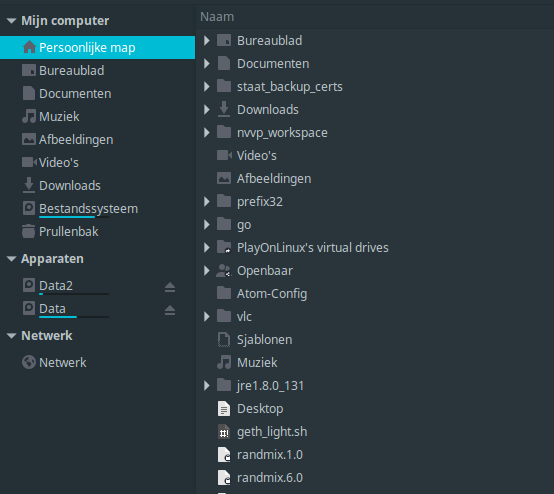
@DarthWound Ow sorry about that. But still this script is not working. I'm using Linux Mint (Nemo 3.6). But the colors of the folders keep the same. Apparently this script says it's on blue (default). But the color icon is set on Icon theme Papirus theme, done in the settings of Linux Mint Theme.
Folder colors won't change (keeps gray/black or white):
Can only select several type of colors via Theme settings (limited to Papirus, Papirus-Light/Papirus-Dark, Papirus-Adapta, Papirus-Adapta-Nokto --> No color selection possible!):

danger89
on 27 Jan 2018
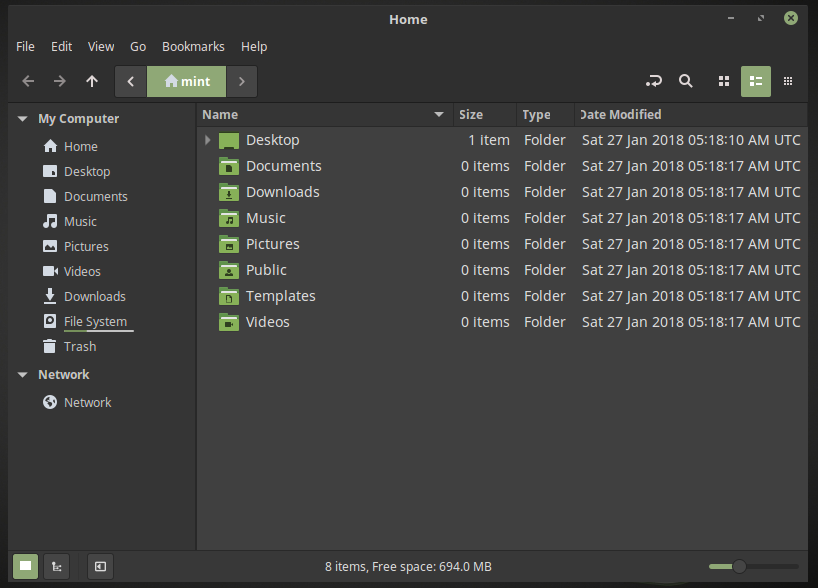
@danger89 16px places icons are monochrome. Increase icon size using the slider below to see the color folders:
SmartFinn
on 27 Jan 2018
@SmartFinn Ow is was that easy.. Just by increasing the magnification level with 1 step (66%). 👍
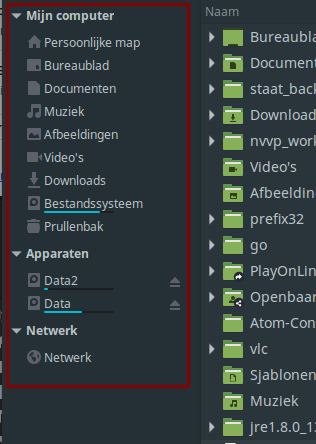
And how about the left side / location bar?
danger89
on 27 Jan 2018
Sidebars are often seen with monochrome small icons, on GNOME/KDE/Mate/whatever... If your file manager allows it, you can increase sidebar (navigation) icons size same way you did for normal view.
By the way, when your theme is dark you should use Papirus-dark.
DarthWound
on 27 Jan 2018
@danger89 these are symbolic icons. GTK apps should color these icons but Nemo didn't support it.
SmartFinn
on 27 Jan 2018
@DarthWound Thanks for the tip. But too bad Nemo (my file manager) can't increase the sidebar icons. Maybe this require some CSS hacking in the theme files.
danger89
on 27 Jan 2018
Related issues
 fotonmoton
·
5Comments
fotonmoton
·
5Comments
 meetdilip
·
8Comments
meetdilip
·
8Comments
 hamperfait
·
6Comments
hamperfait
·
6Comments
 Chamrosh
·
6Comments
Chamrosh
·
6Comments
 bilelmoussaoui
·
4Comments
bilelmoussaoui
·
4Comments
Most helpful comment
@DarthWound working draft at here.
Should works on Unity, GNOME, XFCE4, Mate and Cinnamon.
to apply folders' color:
to restore default:
That's not the final version, I am continuing development.