Paperless: Error on adding tags or retagging
I get the following stack trace when running:
PAPERLESS_FORGIVING_OCR=1 python src/manage.py document_retagger
Traceback (most recent call last):
  File "/usr/lib/python3.7/site-packages/django/db/backends/utils.py", line 85, in _execute
    return self.cursor.execute(sql, params)
  File "/usr/lib/python3.7/site-packages/django/db/backends/sqlite3/base.py", line 298, in execute
    return Database.Cursor.execute(self, query, params)
sqlite3.OperationalError: no such table: main.documents_tag__old

The above exception was the direct cause of the following exception:

Traceback (most recent call last):
  File "src/manage.py", line 11, in <module>
    execute_from_command_line(sys.argv)
  File "/usr/lib/python3.7/site-packages/django/core/management/__init__.py", line 381, in execute_from_command_line
    utility.execute()
  File "/usr/lib/python3.7/site-packages/django/core/management/__init__.py", line 375, in execute
    self.fetch_command(subcommand).run_from_argv(self.argv)
  File "/usr/lib/python3.7/site-packages/django/core/management/base.py", line 316, in run_from_argv
    self.execute(*args, **cmd_options)
  File "/usr/lib/python3.7/site-packages/django/core/management/base.py", line 353, in execute
    output = self.handle(*args, **options)
  File "/home/dpendolino/paperless/src/documents/management/commands/document_retagger.py", line 32, in handle
    document.tags.add(tag)
  File "/usr/lib/python3.7/site-packages/django/db/models/fields/related_descriptors.py", line 926, in add
    self._add_items(self.source_field_name, self.target_field_name, *objs)
  File "/usr/lib/python3.7/site-packages/django/db/models/fields/related_descriptors.py", line 1093, in _add_items
    for obj_id in new_ids
  File "/usr/lib/python3.7/site-packages/django/db/models/query.py", line 465, in bulk_create
    ids = self._batched_insert(objs_without_pk, fields, batch_size)
  File "/usr/lib/python3.7/site-packages/django/db/models/query.py", line 1155, in _batched_insert
    self._insert(item, fields=fields, using=self.db)
  File "/usr/lib/python3.7/site-packages/django/db/models/query.py", line 1136, in _insert
    return query.get_compiler(using=using).execute_sql(return_id)
  File "/usr/lib/python3.7/site-packages/django/db/models/sql/compiler.py", line 1289, in execute_sql
    cursor.execute(sql, params)
  File "/usr/lib/python3.7/site-packages/django/db/backends/utils.py", line 100, in execute
    return super().execute(sql, params)
  File "/usr/lib/python3.7/site-packages/django/db/backends/utils.py", line 68, in execute
    return self._execute_with_wrappers(sql, params, many=False, executor=self._execute)
  File "/usr/lib/python3.7/site-packages/django/db/backends/utils.py", line 77, in _execute_with_wrappers
    return executor(sql, params, many, context)
  File "/usr/lib/python3.7/site-packages/django/db/backends/utils.py", line 85, in _execute
    return self.cursor.execute(sql, params)
  File "/usr/lib/python3.7/site-packages/django/db/utils.py", line 89, in __exit__
    raise dj_exc_value.with_traceback(traceback) from exc_value
  File "/usr/lib/python3.7/site-packages/django/db/backends/utils.py", line 85, in _execute
    return self.cursor.execute(sql, params)
  File "/usr/lib/python3.7/site-packages/django/db/backends/sqlite3/base.py", line 298, in execute
    return Database.Cursor.execute(self, query, params)
django.db.utils.OperationalError: no such table: main.documents_tag__old
I get a similar error when adding a tag from the Web UI. I get the same behavior in Docker or on the server itself.
OS: Arch Linux
Python Version: Python 3.7.2
Django Version: 2.1.5
 dpendolino
All 23 comments
Hey @dpendolino It looks like your Paperless instance has possibly missed/skipped a database migration as it appears you've got a missing table: sqlite3.OperationalError: no such table: main.documents_tag__old
 stgarf
on 7 Mar 2019
stgarf
on 7 Mar 2019
Agreed, I thought the same thing, but I ran the manual migration command:
[dpendolino@arch paperless]$ PAPERLESS_FORGIVING_OCR=1 python src/manage.py migrate
Operations to perform:
  Apply all migrations: admin, auth, contenttypes, documents, reminders, sessions
Running migrations:
  No migrations to apply.
It thinks it is up to date. Grepping the code for that table name wasn't fruitful either.
dpendolino
on 7 Mar 2019
Interesting... Is this an existing instance of Paperless? I'm wondering what your database structure looks like:
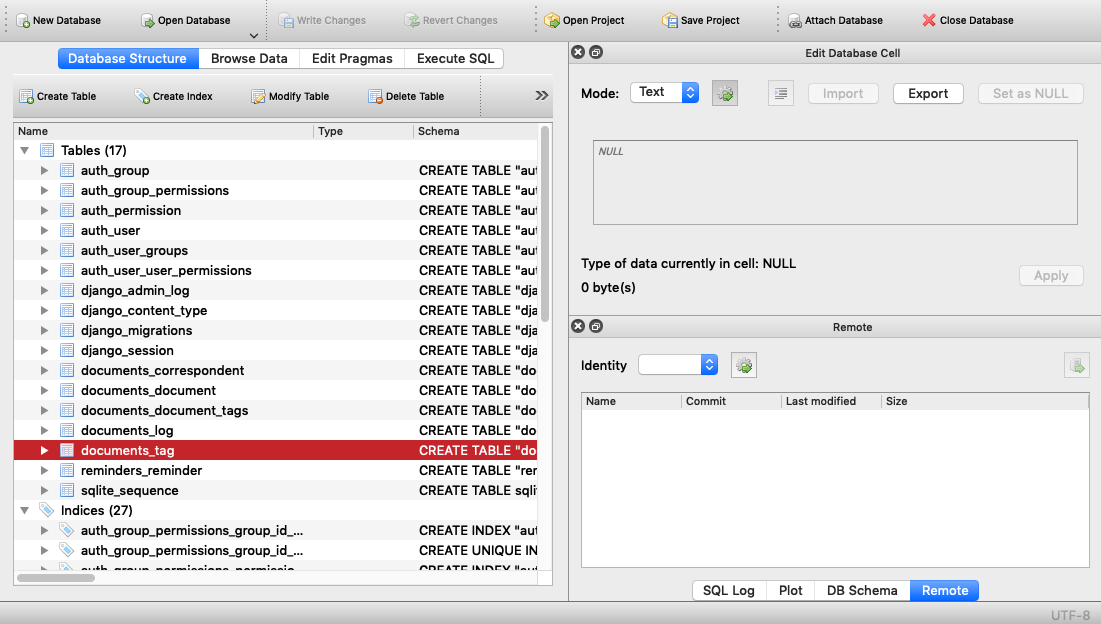
What release version of Paperless are you trying to use, master? 2.7.0? Thanks!
EDIT: Also, are you possibly trying to move from sqlite3 to postgres/mysql/mariadb like in #397 ?
stgarf
on 7 Mar 2019
Ah, right , the version. That would help. I'm on the latest master, a066ad246f38447a9af53390c42f8ebc99185b3a
Tables:
[dpendolino@arch data]$ sqlite3 db.sqlite3
SQLite version 3.27.2 2019-02-25 16:06:06
Enter ".help" for usage hints.
sqlite> . tables
auth_group                  django_migrations
auth_group_permissions      django_session
auth_permission             documents_correspondent
auth_user                   documents_document
auth_user_groups            documents_document_tags
auth_user_user_permissions  documents_log
django_admin_log            documents_tag
django_content_type         reminders_reminder
Thank you!
dpendolino
on 7 Mar 2019
@dpendolino Also, are you possibly trying to move from sqlite3 to postgres/mysql/mariadb like in #397 or #396 ?
stgarf
on 7 Mar 2019
Nope, I am moving from Docker to bare metal but both are sqlite. Honestly the more I think about it, the more I wonder if that may be the issue.
dpendolino
on 8 Mar 2019
I have the exact same issue with a bare installation in a python virtual environment. Haven't switched databases or anything, just upgraded today.
 caffeineflo
on 19 Apr 2019
caffeineflo
on 19 Apr 2019
@stgarf Anything we can do to manually create the database to get this fixed? I can't start paperless with this anymore
caffeineflo
on 24 Apr 2019
Do you still know the commits/versions you upgraded from?
 MasterofJOKers
on 24 Apr 2019
MasterofJOKers
on 24 Apr 2019
It looks to me, like you've hit this bug.
Could you verify, that one of your tables still references the old temporary-for-migration table? I suspect .schema documents_document_tags should show something like "tag_id" integer NOT NULL REFERENCES "documents_tag__old" ("id") DEFERRABLE INITIALLY DEFERRED.
MasterofJOKers
on 24 Apr 2019
I don't know the commits I upgraded from anymore. Sorry about that.
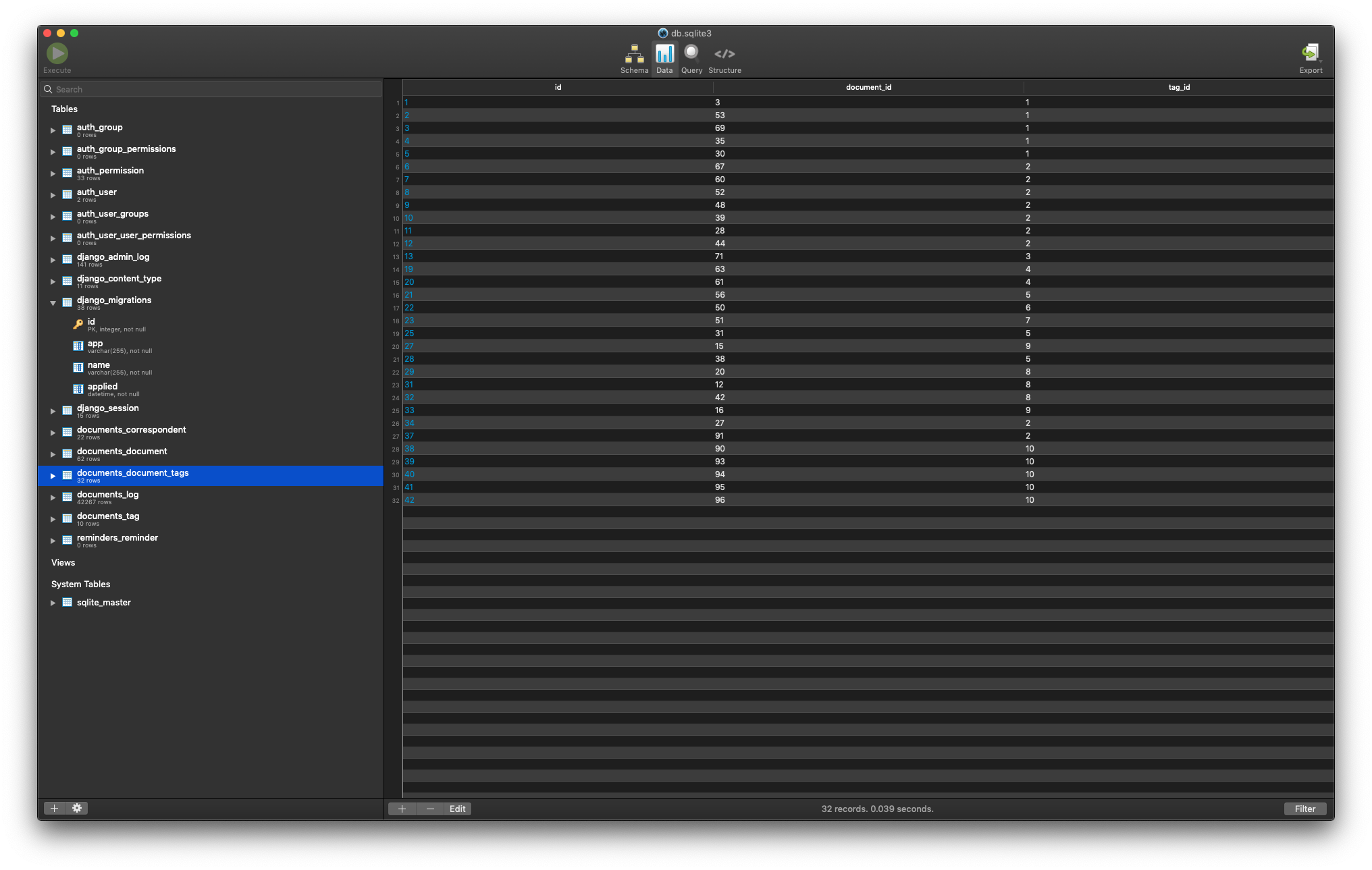
My documents_document_tags table looks fine. Anything else I can try?
caffeineflo
on 25 Apr 2019
Sorry, but I need to see the schema of the table. Could you show that other tab? The data is probably unharmed, yes.
MasterofJOKers
on 26 Apr 2019
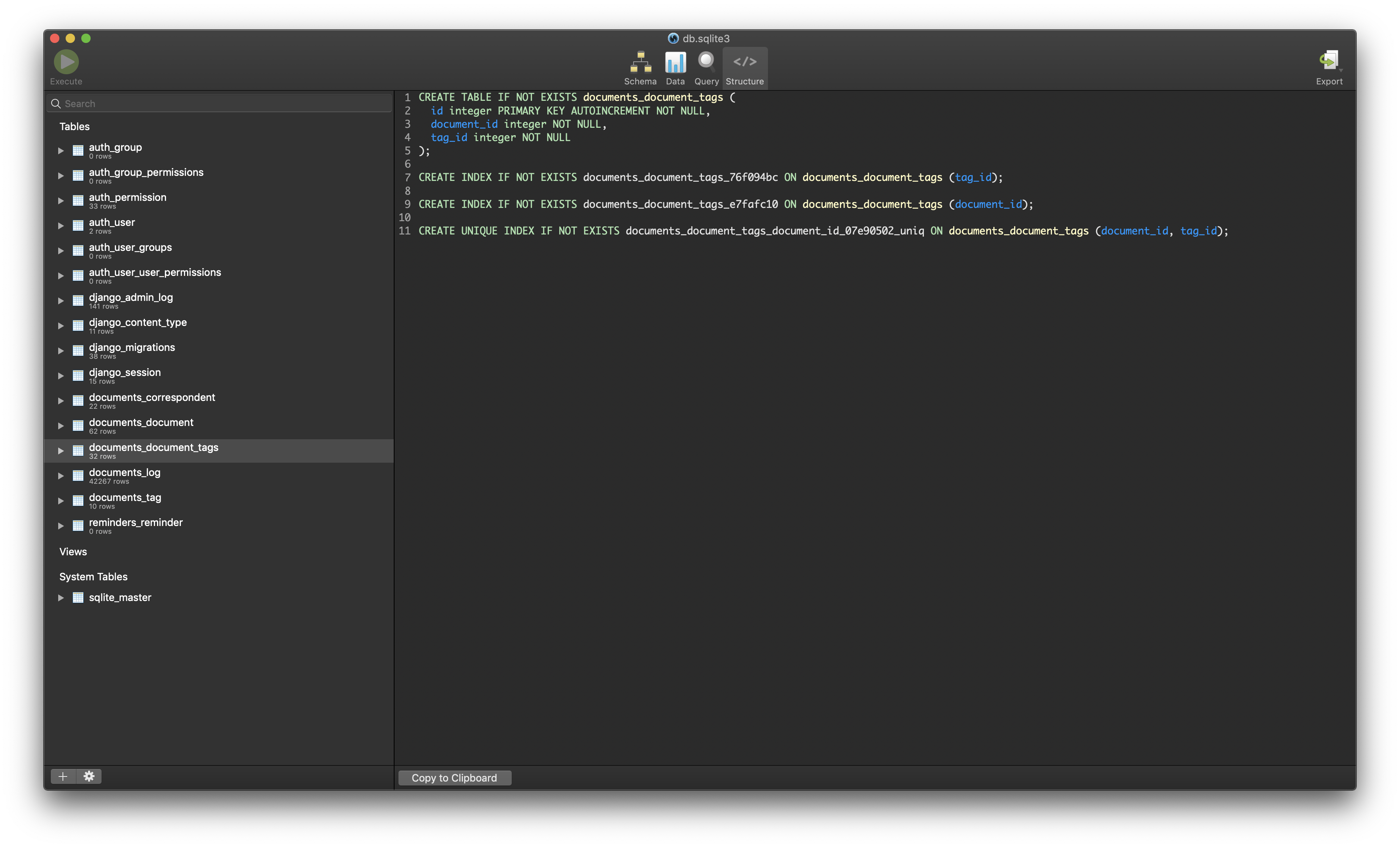
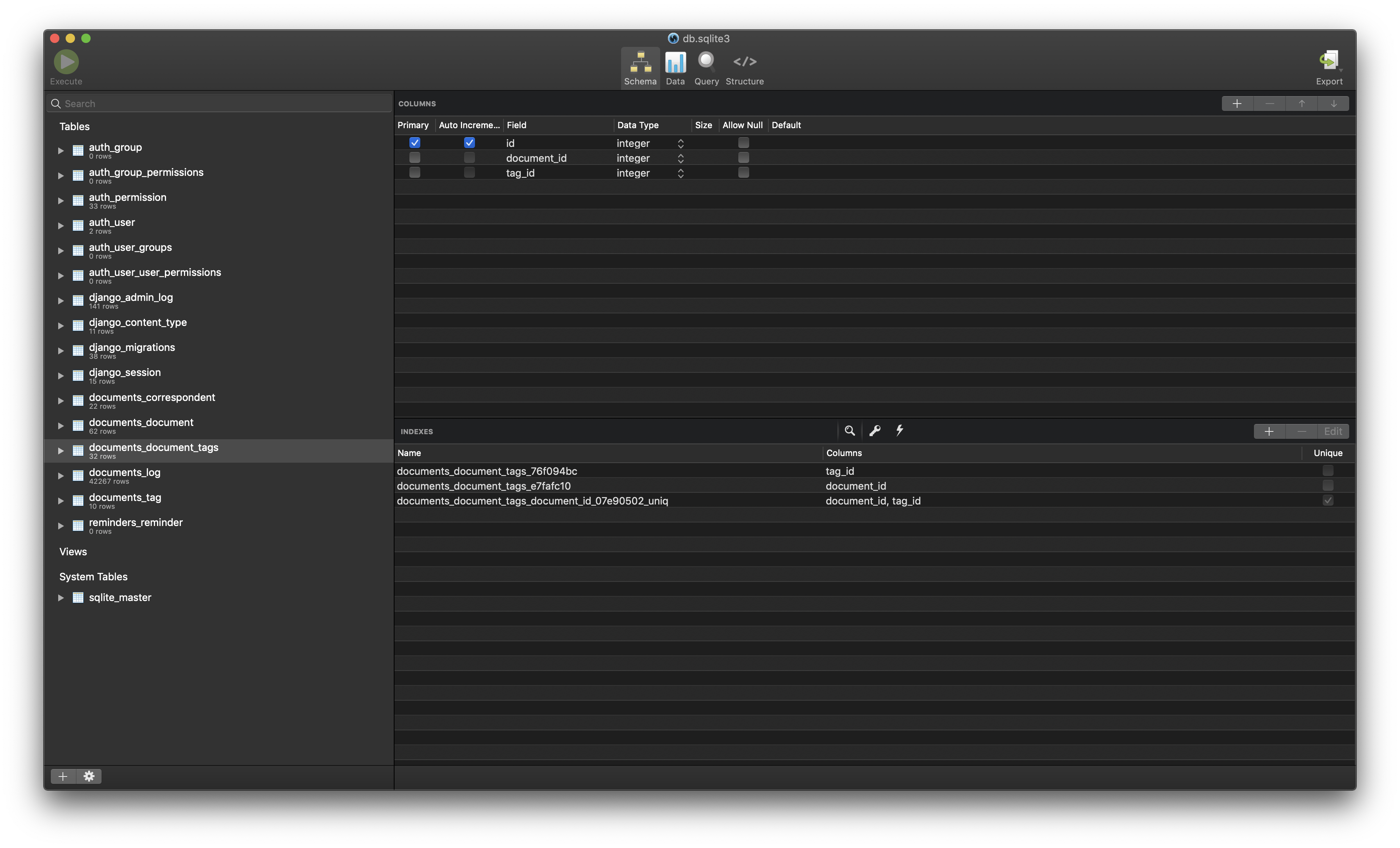
Sorry about that, here is the schema:
caffeineflo
on 26 Apr 2019
This looks really strange, do you, by any chance, have a command line sqlite3 tool at hand?
This is what i looks in a freshly created sqlite database for me (newlines by me for readability):
sqlite> .schema documents_document_tags
CREATE TABLE IF NOT EXISTS "documents_document_tags" (
  "id" integer NOT NULL PRIMARY KEY AUTOINCREMENT,
  "document_id" integer NOT NULL REFERENCES "documents_document" ("id") DEFERRABLE INITIALLY DEFERRED,
  "tag_id" integer NOT NULL REFERENCES "documents_tag" ("id") DEFERRABLE INITIALLY DEFERRED);

CREATE UNIQUE INDEX documents_document_tags_document_id_tag_id_07e90502_uniq ON "documents_document_tags" ("document_id", "tag_id");

CREATE INDEX "documents_document_tags_document_id_006f35a8" ON "documents_document_tags" ("document_id");

CREATE INDEX "documents_document_tags_tag_id_4f4a71e9" ON "documents_document_tags" ("tag_id");
As you can see, there's information in that output, that's missing from the screenshots, i.e. document_id and tag_id are referencing other tables' columns. So your database either doesn't contain that - then it's not that bug, I guess - or that GUI-tool isn't showing all the information.
If you don't have a cli tool at hand, you could run the following query:
select sql from sqlite_master where type="table" and name="documents_document_tags"; which should output the same information, as I've read on stackoverflow. For me that's
sqlite> select sql from sqlite_master where type="table" and name="documents_document_tags";
CREATE TABLE "documents_document_tags" ("id" integer NOT NULL PRIMARY KEY AUTOINCREMENT, "document_id" integer NOT NULL REFERENCES "documents_document" ("id") DEFERRABLE INITIALLY DEFERRED, "tag_id" integer NOT NULL REFERENCES "documents_tag" ("id") DEFERRABLE INITIALLY DEFERRED)
sqlite> .schema documents_document_tags
CREATE TABLE IF NOT EXISTS "documents_document_tags" ("id" integer NOT NULL PRIMARY KEY AUTOINCREMENT, "document_id" integer NOT NULL REFERENCES "documents_document__old" ("id"), "tag_id" integer NOT NULL REFERENCES "documents_tag__old" ("id"));
CREATE UNIQUE INDEX "documents_document_tags_document_id_07e90502_uniq" ON "documents_document_tags" ("document_id", "tag_id");
CREATE INDEX "documents_document_tags_e7fafc10" ON "documents_document_tags" ("document_id");
CREATE INDEX "documents_document_tags_76f094bc" ON "documents_document_tags" ("tag_id");
"tag_id" integer NOT NULL REFERENCES "documents_tag__old" ("id"));
Looks like the table schema needs some massaging but unfortunately database work is a bit beyond the scope of what I know at the moment...
stgarf
on 26 Apr 2019
Thank you. This indeed confirms, that you've hit that bug. Renaming both tables again should fix it, when foreign keys are enabled as shown below (extra newlines again by me, so the commands are easier to find):
SQLite version 3.16.2 2017-01-06 16:32:41
Enter ".help" for usage hints.
sqlite> CREATE TABLE IF NOT EXISTS "documents_document_tags" ("id" integer NOT NULL PRIMARY KEY AUTOINCREMENT, "document_id" integer NOT NULL REFERENCES "documents_document__old" ("id"), "tag_id" integer NOT NULL REFERENCES "documents_tag__old" ("id"));
sqlite> .schema documents_document_tags
CREATE TABLE IF NOT EXISTS "documents_document_tags" ("id" integer NOT NULL PRIMARY KEY AUTOINCREMENT, "document_id" integer NOT NULL REFERENCES "documents_document__old" ("id"), "tag_id" integer NOT NULL REFERENCES "documents_tag__old" ("id"));
sqlite> .tables
auth_group                  django_migrations
auth_group_permissions      django_session
auth_permission             documents_correspondent
auth_user                   documents_document
auth_user_groups            documents_document_tags
auth_user_user_permissions  documents_log
django_admin_log            documents_tag
django_content_type         reminders_reminder

sqlite> PRAGMA foreign_keys = ON;
sqlite> ALTER TABLE documents_tag RENAME TO documents_tag__old;
sqlite> ALTER TABLE documents_tag__old RENAME TO documents_tag;
sqlite> ALTER TABLE documents_document RENAME TO documents_document__old;
sqlite> ALTER TABLE documents_document__old RENAME TO documents_document;

sqlite> .schema documents_document_tags
CREATE TABLE IF NOT EXISTS "documents_document_tags" ("id" integer NOT NULL PRIMARY KEY AUTOINCREMENT, "document_id" integer NOT NULL REFERENCES "documents_document" ("id"), "tag_id" integer NOT NULL REFERENCES "documents_tag" ("id"));
Better make a backup first!
MasterofJOKers
on 26 Apr 2019
Despite reading
Better make a backup first!
last, things worked! Paperless is running again!!! Thank you!!
caffeineflo
on 26 Apr 2019
@MasterofJOKers maybe we should document this in the r-t-d.io docs?
stgarf
on 27 Apr 2019
I don't think so. We've already bumped django to a version, which contains the fix, so it shouldn't happen again. If anything, we'd have to document updating the dependencies before running the migrations.
MasterofJOKers
on 27 Apr 2019
I have the same issue on the consume now with the following error:
django.db.utils.OperationalError: no such table: main.auth_user__old
I guess that's going to be the same steps as before but on the auth_user table?!
caffeineflo
on 15 May 2019
Yes, it should be.
MasterofJOKers
on 15 May 2019
Just leaving this information here for the next person: I ended up using a SQLite UI to change the foreign keys that were pointing at auth_user__old to point at auth_user
caffeineflo
on 15 May 2019
Related issues
 blackwood
·
3Comments
blackwood
·
3Comments
 ovv
·
5Comments
ovv
·
5Comments
 turbomettwurst
·
9Comments
stgarf
·
5Comments
turbomettwurst
·
9Comments
stgarf
·
5Comments
 danielalvsaaker
·
6Comments
danielalvsaaker
·
6Comments