Paper: 1.14.3 unsupported environment terminal
What behavior is expected:
No Warning, colored logs
What behavior is observed:
On Lunch via command prompt or batch file:
main WARN Disabling terminal, you're running in an unsupported environment.
Steps/models to reproduce:
Launch Server via JAVA -Xmx10G -Xms4G -XX:+AlwaysPreTouch -XX:+ParallelRefProcEnabled -jar paper-117.jar
Plugin list:
AutomaticInventory
AutoWorldBackup
ChestSort
DeathMessagesPrime
Dynmap-3.0beta4
EssentialsX
EssentialsXAntiBuild
EssentialsXChat
GetSpawners
Gravy
GriefPrevention
LuckPerms
SignsPortals
ThunderDeath
Tree Feller
Vault
WorldBorder
WorldEdit
Paper build number:
git-Paper-117 (MC: 1.14.3) (Implementing API version 1.14.3-R0.1-SNAPSHOT)
Anything else:
Server 2016 VM, launching command prompt manually (no batch file) results in the same message and no coloring.
System Info: Java 1.8 (Java HotSpot(TM) 64-Bit Server VM 25.211-b12) Host: Windows Server 2016 10.0 (amd64)
I didn't see anything about Windows OS being unsupported, it works fine (colors and all) with Spigot.
 awaldrop
All 13 comments
Terminal implementation what Paper uses needs Visual C++ 2008 Redistributable, is it installed?
 mikroskeem
on 28 Jun 2019
mikroskeem
on 28 Jun 2019
I think installing x64 version could solve the problem. If not, then x86 version definitely solves your issue.
mikroskeem
on 28 Jun 2019
Neither were installed, I first installed the x64 version and relaunched (no change), then installed the x86 version and relaunched (no change). I rebooted the VM and launched again (no change).
I installed the versions you linked, and confirmed they were installed successfully.
The Following redistributables are now installed:
C++ 2008 x64 v9.0.21022
C++ 2008 x86 v9.0.21022
C++ 2015 x64 14.0.230.26
Java is Java 8 Update 211 x64
awaldrop
on 28 Jun 2019
So I installed a brand new Windows Server 2016 VM, grabbed all the patches from Microsoft, installed OpenJDK 8, annnnnnnnnnnd:

It works fine. No manual installs of C++ redistributables. Just out of the box.
So then I thought, maybe it's something they aren't shipping with their Windows Server "Core" offering so I installed the 2016 version of that, installed OpenJDK 8, annnnnnnnnnnnd:

It also works fine. No manual installs of C++ redistributables. Just out of the box.
I'm not doubting your experience, it's very possible there is something somewhere but I can't reproduce this. Windows is going to make this a lot of fun, I'm sure.
 zachbr
on 30 Jun 2019
zachbr
on 30 Jun 2019
@zachbr totally unfamiliar with windows, taking a wild guess here - could powershell be doing something weird? Does running just command prompt change anything?
 AgentTroll
on 30 Jun 2019
AgentTroll
on 30 Jun 2019
Works fine from either
zachbr
on 30 Jun 2019
Couldn't be easy could it? I noticed my point version was slightly lower than your example so I went ahead and did an update to the server OS itself while no-one was on (1607 14393.2906 vs your 1607 14393.3056) Mine still shows 3025 not 3056, but no luck on that fixing it with the updates. Any ideas what else I can check or debug to figure out what is triggering it to disable terminal? (Powershell had same outcome in my case). I am running my VM inside Hyper-V (Win 2016 DataCenter) but that "shouldn't" matter

Just to make sure it wasn't something with my world, I created a new folder and ran Paper fresh, still had the warning and failed for eula as expected

rebuilt the latest spigot for 1.14.3 and tried, no error and got color again:

awaldrop
on 30 Jun 2019
I will try to see about tracking down what specific resources its looking for and adding some sort of debug flag so that it can dump what its trying to do and why it can't.
zachbr
on 30 Jun 2019
TCA prints a proper stack trace for this when debug logging is enabled:
Right now I can't remember exactly how to enable debug logging. I believe it's not in log4j2.xml since it runs before logging configuration is initialized (you can see that because of the different log layout).
So it's probably one of the system properties: https://logging.apache.org/log4j/2.x/manual/configuration.html#SystemProperties
 Minecrell
on 30 Jun 2019
Minecrell
on 30 Jun 2019
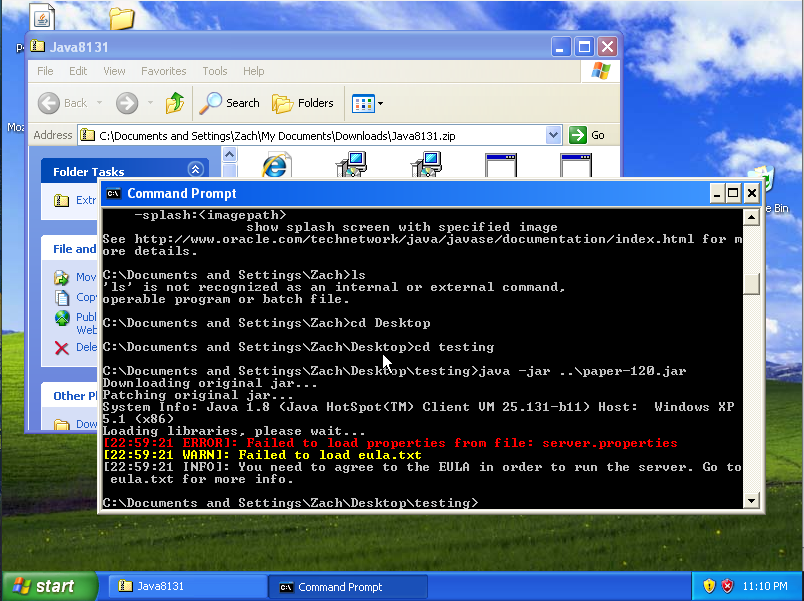
This is not super relevant but while I was playing with this issue I discovered that TCA does apparently work in Windows XP. Thought that was interesting enough to warrant a share 😆
We're probably going to have to run with the correct debug flag to get any meaningful information out of it.
zachbr
on 2 Jul 2019
I am pretty sure that's highly relevant as I was just testing the latest R5.0 release of MC 1.2.5 and hopefully we'll see Paper on that version soon!

 kangarko
on 3 Jul 2019
kangarko
on 3 Jul 2019
Latest version of Paper has resolved the issue for me, might be from https://github.com/PaperMC/Paper/pull/2299 's update?
awaldrop
on 26 Jul 2019
Almost certainly. Happy to know this fixed it for you!
At some point this will get backported to 1.13.2 as well, just want to look into a few hiccups with some web panels first.
I'm going to go ahead and close this, if it needs re-opened feel free to say.
zachbr
on 26 Jul 2019
Related issues
 dbkynd
·
3Comments
dbkynd
·
3Comments
 molor
·
3Comments
molor
·
3Comments
 Dimotai
·
3Comments
Dimotai
·
3Comments
 MarkElf
·
3Comments
MarkElf
·
3Comments
 TNTUP
·
3Comments
TNTUP
·
3Comments
Most helpful comment
This is not super relevant but while I was playing with this issue I discovered that TCA does apparently work in Windows XP. Thought that was interesting enough to warrant a share 😆

We're probably going to have to run with the correct debug flag to get any meaningful information out of it.