Paper: Chunks not unloading correctly 1.14.2
Timings or Profile link:
___We ask that all timings/profiles are a link, not a screenshot. Screenshots inhibit our ability to figure out the real cause of the issue.___
https://timings.aikar.co/?id=357a10d4ec4d4457980e79d899ff973b
Description of issue:
___If applicable___
- I started server, and don't join players.
[17:51:38] [Server thread/INFO]: Uptime: 55 seconds
[17:51:38] [Server thread/INFO]: Current TPS = 20
[17:51:38] [Server thread/INFO]: Maximum memory: 3 200 MB.
[17:51:38] [Server thread/INFO]: Allocated memory: 1 100 MB.
[17:51:38] [Server thread/INFO]: Free memory: 629 MB.
[17:51:38] [Server thread/INFO]: World "world": 529 chunks, 119 entities, 21 tiles.
[17:51:38] [Server thread/INFO]: Nether "world_nether": 529 chunks, 82 entities, 5 tiles.
[17:51:38] [Server thread/INFO]: The End "world_the_end": 529 chunks, 10 entities, 0 tiles.
This is a keep-spawn-loaded setting, and this good.
- Set Worldborder to 10000 with Worldborder plugin.
- Start world generation with /wb world fill and /wb fill confirm commands
- Wait 18 minutes to generate world.
- Stop generation /wb fill cancel
- Wait 8 minutes, but "world" chunks still loaded with no online players.
[18:18:15] [Server thread/INFO]: Uptime: 27 minutes 31 seconds
[18:18:15] [Server thread/INFO]: Current TPS = 20
[18:18:15] [Server thread/INFO]: Maximum memory: 3 200 MB.
[18:18:15] [Server thread/INFO]: Allocated memory: 3 200 MB.
[18:18:15] [Server thread/INFO]: Free memory: 1 971 MB.
[18:18:15] [Server thread/INFO]: World "world": 2 342 chunks, 536 entities, 132 tiles.
[18:18:15] [Server thread/INFO]: Nether "world_nether": 529 chunks, 82 entities, 5 tiles.
[18:18:15] [Server thread/INFO]: The End "world_the_end": 529 chunks, 10 entities, 0 tiles.
Maybe server not unload chunks if there are villagers/villages/pillagers in chunks. (?)
Plugin list:
___All plugins running on the server___
Essentials, Worldborder
bukkit.yml, spigot.yml, paper.yml, server.properties
___Gist/pastebin/hastebin links___
Default generated settings.
Other helpful links
___The more information we receive, the quicker and more effective we can be at finding the solution to the
issue.___
Paper build number:
___This can be found by running /version on your server. latest is not a proper version number; we require the output of /version so we can properly track down the issue.___
 andris155
All 39 comments
please re-try with latest
 Spottedleaf
on 31 May 2019
Spottedleaf
on 31 May 2019
Can confirm w/ latest (1.14.2 #58) it still occurs. Same testing methodology as andris'.


 RealGatt
on 31 May 2019
RealGatt
on 31 May 2019
Tested again, and not fixed this.
But much less the memory usage.
andris155
on 31 May 2019
Tested with Clearlagg /lagg unloadchunks command. This write unload chunks, but not work or instant load server again the chunks. :/
andris155
on 31 May 2019
Don't use clearlagg, it's seemingly been causing issues due to 1.14's changes
 electronicboy
on 31 May 2019
electronicboy
on 31 May 2019
ClearLaggs' been fine up until 1.14.2 for me. Unloaded chunks correctly.
RealGatt
on 31 May 2019
No online players
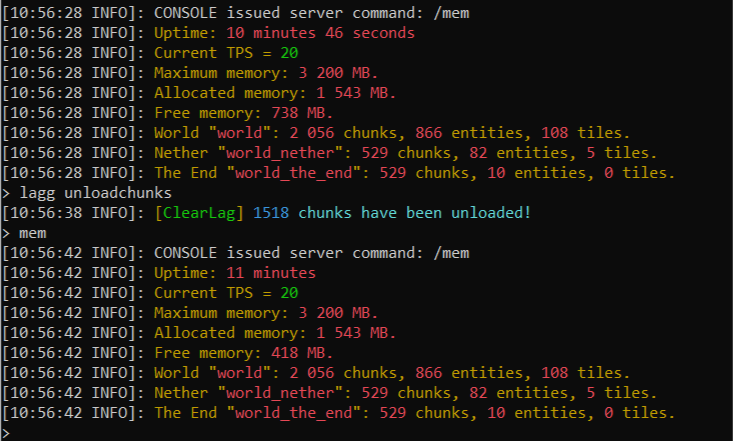
andris155
on 31 May 2019
I can confirm its still leaking (not using clearlag) - after a day running with up to 20 players the (now empty) server still has more than 15000 chunks loaded.
pl
version
 Brokkonaut
on 1 Jun 2019
Brokkonaut
on 1 Jun 2019
No plugins besides Essentials and /gc shows a ton of chunks still loaded after a day of uptime.
 Puremin0rez
on 1 Jun 2019
Puremin0rez
on 1 Jun 2019
Can confirm this is also happening on my server, after the server being online for 14 hours there are 20,000 chunks loaded which are not unloading and it's causing really bad lag. Using LagMontior I can see that the number of open file descriptors steadily climbs throughout the server's operation, starting at around 200 right after restarting and reaching around 800-900 before crashing or lag becoming so bad that it necessitates a restart - I'm not sure if this is related or is a separate issue.
 luigiofthebakery
on 1 Jun 2019
luigiofthebakery
on 1 Jun 2019
Can confir with latest.
 rumickon
on 1 Jun 2019
rumickon
on 1 Jun 2019
having the same issue, confirmed
 lukemango
on 2 Jun 2019
lukemango
on 2 Jun 2019
Same for me
 Kryniowesegryderiusz
on 2 Jun 2019
Kryniowesegryderiusz
on 2 Jun 2019
Please update to builds #61 or higher if available. These builds DO NOT include fixes, but rather includes a system which will help us figure out what's going on.
https://github.com/PaperMC/Paper/pull/2118
The above PR adds a new paper command, /paper debug chunks. Using this command will dump all chunk information relating to what's keeping chunks loaded into a text file in the debug folder in the root server folder. See the PR for specific details on what it dumps. You should paste the entire file onto something like https://gist.github.com/. An example is available here.
Spottedleaf
on 3 Jun 2019
Please update to builds #61 or higher if available. These builds DO NOT include fixes, but rather includes a system which will help us figure out what's going on.
2118
The above PR adds a new paper command,
/paper debug chunks. Using this command will dump all chunk information relating to what's keeping chunks loaded into a text file in thedebugfolder in the root server folder. See the PR for specific details on what it dumps. You should paste the entire file onto something like https://gist.github.com/. An example is available here.
https://gist.github.com/x04/267867c12e4853d6209d9a555d5a5282
That is after about 10-20 minutes of my server being online with 9 people actively playing. Apparently nobody entered the nether or the end during this time so there's no chunks for that, but over 2k loaded overworld chunks.
EDIT: I will get one more tomorrow after my server has ran overnight.
 x04
on 3 Jun 2019
x04
on 3 Jun 2019
0 players online.
[11:08:51] [Server thread/INFO]: Uptime: 11 minutes 50 seconds
[11:08:51] [Server thread/INFO]: Current TPS = 20
[11:08:51] [Server thread/INFO]: Maximum memory: 2 048 MB.
[11:08:51] [Server thread/INFO]: Allocated memory: 913 MB.
[11:08:51] [Server thread/INFO]: Free memory: 187 MB.
[11:08:51] [Server thread/INFO]: World "world": 2 056 chunks, 429 entities, 90 tiles.
[11:08:51] [Server thread/INFO]: Nether "world_nether": 529 chunks, 82 entities, 5 tiles.
[11:08:51] [Server thread/INFO]: The End "world_the_end": 529 chunks, 10 entities, 0 tiles.
[11:08:58] [Server thread/INFO]: Writing chunk information dump to .\debug\chunks-2019-06-03_11.08.58.txt
[11:08:58] [Server thread/INFO]: Successfully written chunk information!
I started a worldborder fill to pre-generate a world. after some time it stopped because there was not enough free memory left to continue. Essentials says 1917 chunks are loaded in the world.
Plugins (2): Essentials, WorldBorder
https://gist.github.com/Brokkonaut/51347a807fc30a9e53657f708e15d7d4
Brokkonaut
on 3 Jun 2019
After joining, flying around for a bit and then leaving.
[14:20:51 INFO]: Uptime: 6 minutes 36 seconds
[14:20:51 INFO]: Current TPS = 20
[14:20:51 INFO]: Maximum memory: 2,048 MB.
[14:20:51 INFO]: Allocated memory: 1,119 MB.
[14:20:51 INFO]: Free memory: 508 MB.
[14:20:51 INFO]: World "world": 1,471 chunks, 309 entities, 1,492 tiles.
[14:20:51 INFO]: Nether "world_nether": 361 chunks, 73 entities, 68 tiles.
[14:20:51 INFO]: The End "world_the_end": 361 chunks, 9 entities, 21 tiles.
 sammko
on 3 Jun 2019
sammko
on 3 Jun 2019
Just to preface:
How many chunks can be loaded has since changed in 1.14. You would expect the maximum number of chunks a single player could load is simply (2*view distance + 1)^2 however that is not the case. Now, in the 1.14 system, (2*view distance + 1)^2 is only the minimum number of required chunks to be loaded. It appears the vanilla server will allow up to (2*(45 - (33 - view distance) + 1))^2 of chunks to be loaded around a player (however ticking will not occur for these extra chunks). So when submitting reports please take into account that vanilla's system WILL keep a LOT more chunks loaded naturally.
This is also similar for spawn (the equation is a little bit different). For example, a spawn, at defaults, can load up to 2025 chunks.
@x04
Looking at your report I see the following:
9 players, however only 6 are in "different areas" (close enough to load the same chunks).
Regioning the data shows you have 6 regions of chunks, which makes sense given you have disabled spawn loading and the above.
You have view distance set to 6, which means a maximum of chunks which can be held for a player is:
((45 - (33 - 6))*2 + 1)^2 = 1369
Most regions were this size, except a couple, but that's due to the fact the players are not all in one place in the areas. Your report shows normal behavior for 1.14.
@andris155
Your spawn is fully loaded (fully loaded at default of 10 will be 2025 chunks total), and there is one forced chunk loading some other chunks. Normal behavior.
@Brokkonaut
Your spawn is fully loaded at 1849 chunks (see my preface above). There is a plugin loading some chunks.
Note that the behavior of a loadChunk() function for plugins has since changed in 1.14, which may be causing that region to be loaded (however it's only loading 68 additional full chunks). Looks like normal behavior otherwise. Most of your chunks are from spawn.
@sammko
Something does look odd with your report. You have chunks loaded with a player ticket however have zero players online, however it is only 2 player tickets.
1 player ticket is only keeping 25 full chunks loaded.
the other ticket is somewhere in spawn, however it appears most of your chunks are loaded by spawn.
There looks to be an issue here but it's not what's loading most of your chunks.
Spottedleaf
on 3 Jun 2019
So this means we need about 2 GB ram per player in 1.14? Like 50 GB for 50 players (with some overlapping chunks)?
I hope Mojang will change that behavior in 1.14.3
Brokkonaut
on 3 Jun 2019
Getting this to on 1.14.2 :(
 jordanwilliams1
on 4 Jun 2019
jordanwilliams1
on 4 Jun 2019
Hi.
Using latest build, running a server with 40-50 players... Perfomance is REALLY ugly.
https://gist.github.com/roman901/bb0abe63987eeb725bceebd0a27878d6
@Spottedleaf what about make a settings for old formula selection?
Memory leaking is two times worse than 1.13 (so eden GC region feel crazy), and memory consumption is very bad..
 roman901
on 4 Jun 2019
roman901
on 4 Jun 2019
chunks-2019-06-04_14.46.58.txt
This is after the server being online for 19 hours (~834 file descriptors).
luigiofthebakery
on 4 Jun 2019
https://gist.github.com/RealGatt/2138b0996dbc7b4ed655063aaf11ccb7
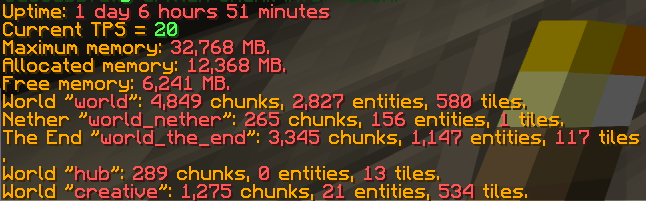
w/ the following plugins;

MSCraft is my own plugin to essentially be a mini-towny. It forces town spawn chunks to stay loaded w/ the Chunk.setForceLoaded(boolean) method,
RealGatt
on 4 Jun 2019
I'm now looking into potentially not removing player tickets as a cause, especially given @luigiofthebakery's report (which shows quite a bit of that).
Spottedleaf
on 5 Jun 2019
Going to add mine to the list if it helps. >20k chunks loaded after a couple hours running, with tps suffering as a result. Timings don't show much other than chunk ticking.
39 people online, 7 view-distance.
 JLyne
on 9 Jun 2019
JLyne
on 9 Jun 2019
I make a new test with players. 10000+ chunks loaded.
chunks-2019-06-09_20.49.53.txt
andris155
on 9 Jun 2019
The root cause is found and has been reported to mojang.
Spottedleaf
on 10 Jun 2019
@Spottedleaf could you add link to mojang bugtracker with this report, so we could track, how is it going?
Kryniowesegryderiusz
on 15 Jun 2019
Issue is private
Spottedleaf
on 15 Jun 2019
Oh okay
Kryniowesegryderiusz
on 15 Jun 2019
Build 97+ includes what should be a fix.
Please monitor chunks via /paper chunkinfo (most plugins will not be able to tell you chunk usage given API changes recently) and report unusual behavior for loading/unloading. Debug reports in such cases will be useful.
Spottedleaf
on 20 Jun 2019
chunks-2019-08-03_17.19.00.txt
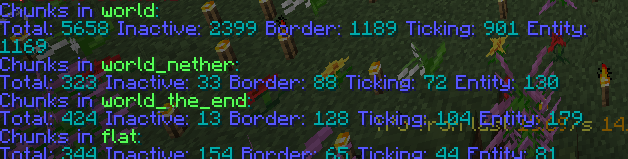
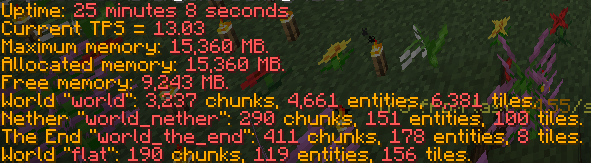

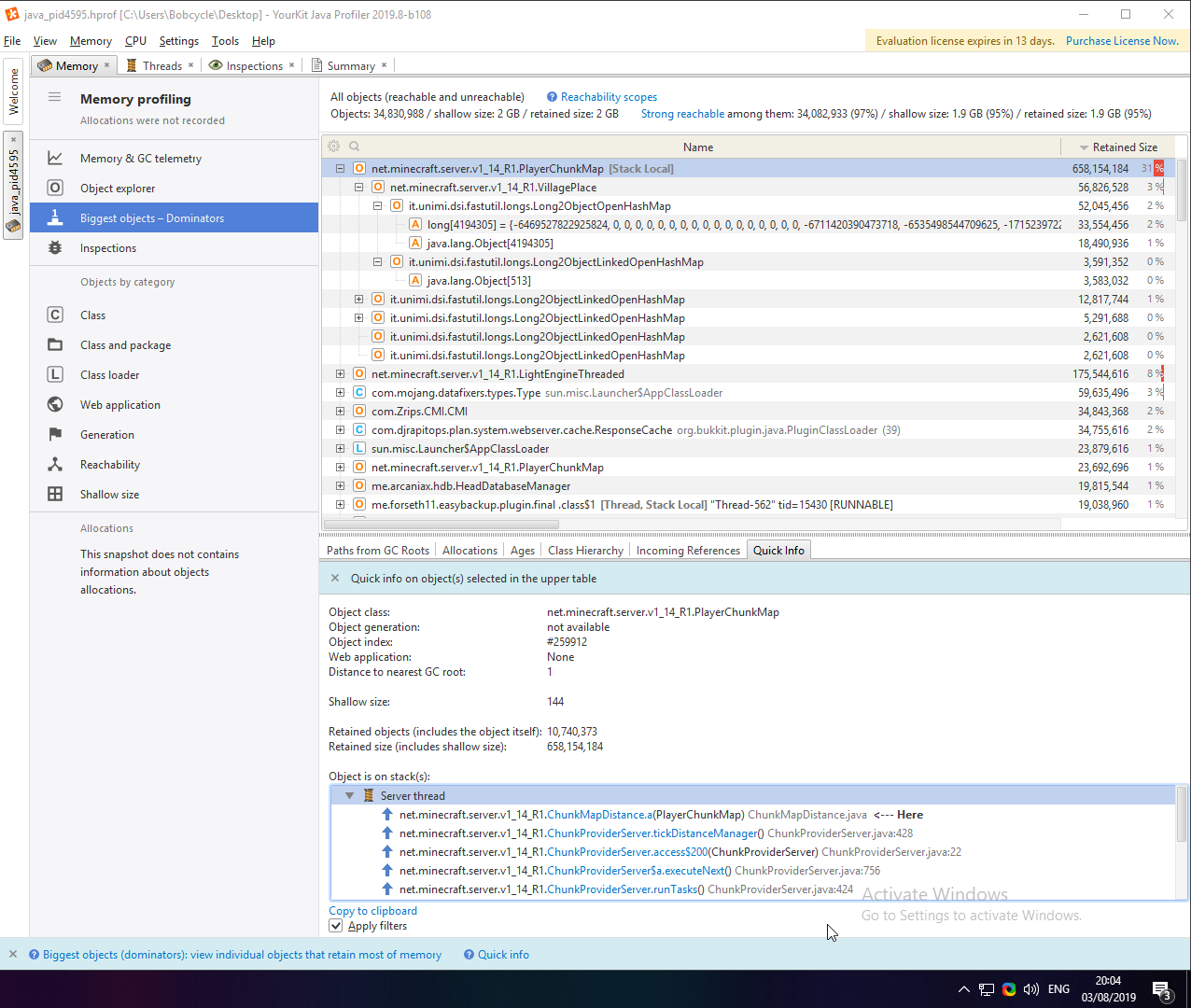
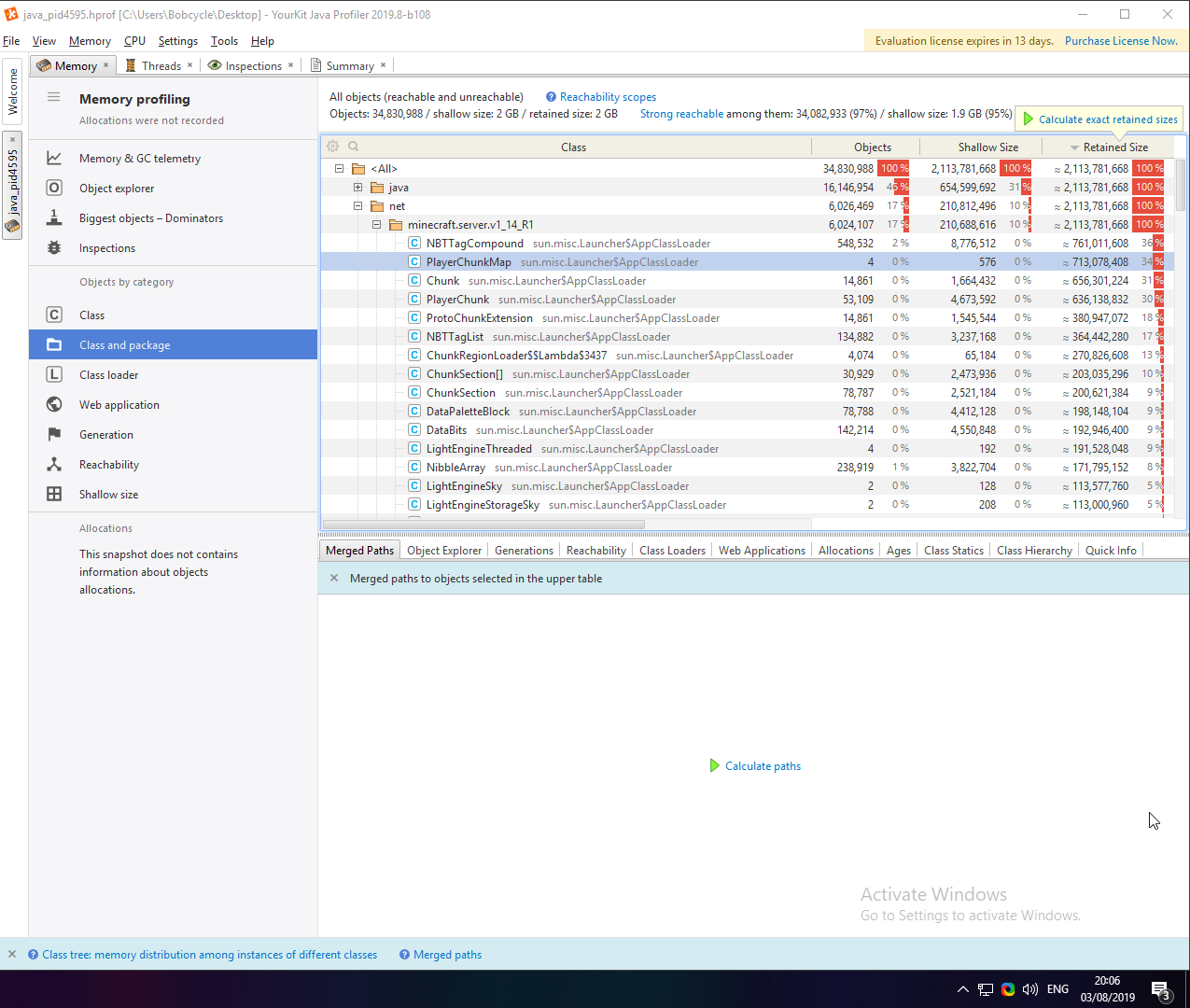
I am running out of memory on my 1.14.4 server, have undertaken a few steps to try and fix this.
- Profiled over 20+ thread dumps which all say it's chunk related.
- Switched to paper build "git-Paper-"1832d799" which is a test build.
- Made an attempt at unloading chunks trough other plugins without success.
- Allocated 15GB instead of the normal 10GB to see if the behaviour will change.
Note that changing to a test build and allocating 15GB is out of the norm. I am aware of this, however, this is purely to try and solve the issue which I have been facing. This also happens under normal conditions, running the normal builds and with 10GB allocated.
This is my start script under here. I have a few thread dumps which I have profiled lined up, I don't know if sharing a 2GB file would go a long way, if screenshots would suffice, please tell me.
#!/bin/sh

while true;
do

  echo "Starting server: Survival 1.14.4 (10GB) (25564)"
  sleep 1
  echo "Killing port 25564/tcp"
  fuser -k 25564/tcp
  echo "Press CTRL + C to abort the startup"
  sleep 1

  java -Xms10G -Xmx10G -XX:+UseG1GC -XX:+UnlockExperimentalVMOptions -XX:MaxGCPauseMillis=100 -XX:+DisableExplicitGC -XX:TargetSurvivorRatio=90 -XX:G1NewSizePercent=40 -XX:G1MaxNewSizePercent=70 -XX:G1MixedGCLiveThresholdPercent=35 -XX:+AlwaysPreTouch -XX:+ParallelRefProcEnabled -XX:+HeapDumpOnOutOfMemoryError -Dusing.aikars.flags=mcflags.emc.gs -jar paperclip.jar

  echo "The server crashed, or stopped unexpectedly!"

done
 Bobcycle
on 3 Aug 2019
Bobcycle
on 3 Aug 2019
I do not see anything in your report out of the ordinary.
Please use a heap dump to CONFIRM it is chunks.
Spottedleaf
on 3 Aug 2019
I do not see anything in your report out of the ordinary.
Please use a heap dump to CONFIRM it is chunks.
https://drive.google.com/file/d/1DQXD-1NuKm7lG2oxcFKFFJ_yVq9rFpZm/view?usp=sharing
I've gone ahead and uploaded a heap dump to google drive, I assume that this probably won't be downloaded, I have added screenshots to support my claim.
Bobcycle
on 3 Aug 2019
Please take this issue to its own issue or on discord, people get notified here.
Secondly, if you don't bother to take the dump when you've OOM'd or about to it's useless.
Spottedleaf
on 3 Aug 2019
I would write to Discord but I got banned 2 mins after I joined by some random mod so I am reopening it here. Sorry for that.
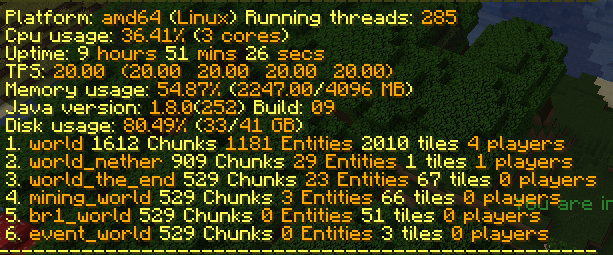
This problem still persist on 1.15.2
 Baterka
on 23 Jun 2020
Baterka
on 23 Jun 2020
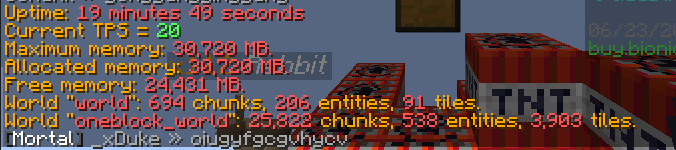
25k chunks with 88 players at 4 view distance...
 camdenorrb
on 23 Jun 2020
camdenorrb
on 23 Jun 2020
Please don't bump old tickets, create a new one and fill the template in
electronicboy
on 23 Jun 2020
Related issues
 BillyGalbreath
·
3Comments
BillyGalbreath
·
3Comments
 ghost
·
3Comments
ghost
·
3Comments
 Shevchik
·
3Comments
Shevchik
·
3Comments
 greenywd
·
3Comments
Brokkonaut
·
3Comments
greenywd
·
3Comments
Brokkonaut
·
3Comments
Most helpful comment
The root cause is found and has been reported to mojang.