Paper.js: Uniting paths sometimes makes some paths disappear.
I'm using paper to create svgs based on a texture. I combine all the 'pixels' into one optimized path using unite, but this one pixel causes it and the rest of the connected pixels to disappear.

You can see what pixel makes it go wrong if I change that pixel to a different color.

Is there a better way to keep merging geometry without the possibility of it deleting stuff like this?
 MichaelPriebe
All 15 comments
Could you provide a test case for replication? Hard to tell without seeing it in action. You can post links to a demo on http://sketch.paperjs.org
 lehni
on 6 May 2017
lehni
on 6 May 2017
Its hard to give you a example because its a node.js application creating svgs basted on .json files and textures.
For example, before optimization:

After my optimization (subtracting all the faces from below, uniting the same colors into one compound path, etc.)

You can see there's some problems where faces go missing after uniting them.
MichaelPriebe
on 8 May 2017
It's simple: I can't fix a bug if I can't reproduce the problem.
You should be able to identify two rhombus shapes where the problem occurs, and log their segments, e.g. console.log(path.segments)
lehni
on 8 May 2017
http://sketch.paperjs.org/#S/bdVRS8MwEAfwr1L60gqZJOm11oFPex4IPqoP2VbZWNaOrlNQ/O7+MycI938p9NdrSC53yVfeh0OXz/OnfTett7nJ18Mmvb+HMTuGaZs9ZH33kS2Gw3E495tHUFksKzG+it64OLs+Zu5zWbVMxRovOtYzFWitYy3VxvhGqW+ZilDFCHd6BKppxURbpgJt9bjCNOVBa8oZGQGx93QOWmtL1ZvK6nEt01pM5ZS6lilWUXm2Q0Qd1ZoqcsZiMQdSfcIUFUXU0VjUGdEGqivVeaZpviQW89X1ix0imvZCV2pDNe2mVkc15UFXasokUcs05YzEYt9orRNFXxB1dAR0ANFUk7qq0bFEhWraCzKCNUL6omWKrLNYKOkLy7SmiuwI7QCiWJvQDiDqaWxaGzl/hSn6mMVixfSsZopYUpOWKc4zoeev1uLmpU+X1O3bLsbFEIcR11WximG9L65fTusQu7L5C5zG0J9imLrSW2syPPAl3XXnfjd1G/x+Cbu8lfj0y/9+w7GKf3BPrsYu7I/Drp9O+fz59fsH
I mean this isn't quite the same issue, but I'm sure its related. I just want the top part in a nice, optimized compound path.
MichaelPriebe
on 8 May 2017
Thanks! That works. I wonder what is going wrong here...
@iconexperience, it looks like we have some more work to do!
lehni
on 8 May 2017
I have a relatively small repro case for this: sketch
There are 3 paths here. If you unite the first two, you can see that the result is already not right, the overlapping paths are not merged into one:
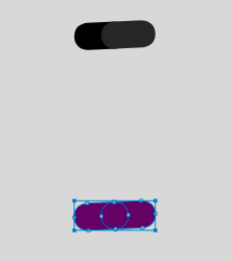
Then uniting those with the 3rd path, the 2nd path gets "erased":
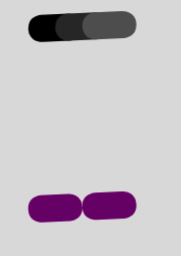
 fsih
on 19 Jun 2017
fsih
on 19 Jun 2017
@iconexperience
Any ideas based on this new info?
fsih
on 27 Jul 2017
@fsih I am not sure if the behavior your example is caused by the same bug as in the original code. I will first try to solve the original issue and then we will see if that fixes yours.
 iconexperience
on 7 Sep 2017
iconexperience
on 7 Sep 2017
Here is a simplified version of the original test case:
var path = new CompoundPath('M24,38l2,1l-2,1l-2,-1z M26,39l2,1l-2,1l-2,-1z M28,40l2,1l-2,1l-2,-1z ')

path.fillColor = 'black'
path.scale(6)
path.translate(200, 200)
var united = path.unite()
united.fillColor = 'blue'
united.translate(0,100)
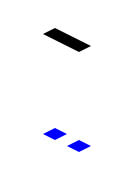
iconexperience
on 7 Sep 2017
What is strange is that the result is correct if we unite the child paths of the CompoundPath separately. If the middle path is added to the CompoundPath (with only the two remaining paths as children), the result is correct:
var path = new CompoundPath('M24,38l2,1l-2,1l-2,-1z M28,40l2,1l-2,1l-2,-1z ')
var path2 = new Path('M26,39l2,1l-2,1l-2,-1z');

path.fillColor = 'black'
path.scale(6)
path.translate(200, 200)
path2.fillColor = 'red'
path2.scale(6)
path2.translate(200, 200)

var united = path.unite(path2)
united.fillColor = 'blue'
united.translate(0,100)
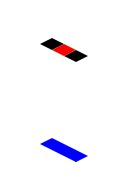
iconexperience
on 7 Sep 2017
I am pretty sure that the problem is caused by this loop in path/PathItem.Boolean.reolveCrossings(). All four segments of the middle child path are removed in this loop, leaving an empty child path.
iconexperience
on 7 Sep 2017
@lehni As I understand it the loop removes segments in cases of several subsequent overlaps. I think the problem is that it currently does not check if these overlaps are all with the same path. If we add a check for this, this issue should be solved. A simple and clumsy solution would be to replace Line 1175 with this:
if (hasOverlap(prev) && hasOverlap(next) && prev._intersection._path._id == overlaps[i]._path._id && next._intersection._path._id == overlaps[i]._path._id) {
A better implementation would be to replace hasOverlap() with a function that also checks if the path is the same, something like this:
function hasOverlapWithPath(seg, path) {
    var inter = seg && seg._intersection;
    return inter && inter._overlap && inter._path._id == path._id;
}
@fsih
The problem that you are seeing has a diffent cause. This seems to be a problem with tracePath(). I recommend we open a new issue with this test case.
iconexperience
on 7 Sep 2017
@fsih @iconexperience I've created a separate issue for that one here: #1387
lehni
on 4 Oct 2017
@iconexperience thanks for solving this one!
lehni
on 4 Oct 2017
Related issues
 hapticdata
·
5Comments
hapticdata
·
5Comments
 techninja
·
4Comments
techninja
·
4Comments
 przyb
·
5Comments
przyb
·
5Comments
 khurramraheel
·
7Comments
khurramraheel
·
7Comments
 croqaz
·
6Comments
croqaz
·
6Comments