Panel: Document subclassing of different component types
Panel: 0.9.7
My Pain
I would like to be able to create reusable Components in Panel by Inheritance that I can use like pn.Column(Component(), other_stuff).
I've tried to describe the concept here https://awesome-panel.readthedocs.io/en/latest/guides/awesome-panel-extensions-guide/index.html
It currently looks like
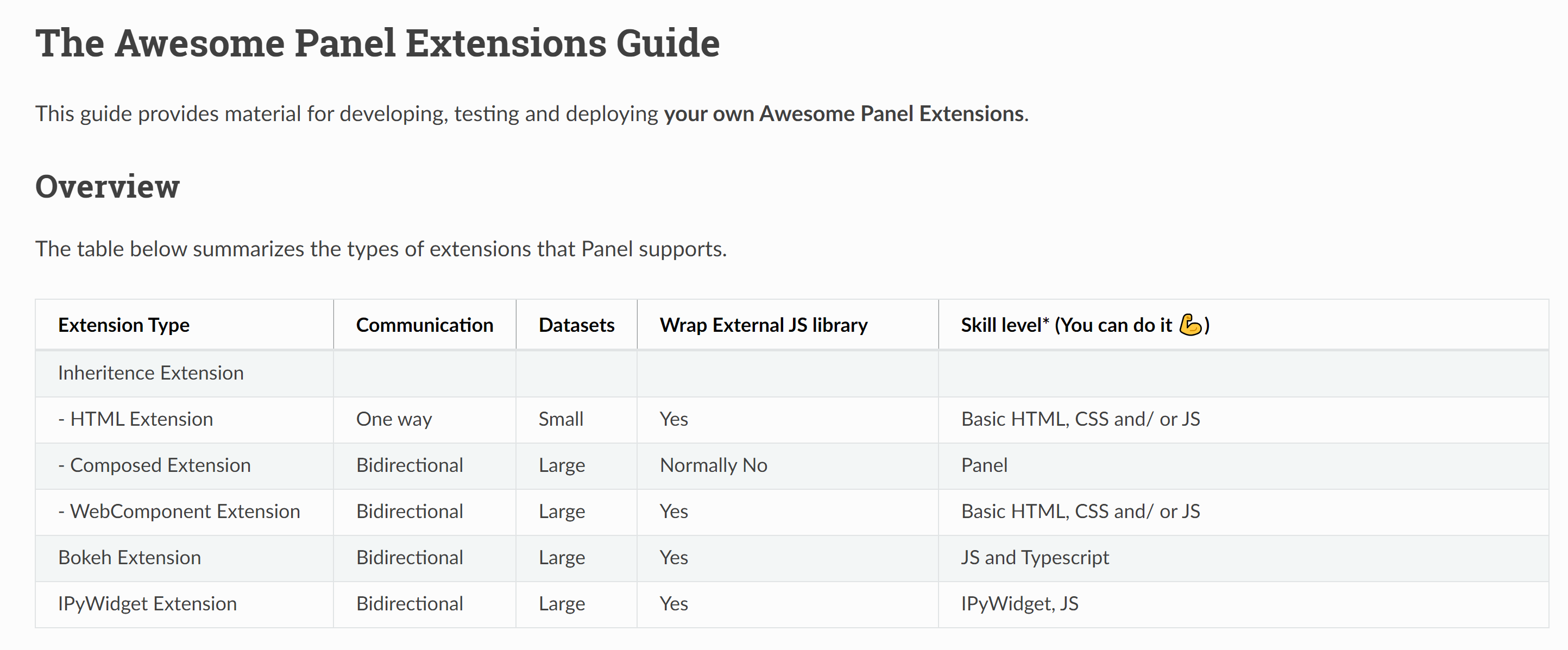
I can get it working with inheritance from pn.Column or pn.pane.HTML although there are some quirks.
But for pn.pane.Markdown it simply does not work.
Reproducible Steps
import param
import panel as pn

class NotebookHeader(pn.pane.Markdown):
    repository = param.String(
        default="MarcSkovMadsen/awesome-panel-extensions",
        doc="The url to the GitHub repository containing the Notebook",
    )
    def __init__(self, **params):
        self._rename["repository"]=None

        super().__init__(**params)

pn.Column("Hello", "you").show(port=5006)
$ python 'awesome_panel_extensions\tools\notebooks.py'
Traceback (most recent call last):
  File "awesome_panel_extensions\tools\notebooks.py", line 15, in <module>
    pn.Column("Hello", "you").show(port=5006)
  File "C:\repos\private\panel-extensions-template\.venv\lib\site-packages\panel\layout.py", line 181, in __init__
    params['objects'] = [panel(pane) for pane in objects]
  File "C:\repos\private\panel-extensions-template\.venv\lib\site-packages\panel\layout.py", line 181, in <listcomp>
    params['objects'] = [panel(pane) for pane in objects]
  File "C:\repos\private\panel-extensions-template\.venv\lib\site-packages\panel\pane\base.py", line 51, in panel
    pane = PaneBase.get_pane_type(obj, **kwargs)(obj, **kwargs)
TypeError: __init__() takes 1 positional argument but 2 were given
Root Cause
The problem is that with obj="Hello" and kwargs={} then PaneBase.get_pane_type(obj, **kwargs) returns NotebookHeader instead of Markdown!!!!
Solution
Support inheritance.
Alternative Solution
Describe clearly in the documentation that this is not supported and what the alternative is. Also answer this Discourse post https://discourse.holoviz.org/t/how-to-create-a-self-contained-custom-panel/985/6 that inheritance is not the way to go. I would be a bit sorry about this because then Panel simply has an api that would not be the expected api by the users (I believe).
 MarcSkovMadsen
All 15 comments
I guess I'm missing something here. A Pane like Markdown is explicitly defined as something you pass an object to, so from my perspective this is a weird thing to do. However if you really think this thing should be a pane then you must follow the conventions for pane types.
I'm guessing since subclassing isn't documented you don't know about the precedence system that's used by pn.panel and layouts to convert arbitrary inputs into valid Panel objects. I think all you need to change is to define priority = 0 as a class level attribute on your NotebookHeader component. This will ensure that the internals of pn.panel and layouts will never use your NotebookHeader component.
 philippjfr
on 23 Jul 2020
philippjfr
on 23 Jul 2020
Just to clarify, pn.panel() is automatically called whenever Panel layouts like pn.Column() expect a Panel object, and it uses a set of heuristics to figure out what the appropriate type of Panel object is for the given item. It's a no-op if you pass in already-constructed Panel objects (panes, widgets, etc.), but otherwise it has to figure out what type of Panel object to create. The heuristics needed are defined by each Pane class (see the applies method), using priority values that help resolve ambiguities. Here you've subclassed Markdown to create a new Pane type, but your new one has precisely the same heuristics and priorities as the superclass, making it an even chance that the old or new one will be selected when pn.panel encounters a string. If you follow Philipp's advice, your new object will never be called implicitly, requiring you to explicitly instantiate it before use. Or you can define a heuristic and priority that will create it for some suitable types of inputs, e.g. for any string ending in .ipynb, similar to how the image types work (having a high priority for a string ending in .png or .jpg). Either way, when you make a subclass, you need to ensure that it isn't jockeying with the superclass for priority, by clearly establishing one of the classes as having priority over the other for each type of data it can process.
 jbednar
on 23 Jul 2020
jbednar
on 23 Jul 2020
Hi @philippjfr
Maybe it's because I don't know how to formulate this well.
Maybe it's because there is currently not the right component available in Panel.
Maybe it's just because I have not seen any examples of this or missed something in the documentation.
But I believe there currently is a fundamental problem in Panel.
How do I as a user create reusable components in Python alone?. For example as asked here https://discourse.holoviz.org/t/how-to-create-a-self-contained-custom-panel/985/6. (Please provide your take on the answer. Thansk).
With reusable components I mean something
- defined as a Class
- Having one or more Parameters
- Displaying something that
@dependson the parameters
and not with an api of
Component(a=a, =b).view
But instead the component is reactive. You could say the end product is a widget. Currently I can only see that it's possible inheriting from layouts and panes.
MarcSkovMadsen
on 23 Jul 2020
@MarcSkovMadsen I hope I didn't discourage you with my comment, I'm certainly not disagreeing with you here. We absolutely must document this and if it's too difficult for a user to extend current component types we should simplify that process or introduce a new type of component which is easy to subclass and extend. My point above was merely that subclassing some random component without following the conventions that are established for that class type is going to lead to trouble and that's not a problem unique to Panel.
philippjfr
on 23 Jul 2020
Btw, I love the look of that table and the whole panel extensions guide you're writing.
philippjfr
on 23 Jul 2020
Thanks. I hope people in the Panel community would be able to take a look, read the overview page, each of the details guides and provide feedback.
I think it’s important because when users have created a few apps they find out they wan’t to create libraries of small, reusable components.
Likewise if they have an app that is growing they would like to refactor that into smaller components.
To me being able to build reusable, custom components that works both in notebook and in large app is one of the unique selling points of Panel.
I am also getting the inspiration from Streamlit. They are also trying to shape that component/ extension language, explore what is possible and describe how.
MarcSkovMadsen
on 24 Jul 2020
Just to clarify,
pn.panel()is automatically called whenever Panel layouts likepn.Column()expect a Panel object, and it uses a set of heuristics to figure out what the appropriate type of Panel object is for the given item. It's a no-op if you pass in already-constructed Panel objects (panes, widgets, etc.), but otherwise it has to figure out what type of Panel object to create. The heuristics needed are defined by each Pane class (see theappliesmethod), using priority values that help resolve ambiguities. Here you've subclassed Markdown to create a new Pane type, but your new one has precisely the same heuristics and priorities as the superclass, making it an even chance that the old or new one will be selected whenpn.panelencounters a string. If you follow Philipp's advice, your new object will never be called implicitly, requiring you to explicitly instantiate it before use. Or you can define a heuristic and priority that will create it for some suitable types of inputs, e.g. for any string ending in.ipynb, similar to how the image types work (having a high priority for a string ending in.pngor.jpg). Either way, when you make a subclass, you need to ensure that it isn't jockeying with the superclass for priority, by clearly establishing one of the classes as having priority over the other for each type of data it can process.
Hi @jbednar .
Regarding pn.panel and heuristics. I would never have guessed that new components I create by inheritance would automatically be included in that selection process. I would have expected only a list of core building blocks of the reference gallery to be included in the selection process.
Is it natural/ would users expect this? Is it described any where? Are there examples?
If I create a large library of components by inheritance wouldn't that slow down Panel as it would have to select from a very large set of components in pn.panel? (It might not be important as I normally specify my panes explicitly in order to have a fast app that can update dynamically).
Maybe it can be a strong thing for users. Just could not come up with an example.
MarcSkovMadsen
on 24 Jul 2020
I hope you would help me out. Because 1) I am helping out others and trying to describe best practice for doing things 2) I am building large libraries of components for my work and in Open Source. And I would not like to have to refactor from a Component() to Component().view api or vice versa and re communicate that both verbally, in my documentation and in various channels.
I would also like to understand if the Component().view way of creating components actually is a way to create reusable components that should be added to the table in the first post above? Yes it is very possible to do. People do it (including my self). But is it the way we should do it?
MarcSkovMadsen
on 24 Jul 2020
Just for the record setting priority=0 works.
import param
import panel as pn

class NotebookHeader(pn.pane.Markdown):
    # In order to not be selected by the `pn.panel` selection process
    # Cf. https://github.com/holoviz/panel/issues/1494#issuecomment-663219654
    priority=0
    repository = param.String(
        default="MarcSkovMadsen/awesome-panel-extensions",
        doc="The url to the GitHub repository containing the Notebook",
    )
    def __init__(self, **params):
        self._rename["repository"]=None

        super().__init__(**params)

pn.Column("Hello", "you").show(port=5006)
So I'm able to create for example a reusable component like BinderButton. That works naturally as BinderButton() and not BinderButton().view.
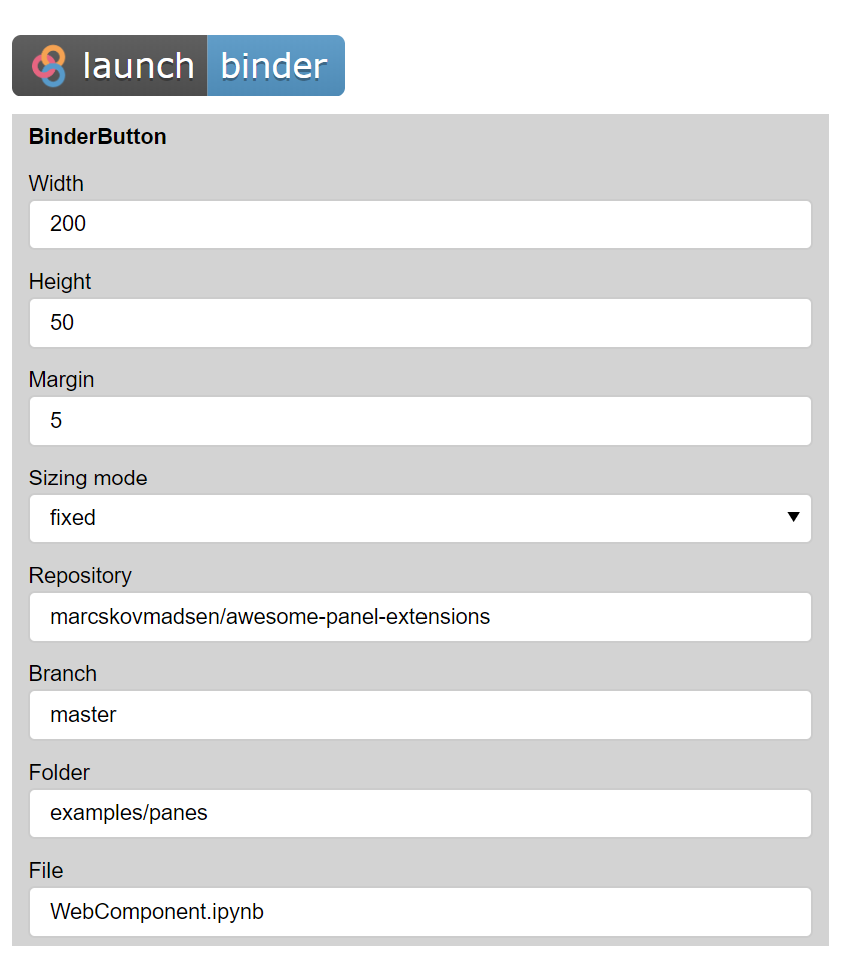
I get 1) a function 2) a reusable component 3) an app that can be deployed. Nice.
Having a button like that and many other buttons is not something I would expect to be in Panel. But it would really help me and others in the community be productive if there was a package of something like most used buttons (badges, social media, readthedocs etc.).
import param
import panel as pn
from param.parameterized import Parameters
from yaml import events


class BinderButton(pn.pane.Markdown):
    repository = param.String()
    branch = param.String()
    folder = param.String()
    file = param.String()

    # In order to not be selected by the `pn.panel` selection process
    # Cf. https://github.com/holoviz/panel/issues/1494#issuecomment-663219654
    priority = 0

    width = param.Integer(default=200, bounds=(0,None))
    height = param.Integer(default=50, bounds=(0,None))

    def __init__(self, **params):
        # The _rename dict is used to keep track of Panel parameters to sync to Bokeh properties.
        # As value is not a property on the Bokeh model we should set it to None
        self._rename.update({"repository": None, "branch": None, "folder": None, "file": None})
        super().__init__(**params)


        self._update_object()

    # Don't name the function `_update` as this will override a function in the parent class
    @param.depends(
        "repository", "branch", "folder", "file", "height", "width", "sizing_mode", watch=True
    )
    def _update_object(self, *events):
        if self.sizing_mode == "fixed":
            style = f"height:{self.height}px;width:{self.width}px;"
        elif self.sizing_mode == "stretch_width":
            style = f"width:{self.width}px;"
        elif self.sizing_mode == "stretch_height":
            style = f"height:{self.height}px;"
        else:
            style = f"height:100%;width:100%;"

        self.object = self.to_markdown(
            repository=self.repository,
            branch=self.branch,
            folder=self.folder,
            file=self.file,
            style=style,
        )

    @classmethod
    def to_markdown(self, repository: str, branch: str, folder: str, file: str, style: str = None):
        folder = folder.replace("/", "%2F").replace("\\", "%2F")
        url = f"https://mybinder.org/v2/gh/{repository}/{branch}?filepath={folder}%2F{file}"
        if style:
            image = f'<img src="https://mybinder.org/badge_logo.svg" style="{style}">'
        else:
            image = f'<img src="https://mybinder.org/badge_logo.svg">'
        markdown = f"[{image}]({url})"
        return markdown


button = BinderButton(
    repository="marcskovmadsen/awesome-panel-extensions",
    branch="master",
    folder="examples/panes",
    file="WebComponent.ipynb",
)
settings_pane = pn.Param(
    button, parameters=["repository", "branch", "folder", "file", "height", "width", "sizing_mode", "margin"], background="lightgray", sizing_mode="stretch_width"
)
app = pn.Column(button, settings_pane, width=500, height=800)
app.servable()
ps. I guess I would should use pn.pane.HTML inheritance instead for efficience reasons, maybe I would call it BinderLink or BinderLinkButton, maybe I could simplify it.
MarcSkovMadsen
on 24 Jul 2020
Based on the discussion above I updated the Guide to something like
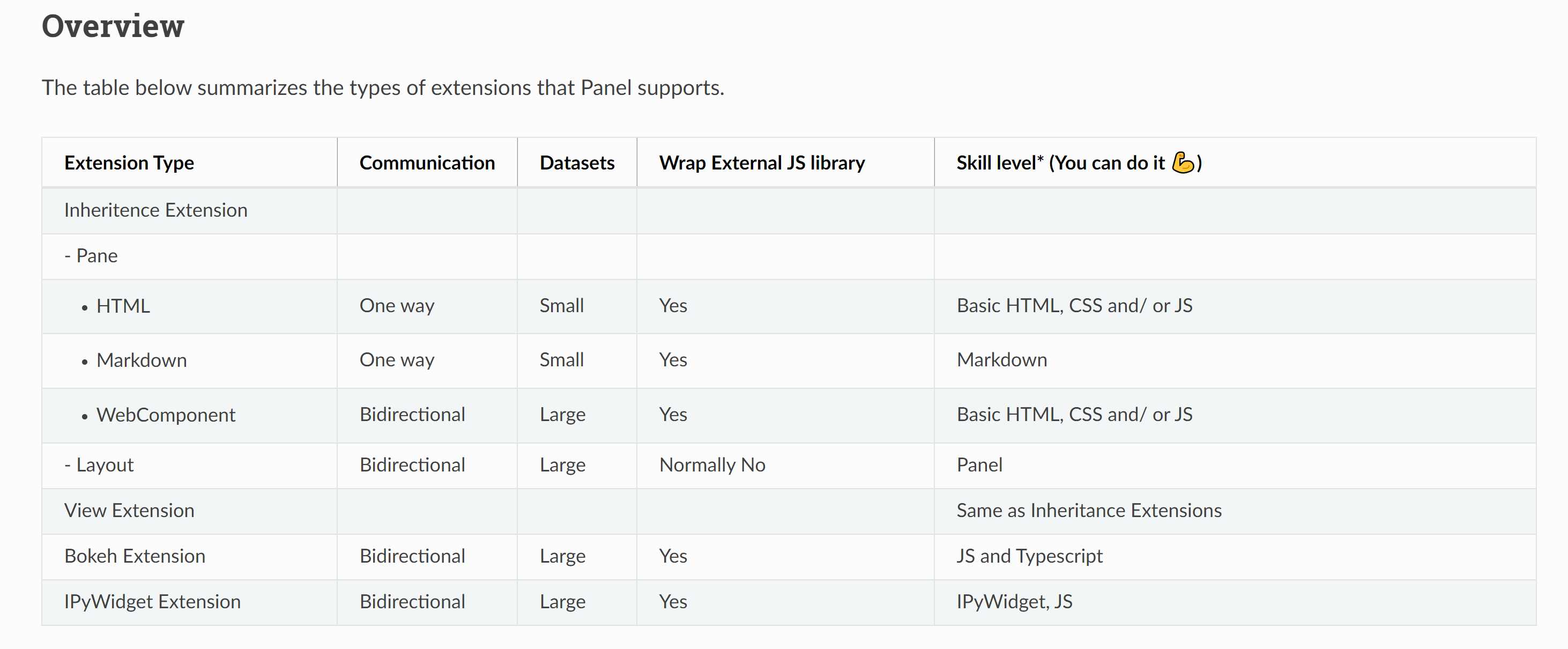
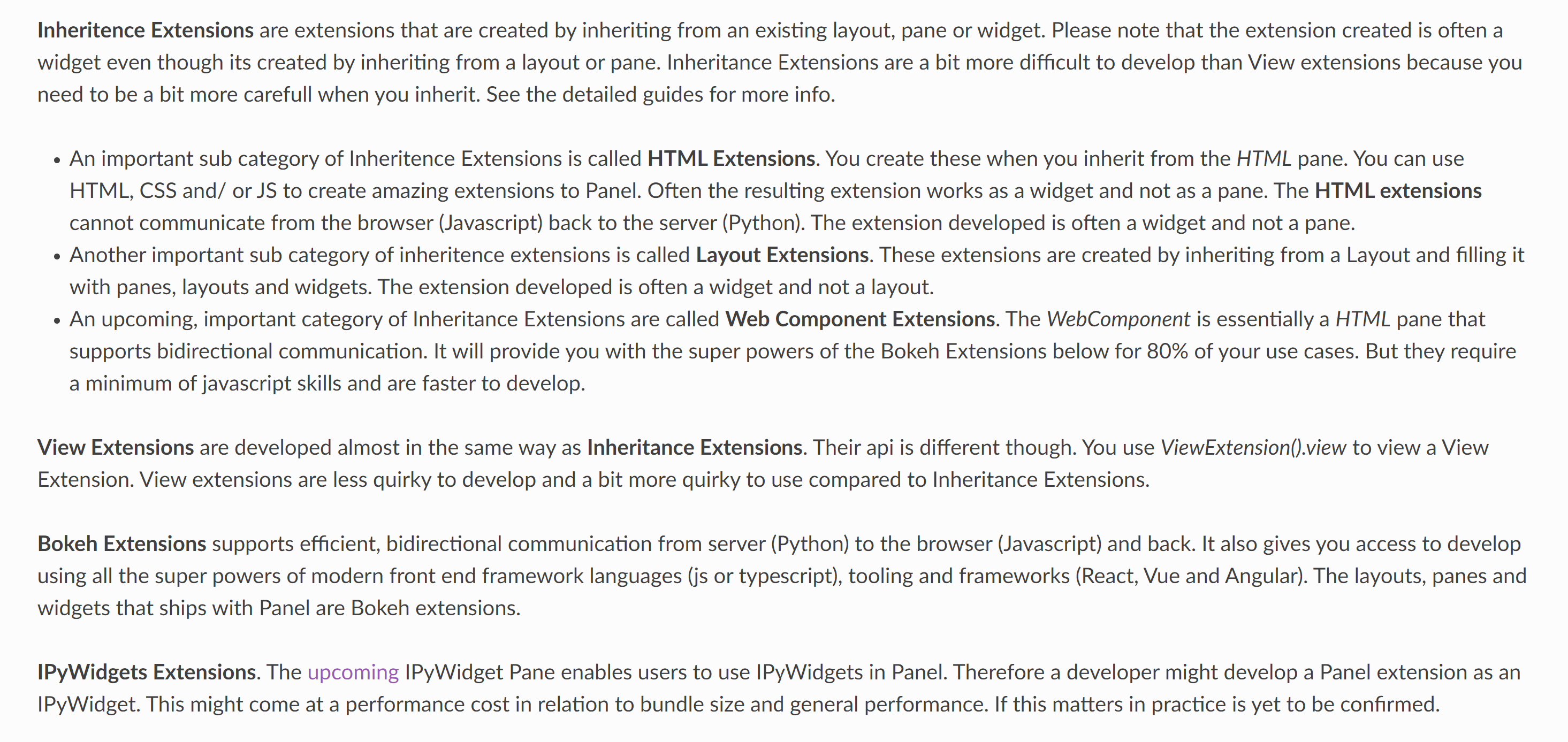
See https://awesome-panel.readthedocs.io/en/latest/guides/awesome-panel-extensions-guide/index.html
MarcSkovMadsen
on 24 Jul 2020
UPDATE
Setting priority=0 removes the error message. But the BinderButton example in fact does not work.
Steps to reproduce
- pn serve the app
- try changing the file name
- If you hover over the button and check the link you can see it has not updated to use the file name you specified.
I was tricked by the fact that it updates/ re-renders when I change height and width. But it does not update/ re-render when I change one of the "new" parameters.
I would really like to know how to fix this or if I should not attempt to inherit from Panes.
Same issue here but for HTML pane https://github.com/holoviz/panel/issues/1483
MarcSkovMadsen
on 25 Jul 2020
Argghh :-) _update and _update_object (and _update_model and _update_pane) are functions of the parent Markdown pane that I should not override.
This code works
import param
import panel as pn


class BinderButton(pn.pane.Markdown):
    """The BinderButton displayes the Binder badge and if clicked opens the Notebook on Binder
    in a new tab"""
    repository = param.String()
    branch = param.String()
    folder = param.String()
    notebook = param.String()

    # In order to not be selected by the `pn.panel` selection process
    # Cf. https://github.com/holoviz/panel/issues/1494#issuecomment-663219654
    priority = 0

    width = param.Integer(default=200, bounds=(0,None))
    height = param.Integer(default=50, bounds=(0,None))

    def __init__(self, **params):
        # The _rename dict is used to keep track of Panel parameters to sync to Bokeh properties.
        # As value is not a property on the Bokeh model we should set it to None
        self._rename.update({"repository": None, "branch": None, "folder": None, "notebook": None})
        super().__init__(**params)

        self._update_object_from_parameters()

    # Note:
    # Don't name the function
    # `_update`, `_update_object`, `_update_model` or `_update_pane`
    # as this will override a function in the parent class.
    @param.depends(
        "repository", "branch", "folder", "notebook", "height", "width", "sizing_mode", watch=True
    )
    def _update_object_from_parameters(self, *events):
        if self.sizing_mode == "fixed":
            style = f"height:{self.height}px;width:{self.width}px;"
        elif self.sizing_mode == "stretch_width":
            style = f"width:{self.width}px;"
        elif self.sizing_mode == "stretch_height":
            style = f"height:{self.height}px;"
        else:
            style = f"height:100%;width:100%;"

        self.object = self.to_markdown(
            repository=self.repository,
            branch=self.branch,
            folder=self.folder,
            notebook=self.notebook,
            style=style,
        )

    @classmethod
    def to_markdown(self, repository: str, branch: str, folder: str, notebook: str, style: str = None):
        folder = folder.replace("/", "%2F").replace("\\", "%2F")
        url = f"https://mybinder.org/v2/gh/{repository}/{branch}?filepath={folder}%2F{notebook}"
        if style:
            image = f'<img src="https://mybinder.org/badge_logo.svg" style="{style}">'
        else:
            image = f'<img src="https://mybinder.org/badge_logo.svg">'
        markdown = f"[{image}]({url})"
        return markdown


button = BinderButton(
    repository="marcskovmadsen/awesome-panel-extensions",
    branch="master",
    folder="examples/panes",
    notebook="WebComponent.ipynb",
)
settings_pane = pn.Param(
    button, parameters=["repository", "branch", "folder", "notebook", "height", "width", "sizing_mode", "margin"], background="lightgray", sizing_mode="stretch_width"
)
app = pn.Column(button, settings_pane, width=500, height=800)
app.servable()
Summary
I can create Panel extensions that inherits from panes or layouts if I am careful. I have concrete examples working for HTML, Markdown and Column.
What I would like to know is
- Should I and others create Panel Extensions by inheriting in this way?
If yes
- Could and should we make it easier? How?
If no
- What should we do instead?
MarcSkovMadsen
on 25 Jul 2020
I would never have guessed that new components I create by inheritance would automatically be included in that selection process. I would have expected only a list of core building blocks of the reference gallery to be included in the selection process.
Panel doesn't make any distinction between components we provide and ones that users create by inheritance; it's all just Panes and Widgets. We'd have to do some serious magic to make it behave otherwise; a user-written subclass is no different from a subclass that we write, automatically inheriting _all_ attributes of its superclass (including its priority), unless explicitly overwritten. I think that can be done, using properties and private attributes, but it would take some thought. I'd recommend filing that as a separate feature request, i.e. to ask that the priority not be inherited by subclasses. We can discuss possible ways to implement that on such an issue.
jbednar
on 8 Aug 2020
I actually don’t think its nescessary to Change the inheritance behaviour and the os no distinction between panel components and custom components.
It surprised me, but its powerful. It could be better documented i believe.
MarcSkovMadsen
on 8 Aug 2020
Related issues
MarcSkovMadsen
·
3Comments
 pybokeh
·
3Comments
pybokeh
·
3Comments
 henriqueribeiro
·
3Comments
henriqueribeiro
·
3Comments
 kcpevey
·
4Comments
MarcSkovMadsen
·
3Comments
kcpevey
·
4Comments
MarcSkovMadsen
·
3Comments