Panel: Sometimes panel output does not appear in Jupyter Lab
Description
Sometimes when I open Jupyter lab and run a notebook containing panel outputs (whatever: columns and rows, buttons and so on), they won't appear in the output. Generally if I close Jupyterlab reopen it, then it works and I see the output. Sometimes it happens I have to do this twice before I get the output.
I'm sure it's not a problem of not haveing installed some extensions because when it does work, it works fine.
Simple screenshot of what I see:

After restarting Jupyterlab (in this case I had to do it twice before seeing this):
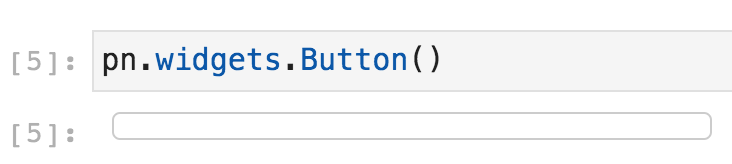
I saw that this happens quite often when I launch Jupyterlab and the notebook is already open from the previous session. However sometimes it just works at first try.
I'm sorry I cannot give you more info, but for the moment it seems really random to me and I cannot see a specific case when this always happens.
I recently updated to the latest panel version and this problem has appeared only recently as well, but I'm not sure if it started when I updated.
Software version info
panel: 0.9.5
Jupyter Lab: 2.1.2
 gioarma
All 15 comments
@gioarma I have been experiencing this as well. What has been working for me is to force a jupyter lab build by executing this for the Jupyter lab server environment at the command line:
jupyter labextension install @pyviz/jupyterlab_pyviz
Not sure if doing jupyter lab build at the command line will result in the same thing.
Not ideal since that means shutting down your jupyter lab server. Not sure if disabling the pyviz extension and then enabling it using the Jupyter Lab GUI will accomplish the same thing. I will try the next time this happens again.
 pybokeh
on 22 May 2020
pybokeh
on 22 May 2020
I am having this issue as well. I was working normally with JupyterLab and all the panels were working, all perfect. Then, I restarted the kernel and cleared all outputs and started to run again, regenerating the panels and I am now having the exact same issue describe above.
At first, I was able to fix by cycling between jupyter labextension install @pyviz/jupyterlab_pyviz / jupyter lab build / pip installl -U --force-reinstall jupyter jupyterlab panel bokeh (also rebuilding using the UI) and removing build_config.json, but at some point these also are not fixing the issue. I am wondering if other jupyter/pyviz settings are messy by running these so many times now. Even if I downgrade JupyterLab and pyviz I can't fix it anymore.
I am also sorry I can't give more info, I see no error messages anywhere. Are there any logs I can share?
 brunorpinho
on 29 May 2020
brunorpinho
on 29 May 2020
The version of the jupyterlab_pyviz extension would be helpful along with any JS console errors you see when this occurs.
 philippjfr
on 30 May 2020
philippjfr
on 30 May 2020
@philippjfr I have the latest jupyterlab_pyviz version (1.0.4)
This is what I get from the JS console:
VM124:263 Uncaught Error: Model 'panel.models.comm_manager.CommManager' does not exist. This could be due to a widget or a custom model not being registered before first usage.
    at Object.s.Models (<anonymous>:263:196)
    at Function._instantiate_object (<anonymous>:262:5095)
    at Function._instantiate_references_json (<anonymous>:262:5245)
    at Function.from_json (<anonymous>:262:8390)
    at Object.t.embed_items_notebook (<anonymous>:655:1539)
    at embed_document (<anonymous>:5:20)
    at <anonymous>:8:5
    at <anonymous>:24:3
    at t.attachWidget (panellayout.js:215)
    at t.insertWidget (panellayout.js:118)
s.Models @ VM124:263
_instantiate_object @ VM124:262
_instantiate_references_json @ VM124:262
from_json @ VM124:262
t.embed_items_notebook @ VM124:655
embed_document @ VM161:5
(anonymous) @ VM161:8
(anonymous) @ VM161:24
t.attachWidget @ vendors~main.0e956ea43d21dbedb2b5.js:2
t.insertWidget @ vendors~main.0e956ea43d21dbedb2b5.js:2
_insertOutput @ vendors~main.0e956ea43d21dbedb2b5.js:2
onModelChanged @ vendors~main.0e956ea43d21dbedb2b5.js:2
m @ vendors~main.0e956ea43d21dbedb2b5.js:2
c @ vendors~main.0e956ea43d21dbedb2b5.js:2
e.emit @ vendors~main.0e956ea43d21dbedb2b5.js:2
_onListChanged @ vendors~main.0e956ea43d21dbedb2b5.js:2
m @ vendors~main.0e956ea43d21dbedb2b5.js:2
c @ vendors~main.0e956ea43d21dbedb2b5.js:2
e.emit @ vendors~main.0e956ea43d21dbedb2b5.js:2
push @ vendors~main.0e956ea43d21dbedb2b5.js:2
_add @ vendors~main.0e956ea43d21dbedb2b5.js:2
add @ vendors~main.0e956ea43d21dbedb2b5.js:2
C._onIOPub @ vendors~main.0e956ea43d21dbedb2b5.js:2
_handleIOPub @ vendors~main.0e956ea43d21dbedb2b5.js:2
async function (async)
_handleIOPub @ vendors~main.0e956ea43d21dbedb2b5.js:2
handleMsg @ vendors~main.0e956ea43d21dbedb2b5.js:2
_handleMessage @ vendors~main.0e956ea43d21dbedb2b5.js:2
(anonymous) @ vendors~main.0e956ea43d21dbedb2b5.js:2
Promise.then (async)
_onWSMessage @ vendors~main.0e956ea43d21dbedb2b5.js:2
code_toggle.js:5 Uncaught ReferenceError: $ is not defined
    at VM133 code_toggle.js:5
(anonymous) @ code_toggle.js:5
That would indeed explain everything. Where did you install panel itself from?
philippjfr
on 30 May 2020
I used conda install -c conda-forge panel
gioarma
on 30 May 2020
you should use conda install -c pyviz panel
Le sam. 30 mai 2020 à 16:39, gioarma notifications@github.com a écrit :
I used conda install -c conda-forge panel
—
You are receiving this because you are subscribed to this thread.
Reply to this email directly, view it on GitHub
https://github.com/holoviz/panel/issues/1347#issuecomment-636339842, or
unsubscribe
https://github.com/notifications/unsubscribe-auth/AENMGS5P53YEF7CN7Q2K5Y3RUELCZANCNFSM4NBW3KAQ
.
 xavArtley
on 30 May 2020
xavArtley
on 30 May 2020
Should is a strong word, conda-forge should also work fine, but yes for now maybe use the pyviz channel.
philippjfr
on 30 May 2020
I uninstalled panel and reinstalled it with conda install -c pyviz panel, but I still have the same problem, with the same error in the JS console
gioarma
on 30 May 2020
Hi @philippjfr, so here are the outputs:
Trying to run:
import panel as pn
pn.extension()

pn.interact(lambda x: x+2, x=1)
Got the following error on the console:
Bokeh: BokehJS plotting callback run at Sun May 31 2020 14:52:15 GMT-0700 (Pacific Daylight Time)
bokeh-1.4.0.min.js:317 [bokeh] setting log level to: 'info'
VM331:28 Bokeh: all callbacks have finished
bokeh-1.4.0.min.js:242 [bokeh] JS/Python version mismatch
bokeh-1.4.0.min.js:242 [bokeh] Library versions: JS (1.4.0) / Python (2.0.2)
bokeh-1.4.0.min.js:243 Uncaught Error: Model 'Slider' does not exist. This could be due to a widget or a custom model not being registered before first usage.
    at Object.o.Models (bokeh-1.4.0.min.js:243)
    at Function.e._instantiate_object (bokeh-1.4.0.min.js:242)
    at Function.e._instantiate_references_json (bokeh-1.4.0.min.js:242)
    at Function.e.from_json (bokeh-1.4.0.min.js:242)
    at Object.t.embed_items_notebook (bokeh-1.4.0.min.js:612)
    at embed_document (<anonymous>:5:20)
    at <anonymous>:8:5
    at <anonymous>:24:3
    at t.attachWidget (panellayout.js:215)
    at t.insertWidget (panellayout.js:118)
[Violation] 'setInterval' handler took 97ms
Running jupyter labextension list I see:
JupyterLab v2.1.0
Known labextensions:
   app dir: /data/miniconda3/envs/bruno/share/jupyter/lab
        @pyviz/jupyterlab_pyviz v1.0.4  enabled  OK
Thanks, much appreciated. Which version of Panel are you working with here? Latest Panel does not support Bokeh 1.4.0, requiring at least Bokeh 2.0, so this must be an old version of Panel, which may explain some of these issues.
philippjfr
on 31 May 2020
I think this line of the error message is saying that bokeh JS is 1.4.0 and python is 2.0.2:
bokeh-1.4.0.min.js:242 [bokeh] Library versions: JS (1.4.0) / Python (2.0.2)
But you are right, I probably did have some mismatch between bokeh/panel. I now reinstalled everything with: conda install -c pyviz panel bokeh==2 holoviews and widgets started to show up again.
brunorpinho
on 1 Jun 2020
For the moment the solution in the above comment of @brunorpinho seems to work for me as well. I had installed only panel and holoviews using conda install -c pyviz, now with also conda install -c pyviz bokeh==2 the output seems to work fine.
gioarma
on 1 Jun 2020
I've just upgrade to panel 0.10.0 and I see this issue on the browser console show up again:
Uncaught Error: Model 'panel.models.location.Location' does not exist. This could be due to a widget or a custom model not being registered before first usage.
    at Object.s.Models (<anonymous>:294:204)
    at Function._instantiate_object (<anonymous>:293:4891)
    at Function._instantiate_references_json (<anonymous>:293:5050)
    at Function.from_json (<anonymous>:293:8363)
    at Object.t.embed_items_notebook (<anonymous>:706:2975)
    at embed_document (<anonymous>:5:22)
    at <anonymous>:8:5
    at <anonymous>:24:3
    at t.attachWidget (index.es6.js:2758)
    at t.insertWidget (index.es6.js:2661)
Tried to reinstall and upgrade bokeh without any luck. It seems to be related to the previous issue.
EDIT: fixed with jupyter lab clean
brunorpinho
on 28 Oct 2020
Just upgraded to 0.10.1 (from 0.9.7) and hit this. @brunorpinho 's fix worked for me too jupyter lab clean
 kcpevey
on 4 Nov 2020
kcpevey
on 4 Nov 2020
Related issues
 MarcSkovMadsen
·
3Comments
MarcSkovMadsen
·
5Comments
philippjfr
·
3Comments
MarcSkovMadsen
·
5Comments
MarcSkovMadsen
·
3Comments
MarcSkovMadsen
·
5Comments
philippjfr
·
3Comments
MarcSkovMadsen
·
5Comments
 davidpasquale
·
7Comments
davidpasquale
·
7Comments